





gambler3k
Members
-
Joined
-
Last visited
-
thnx m8, this worked!! the first u suggested with "null" did not work fyi did the same with my zwavejs2mqtt docker and that seems to work also!
-
same problem for me, did u solve this?
-
How can i access the qbittorrent webui when connected to the unraid server through wireguard plugin? Everything works fine when iam on the local network. And every other docker webui i have is working fine when iam connected through wireguard. Its only qbittorrent docker that dont work so trying to figure out what settings to change. I have Host access to custom networks: Enabled on docker The wireguard tunnel is set to Local server uses NAT: NO and Remote tunnel access I did a static route on the router from the wireguard sub pool 10.253.0.0 to the unraid server local ip i have radarr,sonarr,qbittorrent in the same custom network and radarr and sonarr webui is working fine but not qbittorrent. What am i missing ? Nvm, figured it out. Added my wireguard subnetwork to the docker parameter LAN_NETWORK dont know if this is the way to go but it worked.
-
@trurl just want to say thank you for your answer. I did as u said and iam now up and running with 3 new disks.. Took forever but it works
-
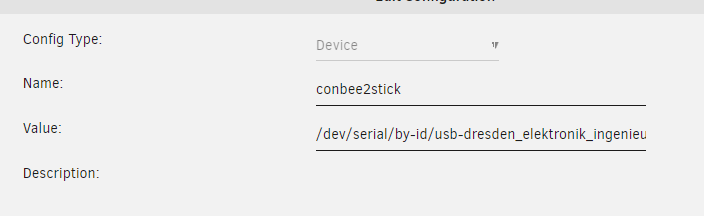
Tried this with my conbee2 stick and no luck. this in zigbee2mqtt configuration.yaml and i get this in zigbee2mqtt log so frustrating having to reconfig every time i reboot server



-
thnx for the input @JorgeB So i just ordered 2x Toshiba N300 HDWG480UZSVA 256MB 8TB 1x WD Red Pro WD6003FFBX Iam currently using a microserver gen8 with 4x drivebays but iam only using 3 of them How would the correct procedure look like to change them out? never done this before. I start with putting 1 of the 8tb and make it a parity drive. Then remove the bad disk and put in the other 8tb and the 6tb and make the original disk part of the array and thats it?
-
Hope iam doing this right. Exactly what am i looking at in the logs? Here is the extended smart test log. nassen-smart-20230125-1124.zip
-
Been running unraid for 1 year without any problems but this morning i woke up to error notification from the server. 20 read errors on disk2. How do i proceed from here? Before i went to work i did a light smart test that passed. nassen-diagnostics-20230125-0738.zip
-
First sry for bad english. So it started yesterday, all of a sudden i could not access the webui of unraid. But everything else seemed to be working, all the docker ui:s are up and i could connect through ftp and ssh. So this morning i ssh and did a "reboot" command(dont know if this is the right way to restart) and NOTHING happend. after that i did a diagnostics command and i will attach that file. But now i cant even login anymore, nothing happends after i enter my password. But still everything else seems fine, qbittorrent is running and GF watching jellyfin like nothing happend. The only new thing i can think about is that i got a push from the server that the nvidia plugin was updated. Should i just hard reboot now or is it something else i can do? nassen-diagnostics-20230122-0951.zip
-
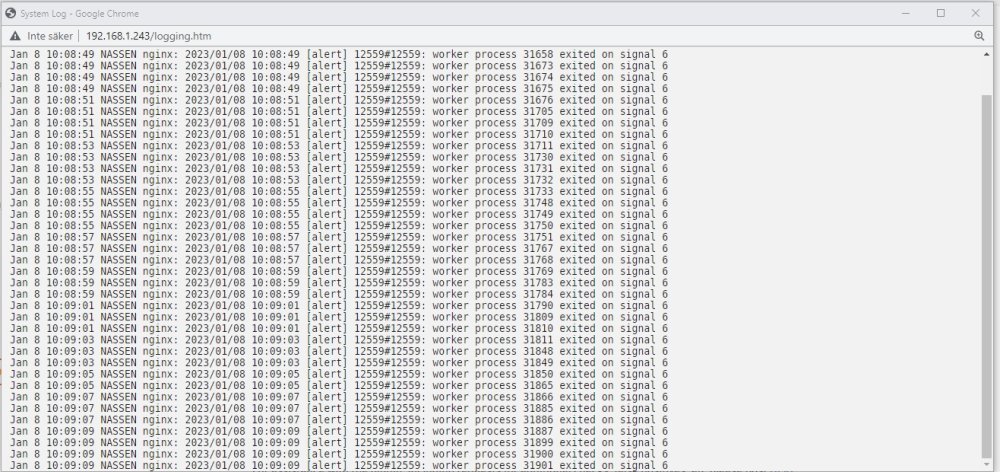
Had problems accessing parts of my webui this morning and when open terminal window ui i kept getting connected reconnected. my syslog show this in picture. deleted the plugin from /boot/config/plugins and rebooted the server seems to have fixed it.
-
Sooo if i get u right its already configured? I dont need to bother? Ty for the welcome 😃
-
gambler3k changed their profile photo
-
Hi, iam new to this. I manage to install the container on a synology nas and get all to work with sonarr radarr etc. I also can browse internet through the privox server on my regular computer, and both torrents and webbrowsing seems to be using the vpn ip. My question is: If the vpn goes down for some reason does it block all the connections then or is my regular ip exposed? If it is how can i prevent and test this? I've heard about something called iptables. Thnx for this container, was looking for a solution like this =).. Happy christmas




