






yayitazale
Members
-
Joined
-
Last visited
Everything posted by yayitazale
-
I suggest you to open a issue https://github.com/blakeblackshear/frigate/issues I cannot help you with this error.
-
Can you post the error?
-
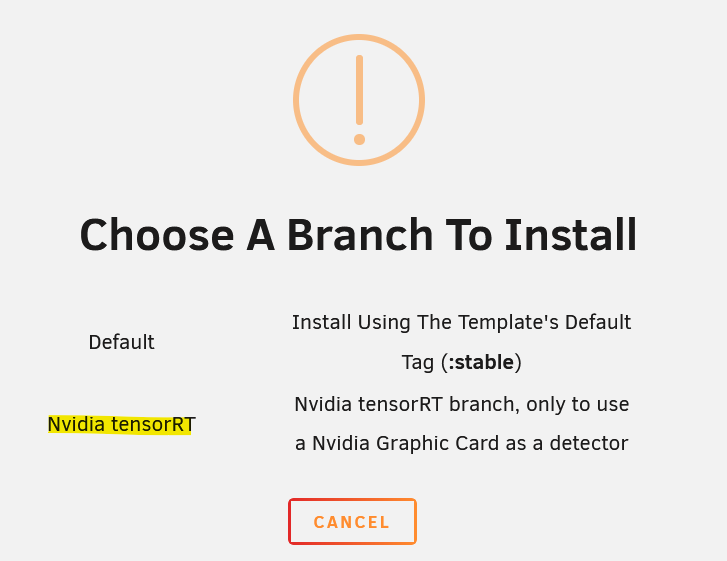
It is everything explained in the additional requirements of the template: You have to deploy Frigate using the TensorRT branch: Then, add "--runtime=nvidia" as extra parameter under advanced view and set the "Nvidia Visible Devices" variable with your "GPU UUID" as the value (you have to install the nvidia driver from the store too, the plugin will give you this value). Then, before launching the container, you should the follow the steps of https://docs.frigate.video/configuration/object_detectors#generate-models to decide witch yolo model you will use and change the "YOLO_MODELS" variable accordingly (and also check "USE_FP16" and "TRT_MODEL_PREP_DEVICE" variables. You should prepare the config file with the required info as it is explained https://docs.frigate.video/configuration/object_detectors#configuration-parameters And then you can deploy the container.
-
As far as I know, this card is only tested in the RPI. I don't think unraid has the drivers for this chips so it will not work. @ich777 maybe you can help us a little bit. The template doesn't need any change, as far as que the device is listed in the host, you will need just to select it as the corals tpus, but without the driver, I think will no be listed as a device. PD: sorry I didn't check it before writting. Yes you have already the driver package for Hailo (search for Hailo RT Driver in the CA store), and once you have installed it you should be able to use it within this template. You can send me some feedback!
-
Port 5000 is still usable for webui but I don't think so will be like that in the future (will be used only for API). Using port 8971 will be a must for UI access, and this port has TLS and user/pass activaded by default. You can deactivate both by config, but at your own risk. If you have issues with ports I suggest you to review your entire systems (as other dockers and VMs adn so) and for sure starting from scratch should help, as I told you access from port 8971 should work out of the box.
-
I don't know what are you doing but this works just out of the box. If you have changed things then I canno't help you
-
You don't need to add anything. Just go to http://192.168.2.10:5000 For the TLS error, did you restarted the container after disabling TLS in the config?
-
The command is perfectly fine. If you want to access to port 5000, it is already added in the template (you can find it under "Show more settings"), so you do need to change anything, you just need to go to http://192.168.2.10:5000 For 8971 port, you should read this: https://docs.frigate.video/configuration/authentication If you have issues you can disable TLS in the config.yml with: # Optional: TLS configuration tls: # Optional: Enable TLS for port 8971 (default: shown below) enabled: False
-
You should follow https://docs.frigate.video/guides/getting_started
-
If you have only one camera feed setup and it is not able to connect to it, maybe it is restarting everything every few seconds so thats why you cannot access the UI corretly. Fix the conection to the camera first.
-
Can't help you with the HA addon, this is topic about the unraid docker.
-
Frigate cannot connect to the camera feed.
-
No, not related with unraid template. Please go and look if any of the closed issues with same log gives you some idea of possible fixes: https://github.com/blakeblackshear/frigate/issues?q=is%3Aissue state%3Aclosed "Conversion failed!
-
You should read the changelog and the new docs and change your config file to meet the changes.
-
Try it with the password reset process described in the docs.
-
You can just update to v15 now in the stable channel (just update it in the docker container list)V0.15.0 has been released, please read the breaking changes and updated documents before updating and change your config files accordingly: https://github.com/blakeblackshear/frigate/releases/tag/v0.15.0 https://docs.frigate.video/Hi, the template is maintained, there have been multiple breaking changes posted here years ago that forced you to have to reinstall the application with a new template. Please read the documentation and the first post in this thread before posting.privileged = falseNoDid you change anything?I saw more recentky buyed failing TPUs but can be...There is already a discussion about this and we didn't get anywhere: https://github.com/blakeblackshear/frigate/issues/8470 I managed to stop this hard locks just using a lower resolution feeds of the cameras, so it should be something related with memory usage, but I was not able to find a root cause.Not sure, I don't have that kind of deployment architecture.



