






yayitazale
Members
-
Joined
-
Last visited
Everything posted by yayitazale
-
If you bind a device to a VM, of course the host is not going to be able to use it anymore so that's why the driver is not finding it. Why are you binding it? To use it with Frigate container template you don't need to bind it. If you are using it inside a VM then I can't help you, this is out of my knowledge and is not the scope of this threat.
-
I don't know what are you doing with HA here. Witch TPU model do you have? How and where are you bonding it?
-
Hi, I don't mean to sound disrespectful but please, if you have had the time to post on the forum, you also had the time to read the instructions that I have added to the template with my time and effort. The problem is not that you don't pull from ghcr, the problem is that you have empty template entries which can't be there empty. The combinations to use frigate are many, so the only way to have a global template that works for everyone is to use only the entries you need and delete the rest.
-
With such little info I can't help you. I think maybe you need to reinstall the app completely from scratch
-
I don't know how are you launching the container, but if it is found in unraid, you just need to pass-through it using the proper entry in the template.
-
You have something wrong in the config file, you are using restreamed links but is not finding ffmpeg is not finding them
-
Did you check the logs?
-
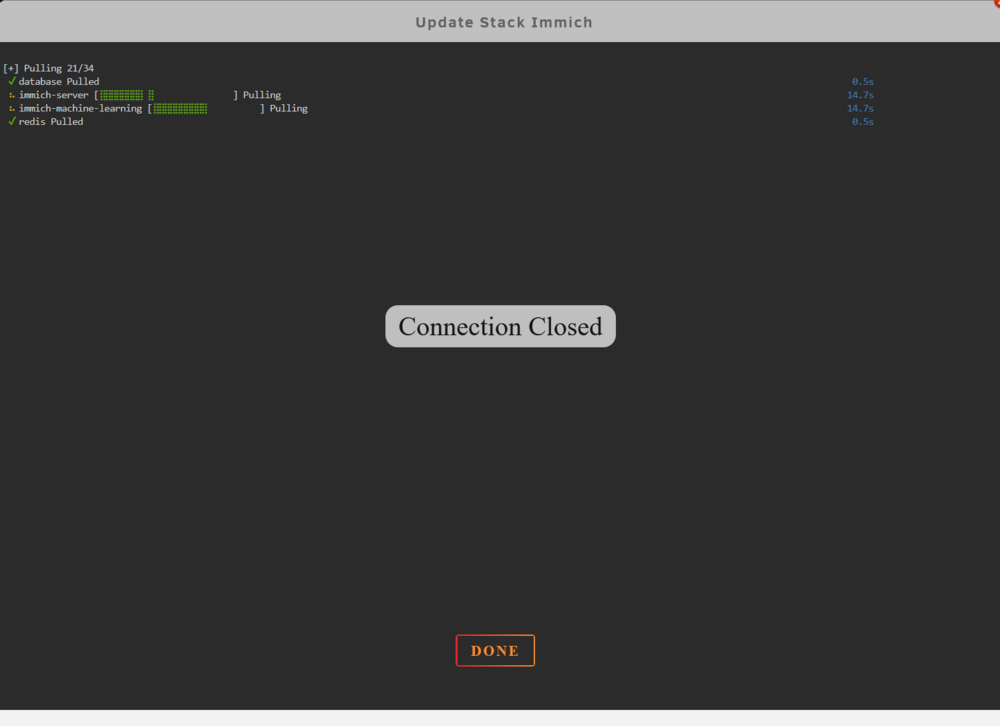
Hi: I'm having a issue while trying to update a stack, I get a connection close before it pulls all the containers images:
-
I use Firefox and I didn't experience any issue at all...
-
Hi this is not the forum to blame on any development bug. In any case, just with a little search in the github you can see that the problem is in the Browser side, having issues with h.265: https://github.com/blakeblackshear/frigate/issues/9696 https://github.com/blakeblackshear/frigate/issues/9101
-
Not sure but this is out of the scope of this topic, you should open a new topic in https://forums.unraid.net/forum/55-general-support/ as this is not a error of the container deployment neither the template. I don't have the skills to help you with this.
-
I have autotrim enabled and I have been using Frigate for many years now and I didn't ever experience that.
-
Did you passthrought /etc/localtime to the container?
-
No, it is not possible to use it at the same time. What I do is just stop the old one during the testing of the beta and if anything goes wrong I just go back.
-
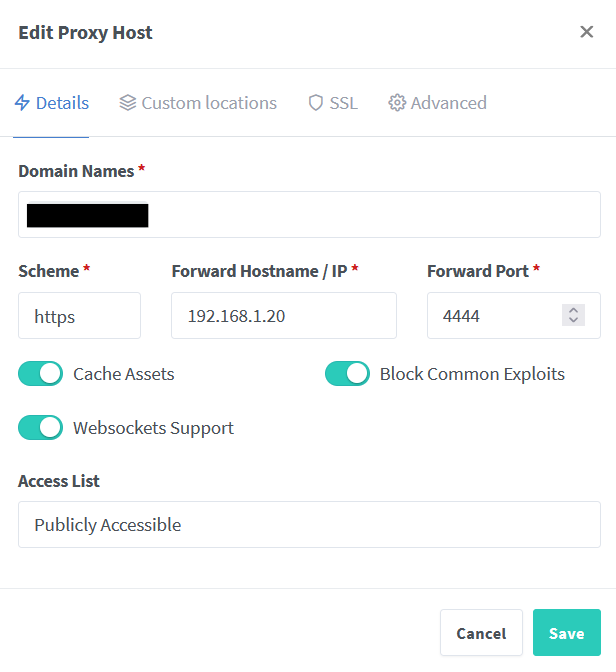
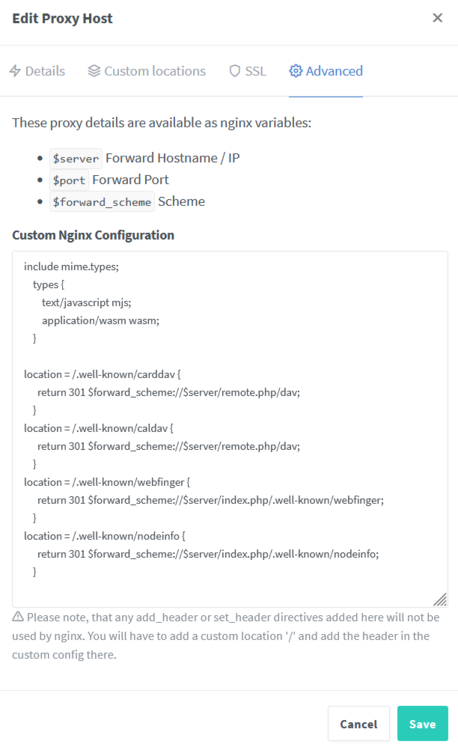
Hi: I'm facing a issue that I'm not capable to correct. Since v28 I have this error: Your web server does not serve `.mjs` files using the JavaScript MIME type. This will cause problems with some apps, preventing browsers from executing JavaScript files. You must configure your web server to serve `.mjs` files with either the `text/javascript`, or, `application/javascript` MIME type. I have tried a lot of things and I have come to the conclusion that the problem is that the hostname is not being applied correctly to the server. If I launch the "curl -I https://my.nextcloud.domain/apps/settings/js/esm-test.mjs" I get a HTTP/1.1 404 Not Found. If I launch the "curl -I http://localhost/apps/settings/js/esm-test.mjs" from the console of the container I get: HTTP/1.1 301 Moved Permanently Server: nginx/1.24.0 Date: Sun, 16 Jun 2024 16:58:25 GMT Content-Type: text/html Content-Length: 169 Connection: keep-alive Location: https://_/apps/settings/js/esm-test.mjs So It looks like the hostname of the location is empty. The /etc/hostname of the container shows: 201a27d91820 And /etc/hosts: 127.0.0.1 localhost ::1 localhost ip6-localhost ip6-loopback fe00::0 ip6-localnet ff00::0 ip6-mcastprefix ff02::1 ip6-allnodes ff02::2 ip6-allrouters 172.17.0.16 201a27d91820 My /config/www/nextcloud/config/config.php file has: 'trusted_domains' => array ( 0 => 'my.nextcloud.domain', 1 => 'localhost', 2 => '192.168.1.20', ), and also: 'overwritehost' => 'my.nextcloud.domain', 'overwriteprotocol' => 'https', 'overwrite.cli.url' => 'my.nextcloud.domain', It is behind reverse proxy (nginx proxy manager) witch I have configure like this for 6 years with no issues: Where I have added the required locations and mime types: What I'm doing wrong? Thanks in advance.
-
What I think you should use. config(4).yml
-
Not sure about your problem but you have something that you can clean in the config file: koipond: - ffmpeg:rtsp://admin1:[email protected]:554/stream1#video=copy#audio=copy#audio=copy#audio=aac In this case you can do this as you are only transcoding audio: koipond: - rtsp://admin1:[email protected]:554/stream1 - ffmpeg:koipond#audio=aac Then here: koipond: ffmpeg: output_args: record: preset-record-generic-audio-copy inputs: - path: rtsp://127.0.0.1:8554/koipond input_args: preset-rtsp-restream roles: - path: rtsp://127.0.0.1:8554/koipond_sub - record input_args: preset-rtsp-restream roles: - detect If you are using the same input/ouput args for all the cameras you can add the ffmpeg part as a general block instead of defining it in every camera: ffmpeg: input_args: preset-rtsp-restream output_args: record: preset-record-generic-audio-copy The logs error just means frigate is not online yet and the integration requested the stats, you should have some other error somewhere.
-
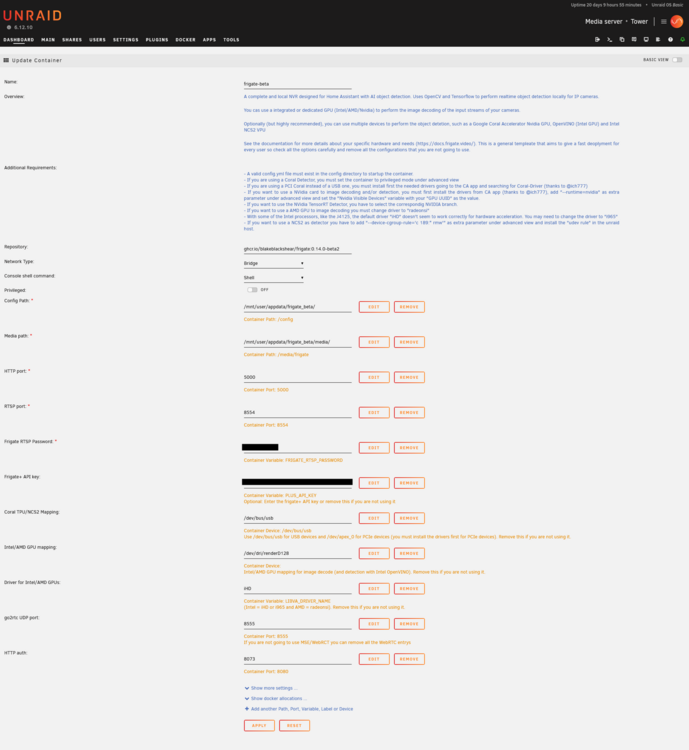
You can test it installing a new instance and changing the the branch manually, but I suggest you to copy the config folder, this is my actual test template: I have already prepared a new template that will be published when v14 is published as stable: https://gitlab.com/yayitazale/unraid-templates/-/merge_requests/7 This will require a app reinstall to meet the new port mapping.
-
Check the user and permissions
-
Did you tried with privileged = false?
-
You already have the answer in the description of the template: Read Grafana Image Renderer documentation and see usage instructions at readme link. In order to use this as a plugin of your Grafana docker instance you must add this enviromental arguments to that container: - GF_RENDERING_SERVER_URL: http://renderer-ip:8081/render - GF_RENDERING_CALLBACK_URL: http://grafana-ip:3000/ Change the IP (and the ports) to suit your configuration.
-
That parameter is the proposed one to launch frigate with docker-run with a nvidia gpu pass-trough: https://docs.frigate.video/configuration/hardware_acceleration#docker-run-cli---nvidia-gpu As we are on Unraid, there is a more "standar" way to pass-trough defined on the nvidia driver plugin, and it is the one implemented on the template:

-
Frigate template is pointing to the "latest" tag so yo you should check if you have change that. Any way, you should reads the changelog and the updated docs to find out what changes you need to make to your settings has there are many new things. Also it is recommended to ensure that you are using all the required new variables in the template or reinstall it from scratch deleting you actual container.
-
You are missing the usb passtrough. I suggest you to start again with a clean template without deleting this: Also, I see in the config file that you are trying to use a yolo model with the coral and that is not posible. As you can read in the docs, the best option is to use the default model that is just fine, so you should comment or delete this part: model: path: /config/model_cache/tensorrt/yolov7-320.trt input_tensor: nchw input_pixel_format: rgb width: 320 height: 320 Yolo models are great for nvidia or openvino detectors, but the coral is a different chip that has its own requirements to create a model. If you want to use another custom modelwith the coral, it must be a tflite model. You can find here most of the pretrained models.

-
Can you post a screenshot of how are you launching the template and the config file?




