





oliver
Members
-
Joined
-
Last visited
Everything posted by oliver
-
just bought a brand new and more reputable new power supply instead of reusing another older one. ordered a new sas card as well for good measure. i just dont understand why it's the same drives that remain problematic. smart tests are all good though. i wonder if the physical drive connector might be damaged. re buiild: i just unassign -> start array -> stop -> resassign and that should rebuild parity?
-
woke up today to see a parity drive dropped out. looks like another random power/data failure? sigh, it ran for a good week before just resetting. i did notice this happened when mover was running, which i guess makes sense since there was writing happening is there any way to see from logs if it's data vs power issue? i suppose now a parity rebuild is required nas-diagnostics-20241221-0546.zip
-
all went well but i got an interesting notification after shutting down the system to remove the old drive and rebooting. it sent me a notification saying a drive drive is missing from another, unrelated pool although array shows everything there. everything appears to look fine in the ui though. notification received: drive seems fine in the pool: diags attached but i dont see any errors in the logs or ui missing cache pool nas-diagnostics-20241217-2303.zip

-
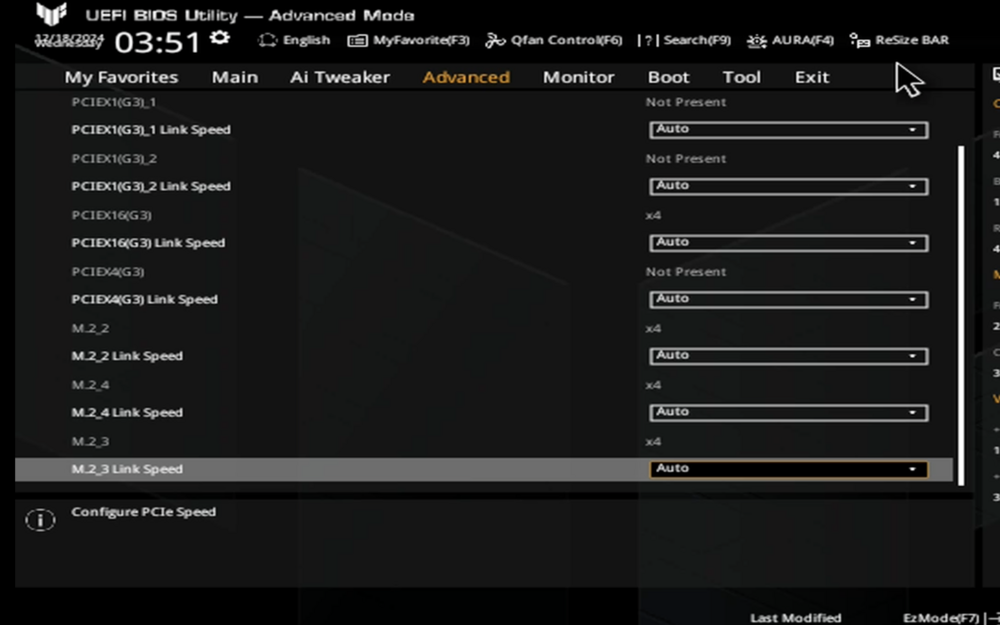
here's a screenshot from my bios showing x4 speed (pciex16g3), but why is unraid/gpuz showing x1?
-
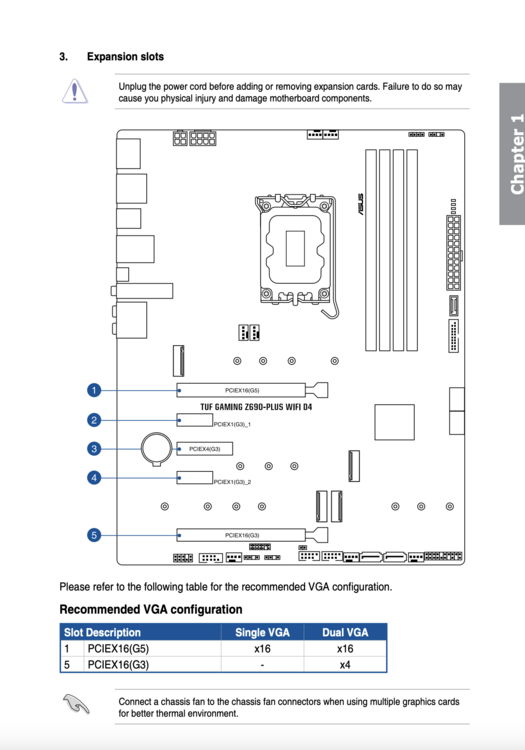
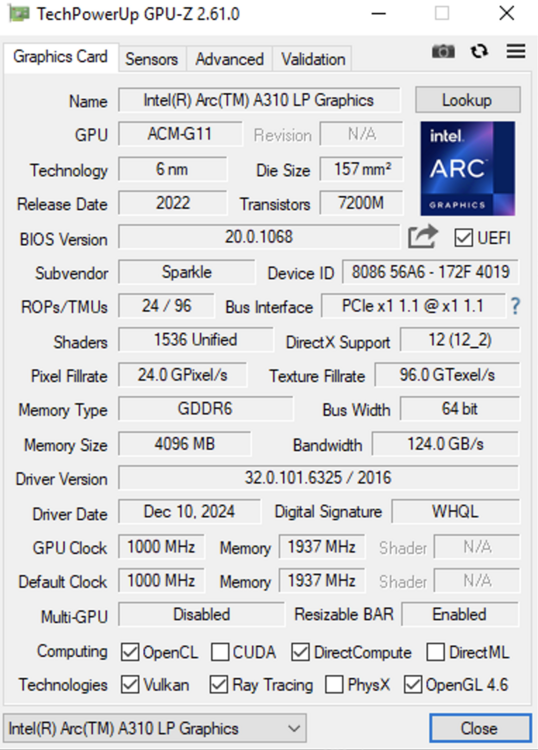
Hi I have unraid 6.12.4 and I just did some hardware changes. I have this motherboard: https://www.asus.com/us/motherboards-components/motherboards/tuf-gaming/tuf-gaming-z690-plus-wifi-d4/techspec/ Now, given this layout: 1. Slot number 1 contains a SAS card, running 16 drives. 2. Slot number 5 contains an Intel ARC A310 card. Rebar enabled. 3. All 4 nvme slots are occupied The operating system in question is Windows Server. The GPU is intel arc and is directly passed to the VM, here is my XML: <?xml version='1.0' encoding='UTF-8'?> <domain type='kvm' id='1'> <name>windevserver</name> <uuid>ddef55d5-9343-e066-7fee-1e651dc4b9f1</uuid> <metadata> <vmtemplate xmlns="unraid" name="Windows Server 2016" icon="windows.png" os="windows2016"/> </metadata> <memory unit='KiB'>8388608</memory> <currentMemory unit='KiB'>8388608</currentMemory> <memoryBacking> <nosharepages/> </memoryBacking> <vcpu placement='static'>8</vcpu> <cputune> <vcpupin vcpu='0' cpuset='0'/> <vcpupin vcpu='1' cpuset='1'/> <vcpupin vcpu='2' cpuset='2'/> <vcpupin vcpu='3' cpuset='3'/> <vcpupin vcpu='4' cpuset='4'/> <vcpupin vcpu='5' cpuset='5'/> <vcpupin vcpu='6' cpuset='6'/> <vcpupin vcpu='7' cpuset='7'/> </cputune> <resource> <partition>/machine</partition> </resource> <os> <type arch='x86_64' machine='pc-i440fx-7.1'>hvm</type> </os> <features> <acpi/> <apic/> <hyperv mode='custom'> <relaxed state='on'/> <vapic state='on'/> <spinlocks state='on' retries='8191'/> <vendor_id state='on' value='none'/> </hyperv> </features> <cpu mode='host-passthrough' check='none' migratable='on'> <topology sockets='1' dies='1' cores='4' threads='2'/> <cache mode='passthrough'/> </cpu> <clock offset='localtime'> <timer name='hypervclock' present='yes'/> <timer name='hpet' present='no'/> </clock> <on_poweroff>destroy</on_poweroff> <on_reboot>restart</on_reboot> <on_crash>restart</on_crash> <devices> <emulator>/usr/local/sbin/qemu</emulator> <disk type='file' device='disk'> <driver name='qemu' type='raw' cache='writeback'/> <source file='/mnt/user/domains/windevserver/vdisk1.img' index='1'/> <backingStore/> <target dev='hdc' bus='virtio'/> <boot order='1'/> <alias name='virtio-disk2'/> <address type='pci' domain='0x0000' bus='0x00' slot='0x04' function='0x0'/> </disk> <controller type='usb' index='0' model='ich9-ehci1'> <alias name='usb'/> <address type='pci' domain='0x0000' bus='0x00' slot='0x07' function='0x7'/> </controller> <controller type='usb' index='0' model='ich9-uhci1'> <alias name='usb'/> <master startport='0'/> <address type='pci' domain='0x0000' bus='0x00' slot='0x07' function='0x0' multifunction='on'/> </controller> <controller type='usb' index='0' model='ich9-uhci2'> <alias name='usb'/> <master startport='2'/> <address type='pci' domain='0x0000' bus='0x00' slot='0x07' function='0x1'/> </controller> <controller type='usb' index='0' model='ich9-uhci3'> <alias name='usb'/> <master startport='4'/> <address type='pci' domain='0x0000' bus='0x00' slot='0x07' function='0x2'/> </controller> <controller type='pci' index='0' model='pci-root'> <alias name='pci.0'/> </controller> <controller type='virtio-serial' index='0'> <alias name='virtio-serial0'/> <address type='pci' domain='0x0000' bus='0x00' slot='0x03' function='0x0'/> </controller> <interface type='bridge'> <mac address='52:54:00:06:f1:95'/> <source bridge='br0'/> <target dev='vnet0'/> <model type='virtio-net'/> <alias name='net0'/> <address type='pci' domain='0x0000' bus='0x00' slot='0x02' function='0x0'/> </interface> <serial type='pty'> <source path='/dev/pts/0'/> <target type='isa-serial' port='0'> <model name='isa-serial'/> </target> <alias name='serial0'/> </serial> <console type='pty' tty='/dev/pts/0'> <source path='/dev/pts/0'/> <target type='serial' port='0'/> <alias name='serial0'/> </console> <channel type='unix'> <source mode='bind' path='/var/lib/libvirt/qemu/channel/target/domain-1-windevserver/org.qemu.guest_agent.0'/> <target type='virtio' name='org.qemu.guest_agent.0' state='connected'/> <alias name='channel0'/> <address type='virtio-serial' controller='0' bus='0' port='1'/> </channel> <input type='tablet' bus='usb'> <alias name='input0'/> <address type='usb' bus='0' port='1'/> </input> <input type='mouse' bus='ps2'> <alias name='input1'/> </input> <input type='keyboard' bus='ps2'> <alias name='input2'/> </input> <audio id='1' type='none'/> <hostdev mode='subsystem' type='pci' managed='yes'> <driver name='vfio'/> <source> <address domain='0x0000' bus='0x0a' slot='0x00' function='0x0'/> </source> <alias name='hostdev0'/> <address type='pci' domain='0x0000' bus='0x00' slot='0x05' function='0x0'/> </hostdev> <memballoon model='none'/> </devices> <seclabel type='dynamic' model='dac' relabel='yes'> <label>+0:+100</label> <imagelabel>+0:+100</imagelabel> </seclabel> </domain> I only use this card for AV1 encoding. Now, according to the picture of the motherboard layout, populating slots 1/5, will result in slow 5 running at x4, which should be fine for my needs. However, AV1 encoding is almost 50% slower than when it was previously installed on this same board (without the nvme/sas card). I also noticed GPU-Z reports only x1 bus speeds, even with the load test running: I'm not sure how to troubleshoot this further. All BIOS speeds are set to 'auto' and it shows the slot running at x4. I do not believe cpu/ram, or IO is responsible for the slow speeds. All encodes are done using handbrake. Diags attached. nas-diagnostics-20241217-0524.zip
-
Awesome, diags attached. I'm looking to replace drive "Docker_vm 2" nas-diagnostics-20241217-0524.zip
-
Hi im running 6.12.14 and have a raid 1 pool for docker/vm, consisting of two devices. File system is btrfs - encrypted and all data is pool only, no mover/cache. To replace a single drive, can someone confirm procedure please: 1. Unassign drive to be removed then start array in normal mode, it should continue to operate off the other one. 2. Stop array again and assign new device to the slot previously occupied. Unraid should automatically rebuild the new disk. Is this all there is to it? Also, can I do both steps 1 and 2 in maintenance mode?
-
I'm using the latest version of the Brave browser (chromium). I've tried on both OSX and windows, the same behavior on both. I get the prompt to accept and click allow then it forever gets stuck on 'enabling'. Attached screenshot

-
wow...just wow LOL. i have no recollection of adding this (this problem had been going on for a while), thank you for pointing it out lol.
-
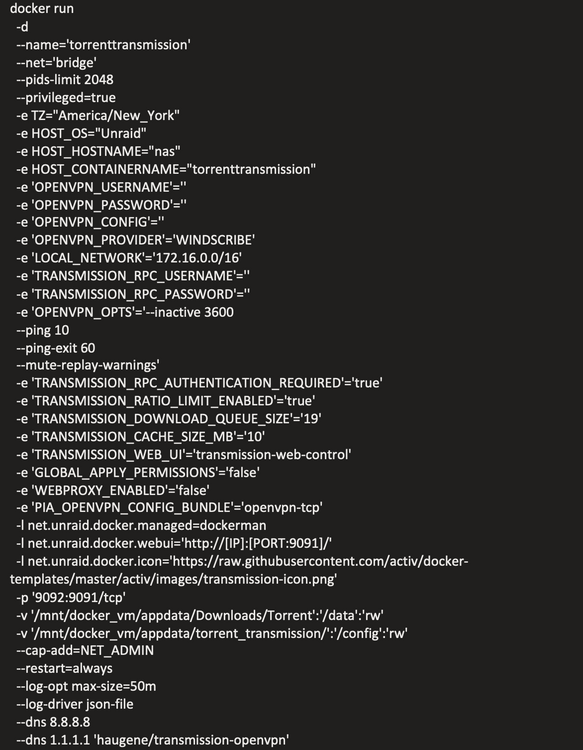
Hi so this problem started after I had a kernel panic and the array shutdown unclean. a single container seems to always want to autostart. I've tried: 1. deleting and recreating the container 2. renaming it 4. deleting the docker.img file and recreating it 5. flipping auto start to on, rebooting, then back to off despite all of this, the container is always starting when the array starts, even though autostart is off. i've attached my diags and below is the docker create command (sensitive info removed) docker run -d --name='torrenttransmission' --net='bridge' --pids-limit 2048 --privileged=true -e TZ="America/New_York" -e HOST_OS="Unraid" -e HOST_HOSTNAME="nas" -e HOST_CONTAINERNAME="torrenttransmission" -e 'OPENVPN_USERNAME'='' -e 'OPENVPN_PASSWORD'='' -e 'OPENVPN_CONFIG'='' -e 'OPENVPN_PROVIDER'='WINDSCRIBE' -e 'LOCAL_NETWORK'='172.16.0.0/16' -e 'TRANSMISSION_RPC_USERNAME'='' -e 'TRANSMISSION_RPC_PASSWORD'='' -e 'OPENVPN_OPTS'='--inactive 3600 --ping 10 --ping-exit 60 --mute-replay-warnings' -e 'TRANSMISSION_RPC_AUTHENTICATION_REQUIRED'='true' -e 'TRANSMISSION_RATIO_LIMIT_ENABLED'='true' -e 'TRANSMISSION_DOWNLOAD_QUEUE_SIZE'='19' -e 'TRANSMISSION_CACHE_SIZE_MB'='10' -e 'TRANSMISSION_WEB_UI'='transmission-web-control' -e 'GLOBAL_APPLY_PERMISSIONS'='false' -e 'WEBPROXY_ENABLED'='false' -e 'PIA_OPENVPN_CONFIG_BUNDLE'='openvpn-tcp' -l net.unraid.docker.managed=dockerman -l net.unraid.docker.webui='http://[IP]:[PORT:9091]/' -l net.unraid.docker.icon='https://raw.githubusercontent.com/activ/docker-templates/master/activ/images/transmission-icon.png' -p '9092:9091/tcp' -v '/mnt/docker_vm/appdata/Downloads/Torrent':'/data':'rw' -v '/mnt/docker_vm/appdata/torrent_transmission/':'/config':'rw' --cap-add=NET_ADMIN --restart=always --log-opt max-size=50m --log-driver json-file --dns 8.8.8.8 --dns 1.1.1.1 'haugene/transmission-openvpn' nas-diagnostics-20241215-0704.zip
-
it looks like it just fixed itself. i happened to check and it's all synced up in both unraid and windows now. i think it's related to this issue i had, which sounds similar to what you basically said:
-
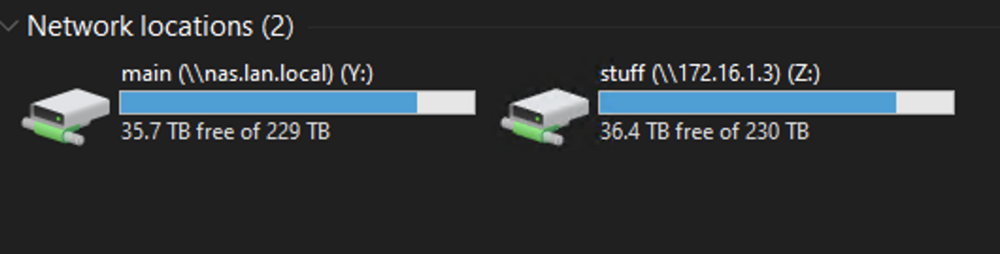
Hi I've recently noticed a discrepancy on my array. It has two shares sharing all the same disks but it's reporting a slightly different size in both windows and unraid itself. I know for a fact that these two used to be the same, im not sure when it differed. I just completed a dual drive rebuild, so maybe something happened? i've individually checked each disk, there is nothing on them but data from the two shares in question.

-
thanks, deleted it and everything is all set now
-
oh wow i didnt even notice that before, the one on the array is last modified way back in august! is it safe to remove a file from /mnt/disk1 directly, no issues with disk level file changes?
-
the problem is the one in my path is technically both of them - it's the user share path: /mnt/user/system/docker/docker.img sounds like per @itimpi in this scenario, it should be picking the docker_vm one but im not sure how to validate this
-
yeah i had the docker and vm services turned off before running mover. everything else moved out. this was the only file that existed in both locations but that makes sense why mover didn't do anything. im honestly not sure how i even ended up in this state with docker.img duplicated, i had some array issues and had to do disable docker, but it didn't disable properly. the containers are all running properly now though i'd just like to do some cleanup. i've confirmed docker.img is in both locations: /mnt/docker_vm/system/docker /mnt/disk1/system/docker They have different checksums but the filesize is the same. I'm guessing just bite the bullet and delete the one on disk1? Is it safe for parity/disk operations to delete a file directly from disk?
-
Hi I am running 6.12.8. I ran into the following two problems today after doing some troubleshooting: Googling around and common problems, it seemed pretty straightforward. Set secondary storage to array and mover action to go from array -> cache (called docker_vm). Then run mover. This mostly fixed it. But im left with a single file, the docker.img file (screenshot), which is present in both the cache pool (docker_vm) and the array itself (disc1). How does the system know which one to use? My docker setting is pointed to /mnt/user/system/docker/docker.img But more importantly, how do I fix it? Is it just a matter of stopping docker and simply deleting the file from disk1 using dynamix file manager (is deleting straight from the disk level ok?).

-
another successful rebuild on first try and all files intact. i feel i should play the lottery at this point. thanks for the millionth time with your assistance.
-
is maintenance mode generally risk free of further damage since things aren't mounted (thinking filesystem mainly)? if another data drive for example was to lose power in maintenance mode, would it also become marked as 'bad'?
-
i was thinking overnight, is there any kind of safe way to spin all drives in order to 'test' that my power supply can handle the current? without any array operations. if another drive drops out during rebuild, i end up in the same mess as when i first started. the closest i can think of would be to run an extended smart test on all drives at the same time, which i should would be max output. thoughts?
-
after shuffling around a bunch of parts, i finally have it in a much better state with no splitters. 16 drives. 1 molex -> 4x sata 1 molex-> 4x sata 8x sata-> sata no splitters/adapters i wish there was a safe way to test power draw on all the drives at once. i suppose a parity check in maintenance mode without corrections would normally be the way to go but since i have 2 drives in a bad state, i can't do that. im wondering which of these options below is the way to go. nas-diagnostics-20241208-1727.zip
-
so my PSU has 4 molex outputs. can each molex handle only a single drive or a cluster of 4? this is a spec sheet to my exact PSU - https://coolermaster.egnyte.com/dl/GqmpIy1k3U My HDD are all mostly HC550 - SATA model - i found this spec sheet - https://www.e4company.com/wp-content/uploads/data-sheet-ultrastar-dc-hc550.pdf with the adaptors i have on hand, i can put a total of 8 drives on two molex connectors, assuming it's safe to split 4 x 2. the remaining 8 drives, i can put on standard SATA connectors, one per conenctor.
-
thanks, i think i have some molex connectors spare, i can try to reduce the number of drives per connector. should take care of the 3.3v issue as well. it's just odd how intermittent the issue is
-
it's SATA- > SATA. but to be clear, it's only 4 drives on the entire cable going to my PSU, the only reason i need to use the splitter is to remove the 3.3v and i only have one cable to remove it.
-
ok so i took the machine apart some more and something i realized. There is a 4 way split power adapter going into my drives, two of which are connected to disk9/12. While I replaced the source of the power to this splitter, I don't think I replaced the power splitter itself. I can't remember for sure but given how dusty it was, I doubt I switched it up. The other two disks on the same splitter never showed issues though. That being said, I did replace it and didn't notice the restart noise coming. This would also pretty much line up with my experience being having these errors two times after I opened the chasis and physically made changes to the array. I can think of 3 options at this point: 1. Do a new array config and preserve parity. - When this error first happened, it was a freshly started array (the prior shutdown was normal). I think there were a few hundred bytes written according to the UI but no files. It was only up for maybe 15 minutes. 2 Try to rebuild these two disks from parity, emulation looked good when the error first occurred, so I don't think there's FS damage this time. 3. Wait for RMA drives to arrive and rebuild. Use dual emulation in the interim. While large, the array isn't very heavily used, I can at the very least limit array usage to reads and minimal writes until RMA is done. Even if option 1 or 2 is successful, I might prefer this just for peace of mind. I'd love to hear your input on which of these 3 approaches you think is best. I also did attach a diag if you don't mind confirming this was a 'clean' start (I noticed notice strange noises). nas-diagnostics-20241208-1254.zip





