





oliver
Members
-
Joined
-
Last visited
Everything posted by oliver
-
thanks i got a clean reboot. im mulling over leaving it all shutdown vs emulating until new drives arrive. i sat next to the sever while booting and i notice right when the UI loads, the area with the 2 drives, it sounds like the hard drives basically restart. it sounds like they are abruptly stopped and restarted. im not starting the array in any way, just when the UI is initially loading. still doing more disassembly to narrow down individual drives im curious, from these diags attached are you able to see anything to that? from a hardware perspective, i am actually running my array on two power supplies since the last incident. all of the hard drives are on one entirely dedicated 750W PSU and the rest of the hardware is on it's own. at this point i've also replaced all the data cables so at this point i don't know what else it could be other than the drives although very interesting they seem to fail always together. there's a set of 4 drives connected to the same power/data and the other two seem fine. nas-diagnostics-20241208-1104.zip
-
sorry to bother you again but today i stopped the server and started it to see the same behavior pop up again. i am able to emulate those two disks successfully but i've decided to just replace them, they are nothing but trouble. i did hear a loud strange beep come from the disks as well. this time, i want to be careful not to ruin the filesystem as i can see both disks correctly emlulated. the problem is...i cannot stop the array, clicking the stop button isn't doing anything at all. there's no containers running or vm's. clicking the stop button just has no effects EDIT: i see this error when clicking STOP array button, something wrong with http server? Dec 8 10:17:56 nas nginx: 2024/12/08 10:17:56 [error] 14354#14354: *17335 connect() to unix:/var/run/emhttpd.socket failed (11: Resource temporarily unavailable) while connecting to upstream, client: 172.16.1.240, server: , request: "POST /update.htm HTTP/1.1", upstream: "http://unix:/var/run/emhttpd.socket:/update.htm", host: "172.16.1.3:82", referrer: "http://172.16.1.3:82/Main" restarting nginx but i still get same error. can i safely stop array via CLI? nas-diagnostics-20241208-1011.zip
-
bumping this older thread but yeah i think that's the ask. usb devices will sporadically reset due to an abundance of reasons but i've noticed unraid will no longer function with the usb nic until the entire server is restarted, even though it still detects the usb nic. see below example disconnect: Dec 6 21:17:20 nas kernel: r8152-cfgselector 2-4: USB disconnect, device number 2 Dec 6 21:17:20 nas kernel: xhci_hcd 0000:00:14.0: WARN Set TR Deq Ptr cmd failed due to incorrect slot or ep state. Dec 6 21:17:20 nas kernel: r8152 2-4:1.0 eth2: Tx status -108 Dec 6 21:17:20 nas kernel: r8152 2-4:1.0 eth2: Tx status -108 Dec 6 21:17:20 nas kernel: xhci_hcd 0000:00:14.0: WARN Set TR Deq Ptr cmd failed due to incorrect slot or ep state. Dec 6 21:17:20 nas kernel: bond0: (slave eth2): Releasing backup interface Dec 6 21:17:20 nas kernel: device eth2 left promiscuous mode Dec 6 21:17:20 nas kernel: br0: port 1(bond0) entered disabled state Dec 6 21:17:20 nas kernel: usb 2-4: new SuperSpeed USB device number 4 using xhci_hcd Dec 6 21:17:20 nas kernel: r8152-cfgselector 2-4: reset SuperSpeed USB device number 4 using xhci_hcd Dec 6 21:17:21 nas kernel: r8152 2-4:1.0 eth2: v2.17.1 (2023/06/13) Dec 6 21:17:21 nas kernel: r8152 2-4:1.0 eth2: This product is covered by one or more of the following patents: Dec 6 21:17:21 nas kernel: US6,570,884, US6,115,776, and US6,327,625. Dec 6 21:17:21 nas kernel:
-
I'm curious if anyone can explain the reason from a technical perspective or a workaround. I have a usb nic that is faster than my motherboards built in nic. I know this is not recommended but until I can upgrade my hardware, it's a good way to get 2.5G over 1G. I am running unraid 6.12.8 and once every I get a USB disconnect event and my USB nic will no longer work until the entire server is restarted. I use active-backup so it's not like the array is unresponsive, it just will not use the 2.5G again, even though it correctly shows up in network settings and hardware. This is the log output from whenever this event happens: Dec 6 21:17:20 nas kernel: r8152-cfgselector 2-4: USB disconnect, device number 2 Dec 6 21:17:20 nas kernel: xhci_hcd 0000:00:14.0: WARN Set TR Deq Ptr cmd failed due to incorrect slot or ep state. Dec 6 21:17:20 nas kernel: r8152 2-4:1.0 eth2: Tx status -108 Dec 6 21:17:20 nas kernel: r8152 2-4:1.0 eth2: Tx status -108 Dec 6 21:17:20 nas kernel: xhci_hcd 0000:00:14.0: WARN Set TR Deq Ptr cmd failed due to incorrect slot or ep state. Dec 6 21:17:20 nas kernel: bond0: (slave eth2): Releasing backup interface Dec 6 21:17:20 nas kernel: device eth2 left promiscuous mode Dec 6 21:17:20 nas kernel: br0: port 1(bond0) entered disabled state Dec 6 21:17:20 nas kernel: usb 2-4: new SuperSpeed USB device number 4 using xhci_hcd Dec 6 21:17:20 nas kernel: r8152-cfgselector 2-4: reset SuperSpeed USB device number 4 using xhci_hcd Dec 6 21:17:21 nas kernel: r8152 2-4:1.0 eth2: v2.17.1 (2023/06/13) Dec 6 21:17:21 nas kernel: r8152 2-4:1.0 eth2: This product is covered by one or more of the following patents: Dec 6 21:17:21 nas kernel: US6,570,884, US6,115,776, and US6,327,625. Dec 6 21:17:21 nas kernel: Is there any way to make the network use it again on the reconnect event? EDIT: I think this may be related to autosuspend: cat /sys/module/usbcore/parameters/autosuspend 2 How would I change this to -1 (to disable autosuspend) on boot? is it save to run this against a running system first to check for stability?
-
is there any way to make unraid gracefully reconnect with a usb adapter? i know usb adapters are not at all recommended for use but i figured i'd ask. for example: Dec 6 21:17:20 nas kernel: r8152-cfgselector 2-4: USB disconnect, device number 2 Dec 6 21:17:20 nas kernel: xhci_hcd 0000:00:14.0: WARN Set TR Deq Ptr cmd failed due to incorrect slot or ep state. Dec 6 21:17:20 nas kernel: r8152 2-4:1.0 eth2: Tx status -108 Dec 6 21:17:20 nas kernel: r8152 2-4:1.0 eth2: Tx status -108 Dec 6 21:17:20 nas kernel: xhci_hcd 0000:00:14.0: WARN Set TR Deq Ptr cmd failed due to incorrect slot or ep state. Dec 6 21:17:20 nas kernel: bond0: (slave eth2): Releasing backup interface Dec 6 21:17:20 nas kernel: device eth2 left promiscuous mode Dec 6 21:17:20 nas kernel: br0: port 1(bond0) entered disabled state Dec 6 21:17:20 nas kernel: usb 2-4: new SuperSpeed USB device number 4 using xhci_hcd Dec 6 21:17:20 nas kernel: r8152-cfgselector 2-4: reset SuperSpeed USB device number 4 using xhci_hcd Dec 6 21:17:21 nas kernel: r8152 2-4:1.0 eth2: v2.17.1 (2023/06/13) Dec 6 21:17:21 nas kernel: r8152 2-4:1.0 eth2: This product is covered by one or more of the following patents: Dec 6 21:17:21 nas kernel: US6,570,884, US6,115,776, and US6,327,625. Dec 6 21:17:21 nas kernel: i don't know what causes this sporadic error but once this happens, the usb network adapter will not work until the entire server is restarted, even though it still is correctly listed in network settings and device list. i am running on unraid 6.12.8 (i cannot update because i get kernel panics).
-
thank you. final update a week later after looking at lost and found. out of 60k files, all but 3 were intact other than the root filenames of the folder (subfolders/files were fine). i was able to repair the 3 bad video files so this is basically 100% recovery from FS corruption. thanks again, the data wasn't critical but it's alway nice to save 30tb!
-
i've currently enabled user share for lost+found but it is making a copy of files when i want to move them into their proper directories so that approach for 30TB would take ages to fix. so the follow commands: mv /mnt/disk9/lost+found/ /mnt/disk9/stuff/lost+found/ mv /mnt/disk12/lost+found/ /mnt/disk12/stuff/lost+found/ should instantly transfer all files into the other share, while preserving parity and not overwriting anything? and once they are all in the same share, i can move folders around at the user share level and not mess anything up? my goal is to leave them on the same disk, just transfer to a different share.
-
so an update after 3 day re-sync...i assumed the worst since the entirety of both drives were dumped into lost+found with none of the original share remaining. however in my spot checking, the overwhelming majority of the data seems to be intact and correct. the worst part seems to just be tons of folders with incorrect folder names, but the contents are still sorted and seem to be intact and named correctly. some questions: 1. if there is an empty folder, does it necessarily mean there was something in there that was lost? i see both numbered folders i didn't have before as well as correctly named folders with no files in them. does that mean there were files in them that could not be recovered? i did notice the overall TB size of lost+found seems to be the same as what was before the event. 2. what is an efficient way to move files around in lost+found share to my primary share, can i do it instantly? moving from lost+found seems to want to initiate a copy to my cache drive instead. i have 26 TB or so worth of data to move across, it would be very slow having to copy it to cache and move to array. im aware of hard links but since the shares themselves are different, can i still use them? or maybe rename the root folder? for example, my two repaired disks are as follow: /mnt/disk9/lost+found/ /mnt/disk12/lost+found/ to allow for instant file moves, can i move the files into a folder called: /mnt/disk9/stuff/lost+found/ /mnt/disk12/stuff/lost+found/ my main share i want to move these to is called 'stuff', which is not present in these disks. can i just rename the root lost+found in each disk to /stuff/lost+found? that would make it from a root share into a separate folder inside of the 'stuff' share, is that right? then i can do atomic movies as i move these files back to where they belong? im not sure though if this type of manual disk manipulation will break parity.
-
unfortunately im not able to locate where i bought it, but it can't be more than 2 years old. the wattage is 750w and it's corsair. i replaced the PS with a spare and the HBA card as well and am trying another rebuild. the old SAS card is quite a bit slower than my new one, it's going to be a long 3 day wait to see what happens.
-
almost immediately on restarting the build the two data drives failed with some kind of odd message about swapping drives, but they basically became inaccessible. at this point im swapping out the entire HBA card and PSU, along with all cables. nas-diagnostics-20241121-0648.zip
-
i think it's one of the two mentioned. im continuing to troubleshoot the issue and still having strange drive dropouts on the old hardware. it's still the same 3 drives but im leaning towards power supply cable or sas card gone bad. replacing both to see what happens. the part i just dont get is why it worked for a full day no problems and then a spike
-
the UI works but stopping or pausing the rebuild isn't doing anything. i do seem to hear some drive noise though so it sounds like something is still happening with drives? parity progress is completely stalled on the UI though i can't cancel the parity rebuild and shutdown to swap cables. anything to be done with command line or should i force shutdown via power button?
-
I have 16 drives installed onto a LSI card onto the PCIEX 5 slot. I also have an intel ARC plugged into the other slot although it was not being used at the time of this incident. I tried to replace my server motherboard/cpu/ram and it worked for about 24 hours without issue. As part of the upgrade, I added three nvme drives but didn't do anything with them. 24 hours after the upgrade, I created a pool from the drives and added the third to another pool. Within minutes, 2 of my drives showed a corrupted filesystem. I was unable to do xfs repair so I rebooted to investigate and started a rebuild. One of my parity drives failed almost immediately during the rebuild. I tried swapping cables on parity 1 and I removed the nvme drives but parity 1 still continued to show read/write errors and wouldn't mount. So I swapped out the hardware and put my old motherboard back. I told the array to accept my parity drive as valid and emulated the failed disk. I was at least able to successfully run xfs_repair on the emulated disks, which of course fixed the issue on parity. I tried a rebuild and it made it 78% of the way before parity 1 failed so at this point i've written off the P1 drive + 2 data disks. Is there any correlation between nvme drives and sas cards? The motherboard was being used by my desktop without issues for 2 years. This is the board: https://www.asus.com/us/motherboards-components/motherboards/tuf-gaming/tuf-gaming-z690-plus-wifi-d4/ From my googling, it appears that nvme might cause SATA ports to become disabled on the motherboard but it shouldn't cause any issues to my SAS card drives, other than perhaps reduced bandwidth on the interface? But that shouldn't corrupt filesystems should it? Or did I just get really unlucky with a triple drive failure? The two failed data disks were on the same split HBA cable but the parity was on a different one. I'm asking because im unsure of if I should try to put the new motherboard back in. My current hardware is really old and i'd like to be rid of it. But I don't want to risk losing more data drives. The entire journey is chronicled here with diags below. Unfortunately I don't have the diags from when the file system became corrupt, so im not i'll ever know what happened with those. Unfor
-
well unfortunately it seems to have made it to 78% and a bunch of read errors on the original parity disk started again. the rebuild appears to be stuck, nothing is moving. i assume at this point i should replace parity 1 and have it checked/rma'd separately. is there any last ditch point in retrying to salvage a single disk from parity 2 or should i just consider both data disks lost at this point? considering the entirety of both drives was lost+found, im tempting to just write off the data. diag attached nas-diagnostics-20241121-0238.zip
-
thank you, now the long 24 hour or so wait. but unlike last time, this one is proceeding without any errors so far. i'll make a new thread to get some feedback on the root cause of this. it was something with the new hardware not playing nice instead of the drives themselves i think.
-
success! thank you so much. everything is in lost/found but that's understandable. i did have to go back and run the file system check on the other bad disk, there is a bug in the UI where it was showing the result for disk 9 in the output for disk 12. to confirm the rebuild proces: 1. set disk type back to auto (not required, but for good measure. currently it's on xfs-encrypted) 2. reassign disks (they will show up as 'new') 3. start in maintenance mode (i want to avoid any activity during the process) 4. click 'sync' button to start data-rebuild does that sound right?
-
done, i ran the check for a single disk (it seems to have kicked it off for both drives though, as the other one also shows a check file system run) and i can see it did some repairs and it looks like ill have some cleanup in lost/found, which is fine. what would my next steps be? diag attached. and also, i really want to say, thank you very much for all the help given so far. nas-diagnostics-20241120-0752.zip
-
hm im not sure what im doing wrong, now it just says 'not installed' when i unassign the two disks and start, there's no option for me to repair the FS. in maintence mode, it just says 'not installed'. in normal mode, it says 'not installed' and on the right it says 'unmountable or missing file system' but when i go to the disk settings there is no option to repair the FS. we want to try to repair the emulated version not the original drive at this point, is that correct? looking at the checkfilesystem procedure, im not sure why i don't have the option. diags attached EDIT: do i need to follow the procedure you listed above again with new array config? nas-diagnostics-20241120-0620.zip
-
sorry for the delay. i installed the old motherboard and replaced all cables while i was at it. after following the procedure, i get the parity drive back but bad disks will not emulate, filesystem error...im guessing the parity drive has a bad filesystem for those drives. should i try to repair emulated FS? attached diags. nas-diagnostics-20241119-1525.zip
-
so i tried switching the cable's and i've removed the bad data drives for the moment. the parity device still says disabled. attached diagnostics. should i assume the parity drive is toast and cannot be used to rebuild the two other disks? can i at least rebuild one of them with the good parity drive? assuming parity is toast, for the two data disks, im thinking about trying to put them into a backup array as an unassigned disk and run a filesystem repair and see if i can salvage data from the lost/found. nas-diagnostics-20241119-1039.zip
-
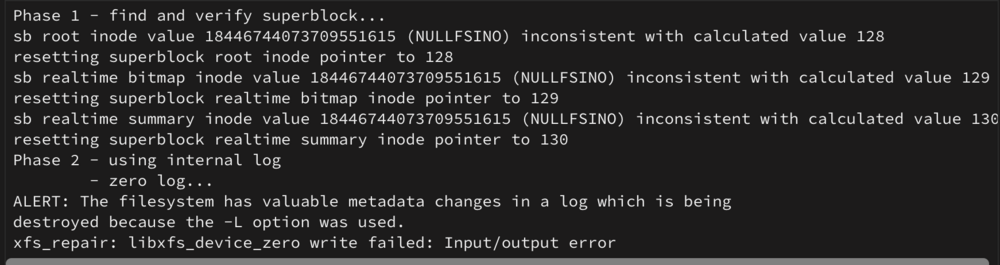
Both failed with input/output error, along with the parity drive again suddenly showing as failed again (diags attached). I need to double check the hardware. All of this nightmare started when I did a motherboard upgrade. I'll see if there's any common connections between the three drives but also probably just go back to my old motherboard and see what happens. I just find it really unlikely all 3 of these would fail at the same time like this, especially if they are not all part of the same connection and have no issues prior to mobo change. Thank you very much for the assistance so far. Attached diags if there's any more info to give. The first one got a little further before i/o: 2nd one failed immediately. nas-diagnostics-20241119-0657.zip
-
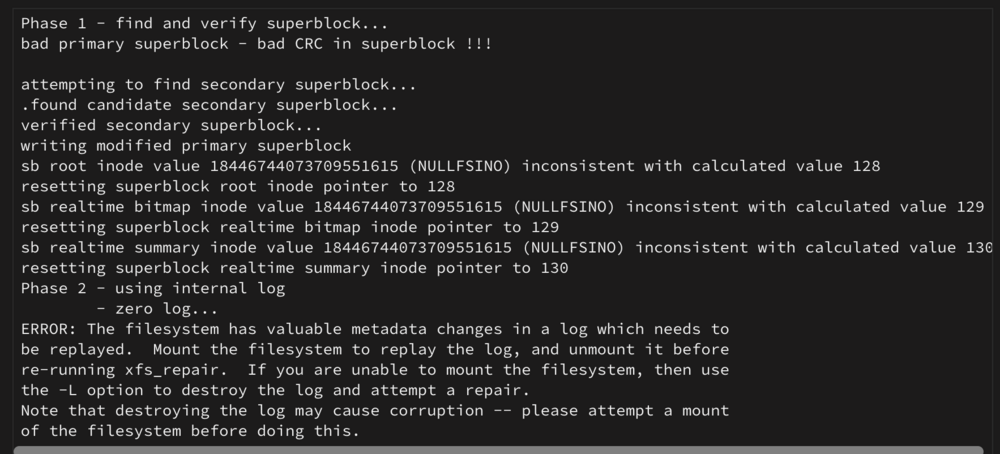
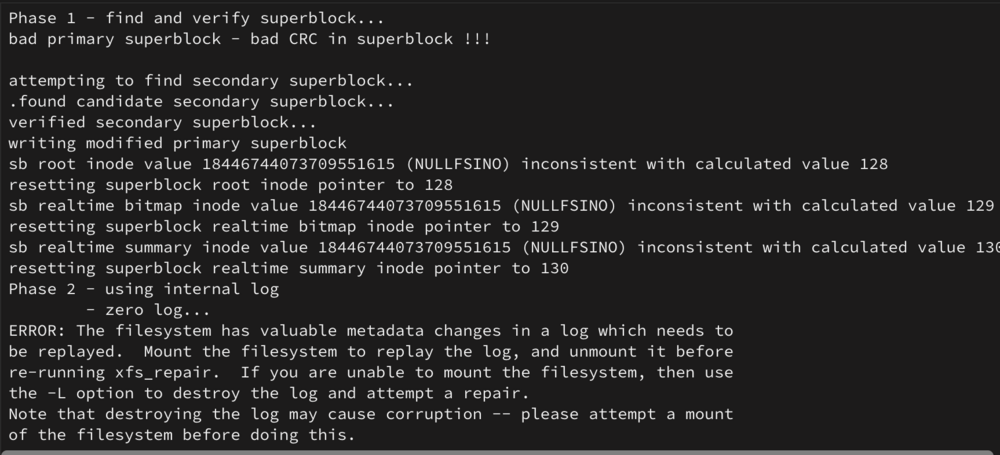
here's the output of xfs repair on both drives without the -n option (attached via screenshot because paste format was not cleanly pasting). should i still proceed with a rebuild once all cables are checked? or is this filesystem level corruption
-
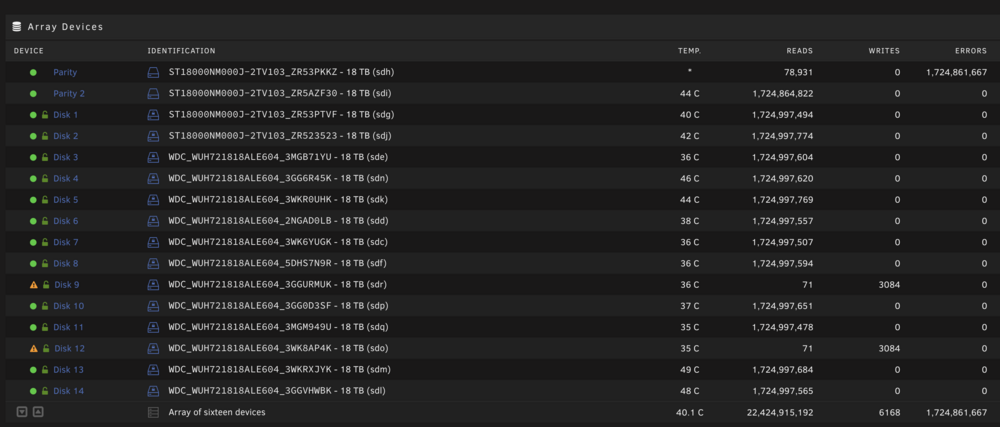
thanks for the reply, unfortunately i stupidly was not aware of the filesystem check and i started the array rebuild process. one of the parity drives immediately also failed during the rebuild. i suspect that one is a cable issue. (new diag and picture attached) Can I stop the rebuild, fix the cable, and then restart from the beginning? Or should I let the current rebuild continue and presumably only one of the drives will be fixed, then I can 'redo' the rebuild to fix the other? I would prefer the former so I only have to rebuild once. nas-diagnostics-20241119-0548.zip
-
One of the parity drives is showing a 100% error rate during the rebuild - I highly suspect a cable issue with the drive. Can I stop the rebuild, fix the cable, and then restart from the beginning? Or should I let the current rebuild continue and presumably only one of the drives will be fixed, then I can 'redo' the rebuild to fix the other? I would prefer the former so I only have to rebuild once.
-
Hi all, diags attached below. I checked my array today only to find two disks with unmountable file systems. I have a dual parity array. I stopped the array and removed the device from the slot to see if I could at least browse the emulated contents but there was no option to do so, it just continued to say unmountable file system. I stopped the array again and then reattached the drives into their proper spot but now they say "new device." and if I try to start the array, it says it will do a parity sync/build. What is my next move...if I start the array, is it saying it will rebuild those two missing disks? Or is it saying it's going to rebuild the entire array and treat those disks as new and everything on them is lost? FS is XFS encrypted if it it matters. I'm worried that when I set the disks unassigned in the first instance, it is now unaware of their previous existance, and now parity won't be able to rebuild then anymore. However, if im wrong and it's going to try to rebuild parity on those two disks, im ok with that, I'd just like to be sure I understand what unraid is saying is going to happen when I start the array. I'm also wondering why when I unassigned it, it was still saying unmountable...possibly the parity also has some corruption on those drives? nas-diagnostics-20241118-2012.zip



