mattz
Members
-
Joined
-
Last visited
-
OK, after a few bumps with the BIOS, I got it back up and running, and the Pool is healthy with the 2x 870 SSDs! It's running a balance now, then I'll run a scrub. Thanks for all the help! untower-diagnostics-20261106-1359.zip
-
Ok, 30 min later it's still stopping. Anything else I should close? untower-diagnostics-20261106-1044.zip
-
There's something weird going on with the /mnt/cache and subsequently the rsync backup. It looks like the /mnt/cache/docker has some sort of recursiveness to it, because it is far too large. The cache only had about 301 GB USED, but the docker folder is 686G. If I have the appdata stuff, should I just cancel it and move on to the next steps? 139G /mnt/cache/appdata 686G /mnt/cache/docker 11G /mnt/cache/domains 314M /mnt/cache/photos 1.0G /mnt/cache/system 0 /mnt/cache/tm-media
-
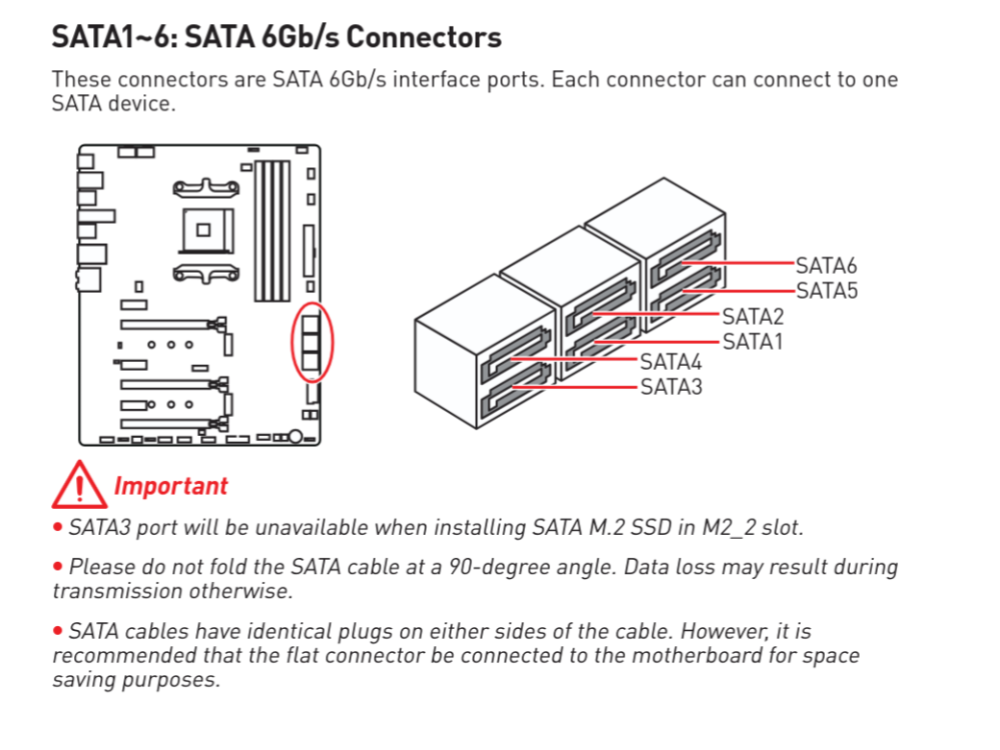
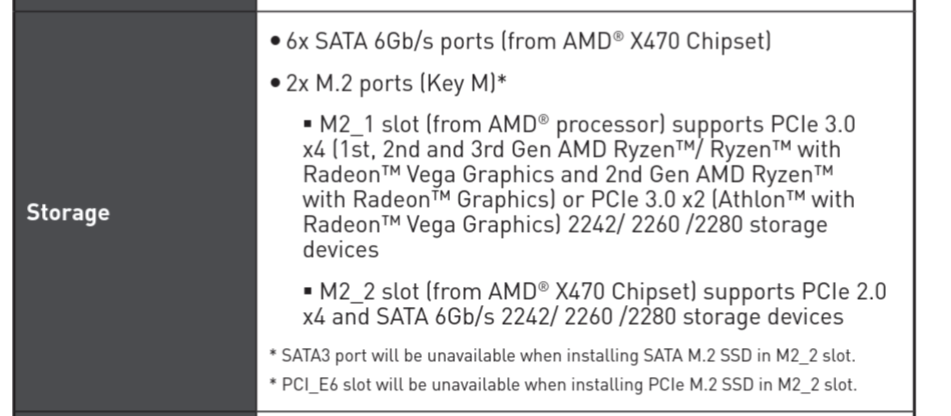
Ok, I also checked, and I don't think I have enough SATA slots to do it in one go. I have 6 SATA slots total and 5 available since 1 of them is used by the M.2 NVME. I'm not sure if that M2_2 slot the ADATA_480GB working cache drive or the ADATA_1TB unassigned drive I use as a VM system disks. So, I am going to have to First add 1 of the 1TB 870s in, do the cache transfer from the ADATA_480GB, then I can turn off and remove the ADATA_480GB and install the second 1TB 870. How does that change the steps here? At the moment I am at Step 4, stopping the array (which is taking forever), but I have done the balance and removed the missing /mnt/cache drive.untower-diagnostics-20261106-0901.zip
-
I got this message when I ran the btrfs balance: # btrfs balance start -f --bg -dconvert=single,soft -mconvert=dup,soft /mnt/cache WARNING: Conversion with missing device(s) can be dangerous. Please use 'btrfs replace' or 'btrfs device remove' instead. Safety timeout skipped due to --forceit looks like it did not run because it went right back to the prompt after that warning. You have the Remove command at 3. Attached the latest diagnostic output. I will await your help on this. untower-diagnostics-20261106-0707.zip Oh, EDIT: Went to the Cache page and I see the Balance is running and 92% running. It must have kicked off and started. I'll continue
-
Awesome! I'll get on this and report back. Great info. TY 🙏 After I posted, I re-read your post and did a full mouth-open double-take. That didn't even register in my mind when I bought the new SSDs. You're right, I should be able to find some SATA slots for that, and I would be fine with that. I added nothing new, and even though the NVME eats up a SATA slot, especially if I remove it I'll have those available again.
-
OK, @JorgeB - I decided to grab two new 1 TB Evo 870 SSDs. How do I get the cache back on the right track? My SATA slots were full, but removing the 1 broken drive, I can swap it out for 1 new 1 TB drive. I then need to transfer all the data on the existing/old cache drive to the new 1 TB drive Then I need to decommission the existing/old cache drive Then install the second new 1 TB drive Reestablish the RAID1 (mirrored) cache with both drives for 1 TB of storage Does that cover it? What steps do I need to take to get there. Do I start again with the balance command above? Really appreciate the help, because I feel like I'm flying close to the sun with the 1 old SSD and no mirror. And if this is a standard swap operation, I'm glad to RTFM if you would point me to the correct scenario. Thank you!
-
Thank you, @JorgeB . Good points. Those drives are ancient, in SSD terms. I will get a new drive and get back with my results. How long will it take for the first command to run?? I left it for over 30-minutes, and it just sat at the command line. I finally canceled it with Ctr+C and the command line recovered, but I didn't see any changes.
-
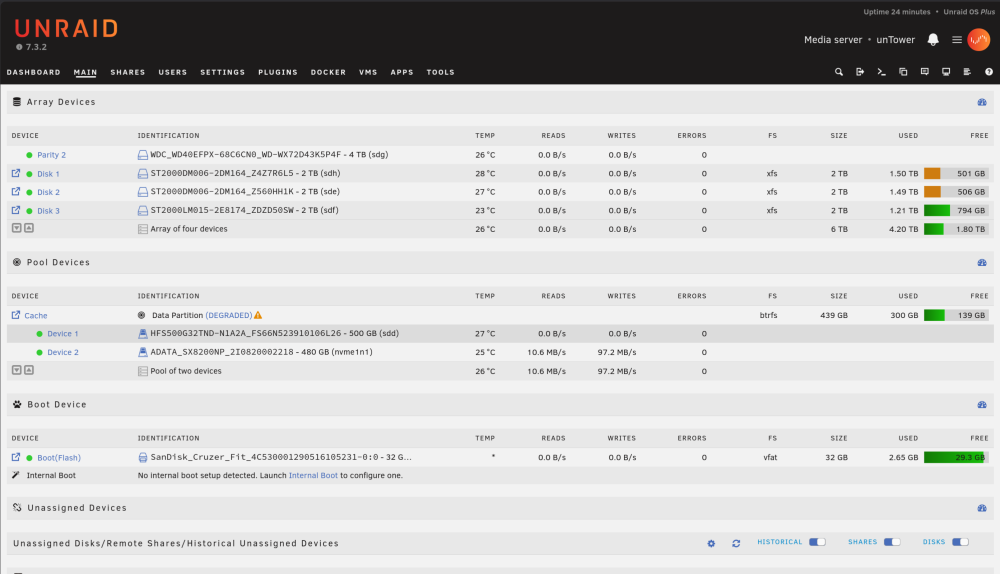
I just had this error pop up today, Device 1 (sdd) on Cache pool (Edit: Raid0 it's RAID1, copy, I mistyped that) is not working. It was initially throwing Errors with every write, so I shut down the server and changed the SATA cable. Now I restarted and it has no reads/writes. Uploaded diagnostics. Is that sdd drive (HFS500) toast? What else can I try? Thanks in advance! untower-diagnostics-20261010-2207.zip
-
Followed this guide with Unraid 6.12.10, and it works like a charm! Screenshots are still valid, too. Thanks so much.
-
Thanks, @JorgeB. It's running with what looks like all my original data! This is a huge relief. I restarted the server in Safe Mode before I ran that check. The checkbox to "rebuild from parity" was available, but I ignored that and started the array in maintenance mode. I think at that point it was already OK since it wasn't asking me to format the drive. I ran the check, via the WebGUI and it didn't have any suggestions. Started the array in regular mode and it worked! Thank you.
-
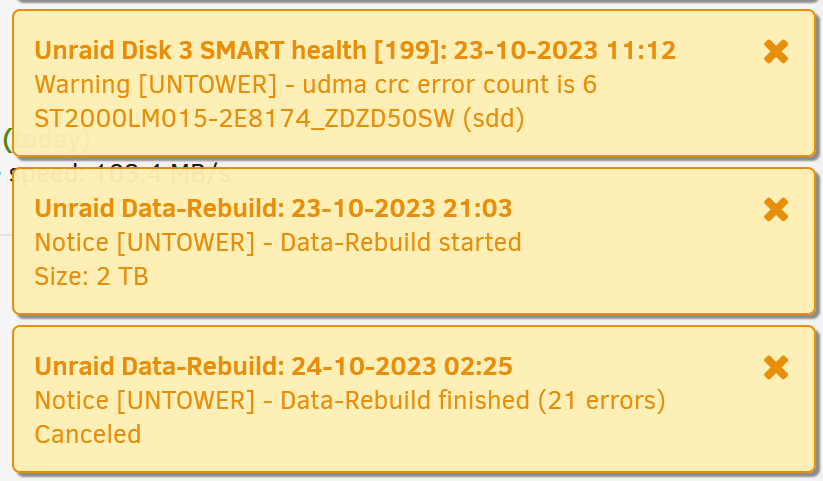
Background in my previous post: I had a failed drive and purchased a new, bigger one and ran a parity swap and rebuild. Everything was going according to instructions until I open up to see how the Data-Rebuild went and see the message (screen shot attached): "Data-Rebuilding finished (21 errors) Canceled". The [previously parity] disk drive that was being rebuilt is still listed as "Unmountable: Unsupported or no file system" despite xfs being listed as the FS (after the rebuild). A couple questions: Did I lose the ability to rebuild that drive from the parity+other data drives (and lose a large portion of my data )? How do I get that drive working in my array? If I lost the data, is it just a matter of formatting (the option is below on Main)? Attached latest diagnostics and a couple screen shots. Edit: I did run a quick SMART check on that 0SW disk after the canceled rebuild, it passed, attached. untower-diagnostics-20231024-0619.zip untower-smart-20231024-0611.zip untower-smart-20231024-0611.zip

-
Sorry, sorry, sorry. Clearly spelled out as a "3 drive parity shuffle" in the FAQ: https://docs.unraid.net/legacy/FAQ/parity-swap-procedure/
-
I think I painted myself into a corner. Unraid 6.12.2. Short question: Can I replace a failed data disk in a single parity with a disk bigger than the parity disk? e.g. rebuild the array using only 2 TB of a 4 TB drive? (I think the answer is the parity disk ALWAYS needs to be the biggest). Background: I have a 6 TB array with a single parity; i.e. 3 x 2 TB data disks + 1 x 2 TB parity disk. I had 1 x data disk die on me. I purchased a 4 TB disk because... The WD Reds are nearly the same price for a 2 TB as a 4 TB. However, the GUI is prohibiting me from hitting "start" after I removed the failed 2 TB drive and replace it with the 4 TB because If this is a new array, move the largest disk into the parity slot. If you are adding a new disk or replacing a disabled disk, try Parity-Swap. How can I get up and running at this point? Is this the best path to go down: Copy the current 2 TB parity disk onto the new 4 TB drive (how do I do this??). THEN use the 2 TB parity disk as a data disk, keeping the 4TB disk as the new Parity. Rebuild from here. (now with a 4 TB parity in case of future upgrade)
-
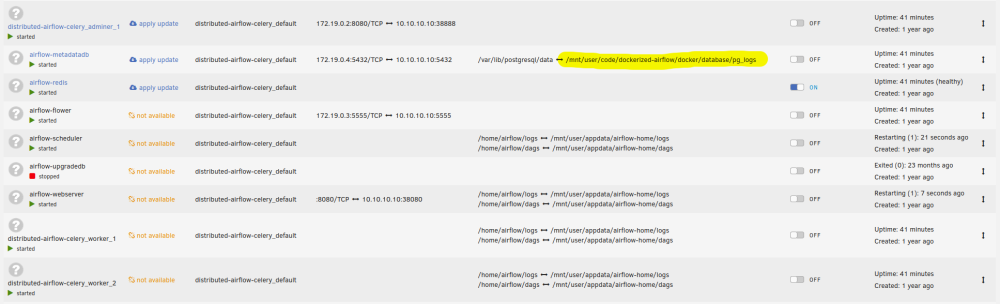
Bear with me - Forgive my ignorance and forgetful brain: About a year ago I set up a Docker Airflow deployment using docker-compose to automatically restart on server reboot. I did this with a docker-compose.yml file (don't remember from where I got the code) and not an App or Plugin. It has been working and bulletproof. Now I no longer need it, but I cannot figure out where I set it up to restart on every reboot! How can I stop Airflow from launching on reboot? Where would this normally be scheduled through? Any log entries I should be looking for to discover this? A few things I've tried: I had a user.scripts plugin entry to start (pip install) docker-compose on every reboot. I disabled that, but on restart the airflow containers are still launching (HOW??) I renamed the dockerized-airflow folder (/mnt/user/code/dockerized-airflow) that contained the docker-compose.yml, but it is still launching and creating the folder for the postgresql db! The code must be somewhere else, but I can't, for the life of me, figure out where. appdata/airflow-home only contains logs and dags, but I have deleted it to no avail. Attached screenshot of the docker containers and mounted volumes. Thank you!