





mattz
Members
-
Joined
-
Last visited
-
Thank you, @JorgeB . Good points. Those drives are ancient, in SSD terms. I will get a new drive and get back with my results. How long will it take for the first command to run?? I left it for over 30-minutes, and it just sat at the command line. I finally canceled it with Ctr+C and the command line recovered, but I didn't see any changes.
-
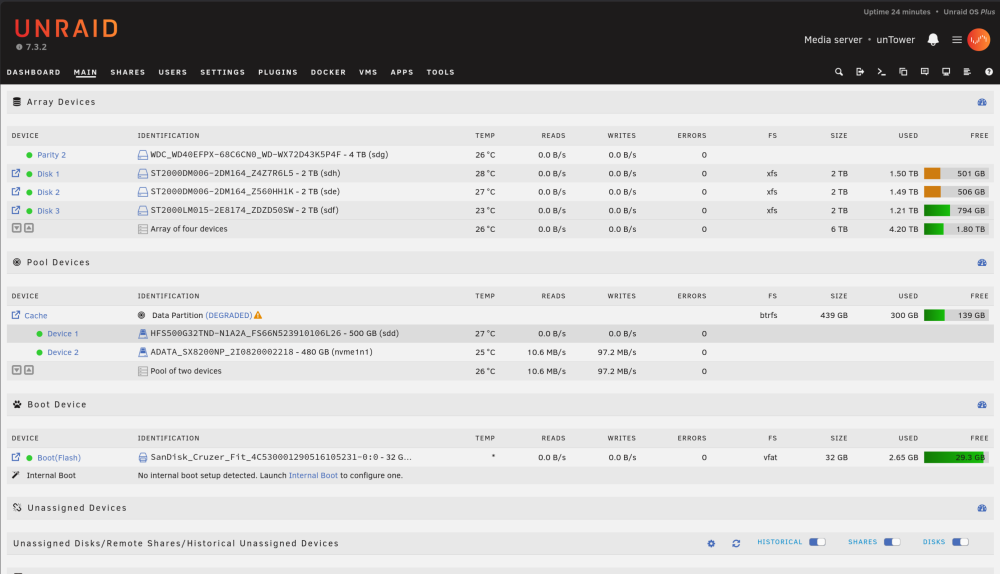
I just had this error pop up today, Device 1 (sdd) on Cache pool (Edit: Raid0 it's RAID1, copy, I mistyped that) is not working. It was initially throwing Errors with every write, so I shut down the server and changed the SATA cable. Now I restarted and it has no reads/writes. Uploaded diagnostics. Is that sdd drive (HFS500) toast? What else can I try? Thanks in advance! untower-diagnostics-20261010-2207.zip
-
Followed this guide with Unraid 6.12.10, and it works like a charm! Screenshots are still valid, too. Thanks so much.
-
Thanks, @JorgeB. It's running with what looks like all my original data! This is a huge relief. I restarted the server in Safe Mode before I ran that check. The checkbox to "rebuild from parity" was available, but I ignored that and started the array in maintenance mode. I think at that point it was already OK since it wasn't asking me to format the drive. I ran the check, via the WebGUI and it didn't have any suggestions. Started the array in regular mode and it worked! Thank you.
-
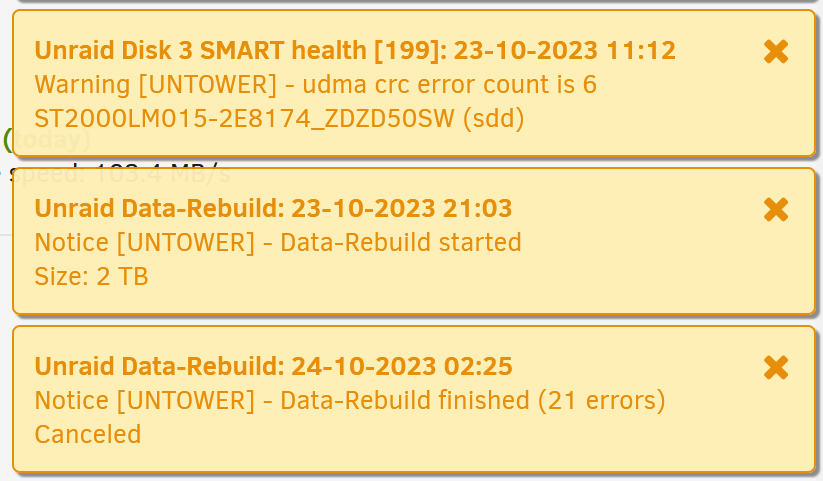
Background in my previous post: I had a failed drive and purchased a new, bigger one and ran a parity swap and rebuild. Everything was going according to instructions until I open up to see how the Data-Rebuild went and see the message (screen shot attached): "Data-Rebuilding finished (21 errors) Canceled". The [previously parity] disk drive that was being rebuilt is still listed as "Unmountable: Unsupported or no file system" despite xfs being listed as the FS (after the rebuild). A couple questions: Did I lose the ability to rebuild that drive from the parity+other data drives (and lose a large portion of my data )? How do I get that drive working in my array? If I lost the data, is it just a matter of formatting (the option is below on Main)? Attached latest diagnostics and a couple screen shots. Edit: I did run a quick SMART check on that 0SW disk after the canceled rebuild, it passed, attached. untower-diagnostics-20231024-0619.zip untower-smart-20231024-0611.zip untower-smart-20231024-0611.zip

-
Sorry, sorry, sorry. Clearly spelled out as a "3 drive parity shuffle" in the FAQ: https://docs.unraid.net/legacy/FAQ/parity-swap-procedure/
-
I think I painted myself into a corner. Unraid 6.12.2. Short question: Can I replace a failed data disk in a single parity with a disk bigger than the parity disk? e.g. rebuild the array using only 2 TB of a 4 TB drive? (I think the answer is the parity disk ALWAYS needs to be the biggest). Background: I have a 6 TB array with a single parity; i.e. 3 x 2 TB data disks + 1 x 2 TB parity disk. I had 1 x data disk die on me. I purchased a 4 TB disk because... The WD Reds are nearly the same price for a 2 TB as a 4 TB. However, the GUI is prohibiting me from hitting "start" after I removed the failed 2 TB drive and replace it with the 4 TB because If this is a new array, move the largest disk into the parity slot. If you are adding a new disk or replacing a disabled disk, try Parity-Swap. How can I get up and running at this point? Is this the best path to go down: Copy the current 2 TB parity disk onto the new 4 TB drive (how do I do this??). THEN use the 2 TB parity disk as a data disk, keeping the 4TB disk as the new Parity. Rebuild from here. (now with a 4 TB parity in case of future upgrade)
-
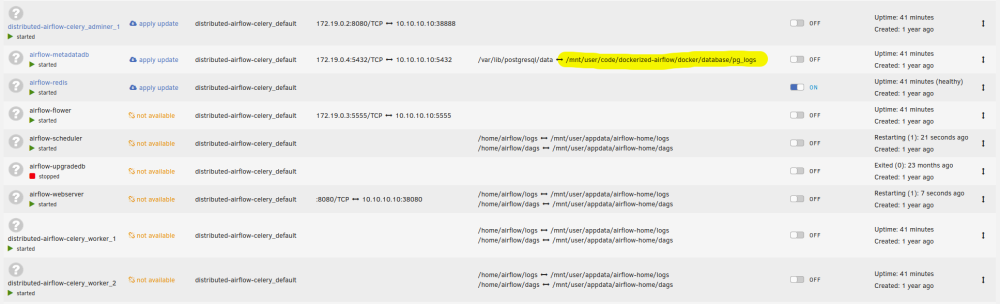
Bear with me - Forgive my ignorance and forgetful brain: About a year ago I set up a Docker Airflow deployment using docker-compose to automatically restart on server reboot. I did this with a docker-compose.yml file (don't remember from where I got the code) and not an App or Plugin. It has been working and bulletproof. Now I no longer need it, but I cannot figure out where I set it up to restart on every reboot! How can I stop Airflow from launching on reboot? Where would this normally be scheduled through? Any log entries I should be looking for to discover this? A few things I've tried: I had a user.scripts plugin entry to start (pip install) docker-compose on every reboot. I disabled that, but on restart the airflow containers are still launching (HOW??) I renamed the dockerized-airflow folder (/mnt/user/code/dockerized-airflow) that contained the docker-compose.yml, but it is still launching and creating the folder for the postgresql db! The code must be somewhere else, but I can't, for the life of me, figure out where. appdata/airflow-home only contains logs and dags, but I have deleted it to no avail. Attached screenshot of the docker containers and mounted volumes. Thank you!
-
@francishefeng59 I will message you the public key. I think they are OK to share on a forum, but I'll err on the side of caution.
-
@Roudy I made that change, started it up, and it's working. WTF? I mean, it ran for YEARS problem-free with my old DNS setup. Whether coincidence or your suggestion: I thank you! 🍻 @francishefeng59 - Check my Log for the environment variables, but also will copy them here. Some of my settings may be out of date because I set it up years ago, but it does work. Check https://github.com/binhex/arch-sabnzbdvpn for the latest settings. Set up these environment variables via your docker config, change the few to fit your : -e VPN_ENABLED=yes \ -e VPN_USER=<vpn username> \ -e VPN_PASS=<vpn password> \ -e VPN_PROV=custom \ -e VPN_CLIENT=openvpn \ -e VPN_OPTIONS=<additional openvpn cli options> \ -e STRICT_PORT_FORWARD=yes \ -e ENABLE_PRIVOXY=yes \ -e LAN_NETWORK=<lan ipv4 network>/<cidr notation> \ -e NAME_SERVERS=84.200.69.80,37.235.1.174,1.1.1.1,37.235.1.177,84.200.70.40,1.0.0.1 \ -e DEBUG=true \ Copy the OpenVPN config files into the appdata folder: appdata/binhex-sabnzbdvpn/openvpn. There should be 3 of them: credentials.conf (with your VPN username and password) the single .ovpn config file that you want to use vpn.crt with the public key (I found it on the Privado Support pages) Side note: Privado now has Socks5 support, so you can directly connect using Radarr and Sonarr, but SABNZBD still does not have it, so you will still need a VPN solution like this for the time being, though I do see a new feature may be coming for that.
-
I might be having the same issues as @francishefeng59. I am also using Privado VPN with the OpenVPN client (Privado is the VPN that comes with the newshosting.com subscription). Since November 4 I have been unable to connect news.newshosting.com AND radarr and sonarr fail to connect to any indexer using the sabnzbdvpn privoxy container proxy. The most maddening part is that watchdog-script in the Log shows the host name resolves: 2021-11-14 21:07:05,613 DEBG 'watchdog-script' stdout output: [debug] DNS operational, we can resolve name 'www.google.com' to address '142.250.69.196' However, running `docker exec -ti binhex-sabnzbdvpn curl -L http://www.google.com` results in: curl: (6) Could not resolve host: www.google.com And in the sabnzbd webgui I get a DNS error for news.newshosting.com: [Errno 99] Address not available Check for internet or DNS problems I tried a different Privado VPN server with new ovpn config files to no avail. Connecting to it directly with my PC's OpenVPN has no problems with DNS or anything. Attached my log with sensitive info redacted. I am not sure where to go from here and would appreciate the help. log-2021-11-14-binhex-sabnzbd-vpn-redact.log
-
I am now running 6.9.2 without issues for either GPU or USB Controller. That is, 6.9.0 fixed the FLR issues that was causing my system to hang, without having to use the custom kernel with 6.8.3. If you are updated past 6.9.0 you should be good to use the VFIO-PCI Config interface under Settings in your Unraid admin web GUI to isolate USB controllers. The only caveat is that I had to be careful about which USB controller I isolated: One had the Unraid USB key drive, and that needs to stay. Another USB controller had my Network port on it, so I couldn't isolate that. Otherwise, I isolated one controller for pass-through to my Windows VM.
-
You said it, @MsDarkDiva! Thank you for the GitHub link and FAQ quote. I guess it was just lazy/taking for granted the "Ignore IP" for me. Took me 2 weeks to finally sit down and try to solve this.
-
Has the latest Unraid (6.9.0) included all the fixes this Kernel includes? I would like to upgrade to the latest version (or have a timeline for it), but not if it involves compiling a custom kernel to accommodate the whole x470 motherboards with Ryzen 2 3000 CPU's and pass-through. TY! Note, I am specifically referencing the FLR fix with the Kernel.
-
@JoeBloggs - I just used the kernel. Yes, just copy it to your flash drive (the /boot/ directory). Save the stock kernels as .bak or something in case you need them. Everything will boot like normal. Just make sure you match the version. Leoyzen has an attached version earlier on this page for Unraid 6.8.3, same as I am using. @Leoyzen - Wanted to say thank you for the FLR fix, I used your kernel, added the parameters I needed and am up and running with the USB controller in my VM! Added `append pcie_no_flr=1022:149c,1022:1487,1022:1485` and used vfio-append to those same ones. Thanks again!



