






sturmstar
Members
-
Joined
-
Last visited
-
Sounds good - similar to the Telegram bot which is integrated in unraid - and I'm using...
-
It worked perfectly. Thank you. If I could make another wish or "feature request" - implement a possibility to send notifications (mail) for different events like "backup successfull", "backup failed" usw. But as I said - that's only a wish. Best regards
-
Hi. Just installed the v2 and added the chmod 777 into the field. I will tell you later if it works this way - but why shoudn't it. Thank you. Best regards
-
I don't know what 'export PUID und GUID means... But I 'solved' it the other way - I got it running by changing PUID und GUID to 0 and 0 on the rclone-docker - I think this means that the rclone-docker is running with root rights - and so it can access the files from vorta. ...best regards
-
Thank you for your efforts here. Just for you to know - currently I use the 'borgmatic' container for borg-backups. The issue with the permissions there is exactly the same - except there is the possibility to run a "hook" after the backup is done. I use it to chmod 777 -r everything after a backup. Also not an elegant solution but it works at the moment. But I just like the GUI from vorta - i hope we can come to a solution there. What I don't understand is - I'm no expert with linux in general - and with file permissions in linux - in combination with docker inside/outside - but should it be so hard (?) - I mean - is this such a 'special' demand? - someone has to be knowing what he's doing. best regards
-
I did what you said - I added the UMASK Var to the vorta docker, deleted the whole repo before, and tried again to upload with rclone. Doesn't work - sadly. I even don't know if the permissions are different then before? best regards
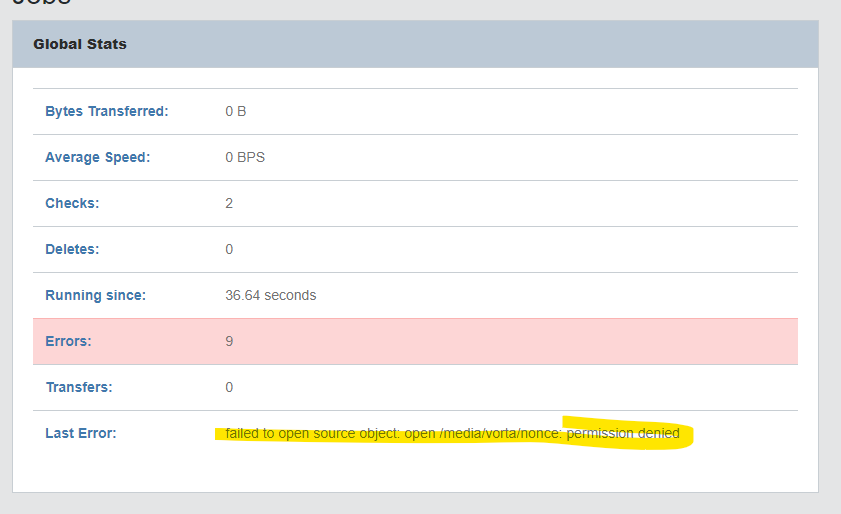
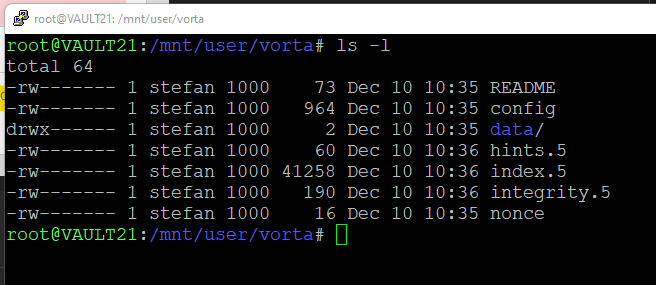
 Hi! Thanks for the quick response. Cronjob in Unraid is imho a bad solution because I don't know how long the backup is running for example. I know there are these UMASK settings - but I must confess I'm not familiar with how these are working exactly. Could you give me a hint how I could/should set them - it would be no problem if the permissions are for all - I have no security issues here. thanksHi! Thank you very much for your docker. I like it very much. I just have one question - would it be possible to change the permissions after a backup-run? I'm asking because I would like to upload the archive-files with another (rclone)-container - but the other docker doesn't have the permission to access the files... Thank you so much!Hallo - ich hänge mich hier mal an - funktioniert dieser Docker noch? Ich hab jetzt mit einem Python Script in einer VM was ähnliches gebastelt - da braucht man Client-Token und Client-Secret - funktioniert das bei diesem Docker auch so? Danke!I just wrote Unraid ... the main reason I don't wanna use the old stick anymore is - it's a 2GB Stick - and i already got trouble with the Flashbackup-Feature from "myservers" because it needs at least the whole "server" again in free space - which wasn't there anymore. Thanks again best regardsOK. How do I do that - via mail?Yeah... i forgot to mention - I don't wanna use the current Pro Stick anymore - it's an very old Kingston USB2 Stick - I wanna use the current Basic-Stick...Hi, as I said. I currently have a Unraid-Server with a Basic-Key in use and one Pro License on a Stick (the Server doesn't exist anymore) - now I want to exchange those licenses. So I want to use the Pro License (from the Stick) on my running Basic-Unraid-Server - of course I don't wanna loose any key or registration. I already changed the Basic-USB-Key once this year... Thank you so much. Best regardsPerformance-wise - sure - but I want them to be pyhsically seperated - that's the reason.



