





santiman717
Members
-
Joined
-
Last visited
Everything posted by santiman717
-
Dude! I hope this works for me! I'm on a B450 also, but I'm geographically separated, so I will get to try it this weekend.
-
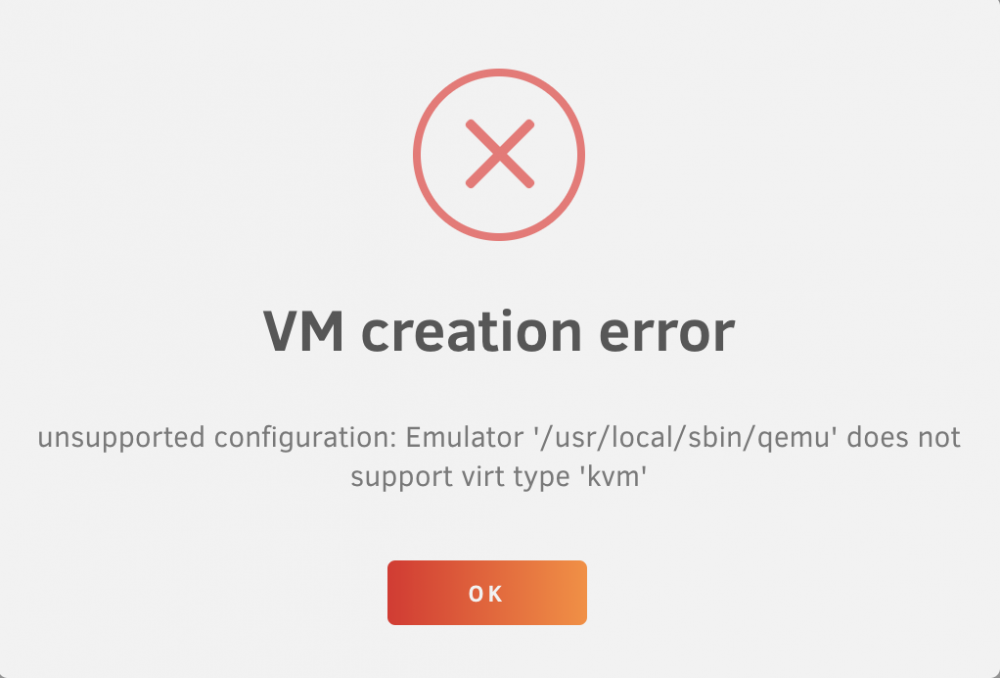
Unraid Version: 6.9.1 Trying to create a CentOS 7 VM on a new unraid installation. I get this error. "unsupported configuration: Emulator '/usr/local/sbin/qemu' does not support virt type 'kvm' " Any Idea how to remedy this? I have another machine running Unraid 6.8.3 and I don't have this issue. Thanks in advance!
-
I recently upgraded my snipe-IT docker container. I'm running into an issue where my user list doesn't display. I turned on debug and has this in the messages section. From what I understand this is caused by them adding new fields to the website, but then a migrate task doesn't happen correctly on the database side. From what I have seen from the Snipe-IT documentation, I need to run some commands in the project root. Specifically "php artisan migrate" Anyone had similar issues?
-
My unraid docker log is below. I'm not even getting to the "Whoops, looks like something went wrong" page. I get the standard "This page isn’t working" HTTP ERROR 500 Any ideas? Module ssl disabled. To activate the new configuration, you need to run: service apache2 restart 2020-10-02 15:55:23,650 CRIT Supervisor running as root (no user in config file) 2020-10-02 15:55:23,651 INFO supervisord started with pid 1 2020-10-02 15:55:24,653 INFO spawned: 'exit_on_any_fatal' with pid 35 2020-10-02 15:55:24,654 INFO spawned: 'apache' with pid 36 2020-10-02 15:55:24,655 INFO spawned: 'run_schedule' with pid 37 AH00558: apache2: Could not reliably determine the server's fully qualified domain name, using 172.17.0.11. Set the 'ServerName' directive globally to suppress this message No scheduled commands are ready to run. 2020-10-02 15:55:25,838 INFO success: exit_on_any_fatal entered RUNNING state, process has stayed up for > than 1 seconds (startsecs) 2020-10-02 15:55:25,838 INFO success: apache entered RUNNING state, process has stayed up for > than 1 seconds (startsecs) 2020-10-02 15:55:25,838 INFO success: run_schedule entered RUNNING state, process has stayed up for > than 1 seconds (startsecs)
-
I removed the media mapping. Got a system health message: Multiple root folders are missing: /media/Movies That checks, I just removed it. Clicked update library. --> In logs "Import failed, path does not exist or is not accessible by Radarr: /data/Movies/..."
-
Downloader: root@localhost:# /usr/local/emhttp/plugins/dynamix.docker.manager/scripts/docker run -d --name='binhex-sabnzbdvpn' --net='bridge' --privileged=true -e TZ="America/Los_Angeles" -e HOST_OS="Unraid" -e 'VPN_ENABLED'='yes' -e 'VPN_USER'='*********' -e 'VPN_PASS'='********' -e 'VPN_PROV'='pia' -e 'VPN_OPTIONS'='' -e 'STRICT_PORT_FORWARD'='no' -e 'ENABLE_PRIVOXY'='no' -e 'LAN_NETWORK'='192.168.1.0/24' -e 'NAME_SERVERS'='209.222.18.222,84.200.69.80,37.235.1.174,1.1.1.1,209.222.18.218,37.235.1.177,84.200.70.40,1.0.0.1' -e 'ADDITIONAL_PORTS'='8081' -e 'DEBUG'='false' -e 'UMASK'='000' -e 'PUID'='99' -e 'PGID'='100' -p '9876:8080/tcp' -p '8090:8090/tcp' -p '8118:8118/tcp' -v '/mnt/user/media/':'/data':'rw' -v '/mnt/user/appdata/binhex-sabnzbdvpn':'/config':'rw' 'binhex/arch-sabnzbdvpn' Radarr: root@localhost:# /usr/local/emhttp/plugins/dynamix.docker.manager/scripts/docker run -d --name='binhex-radarr' --net='bridge' -e TZ="America/Los_Angeles" -e HOST_OS="Unraid" -e 'UMASK'='000' -e 'PUID'='99' -e 'PGID'='100' -p '7878:7878/tcp' -v '/mnt/user/media/':'/data':'rw' -v '/mnt/user/media/':'/media':'rw' -v '/mnt/user/appdata/binhex-radarr':'/config':'rw' 'binhex/arch-radarr'
-
I'm getting the "Import failed, path does not exist or is not accessible by Radarr:" Yesterday I changed all the paths to match in the docker container. I then deleted the database, and started over again, so the paths would be updated. I thought that had fixed it. But now I'm getting the import failed error again. Radarr creates the new file folder. It can see where they are, and if I manually move the files into the newly created folders, it can rename them. What am I missing?
-
32
