





martinjuhasz
Members
-
Joined
-
Last visited
Everything posted by martinjuhasz
-
not sure if this syslog is any different? syslog
-
well, its weird. created another share where i can't get it working currently no matter if i start/stop the array. the error message tho has changed a bit this time Jan 29 19:50:56 Winston move: create_parent: /mnt/disk2 error: Software caused connection abort Jan 29 19:50:56 Winston move: move_object: /mnt/disk2/test2: Transport endpoint is not connected Jan 29 19:50:56 Winston root: mover: finished if i cant get this to work i might have to switch back to xfs. that would be a bummer not to be able to have a cache drive thats guaranteed to be backed up.
-
ok so with a new share the same happened. but somehow after i stopped the array and restarted it (without reboot) mover was working fine once. now after adding another array it failed again. stopped -> started, everything seems ok for the moment.
-
yeah, since the cache pool is the main thing that changed, this might be true. i mainly moved from xfs to btrfs because i wanted to have redundancy so that my files are save. i think i had issues with btrfs when i set this thing up, which is why i chose xfs. Any idea how i could verify its the cache pool?
-
so the mover logs as shown above will not be displayed in the diagnostics syslog somehow. i tried also restarting, moving (i see it in tail -f /var/log/syslog), then dl diagnostics without it being reflected there
-
hm weird, the syslog in the diagnostics is not up to date?! When i tail my syslog and run mover this will get written to log Jan 29 17:37:23 Winston root: mover: started Jan 29 17:37:23 Winston move: file: /mnt/disk1/martin/Rechnungen/Sonstiges/account_111198950_20110614.pdf Jan 29 17:37:23 Winston move: create_parent: /mnt/disk1/martin error: No space left on device Jan 29 17:37:23 Winston move: file: /mnt/disk1/martin/Rechnungen/Sonstiges/regfish_10835224.pdf Jan 29 17:37:23 Winston move: create_parent: /mnt/disk1/martin error: No space left on device Jan 29 17:37:23 Winston move: file: /mnt/disk1/martin/Rechnungen/Sonstiges/Druckbares Auftragsformular.pdf Jan 29 17:37:23 Winston move: create_parent: /mnt/disk1/martin error: No space left on device Jan 29 17:37:24 Winston move: file: /mnt/disk1/martin/Rechnungen/Sonstiges/regfish_10832244.pdf Jan 29 17:37:24 Winston move: create_parent: /mnt/disk1/martin error: No space left on device Jan 29 17:37:24 Winston move: create_parent: /mnt/disk1/martin error: No space left on device Disabling the movers log does not work as this "create_parent" is created by the movers log. When disabling it nothing will show.
-
sure thing winston-diagnostics-20220129-1645.zip
-
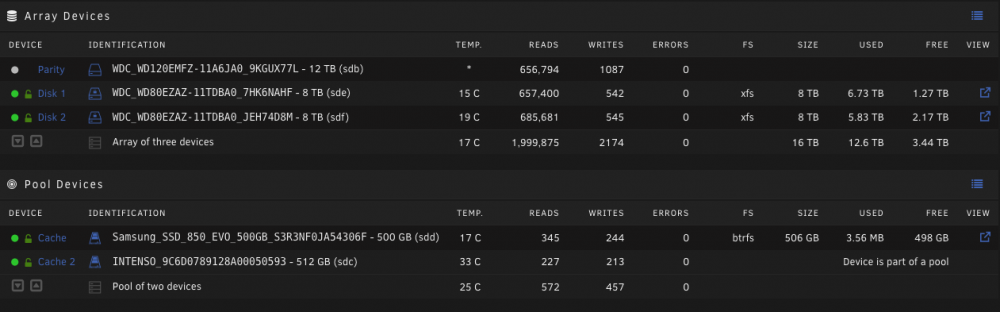
I'm running into an issue with mover that i cannot resolve. It's refusing to move any files and errors with: move: file: /mnt/disk2/martin/folder/to/img/IMG_0194_square_Fotor_edit.png move: create_parent: /mnt/disk2/martin error: No space left on device so everything is in its place, except for the share `martin`. I changed that from `cache: yes` to `cache: prefer` which should move it from my array to the cache. But every file fails. And it's not related to that share as it happened to other shares also and its not to a specific array disk , as both disk1 and two fail. I still have plenty of space left on each drive and the `martin` folder only contains documents and is under 10gb, prob even under 3gb. What i did before this happened is to move from a single cache drive with xfs to a cache pool with btrfs. for this i moved every share to the array with "cache: yes", verified everything is fine, rebuilt the array with a btrfs cache pool and here i am with this problem. Thanks for any help with this, its hard without my dockers up
-
Thanks for creating these templates. i would love to see the `firefly-iii-fints-importer` also added, seems like this importer is the only one that is missing
-
Do you have some more information on that @aptalca? I have a subdomain set up using proxy_domain and swag, but am not able to find anything online about sub-subdomain configuration.
-
my bad. the server was spun up using "localhost", not "0.0.0.0.", so it wasn't exposed to its LAN. Now it shows up on its localip:8000. I'm still struggling to configure swag to forward this. // Edit: nevermind: it shows up now, just took some minutes So if anybody has a more elegant idea of doing this, let me know. I would love to be independent from ports as i might also have multiple instances running, that are connected just with "localhost". some tunneling would be awesome. but i guess that might not be achievable or even practical. in that case a VNC would make more sense.
-
Is there some way to expose a locally running webserver that i started on the code-server terminal for development. I have code-server running using swag for reverse proxy, everything is fine. I have a command to spin up a local web-server for web-dev needs (like hot-reloading etc). The command runs fine and starts a server on some port (lets say 8000). I'm unable to access that website of course. Is there some recommended way to do this on code-server? I was looking for some plugins that would run a headless-chrome or something inside vs-code but they all seem to connect on the client side between browser and server. I also thought about exposing a specific port on the docker and on the proxy, but without luck. Even tho a web-server on port 8000 is runnin in the code-server terminal, i don't seem to be able to access it locally (without swag) even tho the port is exposed in the docker config.

