




Skip to content
View in the app

A better way to browse. Learn more.

Unraid

A full-screen app on your home screen with push notifications, badges and more.

To install this app on iOS and iPadOS
  1. Tap the Share icon in Safari
  2. Scroll the menu and tap Add to Home Screen.
  3. Tap Add in the top-right corner.
To install this app on Android
  1. Tap the 3-dot menu (⋮) in the top-right corner of the browser.
  2. Tap Add to Home screen or Install app.
  3. Confirm by tapping Install.

stackner

Members
  • Joined

  • Last visited

  1. when you say the official one. what one? also is there a working template for it? i tried both the ones in my image and could not get either to work....
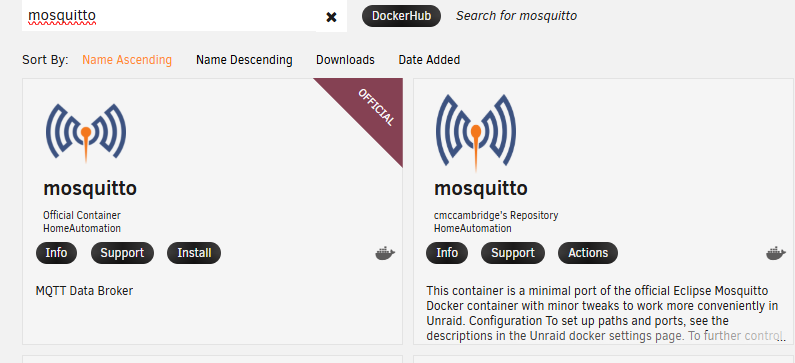
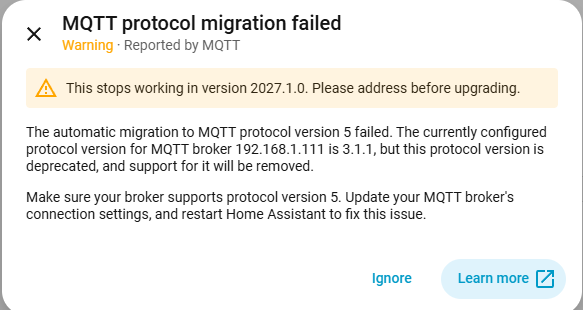
  2. i do not beleive the SPANTS one supports version 5 is the issue.
  3. will; this be getting an update?
  4. awesome thanks for the news. can i ask what is RL?
  5. awesome thanks. just wondered since it was updating every week or so for a while.
  6. what version of the plugin is the current one? my current version is "2019.09.22"
  7. any chance you could make a PROFIT TRAILER for unraid?
  8. i have installed the container however can not get the webui to load. not even an error it just sits trying to open. i have port 8200 forwarded.
Account

Navigation

Search

Search

Configure browser push notifications

Chrome (Android)
  1. Tap the lock icon next to the address bar.
  2. Tap Permissions → Notifications.
  3. Adjust your preference.
Chrome (Desktop)
  1. Click the padlock icon in the address bar.
  2. Select Site settings.
  3. Find Notifications and adjust your preference.
