





Bolagnaise
Members
-
Joined
-
Last visited
Everything posted by Bolagnaise
-
If your getting API bans then you have not created a custom client ID as per this guide - https://rclone.org/drive/#making-your-own-client-id
-
try this modprobe nct6775 force_id=0x290 then run sensors and let us know if it detects.
-
You do not have the nct6687 chip, it will not read anything from it. try 2.
-
@UNOPARATOR run modprobe nct6775
-
Oh sorry i missed that, thats strange, 6775 is already supported in this kernel so it should be working.
-
Yep i just saw, nct6775 is already in the kernel @UNOPARATOR run ‘’sensors-detect’’ from CLI and type yes at all the prompts. Copy paste the outputs
-
@ich777 you may be able to convert this one https://github.com/electrified/asus-wmi-sensors EDIT: ASUS B550 boards dont use WMI, they need nct6775
-
Yep, Works on RC2 as well. I’m not sure if you really need to do to much work because it will be supported in the kernel soon(tm) anyway. let me find the asus WMI plugin i’ve seen people work on.
-
This will not work then mate, you should have mentioned this. you need the WMI ASUS plugin
-
what motherboard do you own?
-
Thanks very much mate, really appreciate the help. Please consider setting up a donate link on your signature:)
-
ok thanks!
-
Yep, i assume i can just run this in user scripts for the time being
-
Your an actual god. It worked, thank you so much!
-
Much appreciated. Have a great day/night.
-
Maybe @ich777 could input some insight if this is even possible. He maintains the kernel helper plugin but i’m not sure if updating this driver is possible to do individually?
-
I recently switched from an intel based system to an Ryzen 5950x on an MSI motherboard and discovered that dynamix system temp plugin does not detect cpu temp due to not having the correct driver in the linux kernel. The driver in question is the NCT6687 driver and it was recently added to the latest linux NEXT kernel in hwmon 6683 driver https://www.reddit.com/r/linuxhardware/comments/kahmb1/nct_6687_support_added_to_linux_kernel/?utm_source=share&utm_medium=ios_app&utm_name=iossmf https://git.kernel.org/pub/scm/linux/kernel/git/next/linux-next.git/tree/drivers/hwmon?h=next-20201215 Noting that unraid 6.9.0-rc1 is running kernel 5.9.13 and that 5.9.14 also doesn’t contain the updated driver package, is there a way for me to install this driver package? TIA
-
On 6.9.0 RC1 if you attempt to adjust the disk temp thresholds values for the CACHE drive only, they will not save after hitting apply. All other cache and array drives update accordingly however: Warning disk temperature threshold (°C) Critical disk temperature threshold (°C)
-
If you remember i moved from the old script so my local is my rclone_upload folder. Heres my current script for reference. #!/bin/bash ###################### #### Mount Script #### ###################### #!/bin/bash ###################### #### Mount Script #### ###################### ## Version 0.96.9.2 ## ###################### ####### EDIT ONLY THESE SETTINGS ####### # INSTRUCTIONS # 1. Change the name of the rclone remote and shares to match your setup # 2. NOTE: enter RcloneRemoteName WITHOUT ':' # 3. Optional: include custom command and bind mount settings # 4. Optional: include extra folders in mergerfs mount # REQUIRED SETTINGS RcloneRemoteName="gdrive_vfs" # Name of rclone remote mount WITHOUT ':'. NOTE: Choose your encrypted remote for sensitive data RcloneMountShare="/mnt/user/mount_rclone" # where your rclone remote will be located without trailing slash e.g. /mnt/user/mount_rclone RcloneMountDirCacheTime="720h" # rclone dir cache time LocalFilesShare="/mnt/user/rclone_upload" # location of the local files and MountFolders you want to upload without trailing slash to rclone e.g. /mnt/user/local. Enter 'ignore' to disable RcloneCacheShare="/mnt/user/mount_rclone" # location of rclone cache files without trailing slash e.g. /mnt/user0/mount_rclone RcloneCacheMaxSize="400G" # Maximum size of rclone cache RcloneCacheMaxAge="336h" # Maximum age of cache files MergerfsMountShare="/mnt/user/mount_unionfs" # location without trailing slash e.g. /mnt/user/mount_mergerfs. Enter 'ignore' to disable DockerStart="plex sonarr sonarr4K radarr radarr4K" # list of dockers, separated by space, to start once mergerfs mount verified. Remember to disable AUTOSTART for dockers added in docker settings page MountFolders=\ {"downloads/completed,downloads/intermediate,downloads/seeds,Movies,TV Shows,4KMovies,4kTVShows"\} # comma separated list of folders to create within the mount # Note: Again - remember to NOT use ':' in your remote name above # OPTIONAL SETTINGS # Add extra paths to mergerfs mount in addition to LocalFilesShare LocalFilesShare2="ignore" # without trailing slash e.g. /mnt/user/other__remote_mount/or_other_local_folder. Enter 'ignore' to disable LocalFilesShare3="ignore" LocalFilesShare4="ignore" # Add extra commands or filters Command1="--rc" Command2="" Command3="" Command4="" Command5="" Command6="" Command7="" Command8="" CreateBindMount="N" # Y/N. Choose whether to bind traffic to a particular network adapter RCloneMountIP="192.168.1.252" # My unraid IP is 172.30.12.2 so I create another similar IP address NetworkAdapter="eth0" # choose your network adapter. eth0 recommended VirtualIPNumber="2" # creates eth0:x e.g. eth0:1. I create a unique virtual IP addresses for each mount & upload so I can monitor and traffic shape for each of them ####### END SETTINGS ####### ############################################################################### ##### DO NOT EDIT ANYTHING BELOW UNLESS YOU KNOW WHAT YOU ARE DOING ####### ############################################################################### ####### Preparing mount location variables ####### RcloneMountLocation="$RcloneMountShare/$RcloneRemoteName" # Location for rclone mount LocalFilesLocation="$LocalFilesShare/$RcloneRemoteName" # Location for local files to be merged with rclone mount MergerFSMountLocation="$MergerfsMountShare/$RcloneRemoteName" # Rclone data folder location ####### create directories for rclone mount and mergerfs mounts ####### mkdir -p /mnt/user/appdata/other/rclone/remotes/$RcloneRemoteName # for script files mkdir -p $RcloneCacheShare/cache/$RcloneRemoteName # for cache files if [[ $LocalFilesShare == 'ignore' ]]; then echo "$(date "+%d.%m.%Y %T") INFO: Not creating local folders as requested." else echo "$(date "+%d.%m.%Y %T") INFO: Creating local folders." eval mkdir -p $LocalFilesLocation/"$MountFolders" fi mkdir -p $RcloneMountLocation if [[ $MergerfsMountShare == 'ignore' ]]; then echo "$(date "+%d.%m.%Y %T") INFO: Not creating MergerFS folders as requested." else echo "$(date "+%d.%m.%Y %T") INFO: Creating MergerFS folders." mkdir -p $MergerFSMountLocation fi ####### Check if script is already running ####### echo "$(date "+%d.%m.%Y %T") INFO: *** Starting mount of remote ${RcloneRemoteName}" echo "$(date "+%d.%m.%Y %T") INFO: Checking if this script is already running." if [[ -f "/mnt/user/appdata/other/rclone/remotes/$RcloneRemoteName/mount_running" ]]; then echo "$(date "+%d.%m.%Y %T") INFO: Exiting script as already running." exit else echo "$(date "+%d.%m.%Y %T") INFO: Script not running - proceeding." touch /mnt/user/appdata/other/rclone/remotes/$RcloneRemoteName/mount_running fi ####### Checking have connectivity ####### echo "$(date "+%d.%m.%Y %T") INFO: *** Checking if online" ping -q -c2 google.com > /dev/null # -q quiet, -c number of pings to perform if [ $? -eq 0 ]; then # ping returns exit status 0 if successful echo "$(date "+%d.%m.%Y %T") PASSED: *** Internet online" else echo "$(date "+%d.%m.%Y %T") FAIL: *** No connectivity. Will try again on next run" rm /mnt/user/appdata/other/rclone/remotes/$RcloneRemoteName/mount_running exit fi ####### Create Rclone Mount ####### # Check If Rclone Mount Already Created if [[ -f "$RcloneMountLocation/mountcheck" ]]; then echo "$(date "+%d.%m.%Y %T") INFO: Success ${RcloneRemoteName} remote is already mounted." else echo "$(date "+%d.%m.%Y %T") INFO: Mount not running. Will now mount ${RcloneRemoteName} remote." # Creating mountcheck file in case it doesn't already exist echo "$(date "+%d.%m.%Y %T") INFO: Recreating mountcheck file for ${RcloneRemoteName} remote." touch mountcheck rclone copy mountcheck $RcloneRemoteName: -vv --no-traverse # Check bind option if [[ $CreateBindMount == 'Y' ]]; then echo "$(date "+%d.%m.%Y %T") INFO: *** Checking if IP address ${RCloneMountIP} already created for remote ${RcloneRemoteName}" ping -q -c2 $RCloneMountIP > /dev/null # -q quiet, -c number of pings to perform if [ $? -eq 0 ]; then # ping returns exit status 0 if successful echo "$(date "+%d.%m.%Y %T") INFO: *** IP address ${RCloneMountIP} already created for remote ${RcloneRemoteName}" else echo "$(date "+%d.%m.%Y %T") INFO: *** Creating IP address ${RCloneMountIP} for remote ${RcloneRemoteName}" ip addr add $RCloneMountIP/24 dev $NetworkAdapter label $NetworkAdapter:$VirtualIPNumber fi echo "$(date "+%d.%m.%Y %T") INFO: *** Created bind mount ${RCloneMountIP} for remote ${RcloneRemoteName}" else RCloneMountIP="" echo "$(date "+%d.%m.%Y %T") INFO: *** Creating mount for remote ${RcloneRemoteName}" fi # create rclone mount rclone mount \ $Command1 $Command2 $Command3 $Command4 $Command5 $Command6 $Command7 $Command8 \ --allow-other \ --dir-cache-time $RcloneMountDirCacheTime \ --log-level INFO \ --poll-interval 15s \ --cache-dir=$RcloneCacheShare/cache/$RcloneRemoteName \ --vfs-cache-mode full \ --vfs-cache-max-size $RcloneCacheMaxSize \ --vfs-cache-max-age $RcloneCacheMaxAge \ --bind=$RCloneMountIP \ $RcloneRemoteName: $RcloneMountLocation & # Check if Mount Successful echo "$(date "+%d.%m.%Y %T") INFO: sleeping for 5 seconds" # slight pause to give mount time to finalise sleep 5 echo "$(date "+%d.%m.%Y %T") INFO: continuing..." if [[ -f "$RcloneMountLocation/mountcheck" ]]; then echo "$(date "+%d.%m.%Y %T") INFO: Successful mount of ${RcloneRemoteName} mount." else echo "$(date "+%d.%m.%Y %T") CRITICAL: ${RcloneRemoteName} mount failed - please check for problems. Stopping dockers" docker stop $DockerStart rm /mnt/user/appdata/other/rclone/remotes/$RcloneRemoteName/mount_running exit fi fi ####### Start MergerFS Mount ####### if [[ $MergerfsMountShare == 'ignore' ]]; then echo "$(date "+%d.%m.%Y %T") INFO: Not creating mergerfs mount as requested." else if [[ -f "$MergerFSMountLocation/mountcheck" ]]; then echo "$(date "+%d.%m.%Y %T") INFO: Check successful, ${RcloneRemoteName} mergerfs mount in place." else # check if mergerfs already installed if [[ -f "/bin/mergerfs" ]]; then echo "$(date "+%d.%m.%Y %T") INFO: Mergerfs already installed, proceeding to create mergerfs mount" else # Build mergerfs binary echo "$(date "+%d.%m.%Y %T") INFO: Mergerfs not installed - installing now." mkdir -p /mnt/user/appdata/other/rclone/mergerfs docker run -v /mnt/user/appdata/other/rclone/mergerfs:/build --rm trapexit/mergerfs-static-build mv /mnt/user/appdata/other/rclone/mergerfs/mergerfs /bin # check if mergerfs install successful echo "$(date "+%d.%m.%Y %T") INFO: *sleeping for 5 seconds" sleep 5 if [[ -f "/bin/mergerfs" ]]; then echo "$(date "+%d.%m.%Y %T") INFO: Mergerfs installed successfully, proceeding to create mergerfs mount." else echo "$(date "+%d.%m.%Y %T") ERROR: Mergerfs not installed successfully. Please check for errors. Exiting." rm /mnt/user/appdata/other/rclone/remotes/$RcloneRemoteName/mount_running exit fi fi # Create mergerfs mount echo "$(date "+%d.%m.%Y %T") INFO: Creating ${RcloneRemoteName} mergerfs mount." # Extra Mergerfs folders if [[ $LocalFilesShare2 != 'ignore' ]]; then echo "$(date "+%d.%m.%Y %T") INFO: Adding ${LocalFilesShare2} to ${RcloneRemoteName} mergerfs mount." LocalFilesShare2=":$LocalFilesShare2" else LocalFilesShare2="" fi if [[ $LocalFilesShare3 != 'ignore' ]]; then echo "$(date "+%d.%m.%Y %T") INFO: Adding ${LocalFilesShare3} to ${RcloneRemoteName} mergerfs mount." LocalFilesShare3=":$LocalFilesShare3" else LocalFilesShare3="" fi if [[ $LocalFilesShare4 != 'ignore' ]]; then echo "$(date "+%d.%m.%Y %T") INFO: Adding ${LocalFilesShare4} to ${RcloneRemoteName} mergerfs mount." LocalFilesShare4=":$LocalFilesShare4" else LocalFilesShare4="" fi # make sure mergerfs mount point is empty mv $MergerFSMountLocation $LocalFilesLocation mkdir -p $MergerFSMountLocation # mergerfs mount command mergerfs $LocalFilesLocation:$RcloneMountLocation$LocalFilesShare2$LocalFilesShare3$LocalFilesShare4 $MergerFSMountLocation -o rw,async_read=false,use_ino,allow_other,func.getattr=newest,category.action=all,category.create=ff,cache.files=partial,dropcacheonclose=true # check if mergerfs mount successful echo "$(date "+%d.%m.%Y %T") INFO: Checking if ${RcloneRemoteName} mergerfs mount created." if [[ -f "$MergerFSMountLocation/mountcheck" ]]; then echo "$(date "+%d.%m.%Y %T") INFO: Check successful, ${RcloneRemoteName} mergerfs mount created." else echo "$(date "+%d.%m.%Y %T") CRITICAL: ${RcloneRemoteName} mergerfs mount failed. Stopping dockers." docker stop $DockerStart rm /mnt/user/appdata/other/rclone/remotes/$RcloneRemoteName/mount_running exit fi fi fi ####### Starting Dockers That Need Mergerfs Mount To Work Properly ####### # only start dockers once if [[ -f "/mnt/user/appdata/other/rclone/remotes/$RcloneRemoteName/dockers_started" ]]; then echo "$(date "+%d.%m.%Y %T") INFO: dockers already started." else # Check CA Appdata plugin not backing up or restoring if [ -f "/tmp/ca.backup2/tempFiles/backupInProgress" ] || [ -f "/tmp/ca.backup2/tempFiles/restoreInProgress" ] ; then echo "$(date "+%d.%m.%Y %T") INFO: Appdata Backup plugin running - not starting dockers." else touch /mnt/user/appdata/other/rclone/remotes/$RcloneRemoteName/dockers_started echo "$(date "+%d.%m.%Y %T") INFO: Starting dockers." docker start $DockerStart fi fi rm /mnt/user/appdata/other/rclone/remotes/$RcloneRemoteName/mount_running echo "$(date "+%d.%m.%Y %T") INFO: Script complete" exit
-
Yep done, still trying to track down the issue but cpu usage has dropped significantly after doing a complete power cycle instead of a reboot. I still see occasional 100% spikes that weren’t prevalent in beta30 so i’m not sure. Anyway, can you share your recommendations for the ‘use cache pool option’ for the mount_rclone, mount_unionfs and rclone_upload folder. I have updated the script you gave me to include the vfs cache option and its running well, just want to make sure its fully optimised but its working well. Does changing the ‘rclonemaxcachesize’ automatically reduce the cache, or do you need to unmount/reboot to reduce size? I currently have it set to 400G as per your script but i’m considering buying another dedicated 2TB NVME drive just for vfs cache.
-
doing some more investigation as the problem has not disappeared, it looks like mergerfs is maxing my cpu. Screenshot attached. This wasn’t present in beta 30. Not sure where to go from here.
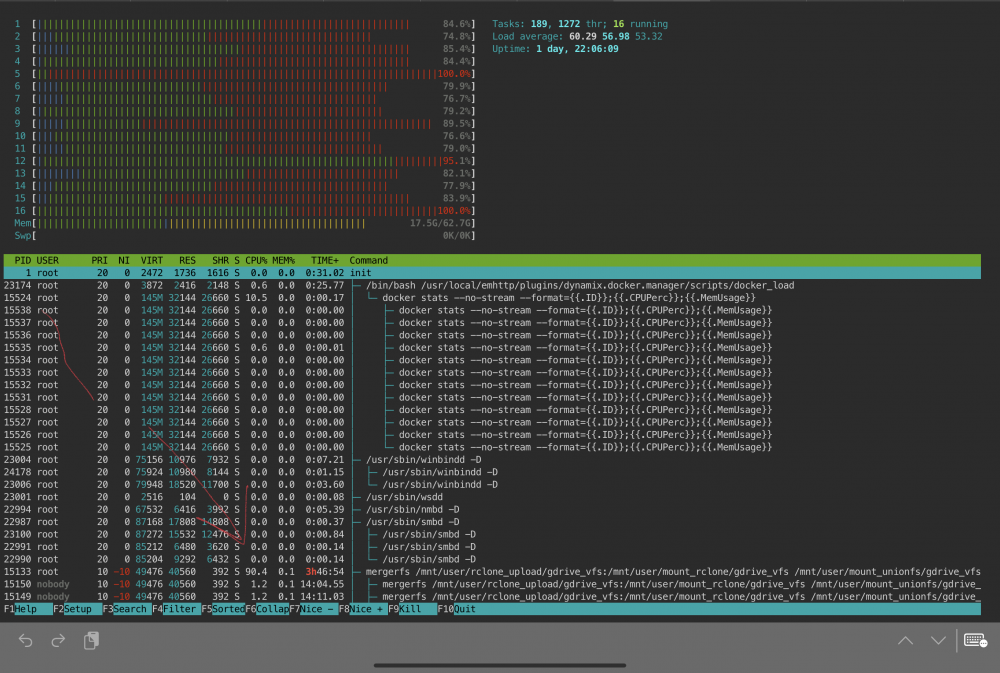
-
Mind i take this to PM to discuss?
-
Just wanted to post this here incase anyone else is experiencing high cpu usage on beta 35 with the new nvidia drivers. Change your docker config paths from mnt/user/cache to mnt/cache/. My 9900K was being maxed out on new beta attempting to access files using SHFS.
-
Going from beta 30 to beta 35 has massively increased my cpu usage. SHFS usage is consuming 60+% of my CPU constantly. Im not sure what is causing this. logs attached. tower-diagnostics-20201120-1620.zip
-
There’s isnt 2 versions and if i delete one of them it deletes both of them as the other file becomes unavailable and no longer plays. I tried the plex dance, but they continue to come back as duplicates even after.....




