





mattcrem
Members
-
Joined
-
Last visited
Everything posted by mattcrem
-
Does anyone know if STV-AV1 encoding can be added to the container?
-
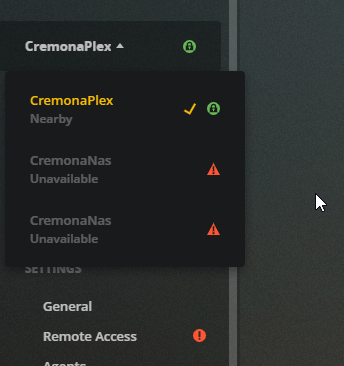
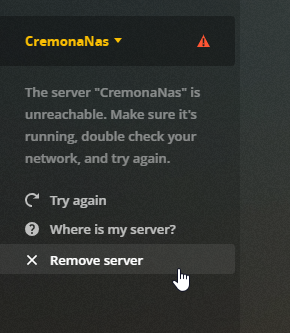
I'm not sure what specific action solved my issue however I did the following things and I managed to solve the "UNREACHABLE SERVER" error: Removed plex container and the image Deleted plex folder from my appdata Updated unraid to Version 6.8.0-rc5 Re-installed plex On the plex initial configuration I set it up as a new server Once loaded everything started working If I went to my account, I could see that I still had my old corrupted servers running: I went to my account > selected broken servers and there is a remove button beneath it: Now everything is back to normal! Just need to rescan my whole library which takes a while. Hope it helps!
-
I keep getting an UNREACHABLE error on the webUI. I've tried deleting and reinstalling the container but it didnt solve the issue. Also removed the plex folder from appdata just in case. Any idea what could be going on?
-
Does anyone know how I can edit this container to start with sql_mode='' instead of the standard "ONLY_FULL_GROUP_BY,STRICT_TRANS_TABLES,NO_ZERO_IN_DATE,NO_ZERO_DATE,ERROR_FOR_DIVISION_BY_ZERO,NO_ENGINE_SUBSTITUTION" ? I am running a custom webapp that has to have this policy off. Only problem is each time I restart the docker container It reverts to the above.
-
canyouseeme says no. but I have ports 80 and 443 forwarded to the unraid's IP port 180 and 1443 (which is what I set for letsencrypt). At any rate, I installed NGINX Reverse Proxy container, switched off letsencrypt and used ports 180 and 1443 for that. Nginx Reverse proxy worked immediately. I can even access it through the CNAME i have forwarded to duckdns.
-
I'm following the spaceinvader guide here :https://www.youtube.com/watch?v=I0lhZc25Sro&feature=youtu.be however I keep getting stuck on the part where letsencypt is first booted up and tries to get a certificate and getting an error that I haven't been able to solve. Network is set up as follows: ISP -> Modem (bridge mode) -> Netgear ORBI Router - Ports 80, 443, mapped to Unraid's IP (not the custom net) ports 180, 1443 -> Unraid Server -> LetsEncrypt docker on customnet DuckDNS container set up and updating publicIP routinely. (ping to mydomain.duckdns.org reveals my external IP) When I fire up letsencrypt I get this in the logs: [s6-init] making user provided files available at /var/run/s6/etc...exited 0. [s6-init] ensuring user provided files have correct perms...exited 0. [fix-attrs.d] applying ownership & permissions fixes... [fix-attrs.d] done. [cont-init.d] executing container initialization scripts... [cont-init.d] 10-adduser: executing...-------------------------------------_ ()| | ___ _ __| | / __| | | / \| | \__ \ | | | () ||_| |___/ |_| \__/ Brought to you by linuxserver.io We gratefully accept donations at:https://www.linuxserver.io/donate/ -------------------------------------GID/UID------------------------------------- User uid: 99 User gid: 100 ------------------------------------- [cont-init.d] 10-adduser: exited 0. [cont-init.d] 20-config: executing... [cont-init.d] 20-config: exited 0. [cont-init.d] 30-keygen: executing...using keys found in /config/keys [cont-init.d] 30-keygen: exited 0. [cont-init.d] 50-config: executing...Variables set:PUID=99PGID=100TZ=Europe/BerlinURL=duckdns.orgSUBDOMAINS=mydomainEXTRA_DOMAINS=ONLY_SUBDOMAINS=trueDHLEVEL=2048VALIDATION=httpDNSPLUGIN=EMAIL=myemail@gmail.com STAGING=2048 bit DH parameters presentSUBDOMAINS entered, processingSUBDOMAINS entered, processingOnly subdomains, no URL in cert Sub-domains processed are: -d mysubdomain.duckdns.orgE-mail address entered: [email protected] validation is selectedGenerating new certificate Saving debug log to /var/log/letsencrypt/letsencrypt.logPlugins selected: Authenticator standalone, Installer NoneObtaining a new certificate Performing the following challenges:http-01 challenge for mysubdomain.duckdns.orgWaiting for verification... Challenge failed for domain mysubdomain.duckdns.org http-01 challenge for mysubdomain.duckdns.org Cleaning up challenges Some challenges have failed. IMPORTANT NOTES:- The following errors were reported by the server:Domain: mysubdomain.duckdns.orgType: connectionDetail: Fetchinghttp://mysubdomain.duckdns.org/.well-known/acme-challenge/TEN3u0g3N88iLRAEqryMvo6GJ71lsvCxP9hMbC5vwg8 :Connection refused To fix these errors, please make sure that your domain name wasentered correctly and the DNS A/AAAA record(s) for that domaincontain(s) the right IP address. Additionally, please check that your computer has a publicly routable IP address and that nofirewalls are preventing the server from communicating with the client. If you're using the webroot plugin, you should also verify that you are serving files from the webroot path you provided. ERROR: Cert does not exist! Please see the validation error above. The issue may be due to incorrect dns or port forwarding settings. Please fix your settings and recreate the container At this point, not sure where else to check
