





ARMITAGEIII
Members
-
Joined
-
Last visited
Everything posted by ARMITAGEIII
-
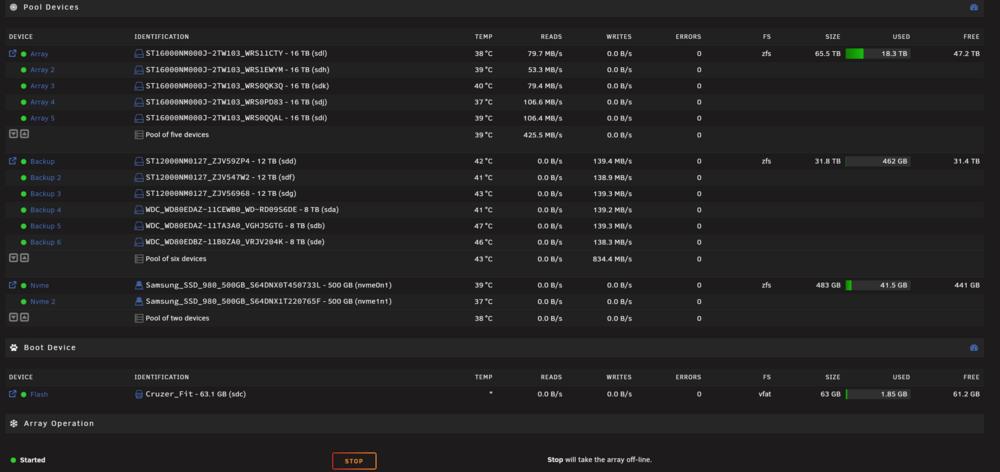
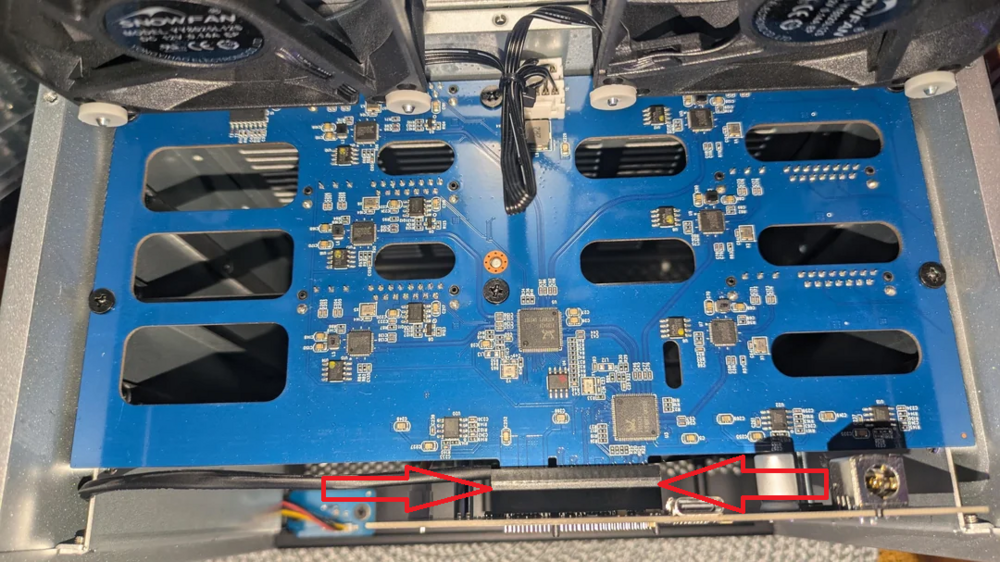
well, finally i located and fixed the issue : It was dirt in the internal conectors in the DaS enclosure , cleaned it with 99% isopropyl alcohol and its working 4 hours ongoing hope it helps someone in the future¡¡ as you can see in the attached image ,all six drives are detected and working ,and not a single error in syslog nostromo-diagnostics-20260321-2200.zip here is a sample picture with the exact zone where the dirt was ,as an advice ,clean every single slot with alcohol, included sata ports/usb C and the board in both sides
-
finally found the problem ,seems that something failed internally and only detect disk in "low speed mode" . so ill build a nas ,to backup my main nas :(
-
well... it was the usb C cable 4 cables failed and 1 cable chinese brand and cheap ,works flawless... one of the cables the original one is 60 euros 2 meters 40 gbps 240W and 8k usb c so... chinese no brand wins ¬¬ if it happens one more time ill build another server with unraid to backup my main server, DaS sucks tbh. and optical fiber cabins are too expensive for my use thank you everyone for the tips :3
-
i have a spare motherboard with i7 6700k with 8 sata ports so... ,its tinkering time :P. also i have another unraid license ,the older ones :)
-
Mar 12 23:47:42 NOSTROMO kernel: usb 1-4.3.2: new high-speed USB device number 42 using xhci_hcd Mar 12 23:47:42 NOSTROMO kernel: usb 1-4.3.2: Device not responding to setup address. Mar 12 23:47:43 NOSTROMO kernel: usb 1-4.3.2: Device not responding to setup address. Mar 12 23:47:43 NOSTROMO sysDrivers: SysDrivers Build Complete Mar 12 23:47:43 NOSTROMO kernel: usb 1-4.3.2: device not accepting address 42, error -71 Mar 12 23:47:47 NOSTROMO kernel: usb 1-4.3.2: new high-speed USB device number 44 using xhci_hcd Mar 12 23:47:51 NOSTROMO kernel: usb 1-4.3.2: new high-speed USB device number 45 using xhci_hcd Mar 12 23:47:56 NOSTROMO kernel: usb 1-4.3.2: new high-speed USB device number 46 using xhci_hcd Mar 12 23:48:00 NOSTROMO kernel: usb 1-4.3.2: new high-speed USB device number 47 using xhci_hcd Mar 12 23:48:00 NOSTROMO kernel: usb 1-4.3.2: Device not responding to setup address. Mar 12 23:48:00 NOSTROMO kernel: usb 1-4.3.2: Device not responding to setup address. Mar 12 23:48:00 NOSTROMO kernel: usb 1-4.3.2: device not accepting address 47, error -71 Mar 12 23:48:05 NOSTROMO kernel: usb 1-4.3.2: new high-speed USB device number 49 using xhci_hcd Mar 12 23:48:09 NOSTROMO kernel: usb 1-4.3.2: new high-speed USB device number 50 using xhci_hcd Mar 12 23:48:13 NOSTROMO kernel: usb 1-4.3.2: new high-speed USB device number 51 using xhci_hcd Mar 12 23:48:13 NOSTROMO kernel: usb 1-4.3.2: Device not responding to setup address. Mar 12 23:48:14 NOSTROMO kernel: usb 1-4.3.2: Device not responding to setup address. Mar 12 23:48:14 NOSTROMO kernel: usb 1-4.3.2: device not accepting address 51, error -71 Mar 12 23:48:18 NOSTROMO kernel: usb 1-4.3.2: new high-speed USB device number 53 using xhci_hcd Mar 12 23:48:27 NOSTROMO kernel: usb 1-4.3.2: new high-speed USB device number 55 using xhci_hcd maybe its time to find a new DaS or use a NaS to backup my main NaS ,which sounds stupid :/

-
Like this i hope¡¡ will try tonight doing a full backup with rsync , hope it works.If not i will attach the DaS to my main computer which also has 10gbps optical fiber and do the backup the old way ,copy and paste using windows (EWWWWWW)
-
sigh added the line ,still happening ,the funny thing is that never is the same drive ,nor the same slot. also if i use the DaS in other devices works flawless. could it be some bios setting? im quite lost here. motherboard is an erying 12500h with 32gb ram ,a nvme to sata adapter and i tried 3 usb c cables with the exact same result :(

-
will do ,it happened again and im not sure what causes it. ill let you know if this fix works
-
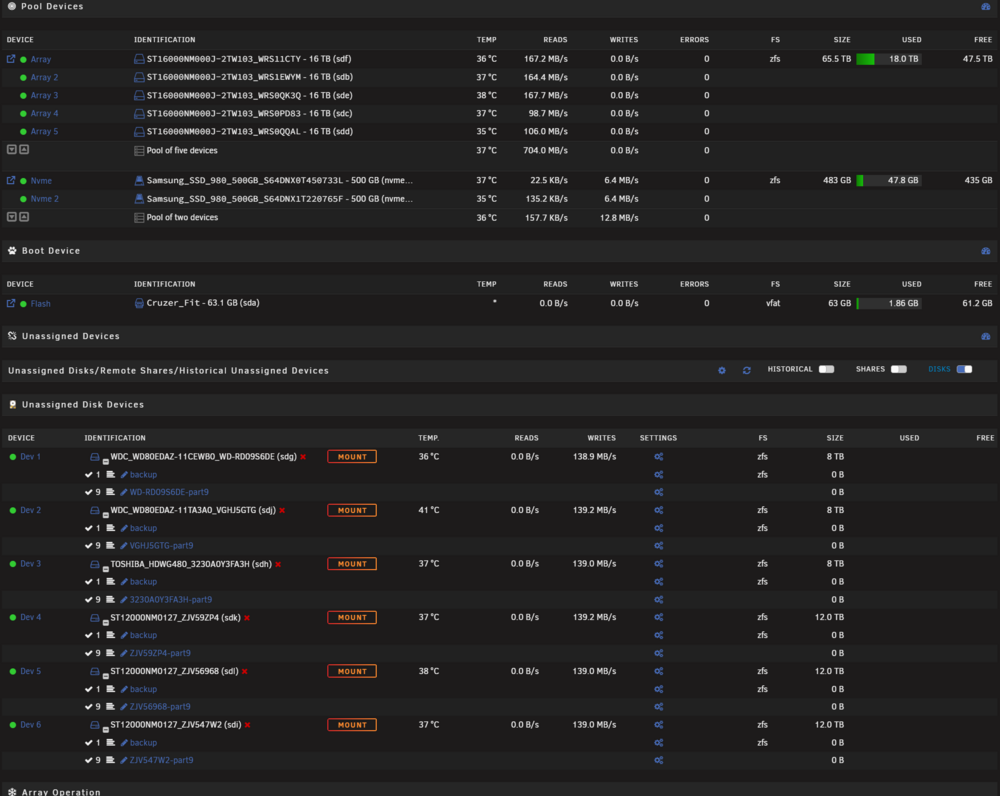
well .it fixed itself ,i really did nothing xD here are the logs and a screenshoot from the backup im currently running: nostromo-diagnostics-20260312-0125.zip seems like the ol "reboot to see if it works" really did hahahaha
-
so i just need to reboot the unit with external array on ? thats how you disable uasp driver?
-
how do i disable USAP in unraid?
-
this is caused when i power off the enclosure ,it always pop in truenas also . note that drives are powered down when this happens ,so i never had a data corrruption problem Thing is the enclosure works in several devices ,but not unraid ,and it worked in the past. Do you know if there is a usb bug or something related that can point me in the right direction? ive tried 3 cables but each one have the same problem after a few seconds the usb array is for offline backup ,not for daily operation :)
-
if it helps ,it worked before with unraid , seeing my own post (stupid me) i pasted a screenshoot of the machine doing a backup to the DaS here https://forums.unraid.net/topic/191977-help-with-diagnostic/#comment-1567708 so maybe its a kernel or update issue , its been a long time since i tried to do a full backup , my bad
-
hello, trying to do an external backup from my unraid server , i noticed one of the 6 external drives dissapeared. after checking logs i see these events nonstop , no matter which external drive ,every time is a different "port": TLDR its a 6 disk enclosure but only 5 works Mar 5 20:56:30 NOSTROMO kernel: usb 1-4.3.4: new high-speed USB device number 35 using xhci_hcd Mar 5 20:56:30 NOSTROMO kernel: usb 1-4.3.4: Device not responding to setup address. Mar 5 20:56:30 NOSTROMO kernel: usb 1-4.3.4: Device not responding to setup address. Mar 5 20:56:30 NOSTROMO kernel: usb 1-4.3.4: device not accepting address 35, error -71 Mar 5 20:56:35 NOSTROMO kernel: usb 1-4.3.4: new high-speed USB device number 37 using xhci_hcd Mar 5 20:56:39 NOSTROMO kernel: usb 1-4.3.4: new high-speed USB device number 38 using xhci_hcd Mar 5 20:56:43 NOSTROMO kernel: usb 1-4.3.4: new high-speed USB device number 39 using xhci_hcd Mar 5 20:56:43 NOSTROMO kernel: usb 1-4.3.4: Device not responding to setup address. Mar 5 20:56:44 NOSTROMO kernel: usb 1-4.3.4: Device not responding to setup address. Mar 5 20:56:44 NOSTROMO kernel: usb 1-4.3.4: device not accepting address 39, error -71 Mar 5 20:56:48 NOSTROMO kernel: usb 1-4.3.4: new high-speed USB device number 41 using xhci_hcd Mar 5 20:56:52 NOSTROMO kernel: usb 1-4.3.4: new high-speed USB device number 42 using xhci_hcd Mar 5 20:56:57 NOSTROMO kernel: usb 1-4.3.4: new high-speed USB device number 43 using xhci_hcd Mar 5 20:57:01 NOSTROMO kernel: usb 1-4.3.4: new high-speed USB device number 44 using xhci_hcd Mar 5 20:57:06 NOSTROMO kernel: usb 1-4.3.4: new high-speed USB device number 45 using xhci_hcd Mar 5 20:57:10 NOSTROMO kernel: usb 1-4.3.4: new high-speed USB device number 46 using xhci_hcd Mar 5 20:57:15 NOSTROMO kernel: usb 1-4.3.4: new high-speed USB device number 47 using xhci_hcd Mar 5 20:57:19 NOSTROMO kernel: usb 1-4.3.4: new high-speed USB device number 48 using xhci_hcd Mar 5 20:57:23 NOSTROMO kernel: usb 1-4.3.4: new high-speed USB device number 49 using xhci_hcd Mar 5 20:57:28 NOSTROMO kernel: usb 1-4.3.4: new high-speed USB device number 50 using xhci_hcd Mar 5 20:57:32 NOSTROMO kernel: usb 1-4.3.4: new high-speed USB device number 51 using xhci_hcd Mar 5 20:57:37 NOSTROMO kernel: usb 1-4.3.4: new high-speed USB device number 52 using xhci_hcd Mar 5 20:57:41 NOSTROMO kernel: usb 1-4.3.4: new high-speed USB device number 53 using xhci_hcd Mar 5 20:57:45 NOSTROMO kernel: usb 1-4.3.4: new high-speed USB device number 54 using xhci_hcd Mar 5 20:57:45 NOSTROMO kernel: usb 1-4.3.4: Device not responding to setup address. Mar 5 20:57:46 NOSTROMO kernel: usb 1-4.3.4: Device not responding to setup address. Mar 5 20:57:46 NOSTROMO kernel: usb 1-4.3.4: device not accepting address 54, error -71 Mar 5 20:57:50 NOSTROMO kernel: usb 1-4.3.4: new high-speed USB device number 56 using xhci_hcd Mar 5 20:57:54 NOSTROMO kernel: usb 1-4.3.4: new high-speed USB device number 57 using xhci_hcd Mar 5 20:57:59 NOSTROMO kernel: usb 1-4.3.4: new high-speed USB device number 58 using xhci_hcd Mar 5 20:57:59 NOSTROMO kernel: usb 1-4.3.4: Device not responding to setup address. Mar 5 20:57:59 NOSTROMO kernel: usb 1-4.3.4: Device not responding to setup address. Mar 5 20:57:59 NOSTROMO kernel: usb 1-4.3.4: device not accepting address 58, error -71 Mar 5 20:58:03 NOSTROMO kernel: usb 1-4.3.4: new high-speed USB device number 60 using xhci_hcd Mar 5 20:58:08 NOSTROMO kernel: usb 1-4.3.4: new high-speed USB device number 61 using xhci_hcd Mar 5 20:58:12 NOSTROMO kernel: usb 1-4.3.4: new high-speed USB device number 62 using xhci_hcd Mar 5 20:58:16 NOSTROMO kernel: usb 1-4.3.4: new high-speed USB device number 63 using xhci_hcd the fun part is that this setup worked 3 years without a single issue in truenas :S ,so i dont think is a cable/DaS/Disk problem. It seems more like a bug or issue with unraid. can anyone help me ? i tested the enclosure with several systems ,even in my steamdeck and every time it shows the 6 drives ,thasts why i ruled out a problem in the setup.... with unraid it works for a few mins if i pull all disks and attach one by one, but after a few minutes the error pop and a random drive dissapear again. The DaS is a TerraMaster D6-320 using USB-C nostromo-diagnostics-20260305-2102.zip
-
final test with unraid clean installation: root@Nostromo:~# iperf3 -c 192.168.1.2 Connecting to host 192.168.1.2, port 5201 [ 5] local 192.168.1.5 port 36746 connected to 192.168.1.2 port 5201 [ ID] Interval Transfer Bitrate Retr Cwnd [ 5] 0.00-1.00 sec 1.10 GBytes 9.44 Gbits/sec 0 405 KBytes [ 5] 1.00-2.00 sec 1.10 GBytes 9.42 Gbits/sec 0 356 KBytes [ 5] 2.00-3.00 sec 1.10 GBytes 9.43 Gbits/sec 0 371 KBytes [ 5] 3.00-4.00 sec 1.09 GBytes 9.36 Gbits/sec 0 388 KBytes [ 5] 4.00-5.00 sec 1.10 GBytes 9.44 Gbits/sec 0 368 KBytes [ 5] 5.00-6.00 sec 1.10 GBytes 9.41 Gbits/sec 0 405 KBytes [ 5] 6.00-7.00 sec 1.10 GBytes 9.42 Gbits/sec 0 396 KBytes [ 5] 7.00-8.00 sec 1.10 GBytes 9.44 Gbits/sec 0 399 KBytes [ 5] 8.00-9.00 sec 1.10 GBytes 9.43 Gbits/sec 0 416 KBytes [ 5] 9.00-10.00 sec 1.10 GBytes 9.43 Gbits/sec 0 376 KBytes - - - - - - - - - - - - - - - - - - - - - - - - - [ ID] Interval Transfer Bitrate Retr [ 5] 0.00-10.00 sec 11.0 GBytes 9.42 Gbits/sec 0 sender [ 5] 0.00-10.00 sec 11.0 GBytes 9.42 Gbits/sec receiver iperf Done. ----------------------------------------------------------- Server listening on 5201 ----------------------------------------------------------- Accepted connection from 192.168.1.5, port 36736 [ 5] local 192.168.1.2 port 5201 connected to 192.168.1.5 port 36746 [ ID] Interval Transfer Bandwidth [ 5] 0.00-1.00 sec 1.06 GBytes 9.07 Gbits/sec [ 5] 1.00-2.00 sec 1.10 GBytes 9.41 Gbits/sec [ 5] 2.00-3.00 sec 1.10 GBytes 9.43 Gbits/sec [ 5] 3.00-4.00 sec 1.09 GBytes 9.37 Gbits/sec [ 5] 4.00-5.00 sec 1.10 GBytes 9.43 Gbits/sec [ 5] 5.00-6.00 sec 1.10 GBytes 9.43 Gbits/sec [ 5] 6.00-7.00 sec 1.10 GBytes 9.41 Gbits/sec [ 5] 7.00-8.00 sec 1.10 GBytes 9.43 Gbits/sec [ 5] 8.00-9.00 sec 1.10 GBytes 9.44 Gbits/sec [ 5] 9.00-10.00 sec 1.10 GBytes 9.44 Gbits/sec [ 5] 10.00-10.04 sec 43.6 MBytes 9.36 Gbits/sec - - - - - - - - - - - - - - - - - - - - - - - - - [ ID] Interval Transfer Bandwidth [ 5] 0.00-10.04 sec 0.00 Bytes 0.00 bits/sec sender [ 5] 0.00-10.04 sec 11.0 GBytes 9.39 Gbits/sec receiver
-
FOUND IT thank you intel and microsoft... just 1 driver adjustment interrupt moderation i think is the english name ,turned it to OFF and it works flawless :) . Hope it will help someone in the future :) windows 10 client: ----------------------------------------------------------- Server listening on 5201 ----------------------------------------------------------- Accepted connection from 192.168.1.5, port 33442 [ 5] local 192.168.1.2 port 5201 connected to 192.168.1.5 port 33448 [ ID] Interval Transfer Bandwidth [ 5] 0.00-1.00 sec 1.05 GBytes 9.05 Gbits/sec [ 5] 1.00-2.00 sec 1.10 GBytes 9.41 Gbits/sec [ 5] 2.00-3.00 sec 1.10 GBytes 9.41 Gbits/sec [ 5] 3.00-4.00 sec 1.09 GBytes 9.40 Gbits/sec [ 5] 4.00-5.00 sec 1.09 GBytes 9.37 Gbits/sec [ 5] 5.00-6.00 sec 1.09 GBytes 9.40 Gbits/sec [ 5] 6.00-7.00 sec 1.09 GBytes 9.38 Gbits/sec [ 5] 7.00-8.00 sec 1.08 GBytes 9.32 Gbits/sec [ 5] 8.00-9.00 sec 1.09 GBytes 9.36 Gbits/sec [ 5] 9.00-10.00 sec 1.09 GBytes 9.39 Gbits/sec [ 5] 10.00-10.04 sec 42.7 MBytes 9.33 Gbits/sec - - - - - - - - - - - - - - - - - - - - - - - - - [ ID] Interval Transfer Bandwidth [ 5] 0.00-10.04 sec 0.00 Bytes 0.00 bits/sec sender [ 5] 0.00-10.04 sec 10.9 GBytes 9.35 Gbits/sec receiver (server running ubuntu live usb) iperf3 -c 192.168.1.2 Connecting to host 192.168.1.2, port 5201 [ 5] local 192.168.1.5 port 52304 connected to 192.168.1.2 port 5201 [ ID] Interval Transfer Bitrate Retr Cwnd [ 5] 0.00-1.00 sec 1.09 GBytes 9.40 Gbits/sec 0 462 KBytes [ 5] 1.00-2.00 sec 1.09 GBytes 9.39 Gbits/sec 0 462 KBytes [ 5] 2.00-3.00 sec 1.09 GBytes 9.39 Gbits/sec 0 462 KBytes [ 5] 3.00-4.00 sec 1.10 GBytes 9.41 Gbits/sec 0 462 KBytes [ 5] 4.00-5.00 sec 1.09 GBytes 9.39 Gbits/sec 0 462 KBytes [ 5] 5.00-6.00 sec 1.09 GBytes 9.41 Gbits/sec 0 462 KBytes [ 5] 6.00-7.00 sec 1.09 GBytes 9.40 Gbits/sec 0 462 KBytes [ 5] 7.00-8.00 sec 1.10 GBytes 9.41 Gbits/sec 0 462 KBytes [ 5] 8.00-9.00 sec 1.09 GBytes 9.40 Gbits/sec 0 462 KBytes [ 5] 9.00-10.00 sec 1.10 GBytes 9.41 Gbits/sec 0 462 KBytes - - - - - - - - - - - - - - - - - - - - - - - - - [ ID] Interval Transfer Bitrate Retr [ 5] 0.00-10.00 sec 10.9 GBytes 9.40 Gbits/sec 0 sender [ 5] 0.00-10.00 sec 10.9 GBytes 9.40 Gbits/sec receiver
-
well thank you for trying ,its a shame having 2 licenses storing dust :( ,is there any legal way to sell the to someone that can use unraid?
-
Its there a way to fix or swap a Linux driver? Like Fetch the Intel ones to see It if makes any difference? Besines that the machine works flawless in unraid with zfs , array speed its the same as truenas :)
-
But then why if i swap the power Mode the speed is almost stable??? If i swap to the first power Mode, the nic works at 4.5GBps avg , is there a command to disable apm? (or disable It at Network level?) As stated ,with truenas this problem didnt exist,so hardware works flawless like has been the last years. In fact i booted truenas just to test and the speed is almost saturating the 10gb in both ways. There must be a way to make unraid works now that It supports zfs :(
-
no one can help me ??
-
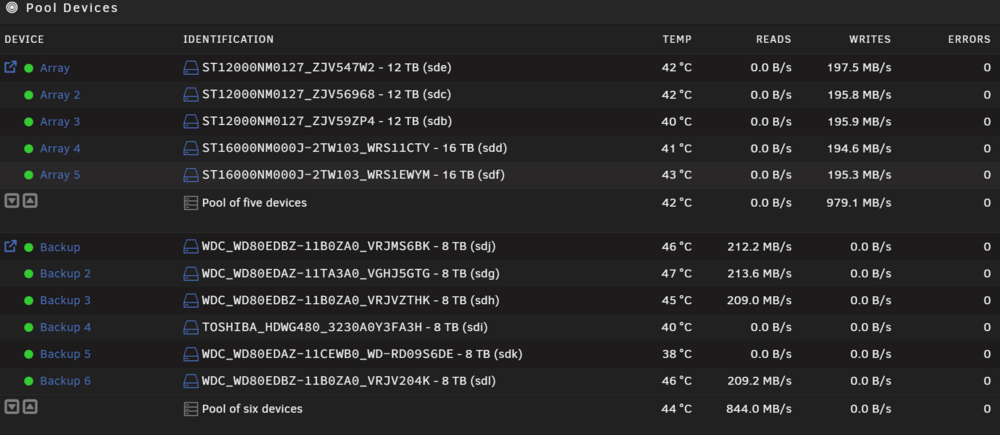
hello ,i was using truenas for 2 years in a i5 12500H with 32gb ram and 2 nvme 500gb with raidZ1 with a throughput around 800-900MB/s between my windows computer and the server. due to unraid using ZFS ( THANK GOD¡¡¡ ) i decided to try unraid again to use it as my daily NaS OS. I move a lot of big files ,like movies ,but also VM hdd images which can be 500GB each ,so thats why i need the best performance from the server. im having trouble, but it all seems network related: Test 1 from PC to SERVER -->iperf start at 3.60ish Gbps but always ends in 900-800mbps root@NOSTROMO:~# iperf3 -s ----------------------------------------------------------- Server listening on 5201 (test #1) ----------------------------------------------------------- Accepted connection from 192.168.1.2, port 52133 [ 5] local 192.168.1.5 port 5201 connected to 192.168.1.2 port 52134 [ ID] Interval Transfer Bitrate [ 5] 0.00-1.00 sec 341 MBytes 2.86 Gbits/sec [ 5] 1.00-2.00 sec 133 MBytes 1.11 Gbits/sec [ 5] 2.00-3.00 sec 121 MBytes 1.02 Gbits/sec [ 5] 3.00-4.00 sec 108 MBytes 909 Mbits/sec [ 5] 4.00-5.00 sec 100 MBytes 839 Mbits/sec [ 5] 5.00-6.00 sec 102 MBytes 858 Mbits/sec [ 5] 6.00-7.00 sec 99.4 MBytes 834 Mbits/sec [ 5] 7.00-8.00 sec 107 MBytes 898 Mbits/sec [ 5] 8.00-9.00 sec 115 MBytes 965 Mbits/sec [ 5] 9.00-10.00 sec 113 MBytes 947 Mbits/sec [ 5] 10.00-10.00 sec 256 KBytes 873 Mbits/sec - - - - - - - - - - - - - - - - - - - - - - - - - [ ID] Interval Transfer Bitrate [ 5] 0.00-10.00 sec 1.31 GBytes 1.12 Gbits/sec receiver Test 2 from SERVER to PC--> the speed is pretty good ,not perfect but i would be ok with it C:\Users\******\Desktop>iperf3.exe -s ----------------------------------------------------------- Server listening on 5201 ----------------------------------------------------------- Accepted connection from 192.168.1.5, port 50840 [ 5] local 192.168.1.2 port 5201 connected to 192.168.1.5 port 50856 [ ID] Interval Transfer Bandwidth [ 5] 0.00-1.00 sec 816 MBytes 6.85 Gbits/sec [ 5] 1.00-2.00 sec 796 MBytes 6.68 Gbits/sec [ 5] 2.00-3.00 sec 753 MBytes 6.32 Gbits/sec [ 5] 3.00-4.00 sec 721 MBytes 6.05 Gbits/sec [ 5] 4.00-5.00 sec 746 MBytes 6.26 Gbits/sec [ 5] 5.00-6.00 sec 734 MBytes 6.16 Gbits/sec [ 5] 6.00-7.00 sec 756 MBytes 6.35 Gbits/sec [ 5] 7.00-8.00 sec 752 MBytes 6.31 Gbits/sec [ 5] 8.00-9.00 sec 768 MBytes 6.44 Gbits/sec [ 5] 9.00-10.00 sec 739 MBytes 6.20 Gbits/sec [ 5] 10.00-10.04 sec 28.1 MBytes 6.16 Gbits/sec - - - - - - - - - - - - - - - - - - - - - - - - - [ ID] Interval Transfer Bandwidth [ 5] 0.00-10.04 sec 0.00 Bytes 0.00 bits/sec sender [ 5] 0.00-10.04 sec 7.43 GBytes 6.36 Gbits/sec receiver now here comes the funny part ... i have an external terramaster D6 320 enclosure using usb C that tops at around 800-900 MBps ,so i did a test to check if the bottleneck is ZFS in unraid: both array can get up to 1 GBps ,but obviously not sustained thew speed fluctuates ,which is totally normal , but my question is What in the @|#~#€¬#¬~€¬@ is slowing down the network speed between PC <---> SERVER ??? both cards are intel x520-1 ,the switch is Tp-link Tl-st1008f and from my pc to switch i use optical fiber LC multimode cable 20 mts+sfp , and from switch to server a DAC cable rated 10G. Mind you with truenas the transfer rate from windows to server was 900ish MBps static ,no dips ,no slowdowns, from the SERVER to PC was the same give or take. what could be causing what to me it seems a bottleneck in the network between those machines? (i also tried jumbo frames 9014 and no luck) nostromo-diagnostics-20250713-2111.zip
-
As i though the problem is once again unraid , 3/3 its always a "hardware / machine / human" problem but hey this will be my third machine that i will move out of unraid ,so for me the problem is unraid with 0% doubt ill save the license if someday this will be a real NaS OS reinstalled the usb and voila ,everything work ,dockers pools even the array xDDDDD tomorrow i will backup everything and run forever from unraid , 3/3 servers cant be a human or hardware problem...
-
though so ,but i had to ask , when the smart test pass in all spinning drives i will redo the unraid usb and check if i can at least save my media collection ,thank you for your help and also im sorry to be kinda grumpy.
-
I Will try to reinstall the USB Drive , if not this Will be my 3rd Nas that i have to move from unraid. I dont understand the trend were everything seems to fail but no one rule out the OS I only Hope to copy my tv/movies out and try other OS to rule out HW. saddly i have to ask , is there a forum here to sell the licenses to other users?? Im pretty much done with unraid If not i Guess i Will have 2 decorative licenses
-
Its been disconnected since yesterday , so yep. I also shutdown and power on the machine like 12 times and the problem remain


