





vanik
Members
-
Joined
-
Last visited
-
Not working here too...
-
I think mine isn't working either. Only using 1 entry, v6.12.8
-
Holy crap, I got it! It was an absolutely insane fluke. I have _TWO_ cache drives in my pool, "cache" and "large". It turns out Unraid was splitting the data across them so since the container was pointed to "cache" and my files (through SMB) were put on "large", it wasn't seeing them. Ugh. COMPUTERS. Thank you so much for your patience and help, ich777!
-
That's the case for SteamCMD, but not the ServerFiles... Would that make a difference? My appdata share is set to Prefer: Cache. Sure! Appreciate all the help oracle-diagnostics-20221027-0934.zip
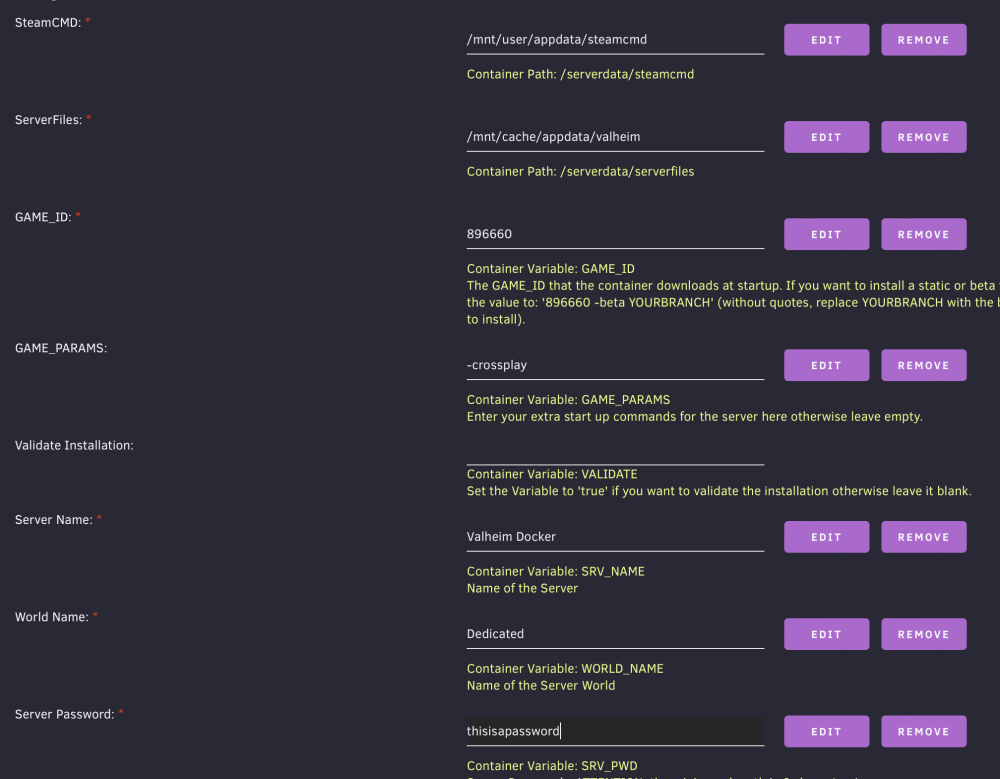
-
FWIW, I turned on server logs and got: ERROR: Shader Legacy Shaders/Particles/Additive shader is not supported on this GPU (none of subshaders/fallbacks are suitable) ERROR: Shader Legacy Shaders/Particles/Alpha Blended shader is not supported on this GPU (none of subshaders/fallbacks are suitable) ERROR: Shader Legacy Shaders/Particles/Alpha Blended Premultiply shader is not supported on this GPU (none of subshaders/fallbacks are suitable) ERROR: Shader Unlit/Color shader is not supported on this GPU (none of subshaders/fallbacks are suitable) ERROR: Shader Lux Lit Particles/ Bumped shader is not supported on this GPU (none of subshaders/fallbacks are suitable) HDR Render Texture not supported, disabling HDR on reflection probe. HDR Render Texture not supported, disabling HDR on reflection probe. Unloading 6 Unused Serialized files (Serialized files now loaded: 0) UnloadTime: 19.529563 ms Only custom filters can be played. Please add a custom filter or an audioclip to the audiosource (Amb_MainMenu). HDR Render Texture not supported, disabling HDR on reflection probe. 10/26/2022 16:37:30: Get create world Dedicated 10/26/2022 16:37:30: failed to load Dedicated 10/26/2022 16:37:30: creating 10/26/2022 16:37:30: Considering autobackup. World time: 0, short time: 7200, long time: 43200, backup count: 4 10/26/2022 16:37:30: Creating first autobackup 10/26/2022 16:37:30: Saving backup at: /serverdata/serverfiles/.config/unity3d/IronGate/Valheim/worlds_local/Dedicated_backup_auto-20221026163730.fwl
-
Completely fresh appdata dir, completely fresh container (only added "-crossplay" and changed the server password), transferred files over from Windows... still no luck 😒
-
I think that's my next move. I just re-tried all the steps and still got a fresh server. Although I wonder if changing the password or the actual server name is doing anything. I'll try that too.
-
Huh! Well, it's a relief it's not corrupted. Did you adjust the any of the Docker variables? and you renamed the files to "Dedicated" before step 7, right?
-
Sure! Appreciate the help There should be a pretty big structure right to the north of the summoning stones. vanikserver.zip
-
No dice 🙁 Grabbed a fresh copy from the CA app, only changed GAME_PARAMS (to add "-crossplay"), SRV_NAME, and SRV_PWD. Renamed Vanikserver.fwl using https://geekstrom.de/valheim/fwl/ to Dedicated.fwl (and just renamed Vanikserver.db to Dedicated.db using my OS), copied both to "appdata/valheim/.config/unity3d/IronGate/Valheim/worlds_local", deleted all the other files inside it... Then started up the server again and still got a new world. I wonder if my save is getting corrupted somehow.
-
"-world" was just a troubleshooting attempt to see if that made a difference. I'll remove it! I copy the files over the network (via macOS Finder). I did stop the container and replace the world to no avail. Hmmm... as far as renaming files to the default: I set the world name to (let's say) "Vanikserver" in the settings, I replaced "Vanikserver.db" and "Vanikserver.fwl", and then I deleted everything else in the "world_local" folder. Is there another default name that's used?
-
Hi - first, thank you so much for all these containers and all the support! I'm running into a similar problem with my previously saved Valheim world not loading on the dedicated server. I've checked: * -crossplay is turned on * the files are in ./appdata/valheim/.config/unity3d/IronGate/Valheim/worlds_local * the Docker World Name is the exact same name as the file * I'm passing the name through "-world [world_name]" * The files I copied over belong to "nobody/users" I still end up getting a fresh world every time. I'm running the Game pass version of the client. Is there some kind of compatibility issue? Is "world_local" not the right folder?

