





MaTi
Members
-
Joined
-
Last visited
-
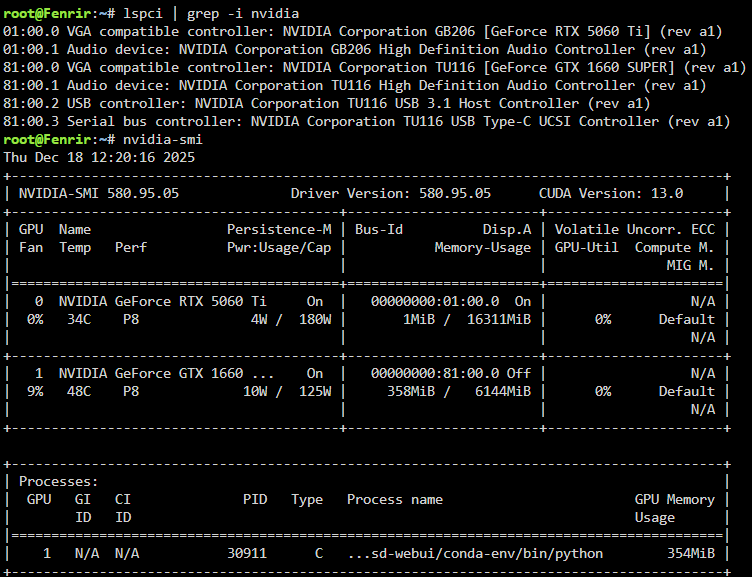
I missed that! Thanks! Now it is working; thanks for your help. Highly appreciated! For anyone trying this with an Asrock TRX50 WS motherboard: I had to update my v10.x bios to the latest to date (13.05 at time of writing) and that solved it. I spent a good 10mins looking for 'BAR support' or '>4G decoding' options, but couldn't find it. Then I gave up and decided to ask chatgpt.. She told me Asrock had deliberately removed these settings from the BIOS and just enabled them for all ports by default. I was like "Suuuuure :) ", but decided to try anyway and sure enough: PS: Do spare yourself a small heart attack when you see your arrays not coming back online: Ofc the bios update will overwrite settings such as bifurcation on PCIe slots (my 4x nvme adapter) and reset the MCIO ports to the default PCIE, instead of SATA. All up and running now. Thanks again for helping out. I can now start playing with some LLMs on 16GB VRAM :).
-
Hi all! I am trying to add a 5060ti to my server, next to my 1660super. After not seeing the card in Unraid, I tried switching to the opensource drivers, but still only the 1660 super shows up: root@Fenrir:~# nvidia-smi -L GPU 0: NVIDIA GeForce GTX 1660 SUPER (UUID: GPU-d3aa70ab-7012-fa6d-a9c0-d793b052fba6) However: root@Fenrir:~# lspci | grep -i nvidia 01:00.0 VGA compatible controller: NVIDIA Corporation GB206 [GeForce RTX 5060 Ti] (rev a1) 01:00.1 Audio device: NVIDIA Corporation GB206 High Definition Audio Controller (rev a1) 81:00.0 VGA compatible controller: NVIDIA Corporation TU116 [GeForce GTX 1660 SUPER] (rev a1) 81:00.1 Audio device: NVIDIA Corporation TU116 High Definition Audio Controller (rev a1) 81:00.2 USB controller: NVIDIA Corporation TU116 USB 3.1 Host Controller (rev a1) 81:00.3 Serial bus controller: NVIDIA Corporation TU116 USB Type-C UCSI Controller (rev a1) ...not sure what nvidia-persistenced should do, but I tried adding it to my go file, but to no avail. The 1660super still works, but hopefully someone can help Thanks!
-
For what it's worth: Just updated to 7.0.0 with no issues. One small remark, I had one docker container NOT set to auto-start, but it was set to auto-start after the update (like all the others). ...I am like 99% sure it was not set to auto-start . Or in other words: probably it was, but perhaps something to monitor for others..
-
Hmm I fixed it, but I think I found a bug perhaps? When I change the network via the gui it does the above. When I first copy the xml, then change that content in a text editor, by adding the .1060 (which is the vlan) to the network info, and copy that back into the VM while being in XML mode, it works. Whenever I change back to GUI mode (or whatever it is called), it will not work anymore.
-
Hi all, I am probably missing out on something, but hopefully you can help! I am currently trying to install a VM for a Retronas host, using his docker app, as published in the CA apps. This works fine. When running the docker I see it creating the VM and downloading the vdisk and unpacking it. The VM works like a charm with this as it's config: <?xml version='1.0' encoding='UTF-8'?> <domain type='kvm'> <name>Retronas</name> <uuid>cc23b809-fc3b-4a19-9316-ea8d3765ed82</uuid> <metadata> <vmtemplate xmlns="unraid" name="Debian" icon="RetroNAS_Icon.png" os="debian"/> </metadata> <memory unit='KiB'>2097152</memory> <currentMemory unit='KiB'>2097152</currentMemory> <memoryBacking> <nosharepages/> <source type='memfd'/> <access mode='shared'/> </memoryBacking> <vcpu placement='static'>2</vcpu> <cputune> <vcpupin vcpu='0' cpuset='0'/> <vcpupin vcpu='1' cpuset='1'/> </cputune> <os> <type arch='x86_64' machine='pc-q35-7.1'>hvm</type> </os> <features> <acpi/> <apic/> </features> <cpu mode='host-passthrough' check='none' migratable='on'> <topology sockets='1' dies='1' cores='1' threads='2'/> <cache mode='passthrough'/> <feature policy='require' name='topoext'/> </cpu> <clock offset='utc'> <timer name='rtc' tickpolicy='catchup'/> <timer name='pit' tickpolicy='delay'/> <timer name='hpet' present='no'/> </clock> <on_poweroff>destroy</on_poweroff> <on_reboot>restart</on_reboot> <on_crash>restart</on_crash> <devices> <emulator>/usr/local/sbin/qemu</emulator> <disk type='file' device='disk'> <driver name='qemu' type='qcow2' cache='writeback'/> <source file='/mnt/user/domains/Retronas/vdisk1.img'/> <target dev='hdc' bus='virtio'/> <serial>vdisk1</serial> <boot order='1'/> <address type='pci' domain='0x0000' bus='0x04' slot='0x00' function='0x0'/> </disk> <controller type='sata' index='0'> <address type='pci' domain='0x0000' bus='0x00' slot='0x1f' function='0x2'/> </controller> <controller type='pci' index='0' model='pcie-root'/> <controller type='pci' index='1' model='pcie-root-port'> <model name='pcie-root-port'/> <target chassis='1' port='0x10'/> <address type='pci' domain='0x0000' bus='0x00' slot='0x02' function='0x0' multifunction='on'/> </controller> <controller type='pci' index='2' model='pcie-root-port'> <model name='pcie-root-port'/> <target chassis='2' port='0x11'/> <address type='pci' domain='0x0000' bus='0x00' slot='0x02' function='0x1'/> </controller> <controller type='pci' index='3' model='pcie-root-port'> <model name='pcie-root-port'/> <target chassis='3' port='0x12'/> <address type='pci' domain='0x0000' bus='0x00' slot='0x02' function='0x2'/> </controller> <controller type='pci' index='4' model='pcie-root-port'> <model name='pcie-root-port'/> <target chassis='4' port='0x13'/> <address type='pci' domain='0x0000' bus='0x00' slot='0x02' function='0x3'/> </controller> <controller type='pci' index='5' model='pcie-root-port'> <model name='pcie-root-port'/> <target chassis='5' port='0x14'/> <address type='pci' domain='0x0000' bus='0x00' slot='0x02' function='0x4'/> </controller> <controller type='pci' index='6' model='pcie-root-port'> <model name='pcie-root-port'/> <target chassis='6' port='0x15'/> <address type='pci' domain='0x0000' bus='0x00' slot='0x02' function='0x5'/> </controller> <controller type='virtio-serial' index='0'> <address type='pci' domain='0x0000' bus='0x03' slot='0x00' function='0x0'/> </controller> <controller type='usb' index='0' model='ich9-ehci1'> <address type='pci' domain='0x0000' bus='0x00' slot='0x07' function='0x7'/> </controller> <controller type='usb' index='0' model='ich9-uhci1'> <master startport='0'/> <address type='pci' domain='0x0000' bus='0x00' slot='0x07' function='0x0' multifunction='on'/> </controller> <controller type='usb' index='0' model='ich9-uhci2'> <master startport='2'/> <address type='pci' domain='0x0000' bus='0x00' slot='0x07' function='0x1'/> </controller> <controller type='usb' index='0' model='ich9-uhci3'> <master startport='4'/> <address type='pci' domain='0x0000' bus='0x00' slot='0x07' function='0x2'/> </controller> <filesystem type='mount' accessmode='passthrough'> <driver type='virtiofs' queue='1024'/> <binary path='/usr/libexec/virtiofsd' xattr='on'> <cache mode='always'/> <sandbox mode='chroot'/> <lock posix='on' flock='on'/> </binary> <source dir='/mnt/user/retronas'/> <target dir='retronas'/> <address type='pci' domain='0x0000' bus='0x01' slot='0x00' function='0x0'/> </filesystem> <interface type='bridge'> <mac address='52:54:00:f8:ab:3e'/> <source bridge='br0'/> <model type='virtio'/> <address type='pci' domain='0x0000' bus='0x02' slot='0x00' function='0x0'/> </interface> <serial type='pty'> <target type='isa-serial' port='0'> <model name='isa-serial'/> </target> </serial> <console type='pty'> <target type='serial' port='0'/> </console> <channel type='unix'> <target type='virtio' name='org.qemu.guest_agent.0'/> <address type='virtio-serial' controller='0' bus='0' port='1'/> </channel> <input type='tablet' bus='usb'> <address type='usb' bus='0' port='1'/> </input> <input type='mouse' bus='ps2'/> <input type='keyboard' bus='ps2'/> <graphics type='vnc' port='-1' autoport='yes' websocket='-1' listen='0.0.0.0' keymap='en-us'> <listen type='address' address='0.0.0.0'/> </graphics> <audio id='1' type='none'/> <video> <model type='qxl' ram='65536' vram='65536' vgamem='16384' heads='1' primary='yes'/> <address type='pci' domain='0x0000' bus='0x00' slot='0x01' function='0x0'/> </video> <memballoon model='virtio'> <address type='pci' domain='0x0000' bus='0x05' slot='0x00' function='0x0'/> </memballoon> </devices> </domain> ..However I need this vm to run on a different vlan, so I chgange the "Network Source" to the right one for that specific VLAN. Not changing anything else, such as boot orders etc. Result after doing this: the VM boots and states there are no bootable devices... 😕 What am I missing/doing wrong? Thanks!
-
Thanks for your feedback! I was hoping for some magical layer between hardware and software which would manage resource and request handling I guess.. Now, to make sure I understand you correctly: do you mean a seperate GPU for each docker and a seperate one for each VM? Or: one GPU for all VM's (shared) and one GPU for all Dockers (shared). Or even: 1 GPU for all dockers shared and for each VM a dedicated GPU where needed? thnx!
-
Hi all! With Christmas coming I convinced my girlfriend that my loyal server (E5-2630 v3 @ Supermicro X10SRA-F) really should go into retirement and that it's time we bought something new. Still not entirely sure how, but I seem to have convinced her. This means, I now need to think about what hardware I should buy. What do I use my server for? I will sum it up, so it's easier to read: Traditional file share storage (samba); Virtual machines (win10/11; nothing fancy (ie "rdp-to-work-machine and 'download-client-machine'); One VM which is heavier: win10 VM running Blue iris, managing 8 IP cameras around the house; Docker (ie Plex, tautulli, pihole, unifi controller, backup tool) Something I want to start doing: GenAI with Stable DIffusion on my server; Something I want to start doing: LLM on my server. My budget: Not a fixed budget really, but I don't need to end up at eur/usd 10k either :). I'd rather pay a bit more so I have something which will last longer, than saving some money and needing to buy somehting new in 2 years again. For now, lets say the budget is $/€ 4000, but feel free to convince me I need more if that's the case. Hardware I am currently considering: Case: Jonsbo N5 (trying to get rid my 19" rack due to physical space) PSU: be quiet! Pure Power 12 M 1000W Motherboard: AsRock TRX50 WS CPU: AMD Ryzen Threadripper 7960X CPU Cooler: Noctua NH-D9 TR5-SP6 4U (height fits) RAM: 2x kit "Team Group T-Force Xtreem FFXD532G7600HC36FDC01" (2x 2x32GB DDR5 ecc reg @ 7600) GPU: Gigabyte GeForce RTX 4060 Ti Windforce OC 16G NVME Storage: See question #3 below please. Spinning rust Storage: I've got some new 20TB disks.. Please provide feedback where you have any. Any feedback is welcome! Questions I already have (may be added/updated ) 1 In all honesty, I am still very much doubting whether I really need an expensive Threadripper. For the past years I have been reading about the importance of ECC reg. memory, but for the past years, my normal DDR4 in my current server have also been doing it's job just fine ;). I have been looking at the Ryzen 9950x and look forward to seeing the new Intel CPUs (to be released in a few days). Think I should stay away from Intel 13/14gen, due to the issues they have been having. (is that a good conclusion?) Also, consumer motherboards often seem to have very limited PCIe slots, looking at what I might need to have: 1 or 2 GPUs? (see question 2), 10Gbit nic, HBA(see question 4) 2 GPU. WHat I would like is one GPU, which I can use for booting the machine, share over multiple VMs and Dockers. I remember from the past I had to put an extra GPU in my old server so it would boot from that one and then my P2000 would be available for Plex. is this still the case? Ideally, I would buy a 4060Ti (for example) as my only GPU in the server and then use it for Plex Transcoding, Stable Diffusion (docker), LLM (docker) and also pass it through to one or multiple WIndows VMs (ie my VM for BlueIris, using AI and thus a GPU). If not, what will/will not work and would I need additional GPUs? 3 NVME. This AsRock motherboard has, if I am reading correctly, 1x 5.0 m2 slot and 1x 4.0 slot. I would like to put in 2 2TB 4.0 nvme sticks and use one for retention so I have 2TB, which I would use for storing docker/VM stuff. This means I am giving up the additional speed of the 5.0 slot. Should this be 'fine' as I think, or is this a silly idea as there is a much better solution available? 4. SATA. The motherboard contains 4x sata and 2x "SlimSAS (PCIe Gen4 x4 / 4 SATA3)". The regular sata ports I understand ;). What's up with the SlimSAS? Is this a port for which I can use a cable which splits a SlimSAS port up into 4 normal SATA ports? Would this mean I could use a total of 12 SATA disks? I will be starting with only a few disks, but being the data hoarder i am, it is likely to grow. Do I indeed want to use these ports, or do I again want a used LSI HBA card from Ebay for connecting spinning rust storage? 5. NIC. This board comes with a 10gbit nic, namely the 'Marvell AQC113'. WIll this work under Unraid? Also, do I want to use this nic? I see alot of people prefering Intel cards such as the X520, but what's the benefit for me? Can/should I be ok with the Marvell, or do I need an extra card? Thank you! I understand this has been a long post, so thank you for spending your time reading everything. I tried breaking everything down as good as I can. SHould you have any questions, please feel free. SHould you have anything feedback or answers to anything of the stuff above: highly, highly appreciated!
-
thanks appreciated!
-
Well, as I was getting up from my chair, I could see the ping was still open suddenly come to live. Also the web front end is loading again, like normal.. Quite happy now to be honest, thank you so much! Perhaps one more question though, as I have never had this before in the 4? years I have been using Unraid till now. I do not see any notifications, all shares are up, all VMs are, all docker containers are... As if nothing ever happened.. Should I check/do anything? What however has been the case for the past weeks however is that log is 100% filled (128MiB). Not sure if that could be related, and if/what I could/should do about it?
-
I did type in reboot, but the only place I could type anything was the field 'user'. Not sure if that would actually do anything? Haven't been around for 5mins after that, so I will go check whether anything actually happened.. brb
-
Hi all, I urgently need some help. I just noticed my Unraid server being down. Web daemon doesn't show any pages anymore, nor can I ping it. When hooking up a monitor and keyboard, I do get the prompt, asking me to login. When I do so with an incorrect user/pass, it tells me it is incorrect. (as expected) When I use the correct one, it echoes: "Write lastlog failed; No space left on device" ..and does not let me login, and returns to the login prompt. What should I do? Tried to query for the error, but I find cases where people still could login. Haven't tried to just turn it off and on again, but also not sure whether I should.. Thanks in advance, very much appreciated!
-
So, I tried just that as I had many weird issues trying to copy the /config folder from the USB stick. Went and bought a new one, which didn't work (usb3) as it wouldn't boot. Found an old 4GB one somewhere in a closet and used that. Copied back the contents of my old /config folder and got all up and running again (after also transfering the license to thenew usb). Thanks for your help!!
-
@itimpithanks! Will try that this afternoon. (something with work and being busy due to end of the year ). Just one last thing Id like to check with you for now though: Should I still trust this current USB stick? Would it make more sense for me to go buy a new one, flash it with the normal Unraid installer and manually copy the config folder from the old/corrupted USB stick to it?
-
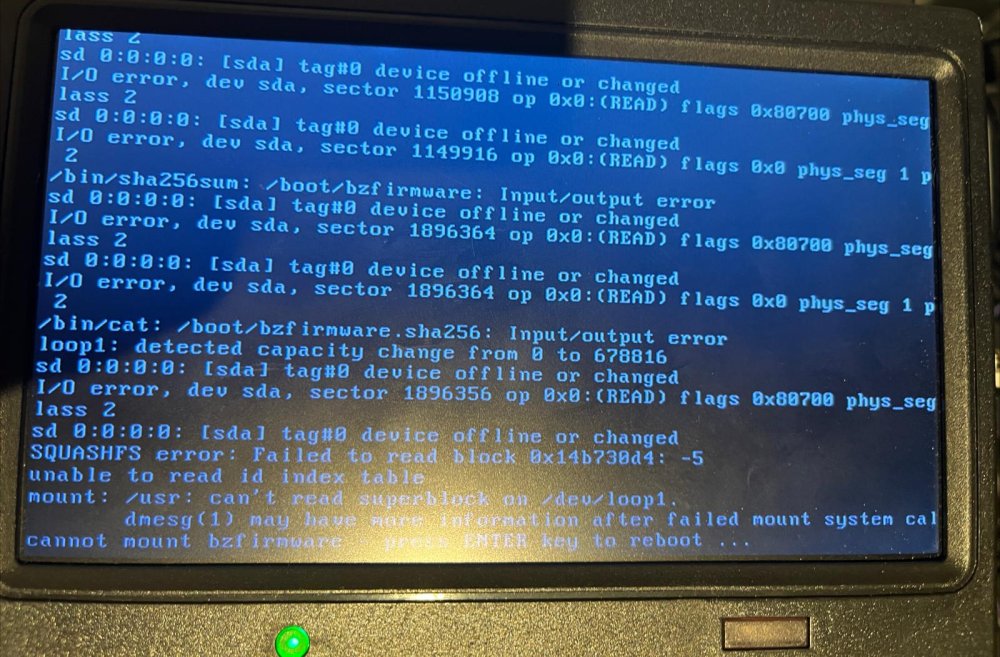
Hi all, My Unraid server does no longer boot, after trying to reboot it last night. I was trying to update one of my docker containers, like I always do, but it downloaded 0 bytes and the app (Plex) would no longer start as a result of that with no further errors. Also when tryign to view the logging it seemed empty. Weird, so I figured 'lets try a reboot'. Then nothing ever came back online anymore, so I checked with a monitor what was going on. When booting it hangs halfway with errors on the screen. Now, my linux knowledge is limited, but I 'think' it is trying to read content from the USB stick, which is failing. 1. Is this correct? if no, please enlighten me If yes, then I guess I will have to replace the USB stick by creating a new one. I then would like to do an attempt to see if I can recover any config files from the broken USB stick and manually copy them to a new stick. Which files/folders would be important? Also, I don't think these data are on the USB stick but on my hard drives. However, how do I ensure that if I make a new USB stick, Unraid will be using existing configs for docker and all its containers? (primarily the Plex config etc is important to me). Thanks for all help, appreciated!
-
Think I found a new bug; present in at least 6.8.2 If you want to change any network settings both the docker and VM manager need to be stopped. However, it turned out I had HVM disabled, which means VMs will not work. This was also displayed under the VM settings.. I could not turn it off though, to change my network settings..

