





YourNightmar3
Members
-
Joined
-
Last visited
Everything posted by YourNightmar3
-
Oh, this suddenly over-night solved itself. Containers are showing "up-to-date" and "Apply update" again.
-
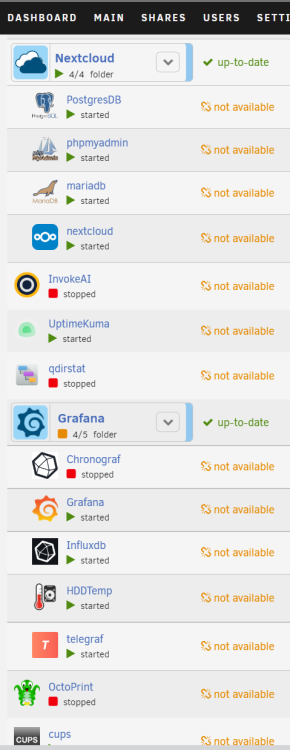
Last night my ISP performed some kind of maintenance that gave me a new static IP address, and since then all of the Docker containers on my server are now showing "not available" at the "version" row. It looks like this: I have already rebooted the server a couple times and also changed the DNS configs from my router's IP address to 1.0.0.2 and 1.1.1.2 because i read a thread on this forum that this solved the same issue for someone, but unfortunately for me that did not solve it. Because i was doubting wether my server had proper internet access i did a 'wget google.com' command in the console and that does work fine: Resolving google.com (google.com)... 2a00:1450:400e:80e::200e, 216.58.208.110 Connecting to google.com (google.com)|2a00:1450:400e:80e::200e|:80... connected. HTTP request sent, awaiting response... 301 Moved Permanently Location: http://www.google.com/ [following] --2022-12-14 23:17:31-- http://www.google.com/ Resolving www.google.com (www.google.com)... 2a00:1450:400e:811::2004, 142.251.39.100 Connecting to www.google.com (www.google.com)|2a00:1450:400e:811::2004|:80... connected. HTTP request sent, awaiting response... 200 OK Length: unspecified [text/html] Saving to: ‘index.html’ index.html [ <=> ] 14.23K --.-KB/s in 0.02s 2022-12-14 23:17:33 (909 KB/s) - ‘index.html’ saved [14569] I have attached diagnostics. Thank you very much in advance. tower-diagnostics-20221214-2319.zip
-
Ah you're right. It said this in the console: I rebooted the server, accessed the GUI and saw the partition was removed. However soon after that my entire server froze. The display out on my KVM was also frozen. I hard shutoff the server and rebooted again, and now it seems to be working without any issues. I managed to format and mount the unassigned SSD :). Not sure if that freeze was related to UD but i thought i'd mention it because it's definitely weird.
-
Yes i did, and then it shows the checkmark with text "Success", but nothing happens at all. Also nothing changed when i reload the page.
-
Hello! I recently replaced my single left over cache SSD for two new SSD's and i want to use the left over SSD with unassigned devices. However i cannot mount or format the SSD or anything like that: When i press the red cross that says "clear disk" it wants me to type "yes" and after that, nothing changes. The SSD was previously BTRFS formatted. What do i have to do to format/mount the SSD?

-
Ah okay thank you I have attached new diagnostics. tower-diagnostics-20221213-1348.zip
-
I ran this command earlier: btrfs balance status /mnt/cache And it said 9% left. I just ran it again and it says "No balance found" so i assume that means it's done? So i think i'll wait for the parity check to complete and then remove the old SSD from the cache pool. Only thing i'm confused about: Why does my cache say "size: 1.5TB" with 3x1TB drives and the "used" and "free" numbers add up to 1.09TB? Is this normal?

-
Ok here it is tower-diagnostics-20221213-1147.zip
-
Yeah no console access unfortunately. I have rebooted the server and a parity check has just started. I don't see anything about a BTRFS operation, how do i know if it ran successfully? I do see my cache pool with my two new drives and one old SSD, all three of those devices say "normal operation, device is active". But i'm also getting a "Warning - pool BTRFS too many profiles (You can ignore this warning when a pool balance operation is in progress)" message while there's no new BTRFS action starting at the moment, just the parity check. How do i know if the previous BTRFS operation finished or not? Do i need to somehow start a balance operation manually (seeing this warning)? And do i need to wait for the parity check to finish first?
-
Hmm i just started the BTRFS action and now after about 30 minutes my server is entirely unreachable on the network. My KVM shows no video signal but the machine is still running. I assume a shutdown during the BTRFS action is unsafe? Or can do a hard shutdown wioth the power button and restart the server? I did watch it start and it was running for 10+ minutes.
-
Yes it is, thanks a lot. Really couldnt find this specific situation by googling and i just needed a confirmation before doing it
-
Something i noticed when i type the "lsblk" command in the terminal is that (if im reading this right) i get three 1TB drives as result: root@Tower:~# lsblk NAME MAJ:MIN RM SIZE RO TYPE MOUNTPOINTS loop0 7:0 0 116.8M 1 loop /lib/firmware loop1 7:1 0 19.4M 1 loop /lib/modules loop2 7:2 0 80G 0 loop /var/lib/docker/btrfs /var/lib/docker loop3 7:3 0 1G 0 loop /etc/libvirt sda 8:0 1 7.5G 0 disk └─sda1 8:1 1 7.5G 0 part /boot sdb 8:16 0 931.5G 0 disk └─sdb1 8:17 0 931.5G 0 part sdc 8:32 0 931.5G 0 disk └─sdc1 8:33 0 931.5G 0 part /mnt/cache sdd 8:48 0 931.5G 0 disk └─sdd1 8:49 0 931.5G 0 part sde 8:64 0 465.8G 0 disk └─sde1 8:65 0 465.8G 0 part sdf 8:80 0 3.6T 0 disk └─sdf1 8:81 0 3.6T 0 part sdg 8:96 0 3.6T 0 disk └─sdg1 8:97 0 3.6T 0 part sdh 8:112 0 7.3T 0 disk └─sdh1 8:113 0 7.3T 0 part /mnt/disks/VDK2E7KK sdi 8:128 0 7.3T 0 disk └─sdi1 8:129 0 7.3T 0 part sdj 8:144 0 7.3T 0 disk └─sdj1 8:145 0 7.3T 0 part md1 9:1 0 7.3T 0 md /mnt/disk1 md2 9:2 0 3.6T 0 md /mnt/disk2 md3 9:3 0 3.6T 0 md /mnt/disk3 md4 9:4 0 931.5G 0 md /mnt/disk4 md5 9:5 0 465.8G 0 md /mnt/disk5 sr0 11:0 1 1024M 0 rom nvme0n1 259:0 0 931.5G 0 disk nvme1n1 259:1 0 931.5G 0 disk Is that correct? I see sbd, sdc, and sdd as 1TB drives. sdd is a 1TB array drive. sdc is my working cache SSD that's left, and sdb doesn't show up anywhere in the unRAID main page. Could that be the other 1TB cache SSD? If so, why is it not showing up in the GUI? If not, then what is it? I have attached my server's diagnostics (once again) in case this might help answer the question/solve the problem. tower-diagnostics-20221213-0059.zip
-
A couple days ago i made a post where it turns out there is something wrong with one of my cache SSD's: I haven't fully figured out the problem yet but i purchased two new SSD's because i have been wanting to replace my cache drives for a while anyway. Then i'll figure out in the other thread why one of the two current SSD's isnt working. My current situation: One working cache SSD and two new unassigned SSD's all connected to the server. How do i replace the one cache disk with the two new ones? Can i add the two new SSD's to the cache pool, wait for the BTRFS action to complete, then remove the current cache SSD from the pool so i only have the two new ones left? I'd like to avoid transferring all cache data to my array if possible. Thanks.
-
Ok so i first unplugged/replugged the cables on the particular SSD but when i booted up unRAID again it said the entire SSD was missing this time. I then swapped the power and SATA cables with the power and SATA cables from the other SSD that is still working to rule out a cable problem and the same SSD still said missing. I then plugged it into my windows computer, formatted it to exFAT because otherwise i couldn't do anything with it. I did a quick read/write test on it and got a normal 400 MB/s, then did a chkdsk cmd command on it with this result: The type of the file system is exFAT. Volume Serial Number is D4AA-EF58 Windows is verifying files and folders... Volume label is New Volume. Windows is verifying file allocations... File and folder verification is complete. Windows is verifying free space... 3815278 free clusters processed. Free space verification is complete. Bad sectors were found and tested while examining free space on the volume. Windows has made corrections to the file system. No further action is required. 976712704 KB total disk space. 256 KB in 1 files. 512 KB in 2 indexes. 1536 KB in bad sectors. 768 KB in use by the system. 976711168 KB available on disk. 262144 bytes in each allocation unit. 3815284 total allocation units on disk. 3815272 allocation units available on disk. It seems to be working fine on my windows PC but it does say bad sectors. I then plugged it back into my unRAID server to see if it would show up but it still cannot find the disk at all. Is that normal? How come my Windows PC can see/use it seemingly fine (even though it may be dying) but unRAID just doesn't see it at all? And does this mean the SSD is just dead?
-
Thanks a lot! Can this cause any serious data issues or is cache 1 my saviour here? I'll check the cable asap and how do i perform a scrub on the pool?
-
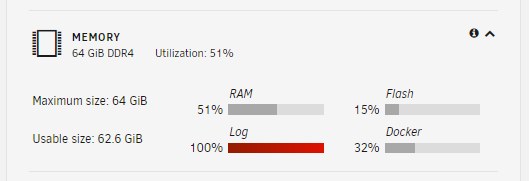
Today i noticed the LOG on the dashboard of my unraid server shows 100%: I used this comment to find out which log file is taking up all this space: du -sm /var/log/* And this is the result: 0 /var/log/btmp 1 /var/log/btmp.1 0 /var/log/cron 0 /var/log/debug 1 /var/log/dmesg 1 /var/log/docker.log 0 /var/log/faillog 1 /var/log/lastlog 1 /var/log/libvirt 0 /var/log/maillog 0 /var/log/mcelog 0 /var/log/messages 0 /var/log/nfsd 0 /var/log/nginx 0 /var/log/packages 1 /var/log/pkgtools 0 /var/log/plugins 0 /var/log/pwfail 0 /var/log/removed_packages 0 /var/log/removed_scripts 0 /var/log/removed_uninstall_scripts 0 /var/log/sa 3 /var/log/samba 1 /var/log/scan 0 /var/log/scripts 0 /var/log/secure 0 /var/log/setup 0 /var/log/spooler 0 /var/log/swtpm 4 /var/log/syslog 14 /var/log/syslog.1 108 /var/log/syslog.2 0 /var/log/vfio-pci 1 /var/log/wtmp When i do cat syslog.2 i see a bunch of BTRFS errors. I have no idea what's going on. I don't know what's causing this and what i should do. Any support with this is much appreciated. I have attached my diagnostics which i checked also contains the logs. Thanks in advance. tower-diagnostics-20221207-1923.zip
-
Ah right that explains a lot. I assumed unRAID would just take the first working network interface it'd find. Thanks a lot, it works now.
-
When i was on around unRAID 6.9 i think, i upgraded my unRAID server to an i5 12600K with a Z690M AORUS ELITE AX DDR4 motherboard. I remember something vague about onboard NICs on the new chipsets not working yet at the time, so back then i bought a cheap PCIE gigabit NIC and have been using it since then. I also had to blacklist iGPU drivers and do some other tinkering to make everything work back then. Recently i upgraded to unRAID 6.11.3 and as far as i understood, everything 12th gen should be fully supported now. I want to get rid of the PCIE NIC to temporarily put a GPU in my server and tinker around with it, so i thought i could simply switch the network cable from the PCIE NIC to the motherboard NIC. However, no matter what i do, the onboard NIC will not work. unRAID does show it in the network settings. I have tried rebooting the server several times as well, but no success. I'm not sure what else i can try. Any help is very much appreciated. I have attached diagnostics. tower-diagnostics-20221114-2110.zip
-
Okay, do NOT use the same USB ethernet adapter that i used. It was causing problems for me and occasionally would just stop working completely. I thought my server was crashing but it was just the usb ethernet adapter. I got a PCI-E 1Gbe NIC that is listed as compatible on the unRAID wiki and it works fine now. All problems solved. https://wiki.unraid.net/Hardware_Compatibility#Network_Controllers
-
My previous reply was silly, of course i can't update from commandline without active internet connection Anyway i didn't like the risk of updating an otherwise perfectly stable system so i went out and bought a USB Ethernet adapter that boasted Linux kernel 2.6/3.x compatability and it's now working great. For anyone else reading this, i got the UGREEN USB 3.0 Ethernet Adapter Gigabit. In the Amazon description it states "Wide compatability: Windows 10 / 8.1 / 8/7 / Vista / XP, Mac OS 10.6 amd up , Linux kernel 3, x / 2.6" It only had to plug it in and it works. I may look for a better solution like a network card, i might want to play around with 10gig networking, but for now this was a great cheap solution. My server is booting fine now. I still got this "error: failed to connect to the hypervisor" message but the webui and everything works great!
-
Thanks for the asnwer. I'll gladly update to try that solution. I did some googling but i could not find how to update unRAID from the command line. How can i do this?
-
I just realized i attached the wrong diagnostics file because the date on the file is wrong. I have just edited my original post to actually have the right diagnostics file that i created yesterday. Edit: I may have found the problem? Some googling told me more people are having issues with onboard NIC's for 12th gen intel. I checked the old diagnostics before the hardware swap and in ifconfig.txt i can see eth0 and eth1 because that board had two onboard ethernet ports. In the new diagnostics however i don't see any eth listed in the same file. I guess i'll need to get a PCI-e NIC. Can someone who knows how to read the diagnostics file better than me confirm this? However this does not explain the "error: failed to connect to the hypervisor" error. I did some googling on that as well and people are saying the VM Backup plugin can cause this error. I do have that plugin installed, and that would explain why it doesn't occur in safe mode, but i've always had this plugin also before the hardware swap, so that is kind of strange.
-
I upgraded my whitebox unraid server today. I swapped out the RAM, CPU and Motherboard and left everything else the same. Before the swap, the server had been working fine for 3 years up until today a couple hours ago before i started swapping hardware. The new parts are: Motherboard: Aorus Z690 Elite AX DDR4 RAM: Corsair Vengance 2x32GB 4000Mhz CPU: Intel Core i5 12600K Unfortunately after that i couldn't access the server over the network anymore. When i booted it up with a monitor attached it said: "error: failed to connect to the hypervisor" And the IP address it said was unresponsive. Booting in safe mode did not output the same error but the IP address was still unresponsive. Because i had set the IP Address as static in my router, i have deleted that assignment in my router and i deleted network.cfg from the USB stick to reset the network settings to default and get a DHCP assigned IP address, but in both normal and safe mode it now says: "IPv4 address: not set" I have attached a diagnostics file that i have just ran from the server itself by attaching a monitor and keyboard. tower-diagnostics-20180101-1803.zip Thank you very much in advance for any replies. Edit: also when i try to boot the server with the GUI option, both normal GUI and safe mode GUI results in a black screen. No GUI appears.


