





YourNightmar3
Members
-
Joined
-
Last visited
Everything posted by YourNightmar3
-
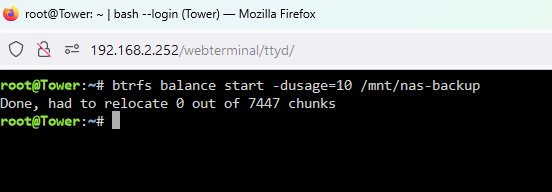
Restarting the array seems to have worked, is 0 relocated good? New diags: tower-diagnostics-20240626-1349.zip
-
How can i make sure it never happens again? Can i set a minimum free size on the pool? Also it looks like it turned back to readonly? diags:tower-diagnostics-20240626-1339.zip

-
This sounds like voodoo magic I moved a 72G folder off the pool, then waited at least 9 minutes (its been more but i lost track) tower-diagnostics-20240626-1323.zip
-
I accidentally closed the terminal window after executing the commands so unfortunately i can't copy paste the output But when doing that one i got a warning about metadata and system being RAID1. The pool is not readonly anymore so that seems good 🙂 I have attached a new diagnostics tower-diagnostics-20240626-1203.zip Is it all good now?
-
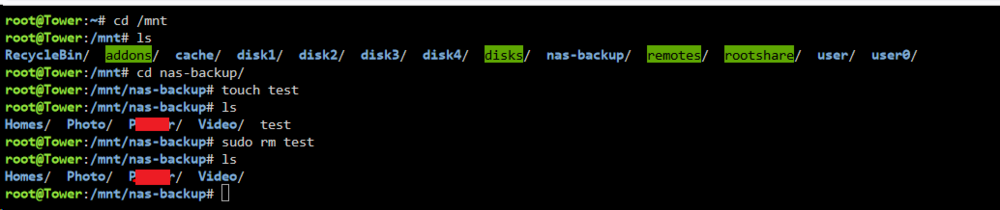
Hi @JorgeB, no problem. The second command gives an error: This is above my Linux knowledge so all i can really do is post this error and hope you know what to do, i think. The only thing i noticed is that /dev/sdg1 is a 4TB disk in my array, is that correct? Is this supposed to be one of the pool disks? I have attached another diagnostics file in case it's nessecary. tower-diagnostics-20240626-1104.zip

-
Hi @JorgeB, or anyone else really Do you still have ideas left for what i can do to diagnose / fix this issue?
-
Yes that is correct, i don't know why it is balancing to raid1, i don't want it to. It should be a single profile.
-
I have restarted the server and here is a new diagnostics: tower-diagnostics-20240624-1526.zip The pool is still readonly. The terminal touch test has the same result. Something odd i noticed is right after starting the array the pool was at 7.87TB Used and 0TB available, with the little bar in red. Then a couple seconds later it suddenly jumped to 7.87TB used and 16.0TB available, which is what i'd expect it to be. That seemed a bit odd to me. Also thanks for the ipvlan tip, i haven't done it just yet because i don't know how (yet) but i'll look into it.
-
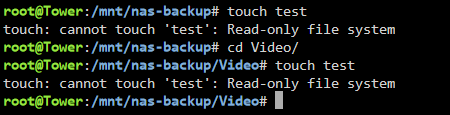
Actually now that i did some more tests it doesn't seem to be Nextcloud related at all. When opening a terminal straight from my unRaid UI i also cannot write to the pool. Anything i can try to check to see why this would be the case? i have attached my diagnostics.tower-diagnostics-20240623-1801.zip
-
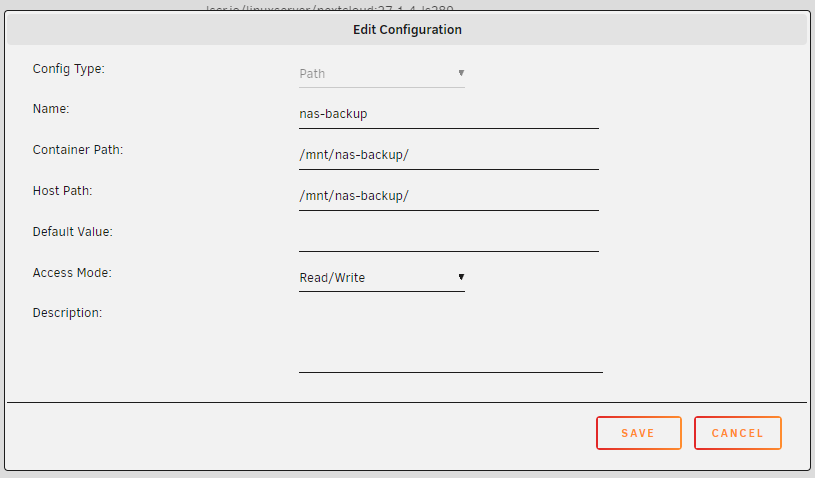
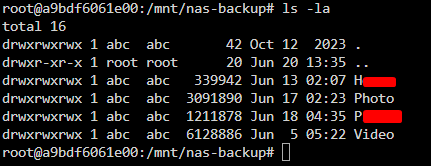
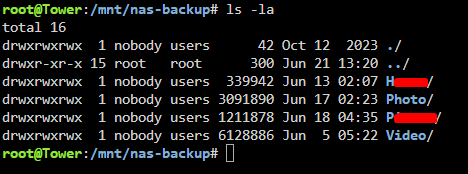
Alright thanks, that is what i meant and i don't want it in this case so my current situation is good Only i'm now having problems where my Nextcloud container can't write to my /mnt/nas-backup/ folder. I mounted it in my Nextcloud like this: It has read access but no write access it seems like. Here is the command ls -la from my unRaid system in case that helps: This is the console of my Nextcloud container: And ls -la from my Nextcloud container: I have limited Linux knowledge so i provided the above information so hopefully you can see if something is wrong, i do not know what most of the command output means. How can i diagnose/fix this?

-
Alright thanks a lot, that makes sense now with what i see in the screenshot as well. One last question, a seperate pool like this does not use your regular array cache, does it?
-
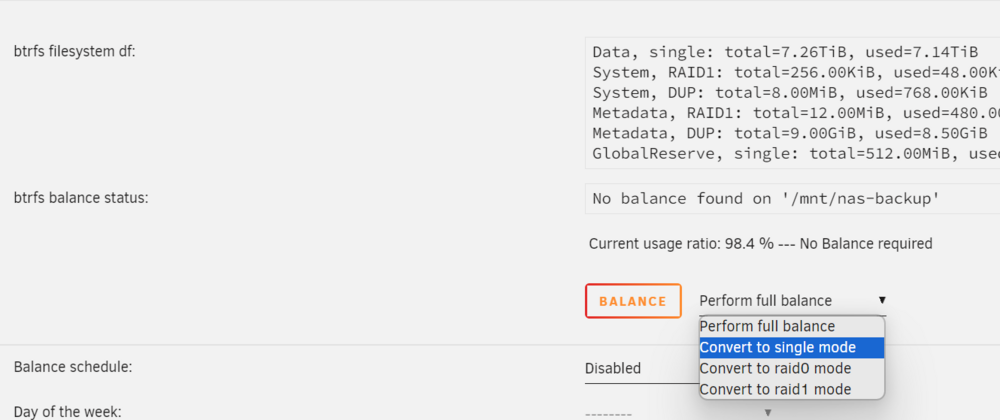
Alright i have attached the diagnostics. The pool is always connected so i will use the method of mapping it to my Nextcloud container and configuring it in there as "local storage". I can see in the diagnostics for the nas-backup pool it says diskFsProfile = "raid1", is this supposed to say "single"? If i do "convert to single mode" and press "balance" nothing changes in the diagnostics when i download them again. tower-diagnostics-20240620-1033.zip
-
Hi @JorgeB thanks a lot for the help. I think i have managed to do it, this looks good but i didn't actually do anything to convert it to a single profile. However the 16TB free space and about 8TB used seems like it is acting as a single profile, no? Is there anything i should check about this to make sure it is all okay? My existing backup data still seems to be there (The 8TB) But how do i actually use this pool now to perform backups to? Previously i had mounted the unassigned 8TB drive which gave me a share of just the drive. I added this share to Nextcloud and performed backups to it like that. How do i do something similar with this pool? And while keeping the existing backup data of course. Edit: I found out there is now a /mnt/nas-backup/ folder. I think i can map this to my Nextcloud container, and then configure it as "local storage" in Nextcloud. Would this be the right way to go about things? Like this (taken from Nextcloud documentation):


-
I'm in luck, it is using btrfs. Is there a guide somewhere on how to do this by any chance?
-
Hey there, Sorry if this is a basic question but i haven't been following the Unraid updates very closely lately so i don't know exactly what functionality is available and how it all works. For a couple years now i have been usingan 8TB disk with the unassigned devices plugin. The disk is mounted and i use Nextcloud to perform backups to it from an external Synology NAS. Now the disk is getting full because the data on the Synology is growing. I'd like to add another disk and pool it together with the 8TB one, so let's say i add a 20TB disk, i want to have a pool of 28TB of backup space available, it should be completely seperate from my main array, and not use my cache drives either. And hopefully be accessible through Nextcloud so i can keep my current backup configuration working. It would be nice if the current backup data on the 8TB disk can be kept as well so i don't have to reupload all that. Is this possible nowadays in Unraid? I know something with pooling was added but i'm not entirely up to date on what it is and how it works. Most of what i can find is about multiple cache pools, but that's not what i want?? Thanks.
-
OH. Well that explains a lot. I have them on auto expand true because i don't really plan on ever using them collapsed, i just like the organization of folders/categories, but you're right now that i've collapsed the folders i can move them just fine. That wasn't clear to me, thank you.
-
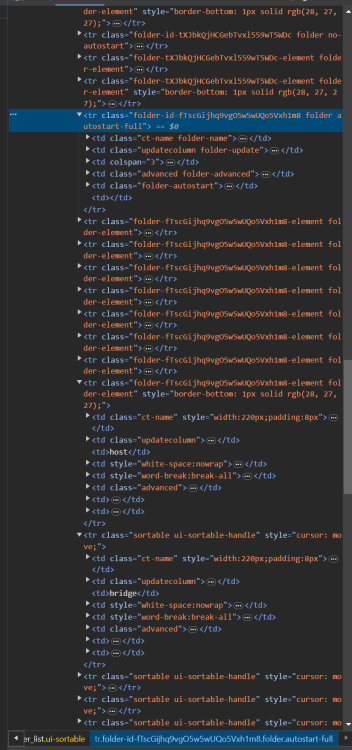
None of my folders have the sortable class, but regular docker containers do:
-
No errors in the console at all, and i disabled all adblockers and also tried on Edge where i've never had any adblockers installed, and still the same behavior. I can't grab the arrows on the folders :s
-
Hello, I just installed this plugin and it looks very promising, i made a bunch of folders, but i cannot reorder them in my Docker list. When i click the padlock to unlock all items, the arrow does appear on the folders, but i cannot grab it, and my cursor also doesnt change when i hover over the little grabby arrow like it does on the regular docker containers, which i can reorder. I tried on both Chrome and Firefox, both have this issue. Im on Unraiud 6.12.5. Am i doing something wrong? Is this a known issue?
-
So i have been dealing with what seems to be completely random crashes with my unraid server. My server can be running for days, and then suddenly just drop out. Wednesday morning after the system crashed again i updated from unRAID 6.11.x to 6.12.5 and i immediately enabled the syslog to flash mirroring in the settings. Then this morning (two days later) i thought "Well it hasn't crashed since then and i did a big update, so there's a decent chance the problem is solved. I read having syslog to flashing enabled for too long is not recommended, so i'll disable it", and i did, and then just now it crashed again. I have a PiKVM connected to the server and when the server crashes the PiKVM doesn't receive any video signal at all, but the fans are still spinning and the power LED on the server is on. My server has a Gigabyte Z690M Aorus Elite AX DDR4 motherboard and an i5 12600K with 128GB DDR4 RAM. I read that the processor officially only supports DDR4 up to 3200mhz but mine was running at 3600mhz with XMP, i just turned that back to 3200mhz so maybe that will help. I have now enabled syslog to flash mirroring again. Are there any other steps i can take to help diagnose the next time this happens? Here are my current server diagnostics in case it shows anything already, but again this is from after a reboot, because when it crashes i have no access at all to the server (no networking and no video signal): tower-diagnostics-20231201-1706.zip
-
Thanks, it works very good indeed! Do you know if this version of the container has a web API that you can call to generate images and get the result returned? Or if there is one like that? I've been looking for a selfhosted InvokeAI webapi like this for a little while to use in some hobby projects. I can't really find much information about it on Google.
-
That works great, thank you! What exactly is the different between the diffuser version and the other version? I feel like my results with this are a little less good than the examples on their github.
-
I got it working and it's great. I'm using an old GTX 970 with 4Gb VRAM and the image generation works fine. The inpainting gives an "out of vram" error fyi. However i've been trying for hours to get the "Waifu Diffusion" model with the kl-f8-anime vae loaded but i can't seem to do it. It shows up in the WebUI and when i press "Load" it seems to do something, then it says "New model loaded" but it didn't actually load the Waifu Diffusion model. Also when i restart my container it says this in the logs: >> Scanning Model: Waifu Diffusion >> Model scanned ok! >> Loading Waifu Diffusion from /userfiles/models/ldm/waifu-diffusion-v1-4/wd-v1-3-float32.ckpt | Forcing garbage collection prior to loading new model ** model Waifu Diffusion could not be loaded: LatentDiffusion.__init__() missing 1 required positional argument: 'personalization_config' I tried different versions and different vae files but i cannot get it to work. Do you know how i'd do this? I've had another Stable Difffusion container running before and i did manage to get Waifu Diffusion working, but that container broke completely that's why i set a new one up with your tutorial.
-
Ah thank you, i'm not very experienced with Docker and i must have changed the name when i executed the docker build command. It's working now.
-
Im getting this error after following the instructions, when creating the container with my XML file: docker: Error response from daemon: pull access denied for invokeai_docker, repository does not exist or may require 'docker login': denied: requested access to the resource is denied. Edit: in the docker template screen i changed the repo from "invokeai_docker" to "invokeai" and now it works. Maybe it has something to do with the fact that i had another "invokeai_docker" container previously.


