





erfly7
Members
-
Joined
-
Last visited
Everything posted by erfly7
-
Not sure how to setup airvpn with DelugeVPN? I see the airvpn option on the pulldown. Where do I get the OPenvpn files? Which ones do I use?
-
Anyone have a step by step for setting up Mullvad vpn with delugevpn since only PiA and airvpn are options?
-
Finally got it working, any guide on how to setup with Sonarr and what rutorrent settings should be using?
-
Thank you so much I am an idiot.
-
so it should be 192.168.0.0/24?
-
yes my router page is at 192.168.0.1 So I just copy echo "# force iptable mangle module to load (required for *vpn dockers)" >> /boot/config/go echo "/sbin/modprobe iptable_mangle" >> /boot/config/go into the terminal in Unraid?
-
ok not sure what I was doing think this is the correct one. supervisord.odt
-
sorry meant rutorrent trying both
-
using piavpn yes placed files in the openvpn folder under rutorrent in appdata no idea where to find log file? supervisordfile.odt
-
rutorrentvpn not working tried to install this one and getting same error Unable to connect Firefox can’t establish a connection to the server at 192.168.0.102:9080. The site could be temporarily unavailable or too busy. Try again in a few moments. If you are unable to load any pages, check your computer’s network connection. If your computer or network is protected by a firewall or proxy, make sure that Firefox is permitted to access the Web. any help?
-
Tried to access delugevpn today and nothing gives following error message An error occurred. Sorry, the page you are looking for is currently unavailable. Please try again later. If you are the system administrator of this resource then you should check the error log for details. Did a complete reinstall following spaceinvaders video to the letter and nothing! any help?
-
After 4 years of building my various PLEX server versions, and constantly having to reinstall radarr, sonarr, PLEX etc. Unraid is first program that easy to get running back to where I had it and to combine everything I need, HARD Drives and programs to get what's in them where it needs to go! than you!
-
yes here
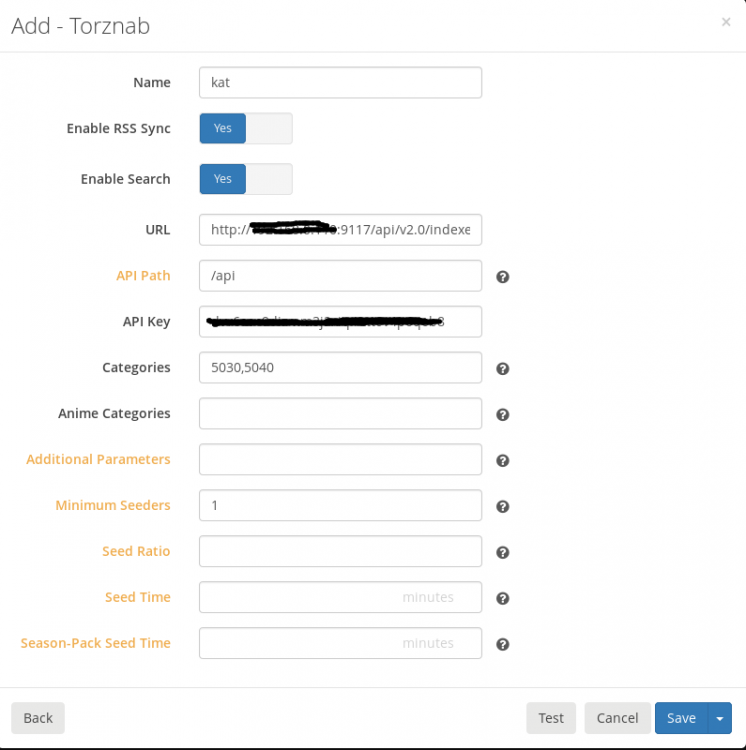
-
Still getting constant failure with adding indexers Invalid request Validation failed: -- Unable to connect to indexer, check the log for more details Unable to connect to indexer: The operation has timed out.: System.Net.WebException: The operation has timed out.: ' took out ip address stuff Here ---> System.Net.WebException: The operation has timed out. at System.Net.HttpWebRequest.RunWithTimeoutWorker[T] (System.Threading.Tasks.Task`1[TResult] workerTask, System.Int32 timeout, System.Action abort, System.Func`1[TResult] aborted, System.Threading.CancellationTokenSource cts) [0x000e8] in /build/mono/src/mono/mcs/class/System/System.Net/HttpWebRequest.cs:956 at System.Net.HttpWebRequest.GetResponse () [0x0000f] in /build/mono/src/mono/mcs/class/System/System.Net/HttpWebRequest.cs:1218 at NzbDrone.Common.Http.Dispatchers.ManagedHttpDispatcher.GetResponse (NzbDrone.Common.Http.HttpRequest request, System.Net.CookieContainer cookies) [0x0011b] in C:\BuildAgent\work\5d7581516c0ee5b3\src\NzbDrone.Common\Http\Dispatchers\ManagedHttpDispatcher.cs:74 --- End of inner exception stack trace --- at NzbDrone.Common.Http.Dispatchers.ManagedHttpDispatcher.GetResponse (NzbDrone.Common.Http.HttpRequest request, System.Net.CookieContainer cookies) [0x001c3] in C:\BuildAgent\work\5d7581516c0ee5b3\src\NzbDrone.Common\Http\Dispatchers\ManagedHttpDispatcher.cs:102 at NzbDrone.Common.Http.Dispatchers.FallbackHttpDispatcher.GetResponse (NzbDrone.Common.Http.HttpRequest request, System.Net.CookieContainer cookies) [0x000b5] in C:\BuildAgent\work\5d7581516c0ee5b3\src\NzbDrone.Common\Http\Dispatchers\FallbackHttpDispatcher.cs:53 at NzbDrone.Common.Http.HttpClient.ExecuteRequest (NzbDrone.Common.Http.HttpRequest request, System.Net.CookieContainer cookieContainer) [0x0007e] in C:\BuildAgent\work\5d7581516c0ee5b3\src\NzbDrone.Common\Http\HttpClient.cs:121 at NzbDrone.Common.Http.HttpClient.Execute (NzbDrone.Common.Http.HttpRequest request) [0x00008] in C:\BuildAgent\work\5d7581516c0ee5b3\src\NzbDrone.Common\Http\HttpClient.cs:57 at NzbDrone.Core.Indexers.HttpIndexerBase`1[TSettings].FetchIndexerResponse (NzbDrone.Core.Indexers.IndexerRequest request) [0x0004b] in C:\BuildAgent\work\5d7581516c0ee5b3\src\NzbDrone.Core\Indexers\HttpIndexerBase.cs:321 at NzbDrone.Core.Indexers.HttpIndexerBase`1[TSettings].FetchPage (NzbDrone.Core.Indexers.IndexerRequest request, NzbDrone.Core.Indexers.IParseIndexerResponse parser) [0x00000] in C:\BuildAgent\work\5d7581516c0ee5b3\src\NzbDrone.Core\Indexers\HttpIndexerBase.cs:298 at NzbDrone.Core.Indexers.HttpIndexerBase`1[TSettings].TestConnection () [0x0000e] in C:\BuildAgent\work\5d7581516c0ee5b3\src\NzbDrone.Core\Indexers\HttpIndexerBase.cs:335
-
Installed it and can connect and see the Webgui However on Sonarr when try to add 1337x and Kickass takes forever to test and then gives timed out failure, sorry not on Unraid server at moment so don't have exact error message but never connects, not sure what is going on they test fine inside the Jackett container and both sites work in web browser.
