





yendi
Members
-
Joined
-
Last visited
Everything posted by yendi
-
Well When I have a intensive task like 150mb/s write, or a parity check, my dockers are not responding. I found that by isolating core I do not have this issue (i7-7700). I was thinking that is I did not pin dockers to core, they would use full CPU... THanks for your help !
-
Ok so the best solution is to restrict unraid to 4 cores and then distribute 1 isolated core per docker
-
I resurrect this post as it is not clear for me: I have a 8 cores CPU and I isolated 4 cores so unraid does not use them. If I don't pin any docker, will they use the 4 cores + the 4 isolated cores that unraid is unable to use or will they be restricted to the same cores as unraid? Thanks
-
This is why I put a 8 day delay on the upload script: to have fresh files in local to prevent multiple concurrent downloads of the same newly released file.
-
Thanks for all those info man! Really you make me save thousands in HDD Have a nice weekend
-
Ok thanks ! So I will put 15D so I have a local 15 days cache to ease up thumbnail creation and prevent a huge bandwidth usage when many people are playing a recent content. Do you have some plex settigns that you deactivate as they are incompatible with Rclone? I have left everything on (even the partial scans etc) and did not see any issue.
-
Playing only 1080 Remux & some 4K. Why ? Do you find a noticeable difference?
-
@DZMM Quick question, if I put a --min-age 15d to use it as a somewhat local cache will it interfer with the directory caching time or any setting ? My idea is to leave a new file few days locally as for example if a new episode of a show is out, many people that have access to my server will watch it few days after. Would it work ? Thanks
-
Cool to know that I my issue is helping others ! I can confirm that since I upgraded my RAM I have not faced any issues (added 8 gb) and lowered the buffer to 128mb. For now I have noticed no difference between 128 and 256 buffer size on a 1000/300 fiber. Cheers !
-
Maybe that's stupid could this come from the mounting script executing AFTER the docker mount?
-
Have the same issue: the search is broken, I don't know why. Has anyone any idea what could have caused that?
-
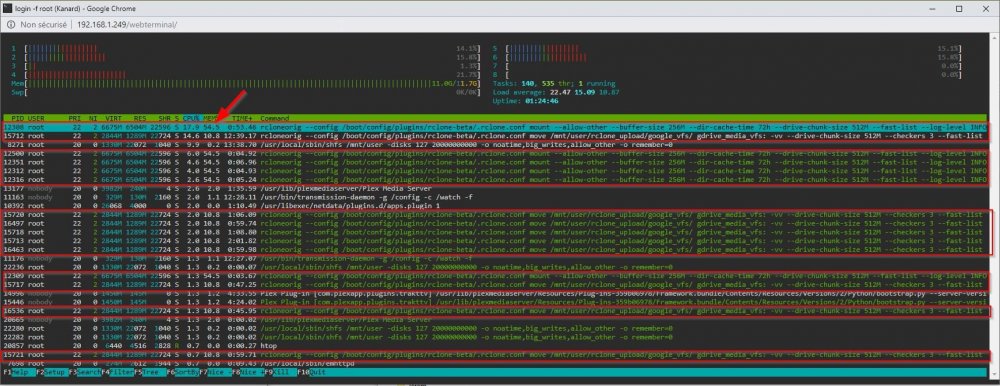
So with the help of rclone guys I might have found the issue: I have 12 gb of ram and when I upload + all the services running on unRAID i am using about 8.5 of the ram. When Plex is doing the thumbnails it seems that it consume all remaining ram for the job: it consume some ram for Plex itself + the --buffer-size 256 * number of opened files. Apparently its 4-5 files simultaneously. I lowered the buffer-size variable to 128mb and I have not seen the issue since 24h. Hope it helps someone who would face this issue !
-
I think there is an issue with Rclone: I saw in live the dismount issue and saw this: rclone had multiple processes using 100% of available memory. Then it crashes and I have to use the unmount script before the being able to remount. Is there any possible explanation? Thanks
-
Often the forums adds invisible character to command that you copy. Paste it on notepad and copy it again.
-
The union fs part allow you to use the upload system and to have both cloud and upload folder merged. So no you dont need that if yu just want to mount a gdrive: You just need "rcloune mount" command. You should check rclone help to chekc what argument to add to your command so it suits your need or just try with one like this: rclone mount --buffer-size 256M --dir-cache-time 72h --drive-chunk-size 32M --fast-list --log-level INFO --vfs-read-chunk-size 128M --vfs-read-chunk-size-limit off gdrive_media_vfs: /mnt/user/mount_rclone/google_vfs
-
I had multiple rclone crash since yesterday (mount is suddenly empty, not only when using Sonarr, also with Plex Scans) but I think I found the issue: I "only" have 12gb of RAM, and the upload + services running on unRAID are eating up 70% of the memory. I read that rclone tend to crash when no RAM is available and I saw that when I do a library scan, memory tend to go to the 90%ish so I ordered 8 gb of more ram... I will give a feedback when my RAM arrive to tell you if its the shortage that make rclone crash.
-
Yes, that's it ! Thanks
-
Sorry, I typed on my cellphone so it made a typo: My question was: Is it ok to add a cache to the 3 shares ? As they are unmounted and recreated each boot via the scripts I wanted to know if it would work/be safe?
-
Do you config that I can use the cache disk without issue with the 3 mounts? As they are created at boot with a script, I prefer to ask.
-
Well, not it seems to be working correctly. The only thing I changed is disabling a plugin (Unbalance) and restarting the server. I try to browse an other show and it seems to work perfectly 🤷♂️
-
I can assure you its a bug; everything is working fine when I reboot: all script launch perfectly and upload is working. Bug when I go to sonarr to change the path of ANY tv show by using the path browser, the "mount_rclone" folder is suddenly empty thus, the Union folder aswell. If I change path using the bulk editor, the mount is preserved. When the mount disapears, I tried to unmount + remount and it fails (can not connect to end point) and when I reboot, everything is fine. Can someone try ?
-
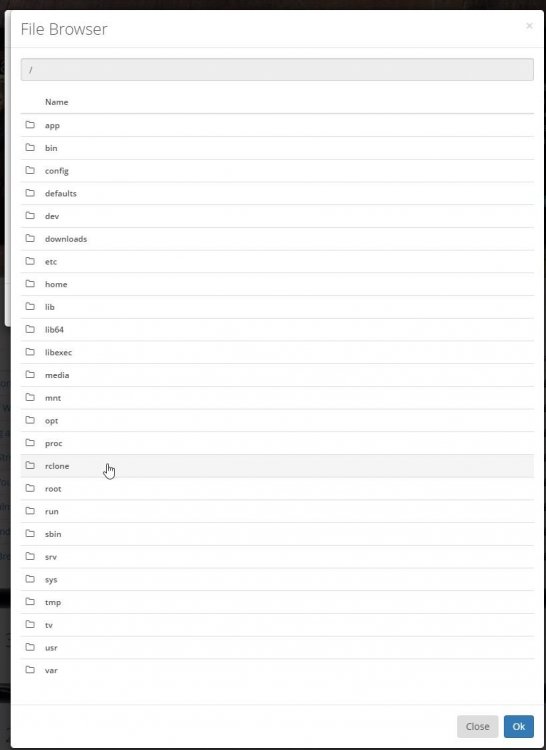
I found a big bug ! If I go to Sonarr to change the path of a tv-show (did not try a movie yet) my mount is gone as soon as I click on the path that I configured in Sonarr: My previous show was local, I copied everything in the rclone union folder, it uploaded successfully. I went to change the path in Sonarr to point it to the union folder and as soon as I click on it, the mount is gone and the only files I see in the Union folder are the one in the Upload folder.
-
Thanks ! Still have some hicups with like the mountcheck file being duplicated so I have to finish a full upload to see why I have it on both on the upload and google folder (two identical files in Union folder with 2 different creation date), but except that it seems pretty solid. Quick question that you probably missed, do you have a backup strategy with this or you just have 1 Gsuite account and if he gets closed you will just re-dl all medias? Anyway, you really have provided great scripts !
-
With this rclone setup and no cache, everything is completely streamed as soon as you access the media? How long does it conserve the downloaded data on the server? Thanks (uploading on-going)
-
I made a typo it’s 40TB. If my tv show path is /mnt/user/Media/TV shows would this command do the trick ? I put the quotes in the path as there is a space and removed the “--delete-empty-src-dirs” Am I correct? Thanks



