





biggiesize
Members
-
Joined
-
Last visited
Everything posted by biggiesize
-
Can you post the entire log from the beginning? If you need to you can roll back to a previous version by editing the application and in the repository replacing qmcgaw/gluetun:latest with qmcgaw/gluetun:v3.31.1 which is the latest major release.
-
Thank you, Squid.
-
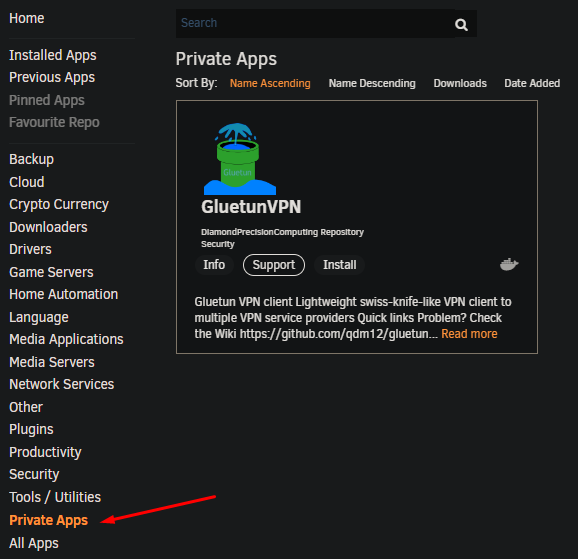
You need to grab the raw file otherwise the grabbed file will be malformed. wget https://raw.githubusercontent.com/DiamondPrecisionComputing/unraid-templates/master/templates/GluetunVPN.xml After that it should show up here
-
Squid wrote up some instructions on how to use a private repository for templates a while back that should still work. https://forums.unraid.net/topic/57181-docker-faq/page/2/?tab=comments#comment-807513
-
Of course. Things like this happen more often than most realize and only a subset turn out to be legitimate concerns. Due diligence still has to be done on all of them. I've never seen a Brinqa report at work that was either completely empty or filled with all legitimate vulnerabilities lol
-
@Squid Thanks for the heads up. Knowing the dev I'm sure it's a false positive.
-
Assuming that you went through the documented install steps it is probably incorrect permissions on the folder/file. Try running these commands from your unraid terminal: chown -R 1000 /mnt/user/Docker/DDNS-updater chmod 700 /mnt/user/Docker/DDNS-updater chmod 400 /mnt/user/Docker/DDNS-updater/config.json
-
No worries I've been there myself. While I won't admit that it was an elegant solution but it works. I just switched back to your repo and so far everything builds like it should.
-
I just submitted a pull request to fix the issue.
-
I finally had time to update the container today. It should be ready to update and have the features you are looking for.
-
The last changes I updates I included in the container should have included that. There have only been minor changes since. Can you post a screentshot of what you see when trying to add a person?
-
Are you pointing to a specific vyprvpn server in your config? You might try a different server or region. I'm sure you already have but I would also double check your credentials take sure they work logging into the vyprvpn website.
-
I just looked at the server list file and I do not see servers for Ashburn. The wiki itself is not always up to date with the latest server changes. I would double-check with Privado that the servers are still valid. If they are, submit a bug report in github for the issue so the dev can work it. https://raw.githubusercontent.com/qdm12/gluetun/master/internal/storage/servers.json
-
Yes, that is correct.
-
Absolutely! I am not using port 8080 either so that "shouldn't" be causing issues. Since you're using the LinuxServer container, there is a fairly easy way to get it running. Edit qbittorrent and add an environment variable called "DOCKER_MODS" with a value of "ghcr.io/gilbn/theme.park:vuetorrent". (Obviously without quotes) Optional: You can choose between a few themes. You can find those here. Just add another variable called "TP_THEME" with a value of the theme you choose. (e.g. TP_THEME=dark) Next, inside qbittorrent, go to Settings -> WEBUI, check Use alternative Web UI and enter its location /vuetorrent, then save. You might need to restart the container but I can't remember.
-
That was my assumption. To my knowledge, while it may be possible, this is not a supported or intended use of Gluetun as it is a VPN client replacement. My suggestion would be to contact the developer and discuss this use case with him . https://github.com/qdm12/gluetun/issues/new/choose
-
This sounds like you are trying to make Gluetun act like a reverse proxy of sorts, which it is not designed for. What is your ultimate goal for this setup?
-
I just pushed a new version. It should be updated in CA within an hour. With the changes I made, you may need to delete the old container and create a new one.
-
It does look like there is a newer version. I will do my best to update it this weekend.
-
Correct.
-
FIREWALL_VPN_INPUT_PORTS and FIREWALL_INPUT_PORTS need a comma separated list of all the ports that need to talk through gluetun (e.g. 7878,8989,9898,etc). FIREWALL_OUTBOUND_SUBNETS needs your local subnet in CIDR form (e.g. 192.168.1.0/16).
-
Did you place those ports in both FIREWALL_VPN_INPUT_PORTS and FIREWALL_INPUT_PORTS. Also, did you place your local subnet in FIREWALL_OUTBOUND_SUBNETS?
-
Can you send me screenshots of the configs for gluetun, radarr and nzbget? Make sure to hide any sensitive info like IPs, Usernames and passwords.
-
My apologies, work picked up and took most of my night. I will look at your logs asap after I grab some rest.
-
I just pushed a change to the template that I believe should fix your install error. The appstore should pick up the new template in ~30 minutes.


