





Everything posted by KernelPanicAttack
-
Dropwatch earns Twitch Drops for you in the background. It picks which campaign to watch, moves to another channel when a stream goes offline, and claims each reward as soon as it’s earned. It also collects channel points and watch-streak bonuses on your favourite channels. A web dashboard shows what’s being mined and what’s next, and lets you set priorities, skip games and review your history. Project: https://github.com/KernelPanic-Studios/dropwatch Image: ghcr.io/kernelpanic-studios/dropwatch First run: open the WebUI, choose a page password, then sign in to Twitch with the one-time code at twitch.tv/activate. One Twitch account per container; don’t run another drops miner on the same account. Reporting a problem: please include the version (Settings › About in the app) and the container log (Docker tab → dropwatch → Logs). Bug reports are also welcome as GitHub issues. Good to know: automated watching for drops isn’t something Twitch’s terms of service allow. Use it on your own account at your own risk.
-
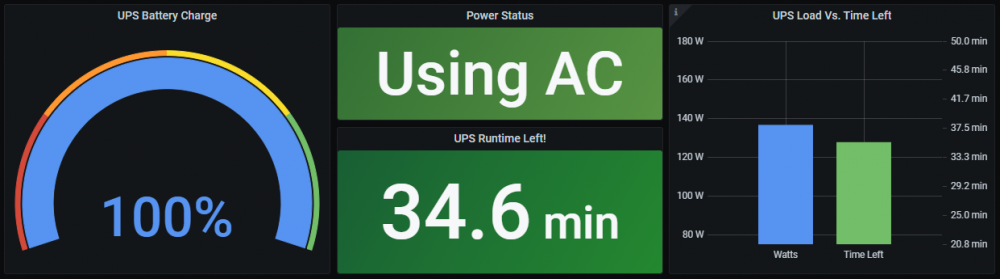
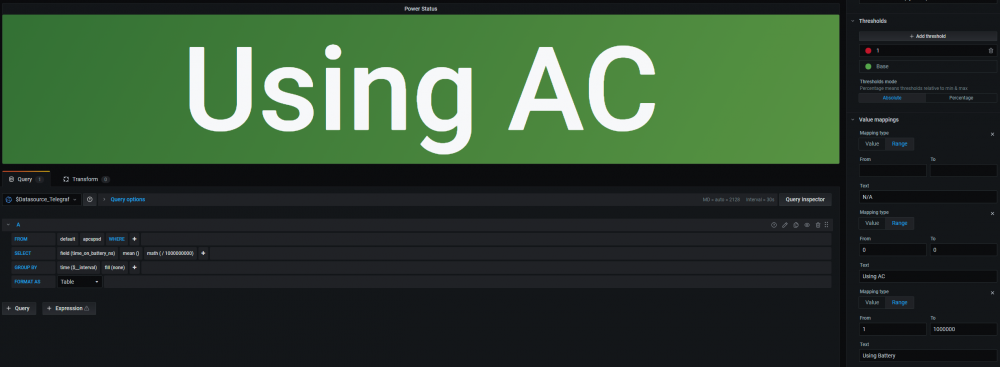
IDK if anyone has done this with their Grafana Dashboard for this yet but I wanted to share it with everyone in case anyone else was curious. There are times when I am not home that I like to check on my server using Grafana and often wondered how I could tell if my UPS was using the AC or the Battery at any given time. I wondered this more so when I knew there was questionable weather near my house. Attached are screenshots of a Query I made that shows you whether or not your UPS is currently using the battery or if it is using the AC power. I'm not particularly good with grafana, I'm still learning, so I don't know if this will work for everyone's setup and UPS but if it does I hope you find it as useful as I do.
-
Getting the same thing here. The issue appears to be caused when users (from what happened to me and others on here) reinstall the plug-in, either by choice or via an update (what happened to me), when on 6.7.0 The plugin worked for me before and after the upgrade from 6.6.1 to 6.7.0 however failed to work after it prompted me there was an update available (the 05.02.2019 update) for it and I went through the update, causing it to reinstall. Tried reinstalling the plugin from CA and from the link provided by the developer at the top of this thread. Also tried rebooting my server. No luck after either. only shows up in the location shown above, nothing under settings and when i click on the icon for the plugin on the above screen, it brings me to a blank page. Please advise. Thank you.



