






xRadeon
Members
-
Joined
-
Last visited
-
Oh sorry man, I got super busy during the holidays and just never got around to this. I did upgrade and powershell was still working fine for me. I think I've done another upgrade since then and it's been working. Not sure what it was, perhaps a uninstall/reinstall of plugin could have resolved it.
-
I haven't upgraded just yet to 7.2.0. I'll try to get upgraded in the next day or two and see what's going on.
-
Yep, it's still kicking. I use it every day to do my BTRFS snapshots. 👍
-
Yeah, it works just fine on version 7. 👍
-
Hello, Just installed the patch plugin and attempted to apply patch 1.0.0, but I got the following error: Installing /boot/config/plugins/unraid.patch/7.0.0/20250128204439-pr271.patch... patching file emhttp/plugins/dynamix.vm.manager/templates/Custom.form.php patching file emhttp/plugins/dynamix/include/FileTree.php patching file emhttp/plugins/dynamix/include/ShareList.php patching file emhttp/plugins/dynamix/scripts/diagnostics patching file sbin/mover Hunk #1 FAILED at 72. 1 out of 1 hunk FAILED -- saving rejects to file sbin/mover.rej Failed to install patch 20250128204439-pr271.patch Aborting One thing that may or may not be relevant is I've set it it loads the flash drive into memory via this command: touch /boot/config/fastusr After trying the first time, it still shows I need to patch, but running the patch again just skips the emhttp* files and still fails on the mover script. Installing /boot/config/plugins/unraid.patch/7.0.0/20250128204439-pr271.patch... patching file emhttp/plugins/dynamix.vm.manager/templates/Custom.form.php Reversed (or previously applied) patch detected! Assume -R? [n] Apply anyway? [n] Skipping patch. 2 out of 2 hunks ignored -- saving rejects to file emhttp/plugins/dynamix.vm.manager/templates/Custom.form.php.rej patching file emhttp/plugins/dynamix/include/FileTree.php Reversed (or previously applied) patch detected! Assume -R? [n] Apply anyway? [n] Skipping patch. 1 out of 1 hunk ignored -- saving rejects to file emhttp/plugins/dynamix/include/FileTree.php.rej patching file emhttp/plugins/dynamix/include/ShareList.php Reversed (or previously applied) patch detected! Assume -R? [n] Apply anyway? [n] Skipping patch. 1 out of 1 hunk ignored -- saving rejects to file emhttp/plugins/dynamix/include/ShareList.php.rej patching file emhttp/plugins/dynamix/scripts/diagnostics Reversed (or previously applied) patch detected! Assume -R? [n] Apply anyway? [n] Skipping patch. 1 out of 1 hunk ignored -- saving rejects to file emhttp/plugins/dynamix/scripts/diagnostics.rej patching file sbin/mover Hunk #1 FAILED at 72. 1 out of 1 hunk FAILED -- saving rejects to file sbin/mover.rej Failed to install patch 20250128204439-pr271.patch Aborting
-
No, most likely not. It's installed into the ram drive, so on a reboot it has to be re-installed. Could potentially use the User Scripts plugin to auto install your module(s) on a reboot.
-
Yes, it will re-install after a reboot by using the already downloaded gz file.
-
When installing the plugin untars the files to this directory "/opt/microsoft/powershell/7/". The pwsh binary file is inside that directory and it's not an "exe" file, it's a native Linux binary file that's named just 'pwsh'. As for docker, I guess what you could do is map "/opt/microsoft/powershell/7/" to some path in the container and then you should be able to call pwsh from that path. I don't know if it would work. Some dockers are very cut down so I'm not sure if pwsh will have access to everything it needs to run properly, but I'm not an expert or anything so maybe it will work just fine, idk. Good luck!
-
I've created a plugin that installs PowerShell for you if you still need it!
-
Greetings, I've authored a plugin to install Microsoft PowerShell. The plugin is found here: https://github.com/x-radeon/unraid-powershell Please note I'm not experienced with writing plugins for Unraid, so install at your own risk. I use the plugin on two of my Unraid installs to manage my BTRFS snapshots with no issues, so I know it works. If you know how to write plugins, please help improve it! Steps to install: On your Unraid install go to Plugins > Install Plugin For the URL, paste in https://raw.githubusercontent.com/x-radeon/unraid-powershell/main/PowerShell.plg Click Install To use PowerShell after install, type pwsh at a terminal or call pwsh in a bash script (when using 'User Scripts" for example) like so: #!/bin/bash pwsh /boot/config/plugins/myscripts/script.ps1 -xRadeon
-
Just create a new path like this (replacing host path to the path where you want the data to be stored at): This will overwrite the the real data folder where the user folders are created at, this works even though we're already passing through the root /data folder.
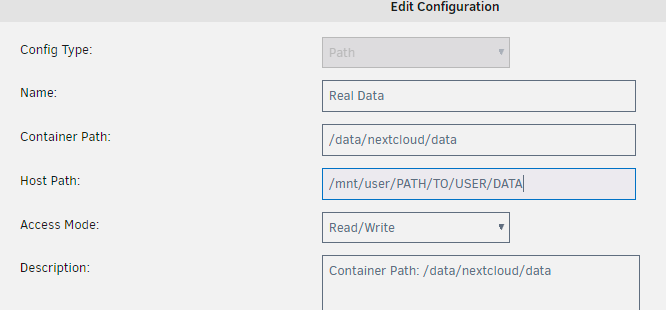
-
Gotcha, I'll just uninstall the plug-in! Thanks!
-
Hi, I was wondering if someone could help me troubleshoot an error I'm getting on my two Unraid boxes with the Trim plugin. I'm getting this error on both boxes (the device is different between the two, but the error is the same): DATE kernel: BTRFS warning (device dm-4): failed to trim 1 device(s), last error -121 I have tried to re-install the plugin, but it continues to throw this error. I was wondering if there's a way I can run the trim command manually with more verbose output so I can troubleshoot what error it's running into. I have Intel SSDs in the cache drive formatted as BTRFS.



