





ubermick
Members
-
Joined
-
Last visited
Everything posted by ubermick
-
Yep, worked before, and was able to see and connect to the home wifi after the initial setup and registration switch. Will have a go with the beta and see if that helps.
-
Sorry trurl - remember when I said I was a moron? 🤣 thebox-diagnostics-20250913-1254.zip
-
Hi all - apologies in advance for being a moron. My USB drive died a death, and spent a couple of days trying to get the config folder off it. Finally did, and managed to get everything back up and running. In doing so, I upgraded to 7.1.4 and was delighted to see that wifi was now supported. During the setup process of the new USB drive, I did see that wlan0 was available to me in the network settings, but at the time was using a wired connection to get everything redone. I've since shut down to move the box back to its normal position in the house, but there's work going on and temporarily need to use wifi for a couple of weeks until the house's Cat6 gets sorted. But on spinning everything back up, wlan0 isn't showing up in the Network Settings GUI - just eth0 and eth1, extra, rules, and routing table. During the boot, I can see that wifi is detected. Motherboard is an ASRock H270M-ITX/ac. Any suggestions on getting it back up and running?
-
Oh no - I've been backing up data that's important (to be fair, not much on there, just photos - the movies and stuff I'd be annoyed to lose, but nothing vital), but the flash drive itself is something that never dawned on me to backup.
-
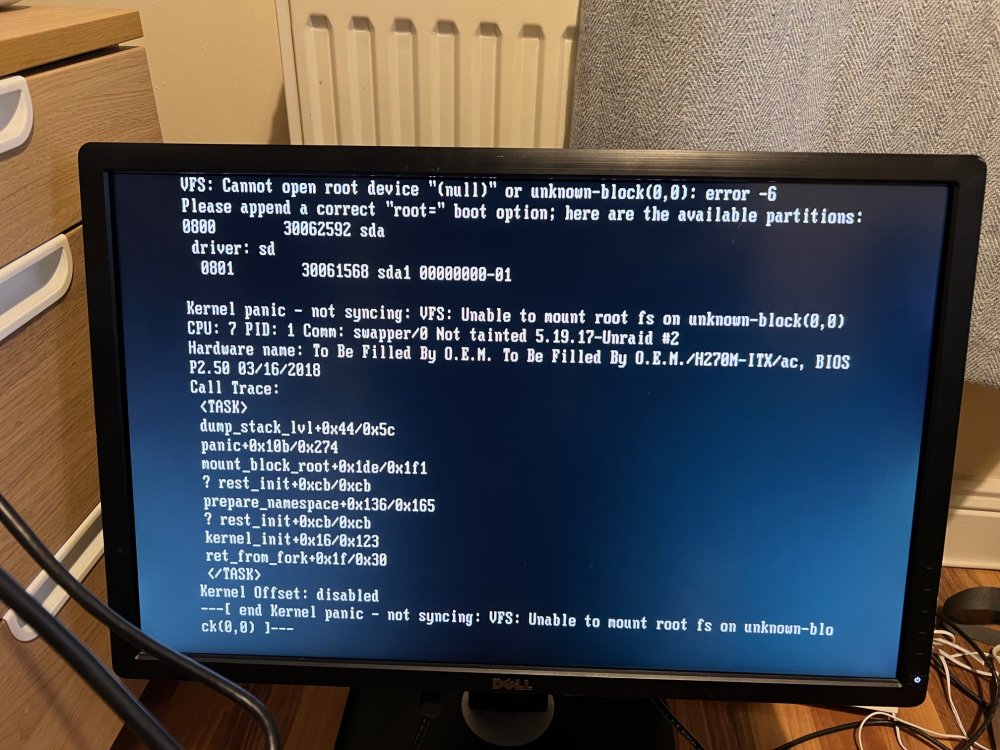
Alas no - full on neglect mode, assuming the thing was bombproof and wouldn't have issues. (Yeaaaaaah...) Managed to at least get a monitor attached to it, and booted with a head attached. Kernel Panic! So seems the way forward is to download the same version I currently have (eek) and just overwrite the bz. files with the new ones?
-
Heya folks - apologies in advance for being basically illiterate in this, but... Had a power outage yesterday. Unraid server was connected via a surge protector, but not a UPS. (I know, I know!!) Powered the box back up after the power came on. Didn't seem to notice any issues, could hear the drives spinning up. Gave it a few minutes, then went to my laptop to access the GUI and start the array. Nope, no sign of it. Ran the gamut of easy issues - rebooted router, tried different ethernet ports on the router, different cables, no luck. (It's completely headless, and currently trying to find a DVI cable to see what's happening during boot). Popped the Unraid USB drive into the PC and got an error - There's a problem with the drive, scan now and repair it. (Sorry windows, I don't trust you, I'm asking people smarter than you first.) My assumption here is that my install is corrupted, so the plan was to back up the contents of the USB, format to FAT32 and reinstall Unraid, then copy the contents of the backed up config folder back over? (
-
Adding my voice to this - an easy to install Threadfin container would be fantastic.
