





Balooforever
Moderators
-
Joined
-
Last visited
Everything posted by Balooforever
-
Le Xigmatek Elysium me fait presque envie de ressortir mon P182
-
Bonjour et bienvenue Je tourne également sous Jeedom (installer sur une co Debian sous unraid) en utilisant principalement du z-wave dans la maison
-
On va faire avec 😂 nos amis belges sont également les bienvenue !
-
Bonjour à tous, Bienvenue sur la partie langue française du forum Unraid, n'hésitez pas à poster ici une 1ere petite présentation avant de poster votre sujet Merci
-
Thank a lot, i go test it. Why 2 file for 6.8.3 - 5.5.8 ? EDIT : With your old bios and 6.7.2, my RX480 work with passtrough. With 6.8.3 and your new bios, stuck in D3 stat ... EDIT : Fine with Bios upgrade ..
-
Thank, work very well. @Leoyzen : Your virtio network work with iCloud or buggy like vmxnet ?
-
Hi, Little question with Opencore, Recovery boot for you ?
-
For your information, in OpenCore (I remove it from my EFI OpenCore) : AptioFixPkg is now part of AppleSupportPkg and OpenCore, please use them instead: AptioMemoryFix.efi is split into OpenCore and FwRuntimeServices.efi. AptioInputFix.efi is moved to AppleGenericInput.efi. CleanNvram.efi and VerifyMsrE2.efi are now part of AppleSupportPkg. EDIT : I clean the OpenCore.efi I get here, all work fine
-
Ok i readd it
-
Thank a lot @ghost82 and @Leoyzen All work : sound, topology (5 core / 10 Thread on GeekBench). RX480 work too. The missing ? The processor name in "About" With "host" passtrough, i don t expose agument for SSE4_2,etc, and it s work Little gain in multi-core with AMD Vanilla and host, thank again ! EDIT : Little question, what is the AGPMInjector.kext ? I remove it and all work
-
oh ! Thank, I go try @ghost82 : I select 1. MacOS (My partition) and nothing. Freeze on selection. I'm just stupid. ! How make automatic start on partition 1 ?
-
hum. with open core, after select boot option he go to boot option and can do nothing. i don t understand how change ACPI S08 for my gpu. I think a use the port 5 but I m not sure (and I don t know how edit the SSDT file..) openCore be little hard to switch from Clover EDIT : I don t understand how it s work, Clover work fine so ..
-
Thank a lot, let s go try
-
Ok, I go test with 8 core. Another question, I search the a Qcowe2 with OpenCore, anyone can upload ?
-
Hi, i don t understand how topology work. I "add" the patch (recopy to Clover") but i get black screen on reboot after clover boot. I don t expose topology for now (10 Processor show on MacOS). Expose with 5 Core - 2 Thread increase performance or juste cosmetic ? Thank
-
I talk about 600MB (Mo in French :D)
-
Speed transfert don t get the speed of the cache With my W10-Vm I can get 550-600Mb for data transfert and 80Mb with my MacOS
-
82574L work better than virtual e1000em ?
-
Where I can find the info.plist file ? Another question, it s possible to use only one Nic from X540-AT2 and the second for Unraid ?
-
I show. He can be my player (IIna :D), i go try with plex It s my player : all work ! Now, I w8 my pci-e card for wifi / bt and a better network driver (or a new network card :D)
-
Yep but same with old Lilu. I don t have a X4000, it s a RX480 and HEVC decode doesn't work (I think :D)
-
Yep
-
The reg from ioexplorer ? Or it s another app ?
-
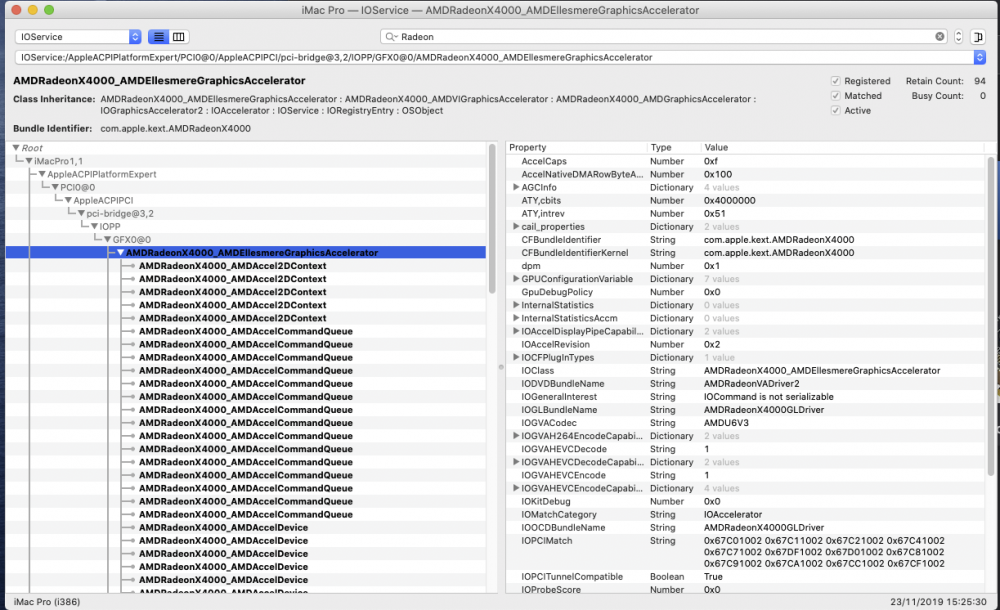
They work but X4000 in ioegistryexplorer
-
Black screen with your whatevergreen (no the beta, the old)


