






lordfiSh
Members
-
Joined
-
Last visited
Everything posted by lordfiSh
-
I use my Unraid System more as Desktop (with NAS Options), then a NAS. So I Shutdown the System for time to time. The Problem from Unraid 7 is (what issn't a Issue in 6) that the Device Paths of my NVME Drives change every start. So every start I have to to the Settings, check what my Windows NVME this time is and change in the VM Setting. Primary vDisk Location --> Manual --> /dev/nvme2n1 (or 0n1 or 1n1). I can't use /dev/disk/by-id/nvme-Force_MP600_XXXXXX, then the Unraid UI just says "Updating" but nothing happens. Any Idea?
-
It look like this is a Problem with my Hardware. I had the same Errors when rebuilding the Disk. Removed 3 of my 4 RAM Sticks and the Problem is fixed (at least for Unraid). But Memtest doesn't find any issues, not sure what are the best steps moving forward... Then rebuilded the Disk via this:
-
Hi, I found a few Thread with this Problem, but I couldn't figgure out why this happend to me. The Disk seem to be fine, also works ok in Windows, but I can't get it to work in Unraid again. I stopped the Array, the Disk is still there and I can pick it, but if I start the Array the Device is disabled again. Is there a Log somewhere why the Device got disabled in the first place? Disk is still connected to the System, still can use the SMART. Logs attached below. Thanks

-
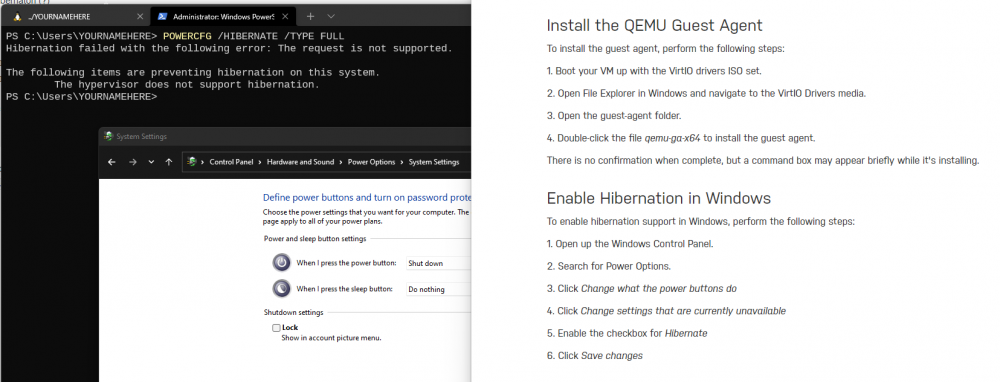
Same Question, I tried this but not showing up. Also tried to add this to the xml <pm> <suspend-to-mem enabled='yes'/> <suspend-to-disk enabled='yes'/> </pm>
-
Github Repo: https://github.com/lordfiSh/unraid-docker-images Support for: Factorio Server Manager (Beta)
-
@trurl why has this been moved to the General Support? I thought this is a Kernel Problem?
-
fixed
-
I have Problems with ConBee II USB Stick (worked fine on my Raspi). Here are the Logs: tower-syslog-20190714-0637.zip
-
I have Problems with the ConBee II USB Stick (works fine on my Raspberry 3). Here are the Logs: usb 1-3: unable to read config index 0 descriptor/all usb 1-3: can't read configurations, error -110 usb 1-3: new full-speed USB device number 10 using xhci_hcd usb 1-3: unable to read config index 0 descriptor/all usb 1-3: can't read configurations, error -110 usb usb1-port3: attempt power cycle usb 1-3: new full-speed USB device number 11 using xhci_hcd cdc_acm 1-3:1.0: ttyACM0: USB ACM device usb 1-3: USB disconnect, device number 11 usb 1-3: new full-speed USB device number 12 using xhci_hcd cdc_acm 1-3:1.0: ttyACM0: USB ACM device usb 1-3: USB disconnect, device number 12 usb 1-3: new full-speed USB device number 13 using xhci_hcd cdc_acm 1-3:1.0: ttyACM0: USB ACM device usb 1-3: reset full-speed USB device number 13 using xhci_hcd Same Problem while using Docker or passing the USB Device to a VM tower-diagnostics-20190714-2115.zip


