





unMaxe
Members
-
Joined
-
Thanks for the link, that helped. I actually tried with the ‘post argument’ as well, but I forgot to put the ‘&&’ operator at the beginning of the line, so it didn’t work.” && docker network connect NETWORKNAME CONTAINERNAME
-
Hello all, I have multiple custom networks and would like to attach some containers to two Docker networks. I can add a second network to a container with docker network connect <network> <container>, and that works fine, but it isn’t persistent. After restarting the container, the second network is lost. I tried adding --network=<custom_net> under "Extra Parameters" in the container configuration, but it failed. Does anyone have a solution how I could solve this? Thank you very much.
-
Hello, i use for the cache drive on my unRAID-Server an Samsung SSD 980 1TB (NVMe). Some SMART-values seems not correct especially the attribute "Power on hours" with actual value 36. This disk is running for 2 months. How i can correct this? Thank you for your help. diagnostics-20230130-1610.zip
-
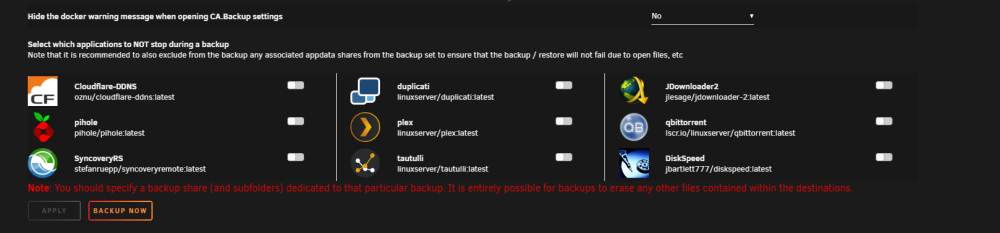
In Appdata Settings I only find under advanced options this field: Is there an other field to change docker stop options?
-
Hello, i've get an error since update AppData v2. For me meaningless error message: [07.12.2022 07:32:05] A error occured somewhere. Not deleting old backup sets of appdata Attached appdata_backup.log But it's create the archive including appdata files, seems nothing is missing. has anyone had this error before? appdata_backup.log
-
Yes, i tried to install docker with a custom port like below, now i reinstalled with default port works now (only edit port at docker settings dont worked). But now it will run fine.
-
Hello, for sure an "noob"-problem I tried to install Diskspeed-Docker via Apps but when I want to access Diskspeed-WebUI-Page I get "Error: Connection failed". Privileged mode is on. What I do wrong? Thanks for helping. diskspeed-log.txt
-
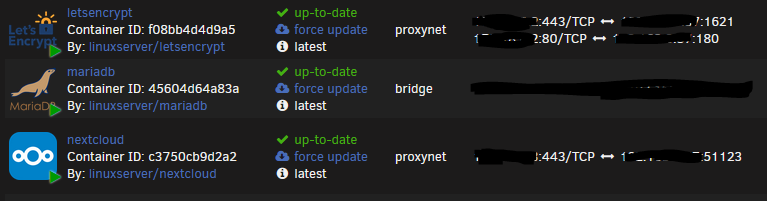
For standard ssl 443 port (which works): port 443 (internet) => 443 to 1621 (router) => ngnix (letsencrypt) "listen 443 ssl" map to nextcloud docker My dream : port 51123 (internet) => 51123 to 1621 (router) => ngnix (letsencrypt) "listen 51123 ssl" map to nextcloud docker. I change opposite the other solution above only the nextcloud.subdomain.conf (letsencrypt docker) row "listen 51123 ssl" But I try some different settings. Now I could narrow the problem a litte bit. Problem is the nextcloud "ngnix" settings not letsencrypt docker. I tested to forward port 51123 directly (without reserve proxy (letsencrypt docker) ) to nextcloud => same error: "403 Forbidden nginx/1.16.0" ... so its an config issue in nextcloud docker but where I should config that, I am a litte bit confused now... Edit: OK my "noob" problem solve partially: setting in nextcloud config.php under "trusted domain": 'trusted_domains' => array ( 0 => 'xx.xx.xx.xx:51123', (internal ip) 1 => 'my.domain.com:51123', (domain) 2 => 'xx.xx.xx.xx:51123', (external ip) BUT works only for internal and external ip not for domain!
-
Correct, that what I try.
-
Yes I took that into account, my configuration works fine with 443. I had also refer spaceinvaders trutorial :)) I only change port in nextcloud.conf from 443 ssl to 53444 ssl, and router config outside port 443 to 53444, all other config are the same. Router seems not the problem because I get on my web-request to the ngix proxy.
-
Hello, works great but now i want to configure reserve proxy with a specific ssl port (standard ssl 443 works fine) for nextcloud. I tried to change the port in nextcloud.conf but then i get 403 Forbidden nginx/1.16.0 error, what I do wrong? Thank you very much in advance. Router is configured with this port. Standard ssl (443) works. server { listen 53444 ssl; listen [::]:53444 ssl; server_name cloud.*; include /config/nginx/ssl.conf; client_max_body_size 0; location / { include /config/nginx/proxy.conf; resolver 127.0.0.11 valid=30s; set $upstream_nextcloud nextcloud; proxy_max_temp_file_size 2048m; proxy_pass https://$upstream_nextcloud:443; } }
-
Works fine but now i try to set up https. Is this possible to combinine with "letsencrypt"-docker (which have reverse proxy included). I tried to setup in /letsencrypt/nginx/proxy-confs but sadly there are no sample .conf for FileBrowser. Maybe someone have allready config this method?

