






MortalMonkey
Members
-
Joined
-
Last visited
Everything posted by MortalMonkey
-
Global C-State control was set to auto in the bios. Changed the option to disabled. Thanks for the link and quick response. I still wonder how the server ran fine for a month before locking up the first time and another month or so before todays event?
-
My Unraid server froze/crashed about a month ago and once I performed a hard reset it was back up and running until this morning. Was unable to access the server through ssh, webgui, and directly connecting monitor and keyboard. Uploading logs and maybe someone can spot the cause. Thank you. cerberus-diagnostics-20220509-1032.zip
-
Thanks for the info @JorgeB Pulled the 12 disks from the array and started the format process on the 1st disk. This is going to take some time to go through 12 of them but I at least have my existing array back up and running.
-
I've had a Unraid server running smooth on a DL380P Gen8 for two years. Decided to retire the server and build a 24 bay Threadripper server. Transplanted the HBA (HP H220 IT-Mode), cache disks and array to a SuperMicro 846 24 bay chassis with BPN-SAS2-846EL1 backplane. Ran that for a couple weeks with no issues. Recently purchased a dozen 4TB disks cheap with mixed but mostly low hrs. (All pass smart test) Running into a lot of read errors on the bottom 12 bays. Troubleshooting Steps to date: - Swapped out H220 for a LSI 9207-8i - P20.00.07.00-IT. - Swapped out the backplane. - Tried 3 different SFF8087 cables. I've ran out of ideas. Thanks. cerberus-diagnostics-20211223-2332.zip
-
I've got 2 of the HP branded Fusion-IO Drive2 1.2TB that I would love to install as cache disks as well. Gonna stick around and see if there is anything I can do to help.
-
Odd. I guess it would cause issues if they happened to share the same cpu cores or the ram was over provisioned. I have 3 vms on my machine and shut down one to boot up macosx because they share the same cpu cores.
-
In regards usb passthrough, I have usb controller passthrough working with my windows vms just fine. When i added one of the controllers to the gui template for macinabox vm + edit the xml side and fire up the vm I get a black screen. GPU passthrough, cpu count, and ram are ok. Any special settings you had to do for usb controller passthrough to work with the mac os vm @SpaceInvaderOne. I followed your video on usb passthrough for my windows vms and it works slick. I was able to passthrough 2 usb controllers from the motherboard to 2 windows vms. One is 4 ports USB3.0 and the other is 2 ports USB3.1. I just connected a 4 port hub to each.
-
USB Passthrough was a failure. Anyone know how to get that to work? I am able to assign a usb keyboard in the template and using it just fine. My goal is to pass through the entire controller I use when I fire up one of my windows virtual machines. Uploaded the template for the windows bare metal vm I will alternate hardware with. +++ OSK REMOVED +++ Catalina GPU+RAM+CPUCatalina G+M+C+USBwindows vm.rtf
-
Ok. Ryzen 7 2700x 8 cpu cores pass-though works. I had issues before and don't know why for sure. Instead of selecting cores in the template and adding the custom xml back to the config, I copied the core xml lines from a windows vm that uses the same cores over the the Catalina xml and I am typing this inside a 8 core 16gb ram rx580 vm of Catalina. Next task is usb passthrough. be back soon.
-
I can report I now have it working fine and it was actually super easy removing the original install of Mojave and starting fresh with Catalina. I have gpu passthrough with my RX 580 and 16gb ram. My next step is to see if I can get a usb controller with mouse and keyboard to pass-though and increase my core count. When I increase my core count with a 2700x to 8,6,4 cores, I get nothing on screen. Going to attempt this shortly and see if I can get it sorted out.
-
Change disk type to raw in the template.
-
Configured the XML for gpu pass-through with RX 580 and I get a blank screen. GPU pass-through working with Windows vms just fine after a custom kernel by @Leoyzen I have tried with and without V bios also. Macos boots just file and works great with VNC set as display.
-
SUCCESS!!!! Changing the disk type to RAW in the template fixed my issue. Now what? Can I change the number of cpu cores / ram without causing issues? Willing to try gpu and usb passthrough also.
-
I have a 500Mbps down connection and solid gigabit thoughout the house. Heck. It could be my ISP acting up. So many variables.
-
@SpaceInvaderOne I can so far report the download of mojave is much faster this morning. Not sure if its the servers or switching to raw. 20 minutes compared to 1h 20m. Also farther than I was with the last three install attempts. Past the first reboot now.
-
I had the same issue last night with both vnc viewer and vnc within unraid. The first two times it was offset pretty bad. This morning I am having no issues. I found that shaking the mouse and activating the mac supersized mouse pointer the mouse offset corrected itself temporarily. Web search produced no results. *shrug*
-
Ill give that a try right now and report back. Thanks
-
@testdasl I prefer VNC Viewer to connect to all my VMs. I followed the install through the disk utility and the part where it downloads the osx image from the servers. After that restart clover directs to the new os disk and I get the error.
-
@SpaceInvaderOne This is after the first reboot.
-
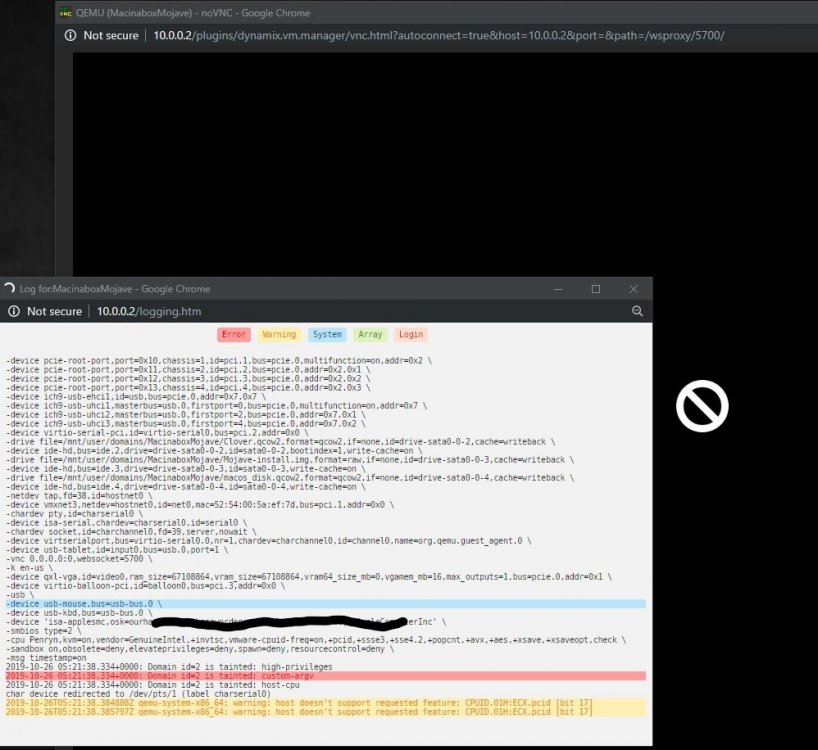
I have nvme baremetal, usb, and gpu passthrough to 2 windows vms for gaming. Both work perfect! I powered off one vm to free resources for this vm to test. -------------------------------------------------------------------------------------------------------------------------------------------------------------------------------------------------------- <?xml version='1.0' encoding='UTF-8'?> <domain type='kvm' id='2' xmlns:qemu='http://libvirt.org/schemas/domain/qemu/1.0'> <name>MacinaboxMojave</name> <uuid>3fc97ade-48bb-436b-8205-7a9bbd524aa6</uuid> <description>MacOS Mojave</description> <metadata> <vmtemplate xmlns="unraid" name="MacOS" icon="/mnt/user/domains/MacinaboxMojave/icon/mojave.png" os="Catalina"/> </metadata> <memory unit='KiB'>4194304</memory> <currentMemory unit='KiB'>4194304</currentMemory> <memoryBacking> <nosharepages/> </memoryBacking> <vcpu placement='static'>2</vcpu> <cputune> <vcpupin vcpu='0' cpuset='0'/> <vcpupin vcpu='1' cpuset='1'/> </cputune> <resource> <partition>/machine</partition> </resource> <os> <type arch='x86_64' machine='pc-q35-3.1'>hvm</type> <loader readonly='yes' type='pflash'>/mnt/user/domains/MacinaboxMojave/ovmf/OVMF_CODE.fd</loader> <nvram>/mnt/user/domains/MacinaboxMojave/ovmf/OVMF_VARS.fd</nvram> </os> <features> <acpi/> <apic/> </features> <cpu mode='host-passthrough' check='none'> <topology sockets='1' cores='2' threads='1'/> </cpu> <clock offset='utc'> <timer name='rtc' tickpolicy='catchup'/> <timer name='pit' tickpolicy='delay'/> <timer name='hpet' present='no'/> </clock> <on_poweroff>destroy</on_poweroff> <on_reboot>restart</on_reboot> <on_crash>restart</on_crash> <devices> <emulator>/usr/local/sbin/qemu</emulator> <disk type='file' device='disk'> <driver name='qemu' type='qcow2' cache='writeback'/> <source file='/mnt/user/domains/MacinaboxMojave/Clover.qcow2'/> <backingStore/> <target dev='hdc' bus='sata'/> <boot order='1'/> <alias name='sata0-0-2'/> <address type='drive' controller='0' bus='0' target='0' unit='2'/> </disk> <disk type='file' device='disk'> <driver name='qemu' type='raw' cache='writeback'/> <source file='/mnt/user/domains/MacinaboxMojave/Mojave-install.img'/> <backingStore/> <target dev='hdd' bus='sata'/> <alias name='sata0-0-3'/> <address type='drive' controller='0' bus='0' target='0' unit='3'/> </disk> <disk type='file' device='disk'> <driver name='qemu' type='qcow2' cache='writeback'/> <source file='/mnt/user/domains/MacinaboxMojave/macos_disk.qcow2'/> <backingStore/> <target dev='hde' bus='sata'/> <alias name='sata0-0-4'/> <address type='drive' controller='0' bus='0' target='0' unit='4'/> </disk> <controller type='usb' index='0' model='ich9-ehci1'> <alias name='usb'/> <address type='pci' domain='0x0000' bus='0x00' slot='0x07' function='0x7'/> </controller> <controller type='usb' index='0' model='ich9-uhci1'> <alias name='usb'/> <master startport='0'/> <address type='pci' domain='0x0000' bus='0x00' slot='0x07' function='0x0' multifunction='on'/> </controller> <controller type='usb' index='0' model='ich9-uhci2'> <alias name='usb'/> <master startport='2'/> <address type='pci' domain='0x0000' bus='0x00' slot='0x07' function='0x1'/> </controller> <controller type='usb' index='0' model='ich9-uhci3'> <alias name='usb'/> <master startport='4'/> <address type='pci' domain='0x0000' bus='0x00' slot='0x07' function='0x2'/> </controller> <controller type='sata' index='0'> <alias name='ide'/> <address type='pci' domain='0x0000' bus='0x00' slot='0x1f' function='0x2'/> </controller> <controller type='pci' index='0' model='pcie-root'> <alias name='pcie.0'/> </controller> <controller type='pci' index='1' model='pcie-root-port'> <model name='pcie-root-port'/> <target chassis='1' port='0x10'/> <alias name='pci.1'/> <address type='pci' domain='0x0000' bus='0x00' slot='0x02' function='0x0' multifunction='on'/> </controller> <controller type='pci' index='2' model='pcie-root-port'> <model name='pcie-root-port'/> <target chassis='2' port='0x11'/> <alias name='pci.2'/> <address type='pci' domain='0x0000' bus='0x00' slot='0x02' function='0x1'/> </controller> <controller type='pci' index='3' model='pcie-root-port'> <model name='pcie-root-port'/> <target chassis='3' port='0x12'/> <alias name='pci.3'/> <address type='pci' domain='0x0000' bus='0x00' slot='0x02' function='0x2'/> </controller> <controller type='pci' index='4' model='pcie-root-port'> <model name='pcie-root-port'/> <target chassis='4' port='0x13'/> <alias name='pci.4'/> <address type='pci' domain='0x0000' bus='0x00' slot='0x02' function='0x3'/> </controller> <controller type='virtio-serial' index='0'> <alias name='virtio-serial0'/> <address type='pci' domain='0x0000' bus='0x02' slot='0x00' function='0x0'/> </controller> <interface type='bridge'> <mac address='52:54:00:5a:ef:7d'/> <source bridge='br0'/> <target dev='vnet1'/> <model type='vmxnet3'/> <alias name='net0'/> <address type='pci' domain='0x0000' bus='0x01' slot='0x00' function='0x0'/> </interface> <serial type='pty'> <source path='/dev/pts/1'/> <target type='isa-serial' port='0'> <model name='isa-serial'/> </target> <alias name='serial0'/> </serial> <console type='pty' tty='/dev/pts/1'> <source path='/dev/pts/1'/> <target type='serial' port='0'/> <alias name='serial0'/> </console> <channel type='unix'> <source mode='bind' path='/var/lib/libvirt/qemu/channel/target/domain-2-MacinaboxMojave/org.qemu.guest_agent.0'/> <target type='virtio' name='org.qemu.guest_agent.0' state='disconnected'/> <alias name='channel0'/> <address type='virtio-serial' controller='0' bus='0' port='1'/> </channel> <input type='tablet' bus='usb'> <alias name='input0'/> <address type='usb' bus='0' port='1'/> </input> <input type='mouse' bus='ps2'> <alias name='input1'/> </input> <input type='keyboard' bus='ps2'> <alias name='input2'/> </input> <graphics type='vnc' port='5900' autoport='yes' websocket='5700' listen='0.0.0.0' keymap='en-us'> <listen type='address' address='0.0.0.0'/> </graphics> <video> <model type='qxl' ram='65536' vram='65536' vgamem='16384' heads='1' primary='yes'/> <alias name='video0'/> <address type='pci' domain='0x0000' bus='0x00' slot='0x01' function='0x0'/> </video> <memballoon model='virtio'> <alias name='balloon0'/> <address type='pci' domain='0x0000' bus='0x03' slot='0x00' function='0x0'/> </memballoon> </devices> <seclabel type='dynamic' model='dac' relabel='yes'> <label>+0:+100</label> <imagelabel>+0:+100</imagelabel> </seclabel> <qemu:commandline> <qemu:arg value='-usb'/> <qemu:arg value='-device'/> <qemu:arg value='usb-mouse,bus=usb-bus.0'/> <qemu:arg value='-device'/> <qemu:arg value='usb-kbd,bus=usb-bus.0'/> <qemu:arg value='-device'/> <qemu:arg value='isa-applesmc,osk=00000000000000000-Obscured-00000000000l(c)AppleComputerInc'/> <qemu:arg value='-smbios'/> <qemu:arg value='type=2'/> <qemu:arg value='-cpu'/> <qemu:arg value='Penryn,kvm=on,vendor=GenuineIntel,+invtsc,vmware-cpuid-freq=on,+pcid,+ssse3,+sse4.2,+popcnt,+avx,+aes,+xsave,+xsaveopt,check'/> </qemu:commandline> </domain>
-
Ryzen 7 2700x
-
This is my third attempt at installing macos using the utility and I get the same error each time after the os installs. I did not modify any settings. This is installed on a Ryzen 7 2700x system if that makes a difference.
-
Just today I use the macbook we have in the IT helpdesk office to create a MacOS Mojave boot image so I could spend my evening adding a MacOS VM to my 2 gamers 1 CPU unRAID build. Get home and load up community applications so I could use Krusader to copy the image off the flash drive. Guess what I see at the top of the community applications list? Talk about GREAT timing @SpaceInvaderOne
-
I now have 2 unRAID servers. The one on the left is my media/file server. A Dell Poweredge T410 with dual Xeon cpus and the one on the right is the new 2 gamers 1 cpu build with dual nvme windows passthrough and dual Radeon RX580's. The Ryzen server I will upgrade to a Ryzen 9 3900x and dual RX 5700 XT's in the near future and out of the desktop chassis and into a 4u server chassis. @Leoyzen Thanks again for building those kernel updates so quick to fix this unfortunate bug.
.thumb.png.a4f7ad77325d132629b407cf109cba69.png)
-
After locating and passing through a usb controller on the motherboard I finally have full control of my primary windows os with full gpu passthrough. The 2nd VM works perfect also just need to passthrough another USB controller to it. Thanks again for the patch! I finally have 2 gamers one cpu with a Ryzen 7 2700x, ASUS ROG Strix X470-F gaming motherboard on latest bios revision. 2 nvme bare metal windows installs passed through to vms with 2 RX580 GPU's and gaming away. * Commented this so others may find this post.



.png.b106a8817bf32133eee0dd6149ac0614.png)