Opawesome
Members
-
Joined
-
Last visited
Everything posted by Opawesome
-
Yes I saw a couple of questions regarding the activation codes. But none of the answers stated clearly whether their validity would be kept "indefinitely", or whether "only for a certain time frame".
-
I bought an extra pro licence that I activated on a test Unraid VM, but I also bought an extra basic license. Do I have to use this "basic" activation code within a certain time frame, or will it stay valid "forever" ? I sincerely apologize to @limetech for not joining the new "periodic payment" model, but I understand that the pre-announcement was also made to give the current users the opportunity to stack up a couple of extra licenses if they want to.
-
Well, it will depend on whether the price of the lifetime license will stay around 130 USD or increase to 250 USD or more. I am not saying that limetech would do it, but if you give the choice between a 20 USD/year subscription or a 500 USD lifetime licence, you are not really offering lifetime licences anymore. I think people fear this kind of business model shift because of that.
-
I have been using Unraid for 4-5 years now, and I have just bought an extra pro licence just in case I would want to build another Unraid machine in the future. Although @limetech did stated that "pro/lifetime" licences would still be offered, it might be at a significant price increase. So I'd rather be safe than sorry. As a user I obviously would have preferred that the pricing/lifetime license model stayed the same, but I also understand that Limetech is not a charity. And the least I can say, is that I don't feel having been robbed paying 129 USD for my Unraid licence.
-
Hi, I was wondering if adding OpenVPN would be interesting ? For those interested, here is how to do it manually yourself via the /boot/extra folder:
-
Oh man, I spent so much time searching for that in vain. Thank you very much !
-
I am bumping up this because I need an answer to complete my LUKS header restore command/script. That would be useful for the community (not only me). See here:
-
The script to backup works fine. It is just the automated restore command that might have issues. It just means that you will have to run the restore command manually, ie. identifying the right HD/nvme device and the right backed up header file with a command like: cryptsetup luksHeaderRestore --header-backup-file <path to relevant LUKS header backup> <device / device partition> IMPORTANT NOTE: If the disk is part of an array protected by parity, the <device / device partition> should be the managed partition device created upon starting the array in maintenance mode, i.e. "/dev/mdXp1", and not "/dev/sdY1". or else you will void the parity. For disk not protected by parity (e.g.: cache disk), pointing to the device partition (i.e.: "/dev/sdY1") seems to work better than pointing to the device itself (i.e.: "/dev/sdY") see: https://forums.unraid.net/topic/133972-backup-and-restore-of-luks-headers-on-array-data-drives/#comment-1217840 and https://gitlab.com/cryptsetup/cryptsetup/-/blob/main/FAQ.md#6-backup-and-data-recovery
-
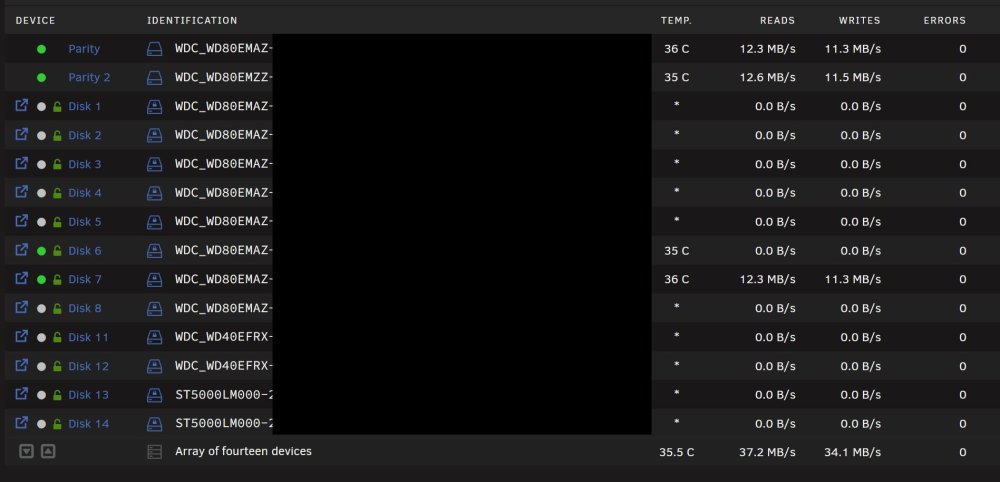
It actually works. I used the following command to get the exact device names: df -h Filesystem Size Used Avail Use% Mounted on rootfs 50G 323M 50G 1% / tmpfs 32M 1.6M 31M 5% /run /dev/sda1 15G 2.5G 12G 17% /boot overlay 50G 323M 50G 1% /lib overlay 50G 323M 50G 1% /usr devtmpfs 8.0M 0 8.0M 0% /dev tmpfs 32G 0 32G 0% /dev/shm tmpfs 128M 9.5M 119M 8% /var/log /dev/mapper/md1p1 7.3T 3.3T 4.1T 45% /mnt/disk1 /dev/mapper/md2p1 7.3T 6.9T 419G 95% /mnt/disk2 /dev/mapper/md3p1 7.3T 3.9T 3.5T 53% /mnt/disk3 /dev/mapper/md4p1 7.3T 6.1T 1.3T 84% /mnt/disk4 /dev/mapper/md5p1 7.3T 6.6T 769G 90% /mnt/disk5 /dev/mapper/md6p1 7.3T 6.0T 1.4T 82% /mnt/disk6 /dev/mapper/md7p1 7.3T 3.9T 3.5T 53% /mnt/disk7 /dev/mapper/md8p1 7.3T 4.8T 2.5T 66% /mnt/disk8 /dev/mapper/md11p1 3.7T 26G 3.7T 1% /mnt/disk11 /dev/mapper/md12p1 3.7T 26G 3.7T 1% /mnt/disk12 /dev/mapper/md13p1 4.6T 3.2T 1.4T 70% /mnt/disk13 /dev/mapper/md14p1 4.6T 527G 4.1T 12% /mnt/disk14 /dev/mapper/nvme0n1p1 932G 197G 735G 22% /mnt/nvme /dev/mapper/sdo1 932G 437G 495G 47% /mnt/sata_raid shfs 75T 45T 30T 61% /mnt/user0 shfs 75T 45T 30T 61% /mnt/user /dev/loop2 45G 30G 12G 72% /var/lib/docker /dev/loop3 1.0G 4.7M 904M 1% /etc/libvirt I tried limiting write speed to disk7 by adding the following extra parameter to the Krusader docker container: --device-write-bps=/dev/mapper/md7p1:10mb Seems to work as intended (see capture attached).
-
I would be very happy to know if limiting write speed to array is possible. Any news by any chance ?
-
FYI, I found in a comment under one of SpaceInvaderOne's video on YouTube that someone figured out how to finalise the "stop array" operation when this problem occurs : (link to source - see the "highlight reply" below the video) I hope this workaround will help until, hopefully, this issue is fixed.
-
I rebooted and got an unclean shutdown... Now performing a parity check... I later found a comment under one of SpaceInvaderOne's video on YouTube that someone figured out how to finalise the "stop array" operation (https://www.youtube.com/watch?v=nV5snitWrBk&lc=Ugweuc_wFZta3uxs0PV4AaABAg.9u9MWHF1ArU9vHBCZfLE09) : I hope this will help.
-
I mean "was" encrypted, now it is filled with zero. I thought about mounting the drive manually to unlock the "not mounted" error loop but I think that is not possible now the drive has no file system on it.
-
Hi, i am currently facing that problem during a critical shrink array operation: Have you been able to find a solution to complete the stop array operation properly ? I was thinking about mounting the drive manually via CLI, to see if that would fix that error but I am unsure whether this is a good idea.
-
I should point out that disk10 is encrypted.
-
Hi, I have just finished zeroing disk10 using this script, during the course of a "shrink array while retaining parity" operation. I understand that this script unmounted disk10 just before zeroying it, as shown in the log below: Unmounting Disk 10 ... Clearing Disk 10 ... I now need to stop the array to create the new config without disk10, but i am stuck with this status: retry unmounting disk share(s) Unraid logs show the following, which seems coherent with the unmounting performed by the zeroying script: Nov 3 15:39:18 MOZART root: umount: /mnt/disk10: not mounted. Nov 3 15:39:18 MOZART emhttpd: shcmd (17681057): exit status: 32 Nov 3 15:39:18 MOZART emhttpd: Retry unmounting disk share(s)... How can i complete the "stop array" operation ? I really need to do it the clean way this time. Attached are the diagnostics files, if required. Many thanks, Op
-
Indeed. I cannot remember why I came to that conclusion. Many thanks !
-
Hi, How can I start and stop syslog server from the command line ? (I have been looking for a long time but cannot find the answer) My Unraid machine is the syslog server for my network I want to be able to perform proper backups of the logs, which I cannot do if the syslog server is running apparently. Many thanks, OP
-
Have you been able to get the OpenVPN server working with any package sourced from the official slackware website ?
-
Noted. The disk is on a backplate connected to an HBA with SAS cables, so I kinda ruled out the cable issue (although I will order an extra cable to make the swap as you suggest). But the disk having been on 24/7 for more than 10 years, I think its time for replacement indeed. If the issue persists after I have put a new disk, then it means this slot of my HDD backplate is defective (which would suck...)
-
UPDATE: Data rebuild finished successfully (I think) but the parity check performed right after caused new read errors. As I still have 31 TB of free space available on my array, I have decided to scatter the 350GB of data from the failing drive (currently emulated thanks to parity) on another drive, then perform a shrink of the array (I will try the method that preserves parity first) and then dispose of the failing drive. Do not hesitate to let me know if I am making a mistake 🙂. In particular, I wonder if I should zero the failed drive while it is being emulated, or actually zero the drive after reassigning it in the config. Unless it makes no difference (which I think could be the case) ?
-
This is noted. Thank you very much for your help.
-
Since the drive looks fine, I took the chance of initiating a rebuild onto itself, as shown here: https://docs.unraid.net/unraid-os/manual/storage-management/#rebuilding-a-drive-onto-itself
-
The extended test completed without error (see attached).
-
Hi, I just got HDD read errors this morning on my drive nb 9. What is your advice regarding that disk and the others ? Bellow is an abstract of the SMART info for that HDD (WDC_WD40EFRX-68WT0N0_WD-WCC4E2DCKH26-20231004-1912 sds), and attached my diagnostics file. I thank you very much in advance for your precious advice. Best, OP === START OF INFORMATION SECTION === Model Family: Western Digital Red Device Model: WDC WD40EFRX-68WT0N0 Serial Number: WD-WCC4E2DCKH26 LU WWN Device Id: 5 0014ee 20da937f8 Firmware Version: 82.00A82 User Capacity: 4,000,787,030,016 bytes [4.00 TB] Sector Sizes: 512 bytes logical, 4096 bytes physical Rotation Rate: 5400 rpm Device is: In smartctl database 7.3/5417 ATA Version is: ACS-2 (minor revision not indicated) SATA Version is: SATA 3.0, 6.0 Gb/s (current: 6.0 Gb/s) Local Time is: Wed Oct 4 19:12:10 2023 CEST SMART support is: Available - device has SMART capability. SMART support is: Enabled AAM feature is: Unavailable APM feature is: Unavailable Rd look-ahead is: Enabled Write cache is: Enabled DSN feature is: Unavailable ATA Security is: Disabled, NOT FROZEN [SEC1] Wt Cache Reorder: Enabled [...] SMART Attributes Data Structure revision number: 16 Vendor Specific SMART Attributes with Thresholds: ID# ATTRIBUTE_NAME FLAGS VALUE WORST THRESH FAIL RAW_VALUE 1 Raw_Read_Error_Rate POSR-K 200 200 051 - 13 3 Spin_Up_Time POS--K 179 173 021 - 8025 4 Start_Stop_Count -O--CK 094 094 000 - 6900 5 Reallocated_Sector_Ct PO--CK 200 200 140 - 0 7 Seek_Error_Rate -OSR-K 100 253 000 - 0 9 Power_On_Hours -O--CK 036 036 000 - 47206 10 Spin_Retry_Count -O--CK 100 100 000 - 0 11 Calibration_Retry_Count -O--CK 100 100 000 - 0 12 Power_Cycle_Count -O--CK 099 099 000 - 1407 192 Power-Off_Retract_Count -O--CK 200 200 000 - 84 193 Load_Cycle_Count -O--CK 198 198 000 - 6938 194 Temperature_Celsius -O---K 116 104 000 - 36 196 Reallocated_Event_Count -O--CK 200 200 000 - 0 197 Current_Pending_Sector -O--CK 200 200 000 - 0 198 Offline_Uncorrectable ----CK 100 253 000 - 0 199 UDMA_CRC_Error_Count -O--CK 200 200 000 - 0 200 Multi_Zone_Error_Rate ---R-- 200 200 000 - 0 ||||||_ K auto-keep |||||__ C event count ||||___ R error rate |||____ S speed/performance ||_____ O updated online |______ P prefailure warning [...]