Opawesome
Members
-
Joined
-
Last visited
Everything posted by Opawesome
-
Thank you so much again for all this @foz . You're definitely the goat. WOW. That dashboard is basically what is probably lacking the most in the backblaze client. I'm speechless. Count me in amongst the interested people.
-
@foz , you're the goat. Plain and simple. I've been waiting for years for this fix... Those very last moments of wait are like a torture :)
-
I noticed that when adding a drive to the template, the drive won't show in Wine on the first start of the docker container, but it will after you restart the container. I've notices that it doesn't make a difference whether you set the path to /drive_x or /drive_x/
-
I tried to increase the CPU load with this command: yes > /dev/null & and it indeed allowed other threads to launch. Once the threads were launched, I killed the "increase CPU load command" with: pkill yes . At any time, you can check the current number of backblaze threads with the command: ps aux | grep bzthread | wc -l . I'll further investigate, but this might be a good base for a workaround.
-
I'm also having the slow upload speeds issue. I understand that for some reasons, you need to put load on the CPU threads to make the backblaze client create more threads: https://github.com/JonathanTreffler/backblaze-personal-wine-container/issues/212#issuecomment-3250106214 But I have no clue about how to do that on the wine docker container. Any help would be greatly appreciated.
-
This is indeed a working solution for me. I modified the /boot/config/go file by adding this: # Fix NGINX limits # sed cannot find the file when executed directly, waiting for 10 secs first sleep 10 sed -i "s;zone=authlimit:1m rate=30r/m;zone=authlimit:1m rate=60r/s;g" /etc/nginx/nginx.conf sed -i "s;zone=authlimit burst=20;zone=authlimit burst=60;g" /etc/nginx/conf.d/locations.conf /usr/sbin/nginx -s reload
-
The container has been working flawlessly for me. Usually, a good start is to: On one hand, add verbosity the command you use on your client to connect to the container by adding -vv or -vvv in your command. For example: ssh -vv -p 22 [email protected] On the other hand, check the log inside the container (not inside Unraid), by opening the container's console and typing this command: cat /config/logs/openssh/current You will get more information as to why you are getting a "connection refused" output with your ssh client. I hope this will help.
-
I can't see the changes for the 02/10/2024 update in the changelog either.
-
You may want to double check this 😀. I really only see instructions referring to "cache only" and "cache prefer" (i.e. versions before 6.12 if I am not mistaken) on this page : https://docs.unraid.net/unraid-os/manual/storage-management/#backing-up-the-pool-to-the-array
-
Tutorial was updated with the openvpn-2.5.5-x86_64-1.txz package for Slackware.
-
You can do it with the array started. Just click on the relevant shares (i.e. appadata, apps, cachetmp and downloads in your case) to change the setting. I think that with the newer versions of unraid, the guide is a bit outdated and the setting "use disk cache" has been changed a bit. You must set the primary storage to "cache" and the secondary storage to "array". The effect of these new settings will occur next time the mover is called, whether manually or upon schedule, meaning that all the data from these shares (currently stores only on your cache drive) will be moved to your array.
-
You are over thinking it 😀 (see the image)

-
You are in the right place 😀. I just think your syntax is wrong. You should probably set the value to: {"writedescription": true} to respect the JSON format requirement (I assumed you had already some options set up with the right format). See https://github.com/alexta69/metube?tab=readme-ov-file#configuration-via-environment-variables for the details. It says:
-
I indeed see "br-fccdcfbfa4d2 UP 192.168.1.1/8" in the ifconfig file of your diagnostics, which is overlapping with your 192.168.1.0/24 LAN. That could be the issue. I would try deleting this custom docker network.
-
Can you try maybe deleting the 192.168.2.0/8 custom docker network ? This /8 CIDR seems very wrong to me on the 192.168.X.X range, as it may overlap with the 192.168.1.0/24 network.
-
If the VPN tunnel is already setup and if you can ping the remote machine from your local machine via that tunnel, then you just need to connect to your remote server via its local IP address. You should be aware however that the speed of a large backup through a VPN tunnel is likely to be significantly slower than through a direct SSH tunnel.
-
I concur, I did this a year ago and worked flawlessly. Just make sure that all files were indeed moved to the array before replacing your cache drive.
-
All the available options are described here : https://github.com/yt-dlp/yt-dlp/blob/master/yt_dlp/YoutubeDL.py#L183 There is indeed this option: The format to use in the docker container template would be to add the following in the "options" field (i.e.: the "Container Variable: YTDL_OPTIONS" variable): "writedescription": true
-
Have you tried stopping the array before enabling bridging, and then starting back the array ? Also, are your other settings the same as mine ?
-
You can see my hardware config in my signature below. It has been running well with Unraid for 4-5 years now. This 4U Logic Case SC-4316S case uses standard ATX power supplies, and I replaced the fans with Noctua fans to reduce the noise level even further.
-
Yes, it was said in the latest podcast. During the show Ed says he is just using one "4 GB" USB stick for his array on his server in order to circumvent this "limitation".
-
If, for example, the starter Licence is like 25 USD / year but the Lifetime licence is 250 USD.
-
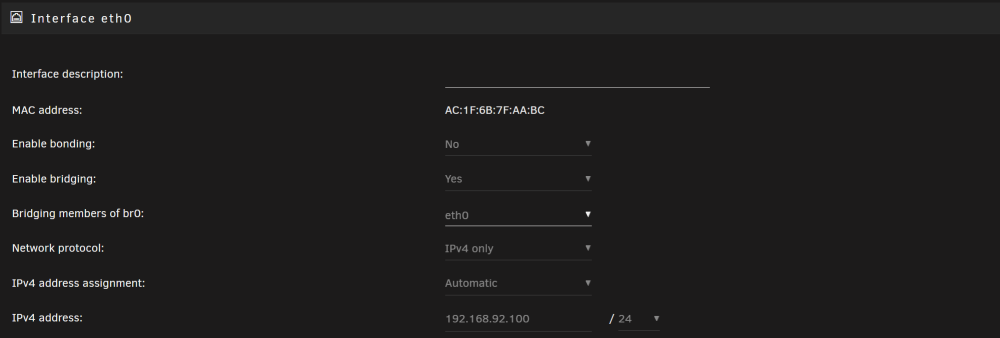
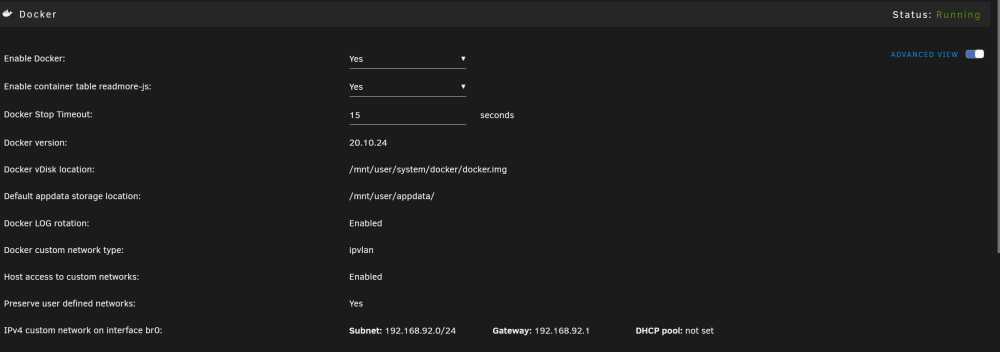
Hi, Here are my (i) pihole docker container settings; (ii) Unraid network setting; and (iii) docker settings. They work on my system. My router is set to use 192.168.92.2 as primary DNS server address.

-
After updating my test server, the 'Hide "dot" files:' parameter in settings > SMB settings remained set to "no". I could not find a 'Show "dot" files:' parameter however.
-
I saw that from limetech: