






Mysteic
Members
-
Joined
-
Last visited
-
I have multicore compression on. Should I try normal compression or turn it off?
-
This plugin stopped working during that major update and has never completed cleanly since then. I have tried changing settings dozens of times and nothing works. Currently set to stop all containers, backup, and start all containers. I keep getting error mess for the following, but it is creating the tar and it looks fine. Any insight would be helpful. Thank you. [Plex-Media-Server] tar creation failed! Tar said: tar: /mnt/cache/appdata/Plex-Media-Server/Library/Application Support/Plex Media Server/Plug-in Support/Databases/com.plexapp.plugins.library.db-2023-01-29: File shrank by 175224832 bytes; padding with zeros backup.debug.log backup.log
-
I guess I glossed over the fact that option was reset after an update. I believe the one where it advised to remove and reinstall the app due to a change. Can't test it right now, but I am pretty confident that is going to be the fix. Thanks.
-
Depends. The files are accessed by another docker I use called Tautulli. I thought the backup processed stopped all dockers first, worked, and then turned them back on. If it is turning them off 1 at a time and Tautulli is still running, it does access static data in Plex's files.
-
I have been reading in here and changing configs, and reading the help info in the plugin for hours and I just give up. I only care about backing up plex app data and it either fails if I include mnt/cache/.... or doesn't back anything up with "there isn't any volume" when I only include mnt/user/..... I attached the debug.log but at this point I might just delete the plugin and move on. backup.debug.log
-
I was not in a position to run memtest so I just replaced the RAM. So far no further errors after the RAM swap. Appears that my 5 year old RAM was trying to meet its maker. Thanks for pointing me in the right direction.
-
I have a pretty new SSD that replaced an old SSD that failed on me after 3 years. It has been about 7 months and the new drive is doing the same thing as the old drive. When I copy items to Unraid, it gets cached no issue. Move command runs at night to move to array, no issue. Wake up the next morning to a log full of corruption errors. I have cleared the error log to monitor that. During the mean time I did a scrub and this is what I got below. Is this drive dying as well or is there something I can do? Granted they are cheat kinda crappy drives so do I need ECC RAM or better SSDs? Scrub results: UUID: c70a7b27-3052-43b0-93ce-e4a59ec706e7 Scrub started: Fri Feb 10 08:54:12 2023 Status: finished Duration: 0:08:03 Total to scrub: 223.71GiB Rate: 474.28MiB/s Error summary: csum=31 Corrected: 0 Uncorrectable: 31 Unverified: 0 Syslog: Feb 10 08:54:41 Yiggdrasil kernel: BTRFS error (device sdc1): unable to fixup (regular) error at logical 14542561280 on dev /dev/sdc1 Feb 10 08:54:46 Yiggdrasil kernel: BTRFS warning (device sdc1): checksum error at logical 17283506176 on dev /dev/sdc1, physical 18365636608, root 5, inode 38197, offset 724992, length 4096, links 1 (path: appdata/Plex-Media-Server/Library/Application Support/Plex Media Server/Media/localhost/0/eb8bfb02be3b1b441dda9b91fee6c03d0d9f9fe.bundle/Contents/Indexes/index-sd.bif) Feb 10 08:54:46 Yiggdrasil kernel: BTRFS error (device sdc1): bdev /dev/sdc1 errs: wr 0, rd 0, flush 0, corrupt 4, gen 0 Feb 10 08:54:46 Yiggdrasil kernel: BTRFS error (device sdc1): unable to fixup (regular) error at logical 17283506176 on dev /dev/sdc1 Feb 10 08:54:51 Yiggdrasil kernel: BTRFS warning (device sdc1): checksum error at logical 19839660032 on dev /dev/sdc1, physical 20921790464, root 5, inode 40640, offset 2842624, length 4096, links 1 (path: appdata/Plex-Media-Server/Library/Application Support/Plex Media Server/Media/localhost/1/11dca2dc678f0312f313a84f05fd4e15eb15f58.bundle/Contents/Indexes/index-sd.bif) Feb 10 08:54:51 Yiggdrasil kernel: BTRFS error (device sdc1): bdev /dev/sdc1 errs: wr 0, rd 0, flush 0, corrupt 5, gen 0 Feb 10 08:54:51 Yiggdrasil kernel: BTRFS error (device sdc1): unable to fixup (regular) error at logical 19839660032 on dev /dev/sdc1 Feb 10 08:54:56 Yiggdrasil kernel: BTRFS warning (device sdc1): checksum error at logical 22247948288 on dev /dev/sdc1, physical 23330078720, root 5, inode 43017, offset 2887680, length 4096, links 1 (path: appdata/Plex-Media-Server/Library/Application Support/Plex Media Server/Media/localhost/1/41c7f3a4a3ad9d1e2c8218677044de843505dfc.bundle/Contents/Indexes/index-sd.bif) Feb 10 08:54:56 Yiggdrasil kernel: BTRFS error (device sdc1): bdev /dev/sdc1 errs: wr 0, rd 0, flush 0, corrupt 6, gen 0 Feb 10 08:54:56 Yiggdrasil kernel: BTRFS error (device sdc1): unable to fixup (regular) error at logical 22247948288 on dev /dev/sdc1 Feb 10 08:55:23 Yiggdrasil kernel: BTRFS warning (device sdc1): checksum error at logical 35393884160 on dev /dev/sdc1, physical 36476014592, root 5, inode 56673, offset 3006464, length 4096, links 1 (path: appdata/Plex-Media-Server/Library/Application Support/Plex Media Server/Media/localhost/2/3add088fb265debb4badc10d789c970399d2000.bundle/Contents/Indexes/index-sd.bif) Feb 10 08:55:23 Yiggdrasil kernel: BTRFS error (device sdc1): bdev /dev/sdc1 errs: wr 0, rd 0, flush 0, corrupt 7, gen 0 Feb 10 08:55:23 Yiggdrasil kernel: BTRFS error (device sdc1): unable to fixup (regular) error at logical 35393884160 on dev /dev/sdc1 Feb 10 08:55:39 Yiggdrasil kernel: BTRFS warning (device sdc1): checksum error at logical 43387895808 on dev /dev/sdc1, physical 44470026240, root 5, inode 64727, offset 8318976, length 4096, links 1 (path: appdata/Plex-Media-Server/Library/Application Support/Plex Media Server/Media/localhost/2/cf9cb0c1c6a56e68f9726195ce7bb8a07c69d49.bundle/Contents/Indexes/index-sd.bif) Feb 10 08:55:39 Yiggdrasil kernel: BTRFS error (device sdc1): bdev /dev/sdc1 errs: wr 0, rd 0, flush 0, corrupt 8, gen 0 Feb 10 08:55:39 Yiggdrasil kernel: BTRFS error (device sdc1): unable to fixup (regular) error at logical 43387895808 on dev /dev/sdc1 Feb 10 08:55:51 Yiggdrasil kernel: BTRFS warning (device sdc1): checksum error at logical 49466060800 on dev /dev/sdc1, physical 50548191232, root 5, inode 70623, offset 3170304, length 4096, links 1 (path: appdata/Plex-Media-Server/Library/Application Support/Plex Media Server/Media/localhost/3/38c1fb68b0b891cf17034f86100b7065e5a3445.bundle/Contents/Indexes/index-sd.bif)
-
I already fixed the issues it caused. I do have a backup, but that would have put me before this happened and I feel like it would have just done this again. I am more concerned with why it decided to just update something without asking me first. And if I can stop it from doing that again.
-
I was greated today with my Plex not workin on my local net. I figured it was related to all the other issues I have been having due to the cache drive dying, but no. I found that Unraid just reset the server's name and several other options for no reason. Logs show it may have updated the Samba file system, but I am not sure. Can someone look at this and help me figure out if I just just fix the settings or a complete restore of the flash drive? yiggdrasil-diagnostics-20221031-1531.zip
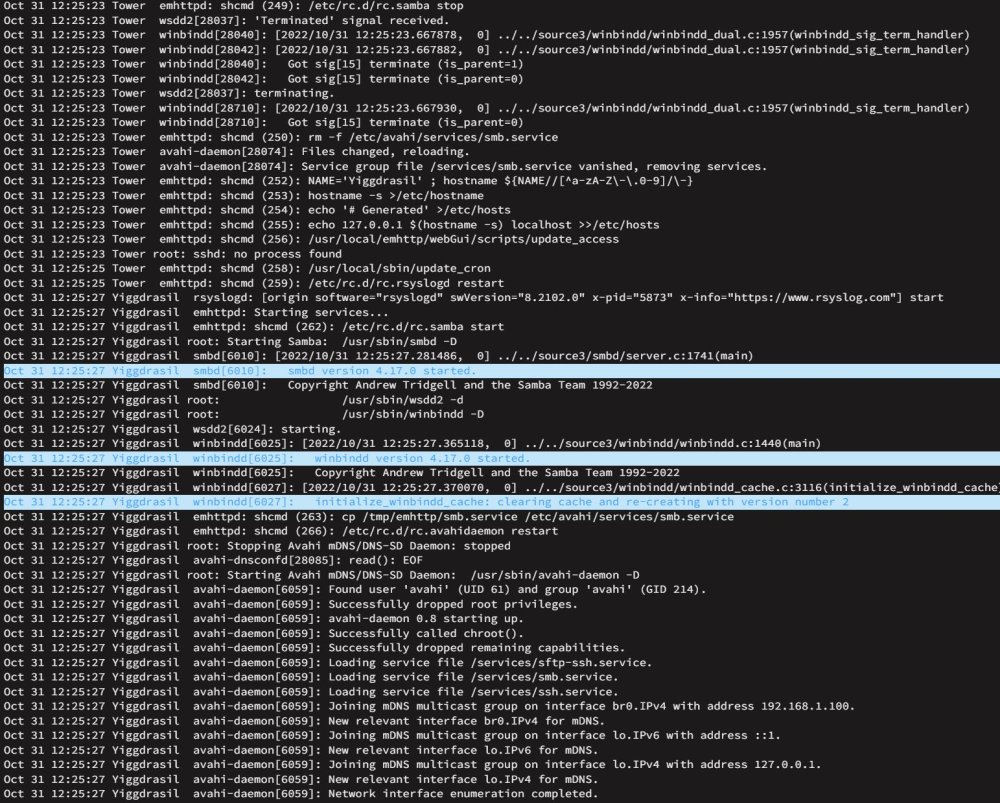
-
I don't know if this can be saved. I had a SSD cache drive fail already and I have had to rebuild my Plex db 4 times now in the last 2 weeks. I am not doing it again. If I have to delete the docker image and start over on the plex db, I am switching OS for good. yiggdrasil-diagnostics-20221016-2213.zip Oct 16 22:25:48 Yiggdrasil root: Stopping Avahi mDNS/DNS-SD DNS Server Configuration Daemon: stopped Oct 16 22:25:48 Yiggdrasil root: Starting Avahi mDNS/DNS-SD DNS Server Configuration Daemon: /usr/sbin/avahi-dnsconfd -D Oct 16 22:25:48 Yiggdrasil avahi-dnsconfd[23135]: Successfully connected to Avahi daemon. Oct 16 22:25:48 Yiggdrasil emhttpd: shcmd (113): /usr/local/sbin/mount_image '/mnt/user/system/docker/docker.img' /var/lib/docker 25 Oct 16 22:25:48 Yiggdrasil kernel: loop3: detected capacity change from 0 to 52428800 Oct 16 22:25:48 Yiggdrasil kernel: BTRFS: device fsid bf66e15c-99ee-4fc4-a9f2-0700faaa960e devid 1 transid 1195349 /dev/loop3 scanned by mount (23170) Oct 16 22:25:48 Yiggdrasil kernel: BTRFS info (device loop3): using free space tree Oct 16 22:25:48 Yiggdrasil kernel: BTRFS info (device loop3): has skinny extents Oct 16 22:25:48 Yiggdrasil kernel: BTRFS info (device loop3): start tree-log replay Oct 16 22:25:48 Yiggdrasil kernel: BTRFS error (device loop3): incorrect extent count for 30408704; counted 1003, expected 1001 Oct 16 22:25:48 Yiggdrasil kernel: BTRFS: error (device loop3: state A) in btrfs_recover_log_trees:6735: errno=-5 IO failure Oct 16 22:25:48 Yiggdrasil kernel: BTRFS: error (device loop3: state EA) in btrfs_replay_log:2500: errno=-5 IO failure (Failed to recover log tree) Oct 16 22:25:48 Yiggdrasil root: mount: /var/lib/docker: can't read superblock on /dev/loop3. Oct 16 22:25:48 Yiggdrasil root: dmesg(1) may have more information after failed mount system call. Oct 16 22:25:48 Yiggdrasil root: mount error Oct 16 22:25:48 Yiggdrasil kernel: BTRFS error (device loop3: state EA): open_ctree failed Oct 16 22:25:48 Yiggdrasil emhttpd: shcmd (113): exit status: 1 Oct 16 22:25:49 Yiggdrasil avahi-daemon[23124]: Server startup complete. Host name is Yiggdrasil.local. Local service cookie is 821752906. Oct 16 22:25:50 Yiggdrasil avahi-daemon[23124]: Service "Yiggdrasil" (/services/ssh.service) successfully established. Oct 16 22:25:50 Yiggdrasil avahi-daemon[23124]: Service "Yiggdrasil" (/services/smb.service) successfully established. Oct 16 22:25:50 Yiggdrasil avahi-daemon[23124]: Service "Yiggdrasil" (/services/sftp-ssh.service) successfully established. Oct 16 22:26:11 Yiggdrasil nmbd[23081]: [2022/10/16 22:26:11.472230, 0] ../../source3/nmbd/nmbd_become_lmb.c:398(become_local_master_stage2)


