ddm73
Members
-
Joined
-
Last visited
Everything posted by ddm73
-
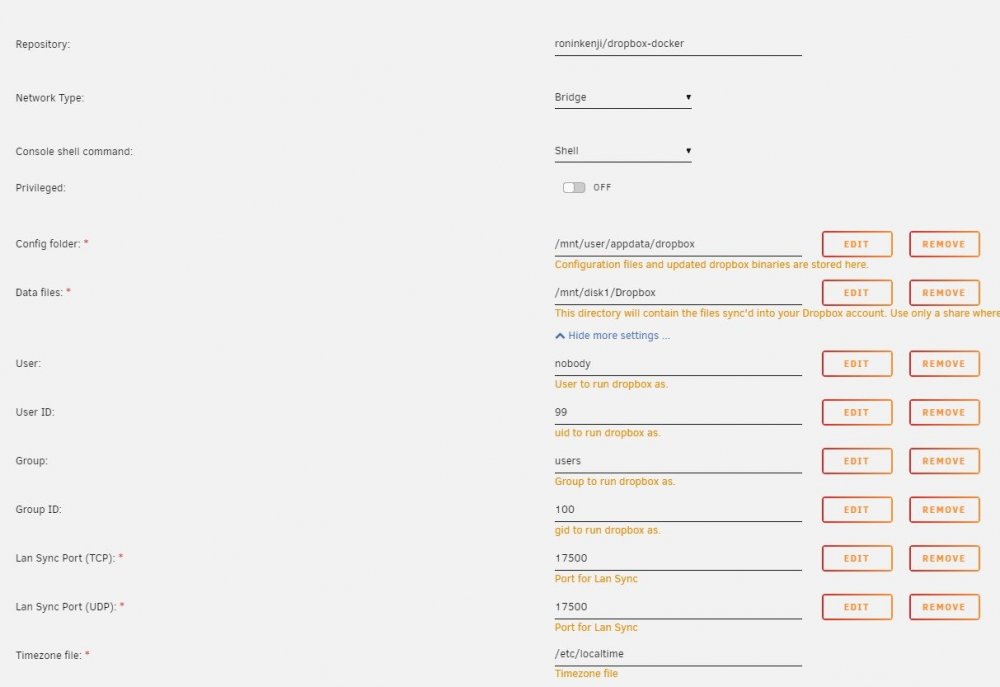
Hoping someone can help with my problem below. Apologies in advance, I've no experience with python and not a lot more using docker but I am learning slowly so excuse my ignorance if I have done something stupid. These are the steps I followed to end up where i am; - Install the docker to Unraid - Open the console from the the Dropbox docker menu - run dropbox.py start -i [If I try to run it without the -i it tells me to use the -i] this installs something. - obtained the url to link my account - type Dropbox.py start for the first time and I get this; sh-4.3# dropbox.py status Dropbox isn't running! sh-4.3# dropbox.py start Starting Dropbox...dropbox: locating interpreter dropbox: logging to /tmp/dropbox-antifreeze-x5v0tL dropbox: initializing dropbox: initializing python 3.7.5 dropbox: setting program path '/root/.dropbox-dist/dropbox-lnx.x86_64-102.4.431/dropbox' dropbox: setting python path '/root/.dropbox-dist/dropbox-lnx.x86_64-102.4.431:/root/.dropbox-dist/dropbox-lnx.x86_64-102.4.431/python-packages.zip' dropbox: python initialized dropbox: running dropbox dropbox: setting args dropbox: applying overrides dropbox: running main script dropbox: load fq extension '/root/.dropbox-dist/dropbox-lnx.x86_64-102.4.431/cryptography.hazmat.bindings._constant_time.cpython-37m-x86_64-linux-gnu.so' dropbox: load fq extension '/root/.dropbox-dist/dropbox-lnx.x86_64-102.4.431/cryptography.hazmat.bindings._openssl.cpython-37m-x86_64-linux-gnu.so' dropbox: load fq extension '/root/.dropbox-dist/dropbox-lnx.x86_64-102.4.431/cryptography.hazmat.bindings._padding.cpython-37m-x86_64-linux-gnu.so' dropbox: load fq extension '/root/.dropbox-dist/dropbox-lnx.x86_64-102.4.431/apex._apex.cpython-37m-x86_64-linux-gnu.so' dropbox: load fq extension '/root/.dropbox-dist/dropbox-lnx.x86_64-102.4.431/psutil._psutil_linux.cpython-37m-x86_64-linux-gnu.so' dropbox: load fq extension '/root/.dropbox-dist/dropbox-lnx.x86_64-102.4.431/psutil._psutil_posix.cpython-37m-x86_64-linux-gnu.so' dropbox: load fq extension '/root/.dropbox-dist/dropbox-lnx.x86_64-102.4.431/tornado.speedups.cpython-37m-x86_64-linux-gnu.so' dropbox: load fq extension '/root/.dropbox-dist/dropbox-lnx.x86_64-102.4.431/wrapt._wrappers.cpython-37m-x86_64-linux-gnu.so' dropbox: load fq extension '/root/.dropbox-dist/dropbox-lnx.x86_64-102.4.431/PyQt5.QtWidgets.cpython-37m-x86_64-linux-gnu.so' dropbox: load fq extension '/root/.dropbox-dist/dropbox-lnx.x86_64-102.4.431/PyQt5.QtCore.cpython-37m-x86_64-linux-gnu.so' dropbox: load fq extension '/root/.dropbox-dist/dropbox-lnx.x86_64-102.4.431/PyQt5.QtGui.cpython-37m-x86_64-linux-gnu.so' Dropbox isn't running! Done! sh-4.3# dropbox.py status Syncing 75,611 files Uploading 1 file... Downloading 75,610 files... So it appears from that last part that Dropbox has started downloading my files to the server however I can't find them. I used the default options when I installed the docker as per the attached image. The only thing I do know is that my docker image is filling up so I think for some reason the files are being stored in the docker rather than the share on disk1. Unraid version 6.8.3 Any help would be greatly appreciated.