





Helmonder
Members
-
Joined
-
Last visited
-
The obvious choice would be plex ?
-
Specifications: CPU: Intel Core i5-8297U @ 2.40GHz (8 cores – efficient yet powerful) RAM: 2× 16GB DDR4 – 32GB total Storage: 512GB M.2 drive, plus room to add an internal 2.5” SSD Cooling: Quiet and solid – ideal for 24/7 operation Usage: This machine has run as my Unraid server with Docker containers, Home Assistant, Plex, and more – always stable and quiet. Thanks to the i5-8297U, it’s energy efficient yet fast enough for multiple VMs or media streaming. With Intel QuickSync, it easily handles multiple Plex streams. Asking price: EUR 220 https://tweakers.net/aanbod/3961800/gm08i5t-compacte-krachtige-mini-pc-met-intel-i5-ideaal-als-home-server-of-unraid-nas.html
-
I’m selling my old but still very solid NAS system. Everything is neatly built into an Antec Twelve Hundred V3 full tower, equipped with 20 externally accessible 3.5” hot-swap bays and plenty of expansion options. Perfect as a strong foundation for a home server, NAS, or lab environment. The stock fans of the 5-in-3 bays have been replaced with quiet Noctuas. I’ve always run UNRAID on it. Specs: Case: Antec Twelve Hundred V3 (very solid chassis, with lots of airflow and space) Hot-swap bays: 4 × SuperMicro CSE-M35T-1 (5 drives each, total 20 disks hot-swappable) Fans: 4 × Noctua NF-A9 PWM (quiet and reliable) CPU cooler: Be Quiet! Dark Rock Pro Motherboard: Supermicro X11SCA (server board, IPMI, ECC support) CPU: Intel Xeon E-2146G (6 cores / 12 threads, ECC support) Memory: 2 × 32 GB Kingston KSM26ED8/32ME (64 GB ECC DDR4 total) SAS controller: Dell LSI SAS 9211-8i HBA (flashed to IT-mode, perfect for ZFS/TrueNAS/Unraid) ⚠️ Note: No PSU included – you’ll need to add your own. Original new price (total): €1885 Asking price: €450 Add is on Tweakers: https://tweakers.net/aanbod/3961614/complete-nas-server-in-antec-twelve-hundred-v3-case-xeon-ecc-hba.html
-
Done ! Running like clockwork and EXTREMELY quiet...
-
I had a jonsbo N4 that turned out to be a bit to restrictive space wise... to small a motherboard with not enough space... So I splurged and got myself a Jonsbo N5, this weekend is build time. New build will be: Case Jonsbo N5 2 * parity Toshiba MG08 SATA (512e), 16TB 5 * data Toshiba MG08 SATA (512e), 16TB CPU. Intel Core i5-14600T Tray CPU Cooler. Scythe Fuma 3 Motherboard. ASRock Z790 Pro RS 64 GB Memory Kingston Fury Beast RGB KF548C38BBAK2-64 PSU. Corsair HX750i APPS Pool. Samsung 990 Pro (met heatsink) 2TB (PC Pa Cache drive. Crucial MX500 2,5" 4TB Network. Mellanox 10G SFP+ SATA 9211-8i HBA LSI (8 port) 8 SATA drives are set up on the mainboard on mainboard SATA connectors. 4 SATA connections setup on the LSI for the last 4 drives that I now do not need. Running VM's: 1 * Ubuntu Spotweb, 1 * Webserver (used for monitoring, home automation image scraping) Running dockers: Tdarr, Tdarr_Node, Prowlarr, Huntarr, NetalertX, Maria-DB, Nextcloud, LazyLibrarian, Plex-Media-Server, Cleanarr, protonmail-bridge, luckyBackup, homebridge, scrutiny, Onedrive, sabnzbd, gPodder, radarr, calibre, bazarr, sonarr, audiobookshelf, calibre-web Happily running Tailscale with mullvad exit nodes.
-
Nope, no support needed, this was an appreciation message, everything just works !
-
Just received my first MacBook (40 year windows user), setting it up... Backups... TimeMachine ?? How the hell am I going to do that.. Ah... UnRaid has my back... default option.. So amazing...
-
Just to be sure I reverted to the previous unraid version, did not make a difference.. I deleted plex, including the folder on appdata, and resetup the docker.. seems to work now.. its repopulating without crashing.. did not setup the quicksync link though.
-
Since a couple of days my Plex crashes immediately after startup... tried restoring the database but that does not make a difference...
-
Errors in syslog: May 5 21:06:13 Home kernel: iwlwifi 0000:03:00.0: Start IWL Error Log Dump: May 5 21:06:13 Home kernel: iwlwifi 0000:03:00.0: Start IWL Error Log Dump: May 5 21:06:13 Home kernel: iwlwifi 0000:03:00.0: 0x03100000 | IML/ROM error/state May 5 21:06:13 Home kernel: iwlwifi 0000:03:00.0: Start IWL Error Log Dump: May 5 21:06:13 Home kernel: iwlwifi 0000:03:00.0: Start IWL Error Log Dump: May 5 21:06:13 Home kernel: iwlwifi 0000:03:00.0: 0x03100000 | IML/ROM error/state May 5 21:06:13 Home kernel: iwlwifi 0000:03:00.0: Start IWL Error Log Dump: May 5 21:06:13 Home kernel: iwlwifi 0000:03:00.0: Start IWL Error Log Dump: May 5 21:06:13 Home kernel: iwlwifi 0000:03:00.0: 0x03100000 | IML/ROM error/state May 5 21:07:03 Home root: Error response from daemon: network with name br0 already exists home-diagnostics-20250505-2123.zip
-
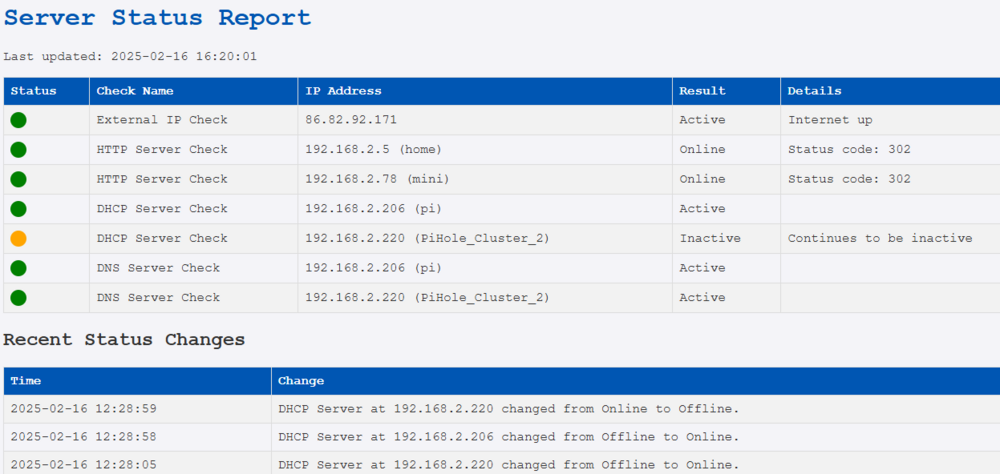
Just wanted to share the following script I use to monitor availability of some of my systems and services. The script runs in CRON at a five minute interval, runs a set of checks and then creates a HTML file that is shown by a webserver process running on the same system. The script sends notifications to PUSHOVER so you get notified of important issues. The script stores the latest test results to make sure a notification only gets sent the moment a service becomes unavailable and not every 5 minutes. #!/bin/bash # Define output file OUTPUT_FILE="/var/www/html/monitor.html" # Start of the HTML file - styling cat <<EOF >$OUTPUT_FILE <html> <head> <title>Server Status</title> <style> body { font-family: 'Courier New', monospace; background-color: #f4f4f8; color: #333; } h1 { color: #0056b3; } table { width: 100%; border-collapse: collapse; } th, td { border: 1px solid #dddddd; padding: 8px; text-align: left; } th { background-color: #0056b3; color: #ffffff; } tr:nth-child(even) { background-color: #f2f2f2; } .check-name { width: 20%; } .ip-address { width: 20%; } .result { width: 20%; } .details { width: 30%; } .status-icon { width: 10%; } .green { width: 20px; height: 20px; background-color: green; border-radius: 50%; display: inline-block; } .red { width: 20px; height: 20px; background-color: red; border-radius: 50%; display: inline-block; } .orange { width: 20px; height: 20px; background-color: orange; border-radius: 50%; display: inline-block; } </style> </head> <body> <h1>Server Status Report</h1> <p>Last updated: $(TZ='Europe/Amsterdam' date '+%Y-%m-%d %H:%M:%S')</p> <table> <tr> <th>Status</th> <th>Check Name</th> <th>IP Address</th> <th>Result</th> <th>Details</th> </tr> EOF log_status_change() { local message=$1 local log_file="/home/marc/monitor/status_changes.log" echo "$(date '+%Y-%m-%d %H:%M:%S') - $message" >> $log_file # Limit shown log to 25 lines tail -n 25 $log_file > $log_file.tmp mv $log_file.tmp $log_file } get_hostname() { local ip=$1 local hostname=$(dig +short -x $ip @<YOUR DNS SERVER>) hostname=${hostname%%.*} echo "${hostname:-Unknown}" } send_pushover() { curl -s \ --form-string "token=pushover app token" \ --form-string "user=pushover user token" \ --form-string "message=$1" \ --form-string "title=Monitoring Alert !" \ https://api.pushover.net/1/messages.json } # Store current state of service save_status() { local service=$1 local status=$2 local status_file="/home/marc/monitor/${service}.status" echo "$status" > "$status_file" } # Retrieve latest status of service get_status() { local service=$1 local status_file="/home/marc/monitor/${service}.status" if [[ -f "$status_file" ]]; then cat "$status_file" else echo "unknown" # Standard value fi } # Functions for checking several things check_server() { local ip=$1 local response=$(curl -s -o /dev/null -w "%{http_code}" http://$ip:80) local current_status="" local hostname=$(get_hostname $ip) if [[ "$response" =~ ^2 || "$response" =~ ^3 ]]; then current_status="online" else current_status="offline" fi local old_status=$(get_status "HTTP_Server_$ip") old_status=${old_status:-online} # If no old status assume 'online' if [ "$old_status" == "online" ] && [ "$current_status" == "offline" ]; then echo "<tr><td><span class='red'></span></td><td>HTTP Server Check</td><td>$ip ($hostname)</td><td>Offline</td><td>Status changed from online</td></tr>" >> $OUTPUT_FILE send_pushover "Monitoring: HTTP server at $ip has become offline." log_status_change "Server at $ip changed from Online to Offline." elif [ "$old_status" == "offline" ] && [ "$current_status" == "offline" ]; then echo "<tr><td><span class='orange'></span></td><td>HTTP Server Check</td><td>$ip ($hostname)</td><td>Offline</td><td>Continues to be offline</td></tr>" >> $OUTPUT_FILE elif [ "$old_status" == "offline" ] && [ "$current_status" == "online" ]; then echo "<tr><td><span class='green'></span></td><td>HTTP Server Check</td><td>$ip ($hostname)</td><td>Online</td><td>Server became online again</td></tr>" >> $OUTPUT_FILE log_status_change "Server at $ip changed from Offline to Online." elif [ "$old_status" == "online" ] && [ "$current_status" == "online" ]; then echo "<tr><td><span class='green'></span></td><td>HTTP Server Check</td><td>$ip ($hostname)</td><td>Online</td><td>Status code: $response</td></tr>" >> $OUTPUT_FILE fi save_status "HTTP_Server_$ip" "$current_status" } check_dhcp() { local ip=$1 local dhcp_check=$(sudo nmap -sU -p 67 --script dhcp-discover $ip 2>&1) local current_status="" local hostname=$(get_hostname $ip) if echo "$dhcp_check" | grep -q "67/udp open\|67/udp open|filtered"; then current_status="active" else current_status="inactive" fi local old_status=$(get_status "DHCP_Server_$ip") old_status=${old_status:-active} # If no old status assume 'active' if [ "$old_status" == "active" ] && [ "$current_status" == "inactive" ]; then echo "<tr><td><span class='red'></span></td><td>DHCP Server Check</td><td>$ip ($hostname)</td><td>Inactive</td><td>DHCP Became unactive</td></tr>" >> $OUTPUT_FILE send_pushover "Monitoring: DHCP server at $ip has become inactive." log_status_change "DHCP Server at $ip changed from Online to Offline." elif [ "$old_status" == "inactive" ] && [ "$current_status" == "inactive" ]; then echo "<tr><td><span class='orange'></span></td><td>DHCP Server Check</td><td>$ip ($hostname)</td><td>Inactive</td><td>Continues to be inactive</td></tr>" >> $OUTPUT_FILE elif [ "$old_status" == "active" ] && [ "$current_status" == "active" ]; then echo "<tr><td><span class='green'></span></td><td>DHCP Server Check</td><td>$ip ($hostname)</td><td>Active</td><td></td></tr>" >> $OUTPUT_FILE elif [ "$old_status" == "inactive" ] && [ "$current_status" == "active" ] ; then echo "<tr><td><span class='green'></span></td><td>DHCP Server Check</td><td>$ip ($hostname)</td><td>Active</td><td>Server became active again</td></tr>" >> $OUTPUT_FILE log_status_change "DHCP Server at $ip changed from Offline to Online." fi save_status "DHCP_Server_$ip" "$current_status" } check_ip() { local ip=$1 local current_status="" local hostname=$(get_hostname $ip) if ping -c 1 -W 1 $ip > /dev/null 2>&1; then current_status="reachable" else current_status="not reachable" fi local old_status=$(get_status "ICMP_Ping_$ip") old_status=${old_status:-reachable} # If no old status assume 'reachable' if [ "$old_status" == "reachable" ] && [ "$current_status" == "not reachable" ]; then echo "<tr><td><span class='red'></span></td><td>ICMP Ping Check</td><td>$ip ($hostname)</td><td>Not Reachable</td><td>ICMP ping became unresponsive</td></tr>" >> $OUTPUT_FILE send_pushover "Monitoring: ICMP Ping failed for $ip" log_status_change "$ip become unreachable." elif [ "$old_status" == "not reachable" ] && [ "$current_status" == "not reachable" ]; then echo "<tr><td><span class='orange'></span></td><td>ICMP Ping Check</td><td>$ip ($hostname)</td><td>Not Reachable</td><td>Continues to be unresponsive</td></tr>" >> $OUTPUT_FILE elif [ "$old_status" == "reachable" ] && [ "$current_status" == "reachable" ]; then echo "<tr><td><span class='green'></span></td><td>ICMP Ping Check</td><td>$ip ($hostname)</td><td>Reachable</td><td></td></tr>" >> $OUTPUT_FILE elif [ "$old_status" == "not reachable" ] && [ "$current_status" == "reachable" ]; then echo "<tr><td><span class='green'></span></td><td>ICMP Ping Check</td><td>$ip ($hostname)</td><td>Reachable</td><td>Ping response restored</td></tr>" >> $OUTPUT_FILE log_status_change "$ip became reachable." fi save_status "ICMP_Ping_$ip" "$current_status" } check_dns() { local ip=$1 local dns_check=$(dig @$ip +nocmd +noall +answer +time=1 +tries=1 SOA google.com) local current_status="" local hostname=$(get_hostname $ip) # Check for 'google.com' in the answer if echo "$dns_check" | grep -q "google.com"; then current_status="active" else current_status="inactive" fi local old_status=$(get_status "DNS_Server_$ip") old_status=${old_status:-active} # If no old status assume 'active' if [ "$old_status" == "active" ] && [ "$current_status" == "inactive" ]; then echo "<tr><td><span class='red'></span></td><td>DNS Server Check</td><td>$ip ($hostname)</td><td>Inactive</td><td>DNS became inactive</td></tr>" >> $OUTPUT_FILE send_pushover "Monitoring: DNS server at $ip has become inactive." log_status_change "DNS Server at $ip changed from Online to Offline." elif [ "$old_status" == "inactive" ] && [ "$current_status" == "inactive" ]; then echo "<tr><td><span class='orange'></span></td><td>DNS Server Check</td><td>$ip ($hostname)</td><td>Inactive</td><td>Continues to be inactive</td></tr>" >> $OUTPUT_FILE elif [ "$old_status" == "active" ] && [ "$current_status" == "active" ]; then echo "<tr><td><span class='green'></span></td><td>DNS Server Check</td><td>$ip ($hostname)</td><td>Active</td><td></td></tr>" >> $OUTPUT_FILE elif [ "$old_status" == "inactive" ] && [ "$current_status" == "active" ] ; then echo "<tr><td><span class='green'></span></td><td>DNS Server Check</td><td>$ip ($hostname)</td><td>Active</td><td>DNS became active again</td></tr>" >> $OUTPUT_FILE log_status_change "DNS Server at $ip changed from Offline to Online." fi save_status "DNS_Server_$ip" "$current_status" } check_external_ip() { # Get external address local external_ip=$(curl -s ifconfig.me) local current_status="" local hostname=$(get_hostname $ip) # Check if IP was received if [[ -n "$external_ip" ]]; then current_status="success" else current_status="failed" fi local old_status=$(get_status "External_IP_Check") old_status=${old_status:-success} # If no old status assume 'success' if [ "$old_status" == "success" ] && [ "$current_status" == "failed" ]; then echo "<tr><td><span class='red'></span></td><td>External IP Check</td><td>N/A</td><td>Failed</td><td>Could not retrieve external IP</td></tr>" >> $OUTPUT_FILE send_pushover "Monitoring: Get external IP failed" log_status_change "Internet became unavailable." elif [ "$old_status" == "failed" ] && [ "$current_status" == "failed" ]; then echo "<tr><td><span class='orange'></span></td><td>External IP Check</td><td>N/A</td><td>Failed</td><td>Continues to fail retrieving external IP</td></tr>" >> $OUTPUT_FILE elif [ "$old_status" == "success" ] && [ "$current_status" == "success" ]; then echo "<tr><td><span class='green'></span></td><td>External IP Check</td><td>$external_ip</td><td>Active</td><td>Internet up</td></tr>" >> $OUTPUT_FILE elif [ "$old_status" == "failed" ] && [ "$current_status" == "success" ] ; then echo "<tr><td><span class='green'></span></td><td>External IP Check</td><td>$external_ip</td><td>Active</td><td>Internet back up</td></tr>" >> $OUTPUT_FILE log_status_change "Internet became available." fi save_status "External_IP_Check" "$current_status" } # Main process, do the checks check_external_ip check_server 192.168.2.5 check_server 192.168.2.78 check_dhcp 192.168.2.206 check_dhcp 192.168.2.220 check_dns 192.168.2.206 check_dns 192.168.2.220 # Add recent status changes to page echo "<table><tr><th>Time</th><th>Change</th></tr>" >> $OUTPUT_FILE echo " " >> $OUTPUT_FILE echo "<h2>Recent Status Changes</h2>" >> $OUTPUT_FILE # Read log and add lines to page if [[ -f "/home/marc/monitor/status_changes.log" ]]; then tac /home/marc/monitor/status_changes.log | while read line do echo "<tr><td>${line%% - *}</td><td>${line##* - }</td></tr>" >> $OUTPUT_FILE done fi echo "</table>" >> $OUTPUT_FILE # Close HTML page echo "</body></html>" >> $OUTPUT_FILE
-
Because I want more control over my DHCP then my providers modem can give I have for a longer time allready used PiHole as my DHCP server. The systems works great and gives me the options I need. I have been running two PiHoles for a longer period of time, this makes sure I have two DNS servers running. I keep them up to date using ORBITALSYNC, that works great. But there has always been one caveat, If the primary PiHole servers breaks down, or the unraid box the VM runs on, then My DHCP is gone and my devices loose their network connection at the end of the lease period. There is no way to activate DHCP in PiHole via script (possibly it would be possible to change config files and then restart Pihole processes but that has always been a bit to intrusive for me, if something goes wrong my misery will be bigger). I have now found a way to very easily do this and just want to share for others benefit. What I do is basically just have both PiHole servers active at the same time, but BLOCK one of them on network level so functionally there is always only one PiHole actually delivering addresses. Its basically a very small script that I run at a 5 minute interval in CRON: #!/bin/bash PRIMARY_PIHOLE="192.168.2.206" INTERFACE="ens2" # Check status of primary PiHole check_primary() { sudo nmap --script broadcast-dhcp-discover -e $INTERFACE | grep "Server Identifier: $PRIMARY_PIHOLE" > /dev/null 2>&1 return $? } # Block DHCP traffic on secondary system block_dhcp() { sudo iptables -C INPUT -p udp --dport 67:68 -j DROP 2> /dev/null || sudo iptables -A INPUT -p udp --dport 67:68 -j DROP sudo iptables -C OUTPUT -p udp --sport 67:68 -j DROP 2> /dev/null || sudo iptables -A OUTPUT -p udp --sport 67:68 -j DROP echo "DHCP geblokkeerd op secundaire Pi-hole." } # Unblock DHCP traffic on secondary system allow_dhcp() { sudo iptables -D INPUT -p udp --dport 67:68 -j DROP 2> /dev/null sudo iptables -D OUTPUT -p udp --sport 67:68 -j DROP 2> /dev/null echo "DHCP toegestaan op secundaire Pi-hole." } # Main process - check status and take appropriate action. if check_primary; then block_dhcp else allow_dhcp fi The script needs to SUDO to be able to do iptables and nmap, sudo normally asks for a password which is something you do not want in a script, so we need to setup the server the script runs on so it does not need that: Give the following command: sudo visudo And then add the following lines to the bottom of the file replace 'username' with the user you run the script with: username ALL=(ALL) NOPASSWD: /usr/bin/nmap username ALL=(ALL) NOPASSWD: /sbin/iptables To have it run every 5 minutes add it to cron, enter the following command: crontab -l And add the followig lines (adjust the paths to fit your situation): */5 * * * * /path/to/dhcp_block.sh >> /path/to/logfile.log 2>&1 Script was created with help of chatgtp and has been working fine for me.
-
Dang.... I think I just realised that all of this was completely useless.... The whole thing works... But before this I just had a primary and a secondary DNS server so it never was an issue... I use Pihole as my dhcp server... And the idea was to make sure that I would always have a dhcp server running at the virtual address.. However.. That means I have to have both pihole serves with active DHCP... and DHCP requests will just be answered by both piholes... Useless... Damn.. stupid me ...
-
Solved my own issue.... Apparently everything was correct but the ARP was confused... I flushed the network tables and that solved the issue !
-
I actually did it a bit differently (did not see your reply yet) and installed two fresh piholes in ubuntu vm's and installed keepalive on them.. The install is succesfull but it seems the virtual address cannot be reached and this might be related to "promiscues mode" not beiing enabled on the unraid bridge... Does that sound like something to anyone ?


