





bjornatic
Members
-
Joined
-
Last visited
-
I'm passing though : GPU, nVme drive controller and usb controller (Fresco Logic FL1100 USB 3.0 Host Controller). And I'm only using the ports on the Fresco card... do I still need mapping and USB patches ? Thanks ! I'll try what you suggest and I'll report back.
-
Well... I spoke too soon. The KP as I wake macOS are back. Every time now. And this is the report I get : mp_kdp_enter() timed-out on cpu 0, NMI-ing mp_kdp_enter() NMI pending on cpus: 0 1 3 6 7 mp_kdp_enter() timed-out during locked wait after NMI;expected 8 acks but received 4 after 0 loops in 8192004096000 ticks With few variations on CPUs number and count... I tried with isolated CPU's and without, with vti=12, 9 or 14 : same problem. And I really don't get why it worked two days in a row without a single issue (and during that time, the process : macOS sleep / unraid sleep / unraid wake / macOS wake happened at least 8 times (as I was testing it and not believing it was working...) 😭
-
Sir, you are an absolute Champion. My hero. My saviour. I do not know who your are, or where you're from but you alone make the internet worth to me. This absolute simple advice solved a two year long mystery : the macos sleep / unraid sleep / unraid wake / macos wake -- macos random crash issue Since two days everything works now flawlessly. Before that, I was about seriously considering buying a mac mini... So. THANK YOU.
-
I'm on BigSur.
-
Nvidia GT 710 / ASUS TUF GAMING X570 / AMD Ryzen 7 2700X - MacPro6,1 Everything is passed trough : GPU, 4 Cores, USB controller, and Nvme SSD Controller. And I use hibernatemode 25, which is the most stable but also leeds to a crash enventually. When you say "it's too much to handle", I have the exact same opinion but I'm stubborn and I'm wondering two thing : - is it working for someone ? - how to investigate properly the issue ? (because I have no clue)
-
Just a quick question : do you also put your Unraid to sleep while your VM is also at sleep ? Because that's the one (main) thing I can't solve on my system : Putting macOS to sleep, unraid to sleep, waking up Unraid, then waiking up macOS without it crashing after a few minutes... If I don't put Unraid to sleep, then the sleep function (pmset 25) of my macOS works just fine. And because the crash after waking up macOS occurs randomly (it can work for for many minutes or crash instantly) I do not know how to begin to search for the problem.. (on the Unraid side or on the VM side...). And should it even work ? (putting the server and the vm to sleep at the same time).
-
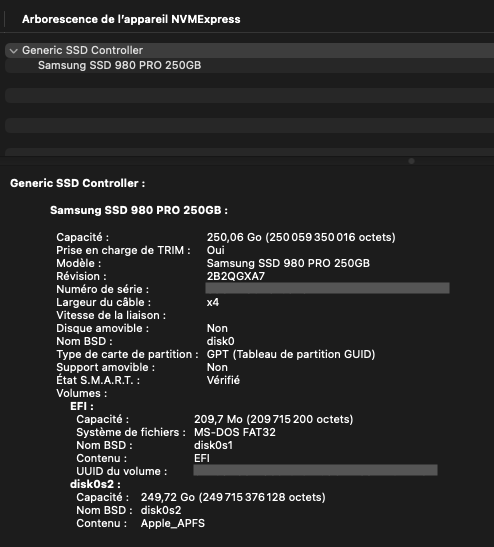
Yes it's passed through. And its a SAMSUNG 980PRO. <hostdev mode='subsystem' type='pci' managed='yes'> <driver name='vfio'/> <source> <address domain='0x0000' bus='0x04' slot='0x00' function='0x0'/> </source> <alias name='hostdev0'/> <address type='pci' domain='0x0000' bus='0x04' slot='0x00' function='0x0'/> </hostdev> I read that the Samsung controller where tricky and not advised on a Hackintosh. But I found no specific info/comment on this one ("Elpis" controller).

-
Unfortunatly, it does not... I should see close to double the speed... But it's not a real problem so It's quite low in my "solve the thing" list. 😑

-
Hi ! Is there a way to add a condition to prevent sleep based on UPS consumption ? My problem is : I use the S3 sleep pluging to automatically put my server to sleep. It checks if no VM is runnig by pinging them. BUT, If I'm in a OS update process, the VM is not responding to the ping, so the S3 sleep pluging puts the server to sleep. Crashing my update process. Graphic cards are passed through my VM resulting in more power consumption when active. I thought that by checking if the UPS power is below a certain value, the plugin could be "sure" that no VM is running. But maybe there is a smarter solution with virsh ?
-
I do not now. I think it would be possible by adding the correct command in the sleep plugin (as sleep is not officially supported by Unraid). And it may be a clean way, but not the logical way in my opinion. The VM has to decide by itself (or by manual command) to be put to sleep. And THEN, the Unraid server, "seeing" that everyone is sleeping, puts himself to sleep. And that's how I have it working. The problem I have is on wake up ^^ (for MacOS only, though). EDIT : and by "sleep" I mean hibernate... just to be clear. And It this state I can even restart the server and the W10 VM will resume OK. EDIT again : I looked around and noticed the option "Enable Virtual BMC :" in the VM manager. And I think that could enable what you suggested.
-
I can answer this as I use a Windows 10 and BigSur VM : I can put to sleep the Windows Vm and put to sleep Unraid with no problem : I wake Unraid, then the W10 wm, and all work fine. Everytime. All bueno. For my Bigsur VM (and for Catalina before it), it's another story and it's the ONLY thing that I can't solve on my Unraid system (well beside network troubles under BigSur..). Meaning the same operation as with the W10 VM works... sometimes. And I can't figure out why as the problem is not happening everytime. But that would be the subject of another thread 🤫
-
Nope. I m on Asus TUF x570.
-
I'm using this one with no apparent problem : "nateck Carte Contrôleur USB 3.0 2 Ports PCI Express pour Win XP/7/8/10 Auto alimentée,KT4006" https://www.amazon.fr/gp/product/B00JEVLEFQ/
-
Has anyone updated to OpenCore 0.6.5 ? I'm on 0.6.4 with network / sleep / Nvme problems. Should I upgrade ?
-
Is there really an advantage to choose the "right" model ? (beside having one that is not too old for BigSur)


