vmax5000
Members
-
Joined
-
Last visited
Everything posted by vmax5000
-
Yes, I did that but had to use -L to fix it. It's all working now Thanks
-
I managed to get all the drives working again, now running a parity check, but lost some data, not sure how much but at least it's all working again. Thanks
-
I found a reddit post that shows how to enable the drives: level 1 Medical_Shame4079 · 2 yr. ago Stop the array, unassign the disk, start the array in maintenance mode, stop it again, reassign the drive to the same slot. The idea is to start the array temporarily with the drive “missing” so it changes from “disabled” to “emulated” status, then to stop it and “replace” the drive to get it back to “active” status. Now I am trying to shutdown the array to try and fix disk 2 but the array won't stop, disk 10 keeps showing busy and the real time logs show it trying over and over again to un-mount the drive. It has been trying for over 1/2 hour so far.
-
Ok, I moved and used the old cables. I can't change the cables from the broadcom card because they only have sata connectors on the ends of the cables the other end connects to the card with a plug that has 4 cables attached. I put the old cables in and attached them to the mother board but the parity 1 and disk 3 are still showing as disabled. Here is the new diags. Thanks ultimate-diagnostics-20240219-1127.zip
-
I just installed the new card with new cables! I can only install the old cables.
-
I installed a Broadcom SAS 9300-8I 8-Port 12Gb/S SATA+SAS Pci-Express 3.0 Low Profile Host Bus controller and moved all of the 16tb drives and a couple of cache drives onto the controller. After booting up I now have major problems, the array just shows starting and will not start. I have a complete flash drive backup and backups of my docker containers as well as a screen shot of what the arrary looked like before the problem started. Any help would be much appreciated Thanks ultimate-diagnostics-20240219-1041.zip
-
Looks like everything is working now, thanks for the help.
-
I managed to get sab to work but not nzbget.
-
I have spent 2 days trying to figure out what is wrong here. I added another pool to put appdata on one pool and plex on another pool because I was getting warnings about appdata and also Plex was running incredibly slow. I now have Plex running great, and I have put appdata on a different pool, but for some reason I can't get sonarr to automatically update my shows. I have tested all indexers and download client and they all pass. I can also manually click a download file within sonarr and it will send it to sabnzb, process, move and complete, but when I click on an automatic search it finds the files but it won't grab them for processing. I hope it is something simple, can anyone please help? Thanks ultimate-diagnostics-20240120-1323.zip
-
I just found another observation. Even though I have the 2.5 gig nic card as eth0 I saw in the dashboard that eth0 only shows 1 gig speed. I there some programming issue that I am missing or do I need to use a motherboard that has a 2.5 gig nic build in?
-
I was able to get 2.5 gig transfers by using a nic to nic so I know that I can get the 2.5 gig transfer rate. In any case I guess I will have to do more testing. I though maybe there was something in my unraid configuration that was the problem, but I guess not. Thanks for the reply.
-
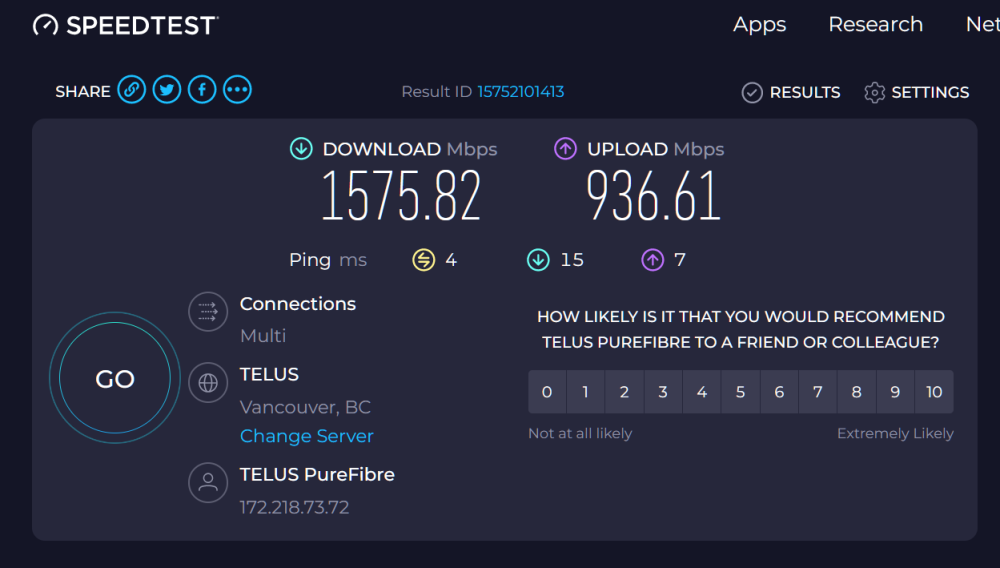
I recently purchased a dual 2.5g router, 4 port 2.5 gig switch and (2) 2.5 gig nic cards. My network cabling is cat 6. When I try to transfer a file I only get 1gig speeds also at the server when I run the speed test I only get 1 gig speed. When I run speed test on my windows computer I get 1.5 gig down. I set the unraid server to use the 2.5 gig card as the only nic card, I proved it by unplugging the cable and losing connection to the unraid server. I watched the youtube video for running iperf but when I install the nerd tools there is no iperf, so I don't know what to run to check the network. Before I got the router and switch I was able to have the 2.5 gig speed by running the 2.5 gig card directly to my windows computer with just a cable, so I know that am definitely running the correct cabling. I know the 4 port switch is correct because I can plug my windows computer into any of the 4 ports and still get 1.5 gig download speeds. Any help would be appreciated. ultimate-diagnostics-20240114-1221.zip
-
I managed to undelete the files on the flashdrive and rebooted. Everything looks ok now.
-
I saw a folder on disk 2 of my array that appeared on all of the drives on the array, so I thought I could clear some space by deleting the duplicate folders. After I deleted the folders I have lost all my shares and disk 2 has issues. Is there any way to undelete the folders? I don't have a backup of my appdata, I think it was on disk 2. ultimate-diagnostics-20240103-1356.zip
-
Where do I change the paths in the new Sonar? I keep getting an error: [Error] DownloadedEpisodesImportService: Import failed, path does not exist or is not accessible by Sonarr: /data/Complete/ I have gone through every screen but I can't find where I can change the path. I tried editing the container but I can't find a path to data. Thanks
-
I added binhex emby as a docker and set everything up. If I set emby docker as host I can access it through the local network ok, but if I set it to bridge I can't access the ip address from local or remote. If I open a terminal window I can ping the bridge ip address but only on the server itself. I programmed my router to use the port and internal ip address but I still can't access emby. Any help would be appreciated... Thanks ultimate-diagnostics-20231217-1527.zip
-
I think I found out the problem, the cache drive (SSD) is dead. If I replace the cache drive will the config re-install the docker image? Is there a way to not lose my configuration? Thanks V
-
I copied the files as you said from the old version usb key to the current usb key with 6.12.4 as you suggested but after booting up, I still don't have my dockers. The problem happened when I tried to remove a plex docker on the running system but it would not remove, I got an image picture for the docker that showed a ?. I did not try to re-install the plex docker when I saw that, I just rebooted the server and when it came up all the dockers were gone. Thanks
-
I made a replacement bootable usb key with unraid 6.11.0, my current version is unraid Version: 6.12.4. When I tried to follow the instructions to replace the usb key I was unable to install the plug-in. So I booted up with my current version but I have lost all my dockers. I don't know how I lost them. Is there any way that I could use my older backup usb key? I have backups of my appdata, libvert and flashdrive. I am currently dead now. Will I have to rebuild all my docker containers? ultimate-diagnostics-20231114-2135.zip
-
I managed to fix it by restoring an older backup. I figured out how to restore the backup on my own, now it is working. V
-
here are the sonarr logs, I should have added Thanks logs.rar
-
I just noticed recently that my sonarr was not updating and the refresh buttons stopped working. I saw this error in the logs: code = Corrupt (11), message = System.Data.SQLite.SQLiteException (0x800007EF): database disk image is malformed. I searched all over for an answer and I found a link that was supposed to tell me how to fix this issue, but the link no longer exists. Can the database be fixed or do I have to remove sonarr and reinstall it? ultimate-diagnostics-20231020-1618.zip
-
I found out what the problem was. After the upgrade to 6.11.0, I don't know if the setting was there in the older build or not, but there was a setting for sleep and it was enabled. I disabled the sleep setting and that fixed the issue. Thanks
-
I guess I'm confused about how to retrieve the data to look at it. Anyway, thanks for your help, I will read more to figure it out. Thanks again
-
Thanks, last night it did not go down. I'm unclear as to where to find the icon that you pointed to in the link to the docs. Is this the Icon? See attached screen shot. Thanks.