





CaptainTrap
Members
-
Joined
Everything posted by CaptainTrap
-
Just wanted the thank you for your support @JorgeB in holding my hand through this process. Everything seems to be running fine after reading your other posts on similar BTRFS corruption topics and your suggested resolutions as well as responding to my own queries. Thanks!
-
I disabled docker and VM and stopped array but its stuck unmounting: /mnt/cache: target is busy /mnt/disk5: target is busy
-
Everything has been running fine since my last post (two days ago) PMS and other dockers working as expected. However early this morning Docker service failed to start and I saw BTRFS corruption errors again! Diags attached. Any help is appreciated. laniakea-diagnostics-20251114-0819.zip
-
Thanks, JorgeB. I was running the D.O.C.P. (edited from XMP) profile out of habit. Server is my old gaming platform. I will set it back to 3200. This has been running solid for years with no issues until this week with the dirty shutdown during Mover job. Is there anything else in the diags? Where can I go in the diagnostics to view my system info?
-
A few days ago I had a very dirty hard shutdown while Mover was running on my btrfs cache pool (2 nvme drives 1tb & 500gb). On reboot I noticed that the pool devices were unmountable. I ran btrfs check and found a corrupt block. After several attempts to repair it I was able to remount the drives and pull a backup copy of my appdata and VM ISOs with some unreadable files that i skipped over (mostly Plex posters). I deleted my docker image and reinstalled my apps and copied appdata back. Everything seemed fine at first until I started geting file sytem is read-only errors and very slow unmounting and mounting disk times. I decided to remove, clear and reformat my cache pool devices and copy my backed up appdata back over. Again everything was up and running for a few minutes until the read-only error came back. I pulled diagnostics right before another hard shutdown and am currently running memtest with 0 errors. Is there anything I can do with the filesystem besides replacing the RAM and NVME drives? laniakea-diagnostics-20251111-2229.zip
-
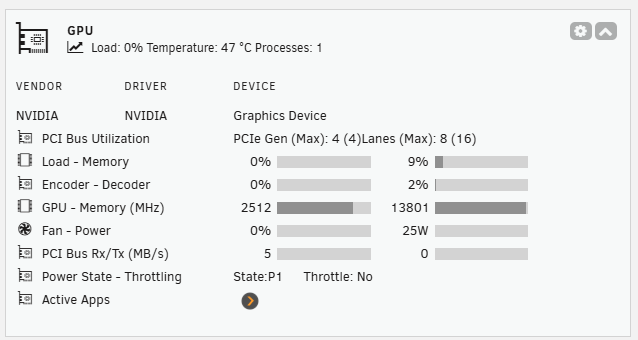
Hi I just got my nvidia 5060 gpu working with opensource nvidia plugin driver. However, now the GPU Statistics plugin is not working on my dashboard. Is this GPU supported? Is there anything I can do to get it to work? I forgot to select the GPU ID in the plugin settings. But its not reporting the GPU device model. For the record device model is not shown in the opensource nvidia driver plugin either. I have seen other screen shots with 5070 ti's posted above. Any advice is appreciated.
-
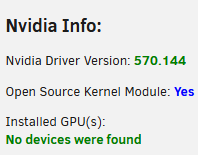
Found the other support thread from Sunday and updated to opensource driver and rebooted but my GPU is still not detected. Its showing in BIOS and system devices. I am running 7.1.2 Lspci cmd shows: 0a:00.0 VGA compatible controller: NVIDIA Corporation Device 2d05 (rev a1) (prog-if 00 [VGA controller]) Subsystem: Gigabyte Technology Co., Ltd Device 41a2
-
Just got this installed and configured today. I am getting DNS_PROBE_FINISHED_NXDOMAIN on most URLS now. I have been researching potential fixes but few mirror this setup with unraid+pihole+unbound. Any support to resolve this is appreciated.
-
Hi ich, I just checked the log files at the point of crash from the docker console and this is the line logged indicating a segmentation fault when FORCE_86 is set to false: 15:24:48 Host identity created. /opt/scripts/start-server.sh: line 69: 66 Segmentation fault ./arma3server_x64 ${GAME_PARAMS}
-
Hi Ich. This is perplexing then as when i set to false the server crashes. When i set to true its stable and connects to steam. could there be bios settings that solve this?
-
Adding the docker parameter "FORCE_X86" set to true fixed my issue. Now I just need to get battleeye working for external connections and mods loaded.
-
Hi ich777. I just installed the ArmA3 Docker and only added my steam username, password and server name (in server config file). The docker keeps rebooting every 10 seconds. The docker log file shows everything is connecting and giving no errors. Im running Unraid 6.12.4 I tried reinstalling the docker but same issue persists. My CPU is Intel® Core™ i5-9400 CPU @ 2.90GHz Here is my latest docker log file. arma3 docker logs.txt
-
Project Zomboid Docker by ich777 update to b41 beta Hi, I am trying to update the server to 41.61 (the new b41 beta) but I am having trouble doing so. I think the easiest way is to copy the game files from my steam directory on my personal pc to the server directory but I dont know where the files are and where to copy them to. I have tried to do it via steamCMD but I cannot even log into steamCMD from the docker menu with anonymous, it fails on username. Any help would be appreciated! Thanks

