






CorserMoon
Members
-
Joined
-
Last visited
Everything posted by CorserMoon
-
Do you recommend running a scrub on the cache pool?
-
That did it. Thank you @JorgeB.
-
Should I stop the array first before running this command?
-
My Unraid server was non-responsive so I had to force reboot via IPMI. Upon reboot, I am getting the following error and the docker tab is showing no docker containers installed: BTRFS: error (device nvme1n1p1) in btrfs_replay_log:2500: errno=-5 IO failure (Failed to recover log tree) I came across THIS post which seems relevant but their error was slightly different. Thoughts on how to proceed? (diags attached) EDIT: Here is another clue. The cache pool on which docker.img lives is showing unmountable: corsermoon-diagnostics-20230615-1340.zip


-
OK, thanks for the insight. Bad storms last night and despite everything being plugged into UPS's, could have been flakey power issue.
-
Hi all. Woke up this morning to Organizr not working (throwing "not writeable" error) as well as many other dockers not operating as expected. Next step was checking the log file which is 100% full. All disks/pools/shares are green and readable though. Log filled up with BTRFS and rsyslog write errors (I am using syslog server). Before I reboot to clear the log file, wanted your expert eyes on. executor-diagnostics-20220714-1053.zip
-
I ended up just sending a Power Off command via IPMI which essentially forced power off. After rebooting, the NIC came back up but I can't find in the logs what was holding up the shutdown. Have syslog server running as well, but the only entries I see for today are when I powered it back on. I don't see the powerdown command.
-
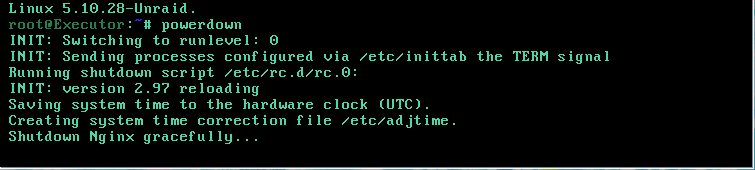
So earlier today I suddenly lost connection to my unraid box. After troubleshooting, determined that the NIC is dead (Mellanox ConnectX-2). So I IPMI'd into the motherboard and used the iKVM console to log into unraid via CLI and issued the command 'powerdown'. Problem is that it has been sitting at 'Shutdown Nginx gracefully...' for 30 minutes. Do I have any options besides power cycling it? Really trying to avoid that and the 30 hour parity check.
-
I'm thinking it is either weirdness with my gateway (ATT fiber gateway) or corruption/conflicts with the unraid routing table. I may try resetting the unraid network settings so see if that helps. I'm also in hte process of building a pfsense box and bypassing the gateway. Hopefully one of those fixes the issue.
-
With only my router IP as the DNS, I can only access unraid (192.168.1.107) but no internet (http://www.google.com for example) and no other devices on my LAN such as 192.168.1.254 (router), 192.168.1.111 (managed switch) or 192.168.1.201 (Hubitat), etc. If I add 8.8.8.8 to the DNS record (so it's then 192.168.1.254,8.8.8.8) I can access unraid (192.168.1.107) and the internet (Google, etc), but still no other LAN IPs. Right now I'm at my in-laws on their network which is 192.168.68.x so that shouldn't be a conflict.
-
Yea, similar issue to me (though I don't use pihole). I can only access unraid when i have the DNS set to my router but no internet and no LAN. If I add a public DNS like 8.8.8.8, I can then access internet, but still no LAN. I've read through dozens of threads and reddit posts and still have been unable to get local LAN access to work.
-
Yeah, that's why I originally went with an open rack. Will have to figure out proper ventilation without all the noise.
-
Yeah, I'm now in the process of looking into getting a locking cabinet...
-
Thanks for the help. All disks green and parity check started. I think I may be ok.
-
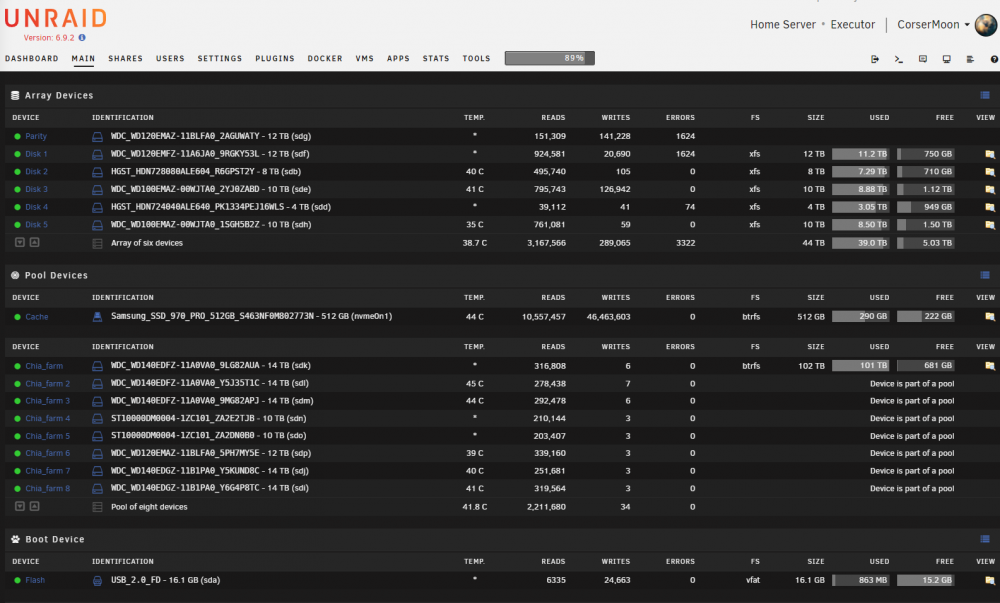
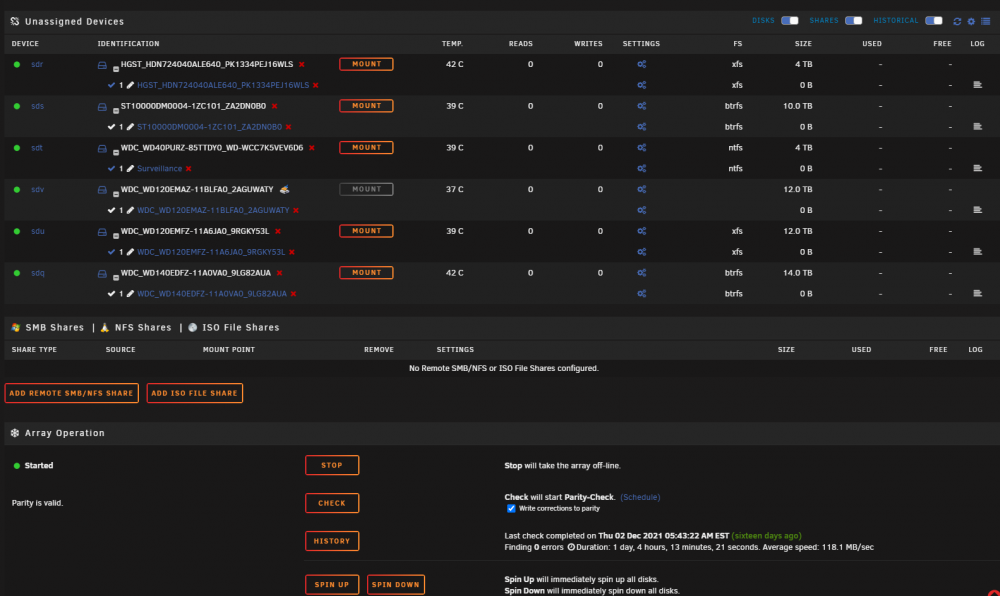
So I was driving home and started getting error emails that disks were disappearing. To my horror, my wife informed me that our toddler got into my office and disconnected 6 of the harddrives from my rackmount server. My wife caught him in the act and replugged them (they were not totally pulled from the enclosure so they are all in the original bays). All bays are hotswap and the drives are showing up in GUI as Unassigned Devices. 3 of the disks are part of the single parity protected array. One of these 3 is the parity disk itself. The other 3 are part of a separate cache pool of disks that is not parity protected. I'm still getting tons of continuous error emails as well. Am I totally f'ed? I can't even rebuild from parity because one of the disks is a parity disk and regardless, there are 2 other disks in the array that got pulled. Is there a way to just say "hey unraid, my bad, disks are here, they are fine, sorry"? Help
-
I'm in a similar boat. Wireguard seems to be plug and play for some and broken for others like us.
-
hm. I don't know what is going on the. I've tried different vpn subnets, trashing everything and restarting from scratch, and still same behavior. Anyone else here running an ATT residential fiber gateway that has wireguard working? I'm wondering if some baked in firewall rules on the router is the issue.
-
I ran the 'wg' command in unraid to ensure i was connected and I noticed that the peer endpoint (my phone connecting from 5G using duckdns) has a random port on the end of the ip. Is this expected? The server endpoint I set up is [mydomain].duckdns.org:51820.
.png.27a14f525cad19e5fa4559c3adc6ff64.png)
-
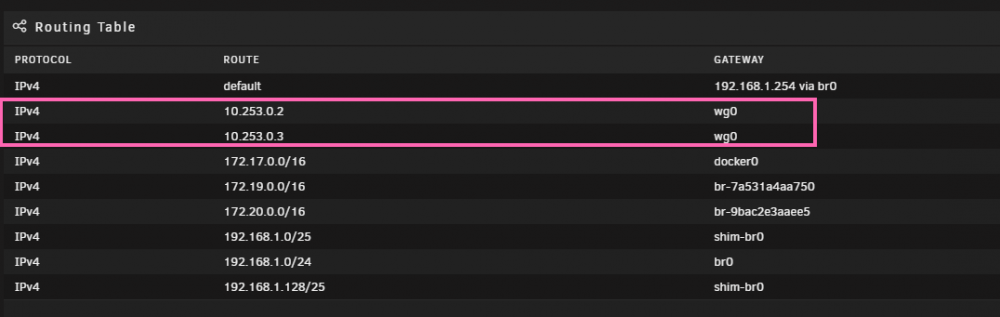
Not sure if this is normal or not, but when looking at the Unraid network settings Routing Table, the 2 VPN IPs (10.253.0.2 & 10.253.0.3) hace "wg0" as the gateway. Is that expected?
-
Any idea if you can set up a static route on an ATT Arris BGW210?
-
No worries! Glad it was an easy fix!
-
No, I mean are the windows machines that you are using wireguard on signed on to a different Wi-Fi network than where the unraid server is? You can't sign into a VPN while still on the same LAN.
-
Are your other windows machines connecting from a different network/subnet?
-
-
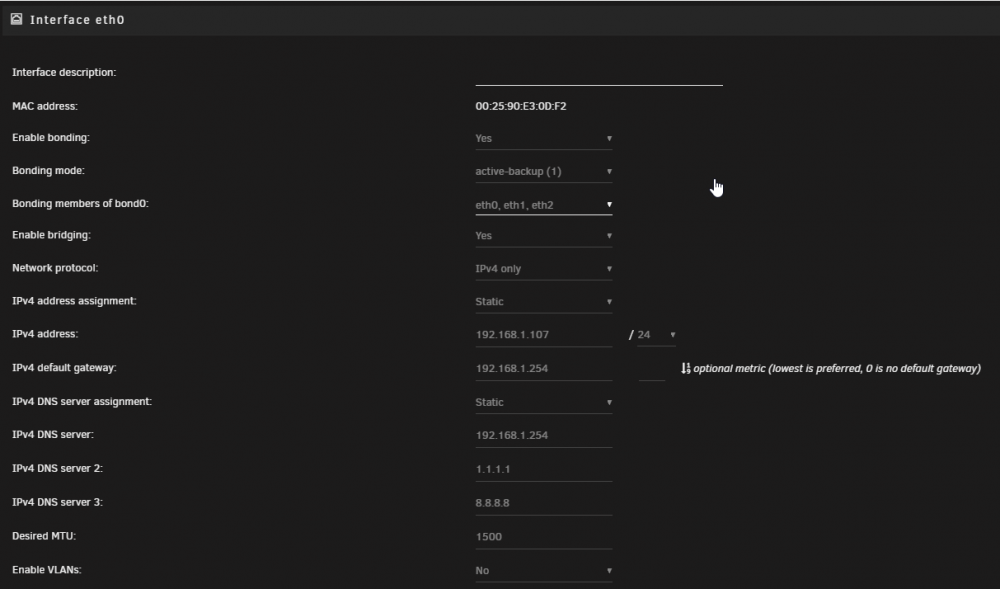
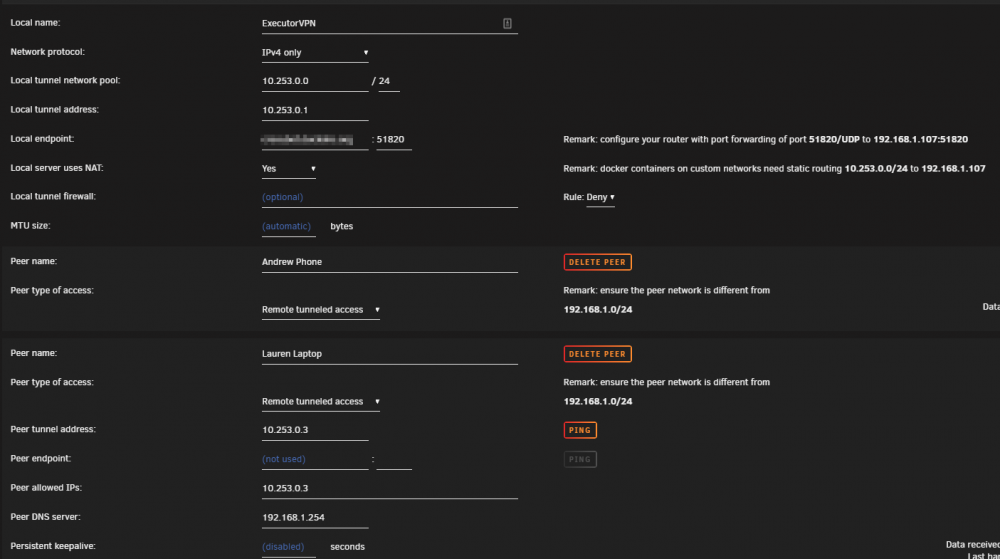
I've gone through the set-up and troubleshooting several times and still having issues with getting Remote Tunneled Access working correctly. Help, I'm stuck. Symptoms: Can connect to VPN but only able to access unraid (192.168.1.107) No access to other LAN IPs. I know dockers with custom IPs wont work, but I can't even access IP cameras, other devices, router, etc. No Access to Router (192.168.1.254). No internet when using router ip as DNS. When adding a public dns like 1.1.1.1, I can access internet, but still no access to other LAN devices. Troubleshooting Tried connecting from different wifi network that is on different subnet (192.168.68.x) Tried connecting from 5G cell network Tried on both cell phone (wifi and 5g) and laptop (wifi) Updated apps, updated vpn files/config UDP port forwarded Settings>Network Settings>Enable Bridging = Yes Settings>Docker>Host Access to Custom Networks = Yes I used to use OpenVPN and didnt have issues so I'm pretty sure my network setup isn't overly complicated. Attached images of VPN and Network settings for reference.







.png.27a14f525cad19e5fa4559c3adc6ff64.png)


