





rukiftw
Members
-
Joined
-
Last visited
-
maybe i missed it, but just in case i found a bug, none of the version 9 install from scratch. This includes the recommended home version of 9.0.114-unraid through 9.0.108-unraid. All of them do not create any files in their respective appdata folder, and give the same error (version is different of course): WARN Unable to load properties from '/usr/lib/unifi/data/system.properties' - /usr/lib/unifi/data/system.properties (No such file or directory) {"time":"2025-03-02T00:31:32.000Z","type":"INF","msg":"starting unifi (9.0.114)"} However, installing 8.5.6-unraid first and then changing the tag to 9.0.114-unraid, upgrades just fine.
-
anyway to get access to br0 dockers? with dsmith44's docker tailscale verison and docker host network access enabled, it can access br0 dockers. So far i have been unable to get this plugin to do the same. any ideas?
-
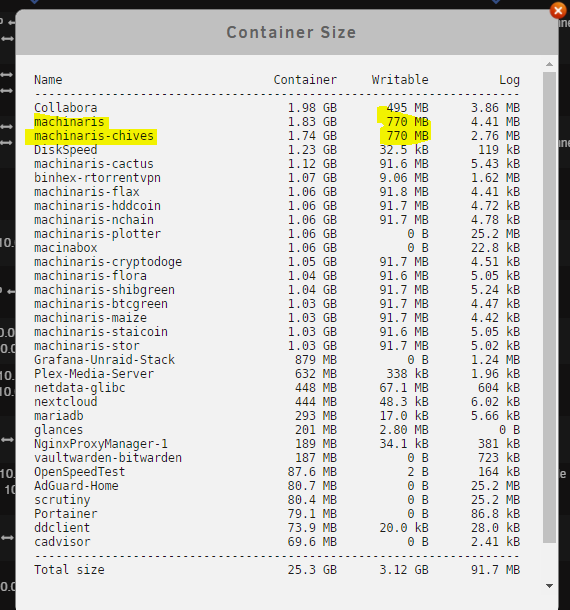
The image shows the chia and chive fork are both writing to the docker image. The other forks to not. The log location provided are outside of the docker image. Any ideas what could be writing to it?
-
is there a way to delete the logs? 1.4gb is quite high
-
am i blind? i am unable to find the setup guide. Can someone point me in the right direction?
-
Does this work for the chia forks as well?
-
i use gate.io. no kyc. i transfer my XCH (chia) to them. Sell it for USDT and then plan what to do with it. I was then trading it to matic and investing on polygon for most of this year, but recently started playing with the fantom and avalanche networks. I really like that it supports cross transfers with minor waits (minutes) and low fees. It is not a USA site, so it may seem sketchy, but is quite popular in Asian counties.
-
upgrading to 0.65 broke the chia wallet. debug log attached. debug.log
-
cryptodoge is new and not listed on CA. still in testing?
-
My search-fu failed me. Questions: The 'check plots' function has been removed from the farmers tab. I am unable to find it. Where was it moved to? How do i disable certain alerts? Silicon is generating 2213 alerts per day for being 'offline' while it syncs. Setting up harvester alt coins (on sperate machines), doesn't function in any way. They do not communicate. Size is not reported. unable to access logs Machinaris does see them, at times, but then replaces them with another alt coin harvester. This is similar to the DNS issues a few revisions back. Assigning manual IPs does not resolve.
-
I started experimenting with this last night. So far there is no way to interact with them. To get them to sync and and report in, the following is required: Own IP. The default bridge mode will not work as the worker's name is linked to its IP address. Adding the following to extra parameters: -h "<dockername>" -e TZ=<local> -e worker_address=<Worker IP> -e controller_host=<Machinaris IP> -e controller_api_port=8927 EX: -h "chives" -e TZ=America/Los_Angeles -e worker_address=192.168.1.24 -e controller_host=192.168.1.2 -e controller_api_port=8927 I also have not been able to figure out what the worker_api_port is for. None of them are being requested by docker, so the port isn't actually opened. when manually opening the by via -p 8931:8931 (for chives), nothing changes. it appears the built in flax and the addon flax are different. I was unable to find documentation any of this, so everything done was a guess.
-
is sware i already tried that, but its working now. Your help is highly apprecated. for the next person, you add the following to the template from the ca app, under extra parameters: -t -e TZ=America/Los_Angeles -e worker_address=10.0.0.3 -e farmer_address=10.0.0.2 -e farmer_port=8447 -e flax_farmer_port=6888 -e farmer_pk=* -e pool_contract_address=* -e controller_host=10.0.0.2 -e controller_api_port=8927 then fill in the rest of the template as normal.
-
I use two drives in a raid 1 for my transfer cache. They write/read at 160mb/s. Then mover runs at 11pm. The array with dual parity reads at 150mb/s, but write is only 35mb/s. Reconstruct mode pushes it to 55mb/s. My dockers are on an r1 satassd cache drives, and the plotter is on an nvme drive with high endurance. using this setup, a plot is created every 36 minutes, start to finish.
-
Any suggestions on getting the harvester+plotter working? Error: Connection Refused certs are are in both the farmer_ca and \mainnet\config\ssl\ca folders IPs are used instead of hostnames. Here are the docker command: draft1: generated on the full node, using the new worker button. docker run -d -t --name machinaris-plotter -h chiaharvest -v /mnt/user/appdata/machinaris/:/root/.chia -v "/mnt/user/chia/:/plots" -v "/mnt/ssdnvme/:/plotting" -e TZ=America/Los_Angeles -e farmer_address=10.0.0.2 -e farmer_port=8447 -e flax_farmer_port=6888 -e farmer_pk=* -e pool_pk=* -e pool_contract_address=* -e mode=harvester,plotter -e controller_host=10.0.0.2 -e controller_api_port=8927 -e plots_dir=/plots -e blockchains=chia,flax -p 8926:8926 -p 8927:8927 ghcr.io/guydavis/machinaris draft2: (https://github.com/guydavis/machinaris/wiki/Workers) docker run -d -t --name "machinaris" -h "chiaharvester" -v "/mnt/user/appdata/machinaris/:/root/.chia" -v "/mnt/user/chia/:/plots" -v "/mnt/ssdnvme/:/plotting" -e TZ="America/Los_Angeles" -e farmer_address="10.0.0.2" -e farmer_pk="*" -e pool_pk="*" -e pool_contract_address="*" -e mode="harvester+plotter" -e controller_host="10.0.0.2" -e plots_dir=/plots -e blockchains=chia -p 8926:8926 -p 8927:8927 ghcr.io/guydavis/machinaris there is no firewall present to be blocking communications.

-
I followied this guide: https://github.com/guydavis/machinaris/wiki/Plotman#plotting and https://github.com/guydavis/machinaris/wiki/MadMax it does not work. machinaris doesnt know what the madmax type is. Error: Traceback (most recent call last): File "/chia-blockchain/venv/lib/python3.8/site-packages/plotman/configuration.py", line 40, in get_validated_configs loaded = schema.load(config_objects) File "/chia-blockchain/venv/lib/python3.8/site-packages/marshmallow/schema.py", line 714, in load return self._do_load( File "/chia-blockchain/venv/lib/python3.8/site-packages/marshmallow/schema.py", line 896, in _do_load raise exc marshmallow.exceptions.ValidationError: {'plotting': {'e': ['Missing data for required field.'], 'k': ['Missing data for required field.'], 'job_buffer': ['Missing data for required field.'], 'type': ['Unknown field.']}} The above exception was the direct cause of the following exception: Traceback (most recent call last): File "/chia-blockchain/venv/bin/plotman", line 8, in <module> sys.exit(main()) File "/chia-blockchain/venv/lib/python3.8/site-packages/plotman/plotman.py", line 137, in main cfg = configuration.get_validated_configs(config_text, config_path) File "/chia-blockchain/venv/lib/python3.8/site-packages/plotman/configuration.py", line 42, in get_validated_configs raise ConfigurationException( plotman.configuration.ConfigurationException: Config file at: '/root/.chia/plotman/plotman.yaml' is malformed

