





dealbakerjones
Members
-
Joined
-
Last visited
Everything posted by dealbakerjones
-
i can get them - whats the safest way to get them onto a thumb drive? i have a drive showing in Unassigned Devices, do i mount this in its own pool?
-
Ok i added the new 900gb drive to it's place in the array (disk3), added the old disk3 (450gb) to a new pool, and started the array. old disk 3 (450gb) says unmountable, this is the disk log:
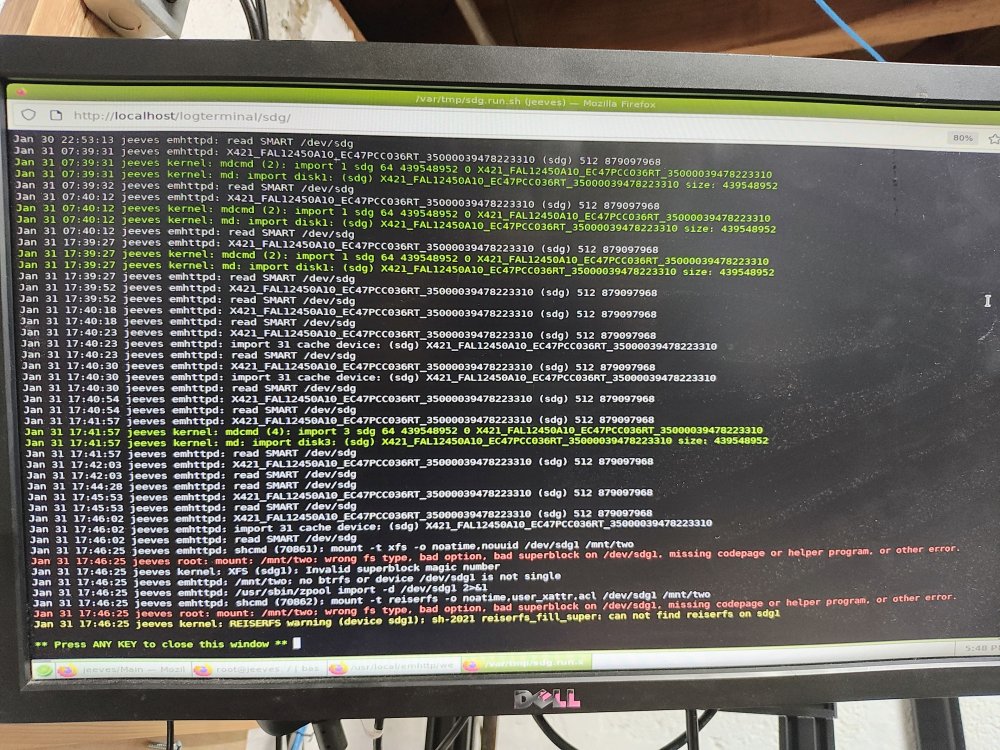
-
I don't; this whole past month has been trying to expand my array so I can support a full backup (r620's 2.5" drives just aren't big enough to give me what I need, so all this work has been to give me the extra capacity from an MD1200 and a bunch of 6TB drives. I have come to terms with the idea of the loss of the current disk (a few movies, and maybe a VM - but nothing life essential), but afaict the disk should be intact. We'll see. Big lessons (re)learned - diagnostics always first, and only do one thing at a time
-
Thanks very much, I will try to get UD installed offline this afternoon. If not, I'll do the new pool and use UnBalanced to copy the data to the new/bigger disk. Either way I'll post back with findings, thanks for the help - I am trying to increase my understanding of exactly how parity ops work; I'm starting to think that if I had just left everything for a bit after preclear/assigning the new drive, it would have worked smoothly.
-
Gotcha. so my steps are: 1. Dowload/install Unassigned Devices (gotta figure this out offline) 2. Create new single device pool 3. Add old drive to this pool 4. Use UD to copy files
-
Ok, when i tried to assign the old disk to a new slot, unraid said it would start the Disk-clear proces, which i think will lose some data? i don't have Unassigned Devices and don't have Internet (pfsense vm is acting up) but i think i can download from github to a thumb drive and install. Could i create a new config with the old disk assignments (unassign the new drive, assign the old drive in its original place, then preserve everything and create a new config)?
-
i do! I formatted the new (900gb) drive thinking it was needed to mount. But since the old drive is 450gb, unraid won't let me reassign the smaller drive in it's original place
-
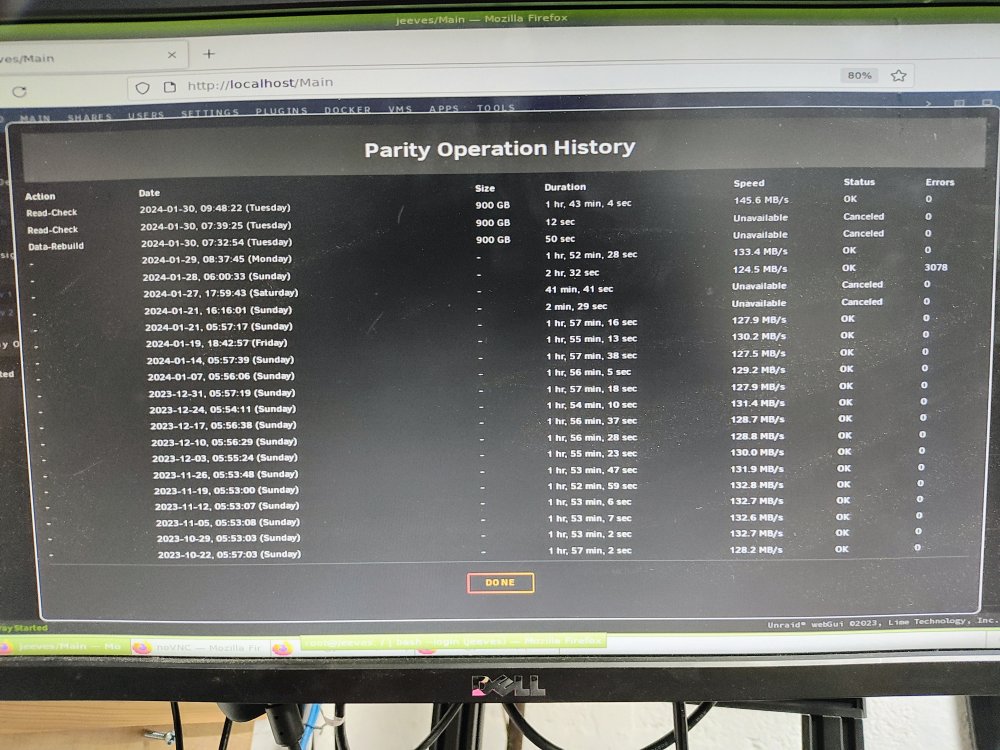
I was trying to replace a 450gb drive with a 900gb one. (Just did this successfully a few days ago.) I precleared the new drive in an empty slot, stopped the array, but when i assigned the new drive and restarted the array, it said "unmountable". Parity sync didn't start to write emulated data to the new drive (that i could see). so I stopped the array, and tried to add the old disk back (which is unchanged). Now that one said "unmountable" too. now i started to freak out a bit. i added the new drive and tried "format", but the array never rebuilt data to the new drive, and i just have an extra empty drive. Now i can't replace the old drive bc unraid says it's too small, but i think it still has all the data on it. What to do? I'm one of those dummies who has my pfsense in a vm (i know i know) so i cant download diagnostics, but heres a pic of the History - looks like parity should still be valid from the old drive.
-
Thanks for your help so far - I'm still stumped! 1. I flashed BIOS to the HBA, but during boot sequence it's still not recognized (BIOS is enabled in the R620, I followed this video https://www.youtube.com/watch?v=ggdbgjm8cRQ) -- but unraid sees the device in PCIe settings (lspci and sas2flash both confirm, and device messages show in unraid system logs) 2. I tried using a known good drive (part of my array) and a new drive (which appears in Tools>Preclear Disk) in the MD1200, but nothing appears anywhere I can find in unraid (lsscsi, Tools>System Devices) [actually the new drive shows up in preclear but doesn't get a green status light in the MD1200, not sure what's up with that) 3. closer look at the MD1200 shows it's actually in an error state, but both EMMs, PSUs, and all HDDs show green/ready, not sure what else I can troubleshoot (replace the backplane? control panel?) Not quite sure where to go from here - if I can get the HBA BIOS to load, I'm hoping I'll be able to tell if the HGST drives need to be formatted to 512 or something (rule out the HBA as the issue), which will confirm that the MD1200 is just dead and I need to return it. jeeves-diagnostics-20240127-1848.zip
-
only other things I've seen online/can think of: - some sas cables are not bi directional, i asked the ebay seller to be sure (cable is new i think) - sometimes the server may not read the card correctly and you need to set the pcie bus to read 2x8 instead of 1x16; this is possible but since the card is recognized correctly, seems unlikely?
-
OK I crossflashed updated firmware, checked all the cables, everything is showing solid green/good, checked that I'm in unified mode and connected to EMM0, but still not seeing the drives anywhere. Is there anything else I can check? jeeves-diagnostics-20240122-1927.zip
-
thanks! I'll reflash the firmware with the broadcom latest to be sure - ill check on the temps too, fans have been spinning fine and other temps look ok in the dashboard. Is that temp specific to the HBA ("mpt2sas_cm0")?
-
Hey everyone, been digging through the threads on getting these cards configured. I have a Dell R620 and have used a PERC H310 so far). I am adding a PowerVault MD1200 and bought an 0TFJRW (LSI SAS2308 / 9206-16e) HBA to get an external SAS port to hook it up to the R620. Everything is connected and powered on (MD1200 drives show ready lights), but the drives in the MD1200 don't appear available for preclear, or anywhere else. 1. the HBA shows in unraid System Devices: IOMMU group 56: [1000:0087] 43:00.0 Serial Attached SCSI controller: Broadcom / LSI SAS2308 PCI-Express Fusion-MPT SAS-2 (rev 05) IOMMU group 57: [1000:0087] 45:00.0 Serial Attached SCSI controller: Broadcom / LSI SAS2308 PCI-Express Fusion-MPT This is also supported when I run lspci: 43:00.0 Serial Attached SCSI controller: Broadcom / LSI SAS2308 PCI-Express Fusion-MPT SAS-2 (rev 05) Subsystem: Broadcom / LSI SAS2308 PCI-Express Fusion-MPT SAS-2 Flags: bus master, fast devsel, latency 0, IRQ 41, NUMA node 1, IOMMU group 56 I/O ports at bc00 [size=256] Memory at d0ff0000 (64-bit, non-prefetchable) [size=64K] Memory at d0f80000 (64-bit, non-prefetchable) [size=256K] Expansion ROM at d0000000 [disabled] [size=1M] Capabilities: [50] Power Management version 3 Capabilities: [68] Express Endpoint, MSI 00 Capabilities: [d0] Vital Product Data Capabilities: [a8] MSI: Enable- Count=1/1 Maskable- 64bit+ Capabilities: [c0] MSI-X: Enable+ Count=16 Masked- Capabilities: [100] Advanced Error Reporting Capabilities: [1e0] Secondary PCI Express Capabilities: [1c0] Power Budgeting <?> Capabilities: [190] Dynamic Power Allocation <?> Capabilities: [148] Alternative Routing-ID Interpretation (ARI) Kernel driver in use: mpt3sas Kernel modules: mpt3sas 45:00.0 Serial Attached SCSI controller: Broadcom / LSI SAS2308 PCI-Express Fusion-MPT SAS-2 (rev 05) Subsystem: Broadcom / LSI SAS2308 PCI-Express Fusion-MPT SAS-2 Flags: bus master, fast devsel, latency 0, IRQ 41, NUMA node 1, IOMMU group 57 I/O ports at ac00 [size=256] Memory at d1ff0000 (64-bit, non-prefetchable) [size=64K] Memory at d1f80000 (64-bit, non-prefetchable) [size=256K] Expansion ROM at d1000000 [disabled] [size=1M] Capabilities: [50] Power Management version 3 Capabilities: [68] Express Endpoint, MSI 00 Capabilities: [d0] Vital Product Data Capabilities: [a8] MSI: Enable- Count=1/1 Maskable- 64bit+ Capabilities: [c0] MSI-X: Enable+ Count=16 Masked- Capabilities: [100] Advanced Error Reporting Capabilities: [1e0] Secondary PCI Express Capabilities: [1c0] Power Budgeting <?> Capabilities: [190] Dynamic Power Allocation <?> Capabilities: [148] Alternative Routing-ID Interpretation (ARI) Kernel driver in use: mpt3sas Kernel modules: mpt3sas Running sas2flash shows the card is running in IT mode, and the firmware is pretty up to date (I saw a May 2023 post showing 20.00.07.00 as current, is this right?): ./sas2flash -list LSI Corporation SAS2 Flash Utility Version 20.00.00.00 (2014.09.18) Copyright (c) 2008-2014 LSI Corporation. All rights reserved Adapter Selected is a LSI SAS: SAS2308_2(D1) Controller Number : 0 Controller : SAS2308_2(D1) PCI Address : 00:43:00:00 SAS Address : 5000d31-0-0083-a41d NVDATA Version (Default) : 14.01.00.08 NVDATA Version (Persistent) : 14.01.00.08 Firmware Product ID : 0x2214 (IT) Firmware Version : 20.00.11.00 NVDATA Vendor : LSI NVDATA Product ID : SAS9206-16e BIOS Version : N/A UEFI BSD Version : N/A FCODE Version : N/A Board Name : SAS9206-16E Board Assembly : H3-25553-01A Board Tracer Number : SV42817207 Finished Processing Commands Successfully. Exiting SAS2Flash. ./sas2flash -c 1 -list LSI Corporation SAS2 Flash Utility Version 20.00.00.00 (2014.09.18) Copyright (c) 2008-2014 LSI Corporation. All rights reserved Adapter Selected is a LSI SAS: SAS2308_2(D1) Controller Number : 1 Controller : SAS2308_2(D1) PCI Address : 00:45:00:00 SAS Address : 5000d31-0-0083-a425 NVDATA Version (Default) : 14.01.00.08 NVDATA Version (Persistent) : 14.01.00.08 Firmware Product ID : 0x2214 (IT) Firmware Version : 20.00.11.00 NVDATA Vendor : LSI NVDATA Product ID : SAS9206-16e BIOS Version : N/A UEFI BSD Version : N/A FCODE Version : N/A Board Name : SAS9206-16E Board Assembly : H3-25553-01A Board Tracer Number : SV42817207 Finished Processing Commands Successfully. Exiting SAS2Flash. I'm hoping I missed something really silly - can anyone point me in the right direction? jeeves-diagnostics-20240121-1807.zip
-
sorry to necro an ancient thread but you just saved me an hour of reinstalling ubuntu to solve this, thanks so much
-
hello, I had a power failure that wiped my pfsense vm, and now my proxy containers don't work. Everything is up and running, no errors; I've checked that ports 80 and 443 are open on the rebuilt pfsense vm, and SWAG, Vaultwarden, and Guac are all running/accessible locally. I'm stumped on what to troubleshoot next - I've looked at the proxy config files, everything looks correct. What couldI be missing?
-
I saw in another thread that the Go method may not work in the newest version of Unraid:
-
Would this work if it was in a User Script (CA User Scripts plugin)?

