





Ookami313
Members
-
Joined
-
Last visited
Everything posted by Ookami313
-
Worked like a breeze. Thanks for the help.
-
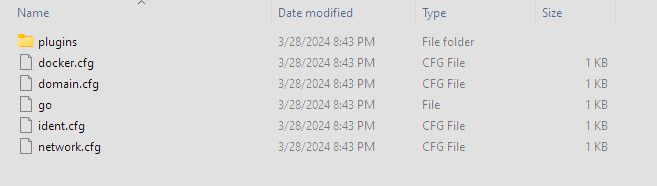
OK, so to make sure I'm following, rename all the .cfg files to .bak copy the .bak files changing their name to lowercase and also extension back to .cfg delete all the .bak files and reboot Is that the gist?
-
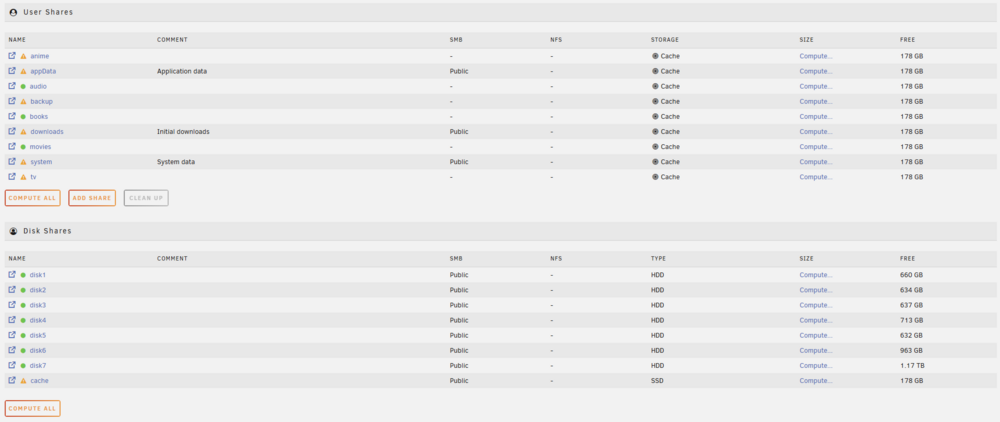
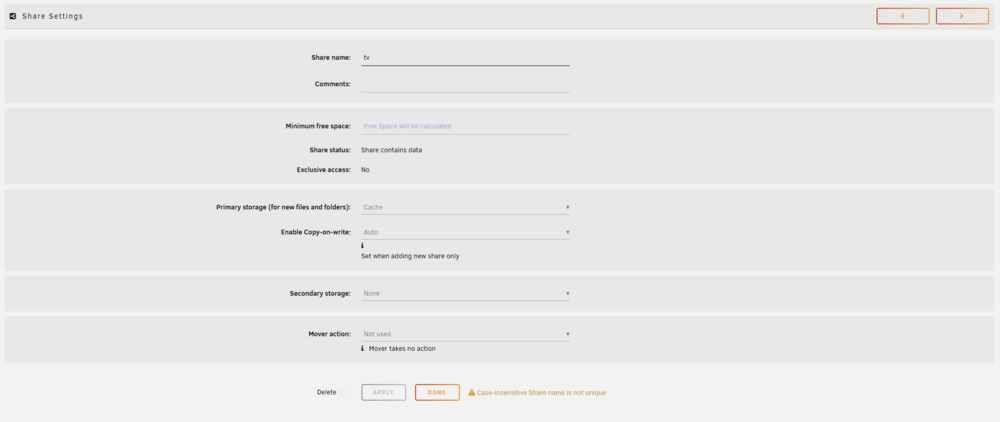
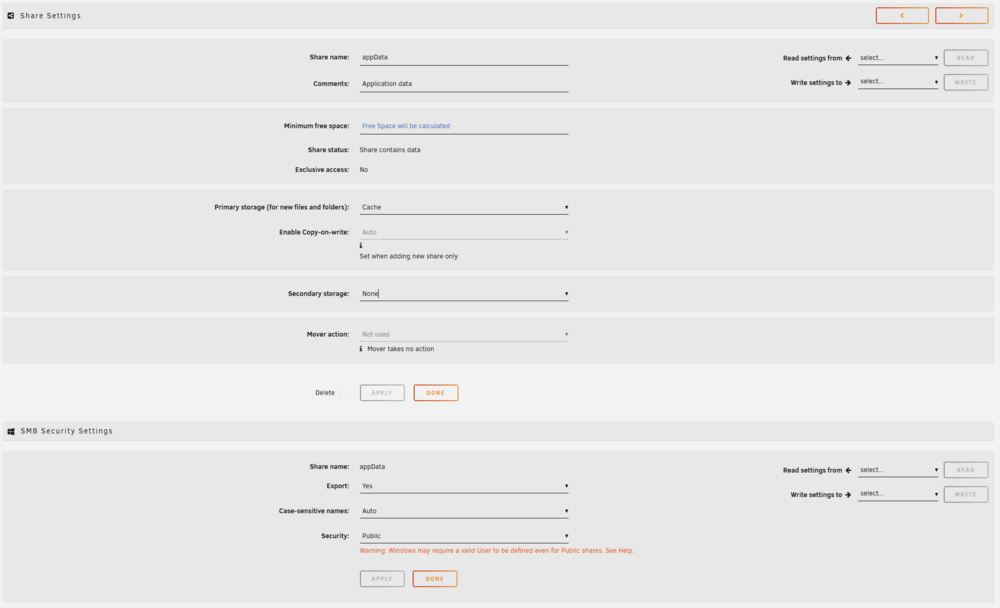
Updated from 7.1.4 to 7.2.4 over the weekend. Since the update my shares have gone weird for lack of a better term. The shares still exist on the server, but the SMB capability no longer exists (all but cache, downloads, system, and appData). All shares changed to Cache Storage even those I had set to Array and the option to change them is greyed out and cannot be selected. appData, cache, downloads, and system all look to be open to configuration and have a SMB security settings section at the bottom of the page, the others do not. If I try to manually move any files from the cache drive to the array using Krusader I get privilege errors. I logged out of my personal user account and into root but I seem to be getting the same issue even under root. Rebooted system, no effect. Rebooted into GUI Safe mode, no effect. Any ideas on how to fix this? Thanks.raven-diagnostics-20260323-1847.zip
 OK, I will start there minus the disabling of the array auto start. Due to the fact that I have more drives in my array than the trial version gives I assume that the recover tool for my license is done via the main page. Sorry, I've never had to recover my license before, the flash drive that died is the original I've used since I started using Unraid. Thanks.This is what I have in the config folder:
 Thanks for the information. I've started the process by creating a new boot flash disk with the USB creator, but reading the instruction provided it is saying to modify the file /boot/config/disk.cfg on the flash drive and if necessary, change the startArray="yes" entry to startArray="no". However, when I go into the new drive, I'm not seeing the disk.cfg file. In fact, there is no boot directory, only a config, EFI, and syslinux. Is this a file that get created after the initial boot up? Thanks.Hoping to get some advice and help. Was working on my server last night with no issue. Was able to update some dockers and rename new episodes that had been grabbed. Came back about an hour later and for some reason SABnzb and Sonarr were reading as not connected so I switched to the tab I have open for the Unraid dashboard and noticed that at some point both the CPU and memory had hit 100% usage, and the dashboard was frozen and unresponsive. Went to my server to try and login directly and the login screen was unresponsive. Unfortunately had to do a hard shutdown on the system and when it came back up, I kept getting a no bootable device found error. Tried going onto the BIOS and saw no flash drive listed in the boot sequence menu. First, is it possible to read the drive on my windows machine? I tried to plug it in, but the system would not recognize it so I'm not totally sure if it's because the drive is used for a Linux system (still an amateur when it comes to Linux) or if it was because the drive has failed. Second, assuming the drive has failed is there any way to recover and gain access to my system again? I do have a backup of my flash drive, but it's on the array as I had the backup plugin do a daily backup of the flash drive when my appdata share was backed up. Truth be told I don't know if I did a backup to the Unraid website when my system and account were linked after the update to 6.12, and I'm not sure how to verify. Anyway, any help and/or assistance would be greatly appreciated. I've basically come to the realization that I'm probably screwed, but I'm holding out a little hope. Thanks.Curious to know if this LS docker version has moved over to Mylar3. I can't tell from the version listed in the application itself because all I see for the version looks to be a 256 hash. The application site link above, the community apps installer for the LS docker, and in the application itself still point to the original Mylar github page which says development has been stopped and moved to Mylar3. Anyway, I have been planning on wiping my appdata and rebuilding to see if I can fix an issue I've been having and wanted the latest version being developed/supported, so I figured I'd ask. thanks.I have deleted the config directory and had the container rebuild it. It's possible that the plugin directory isn't getting created, but I don't have a directory structure to verify with. I did notice that the last few times I tried to delete the config directory that it was not deleting everything and leaving a a few internal directories intact. When I tried to delete them it would tell me that the directory wasn't empty. I couldn't see any hidden files in the directory with Windows, but it's possible a hidden Linux file wouldn't delete, though I didn't see one with an ls command. Ended up having to do a rm -rf of the directory to get rid of it. Thanks.Yes. Both Chrome and Firefox. Same error.Deleted the container and image. Deleted the rogue image. Reinstalled the container. Still getting the following error. [18.03.2016 23:38:38] WebUI started. [18.03.2016 23:38:39] Bad response from server: (0 [error,getplugins]) NetworkError: Failed to execute 'send' on 'XMLHttpRequest': Failed to load 'http://192.168.0.20:8089/php/getplugins.php'. [18.03.2016 23:38:40] Bad response from server: (0 [error,getuisettings]) Seems to occur even whether I install the linuxserver or captinsano container. Thanks.root@Tower:~# docker ps -a CONTAINER ID IMAGE COMMAND CREATED STATUS PORTS NAMES 9d2f86e9db9f linuxserver/rutorrent "/sbin/my_init" 23 minutes ago Up 22 minutes 0.0.0.0:9527->9527/udp, 0.0.0.0:45566-45576->45566-45576/tcp, 443/tcp, 0.0.0.0:8089->80/tcp ruTorrent 56ce7053092f linuxserver/sonarr "/sbin/my_init" 2 weeks ago Up 2 hours 0.0.0.0:8989->8989/tcp Sonarr 7514362f6e99 linuxserver/headphones "/sbin/my_init" 2 weeks ago Up 2 hours 0.0.0.0:8181->8181/tcp Headphones 8a73ace2ae8e linuxserver/deluge "/sbin/my_init" 2 weeks ago Up 2 hours Deluge d3e4338d28fc linuxserver/couchpotato "/sbin/my_init" 2 weeks ago Up 2 hours 0.0.0.0:5050->5050/tcp CouchPotato 2f13f318aec9 aptalca/docker-rdp-boinc "/sbin/my_init" 2 weeks ago Up 2 hours 3389/tcp, 0.0.0.0:8800->8080/tcp RDP-Boinc 8620f1aa9dce linuxserver/mylar "/sbin/my_init" 6 weeks ago Up 2 hours 0.0.0.0:8090->8090/tcp Mylar 5db3528656be linuxserver/sickrage "/sbin/my_init" 3 months ago Exited (0) 3 months ago SickRage 2ce5fa33fc32 linuxserver/transmission "/sbin/my_init" 4 months ago Up 2 hours 0.0.0.0:9091->9091/tcp, 0.0.0.0:51413->51413/tcp transmission 39b759e07f8c needo/sickbeard "/sbin/my_init" 4 months ago Exited (137) 4 months ago SickBeard db6671985ad7 linuxserver/sabnzbd "/sbin/my_init" 4 months ago Up 2 hours 0.0.0.0:8080->8080/tcp, 0.0.0.0:9090->9090/tcp SABnzbd 9b8b498c98d1 hurricane/ubooquity "/start.sh" 4 months ago Up 2 hours 0.0.0.0:8085->8085/tcp Ubooquity root@Tower:~# docker images REPOSITORY TAG IMAGE ID CREATED VIRTUAL SIZE linuxserver/rutorrent latest f70b0c417072 9 days ago 577.4 MB linuxserver/headphones latest 01d528f98f04 2 weeks ago 848.2 MB linuxserver/couchpotato latest db4b75be1e6b 2 weeks ago 642.4 MB linuxserver/deluge latest 35c511de52b6 2 weeks ago 438.6 MB linuxserver/sonarr latest 7ca3a1772973 2 weeks ago 499.5 MB linuxserver/mylar latest 526ca001354d 6 weeks ago 593.1 MB linuxserver/sickrage latest d17ff62b0989 3 months ago 533.6 MB linuxserver/transmission latest a99bef15eab1 4 months ago 307 MB linuxserver/sabnzbd latest fbd5ba31845b 4 months ago 345 MB <none> <none> dacd34ba0e5a 5 months ago 503.4 MB pinion/docker-mylar latest 0e6da771e09c 5 months ago 361.5 MB hurricane/ubooquity latest ef2cf9ccb52d 6 months ago 533.1 MB aptalca/docker-rdp-boinc latest 2266ab4f603f 10 months ago 625.2 MB needo/sickbeard latest 63f514919721 11 months ago 337.6 MB root@Tower:~#Try changing /mnt/user/ to /mnt/cache/ for the appdata share Same error.Screen shot posted below. Noticed your's looks different, but then I saw you were using 6.2 beta. Thanks
 Rebooted my system and reinstalled ruTorrent, but it will still not run correctly. Unsure of the problem. Still getting the following error upon starting the container and accessing the webhost. [17.03.2016 18:05:21] WebUI started. [17.03.2016 18:05:22] Bad response from server: (0 [error,getplugins]) NetworkError: Failed to execute 'send' on 'XMLHttpRequest': Failed to load 'http://192.168.0.20:8089/php/getplugins.php'. [17.03.2016 18:05:22] Bad response from server: (0 [error,getuisettings]) I did notice that when I was reinstalling, I kept seeing that some of the image already was installed: IMAGE ID [f70b0c417072]: Pulling fs layer. IMAGE ID [f7eef3e8d2a5]: Already exists. IMAGE ID [f504bc93666d]: Already exists. IMAGE ID [9e58b20b58ab]: Already exists. IMAGE ID [97b492236f76]: Already exists. IMAGE ID [1e4ce1496f97]: Already exists. IMAGE ID [b3260a41280d]: Already exists. IMAGE ID [a4e1f7d8ab53]: Already exists. IMAGE ID [35100966404c]: Already exists. IMAGE ID [f6953bdb8339]: Already exists. IMAGE ID [6e9b74243288]: Already exists. IMAGE ID [83770ba1bc9a]: Already exists. IMAGE ID [82d40d68893f]: Already exists. IMAGE ID [87c5ffca2485]: Already exists. IMAGE ID [f38bff93c51e]: Already exists. IMAGE ID [497ee53addc1]: Already exists. IMAGE ID [4ede16d1bc02]: Downloading 100% of 32 B. Verifying Checksum. Download complete. Is this normal, or is there a way to delete everything in case something in these pieces, that already exist, is causing the issue? Thanks.I was on my LAN accessing my server from my gaming computer.1. Yes, stopped the container, deleted the config folder on my cache drive, restarted the container to rebuild the config directory and files. 2. appData folder is on the cache drive along with configs for all my other containers. No issue with any of the others that I can see. 3. Removed the docker container as well as the image and reinstalled/pulled. No effect. If no other resolution can be found, I'll reboot the server tomorrow when I get home from work and see if that does the trick. When in doubt, reboot I guess. lol. Thanks.Deleted and rebuilt. Get the following error again. [16.03.2016 20:54:44] WebUI started. [16.03.2016 20:54:45] Bad response from server: (0 [error,getplugins]) NetworkError: Failed to execute 'send' on 'XMLHttpRequest': Failed to load 'http://192.168.0.20:8089/php/getplugins.php'. [16.03.2016 20:54:45] Bad response from server: (0 [error,getuisettings]) Thanks.Looking for clarification on an error I'm getting and was hoping for some help. Initially I was using the captinsano version of the ruTorrent docker, but after it was released by Linuxserver.io I decided to move to that version since all my other dockers are compiled by them. Had everything up and running fine, downloading and seeding files, then the other day we had several days of thunderstorms rolling through. My system had to shutdown, which is fine because I needed to reboot for the 6.1.9 upgrade. Didn't pay any attention till today when I went to add a new torrent and found that all the downloads and seeds I had running were no longer listed and I'm getting the bellow error in the log. [16.03.2016 19:46:32] WebUI started. [16.03.2016 19:46:32] No connection to rTorrent. Check if it is really running. Check $scgi_port and $scgi_host settings in config.php and scgi_port in rTorrent configuration file. Renamed the config directory and restarted the docker to rebuild the config and then got following errors. [16.03.2016 20:06:12] WebUI started. [16.03.2016 20:06:13] Bad response from server: (0 [error,getplugins]) NetworkError: Failed to execute 'send' on 'XMLHttpRequest': Failed to load 'http://192.168.0.20:8089/php/getplugins.php'. [16.03.2016 20:06:13] Bad response from server: (0 [error,getuisettings]) Application no longer looks like it wants to run correctly. Any clue on resolving this? Thanks.I'm obviously blind since I didn't see "unRAID 6" in the title... durrr To eager to try I guess. I'll just have to wait till I upgrade to 6. Thanks.Just curious, is this compatible for v5 or is it v6 only? Not sure if something was updated, but I just tried to install the plugin and got the following error: root@Tower:/boot/config/plugins# installplg NerdPack.plg installing plugin: NerdPack file /usr/local/emhttp/plugins/NerdPack/README.md: already exists file /usr/local/emhttp/plugins/NerdPack/NerdPack.png: already exists file /boot/config/plugins/NerdPack/packages/iftop-1.0pre2-x86_64-1.txz: downloading from https://raw.githubusercontent.com/eschultz/unraid6-nerdpack/master/packages/iftop-1.0pre2-x86_64-1.txz ... ERROR: cannot verify raw.githubusercontent.com's certificate, issued by `/C=US/O=DigiCert Inc/OU=www.digicert.com/CN=DigiCert SHA2 High Assurance Server CA': Unable to locally verify the issuer's authority. ERROR: certificate common name `www.github.com' doesn't match requested host name `raw.githubusercontent.com'. To connect to raw.githubusercontent.com insecurely, use `--no-check-certificate'. bad download, deleting Thanks for any assistance.You wouldn't by chance have pics of your setup? I'm curious about this case, but want to see how much clearance in the back you have with your 5x3's. Looking at the pics on Xoxide site doesn't give a clear view of the space between the bottom 3 bays and the PS/Drive mounts. Would hate to buy it only to find out it doesn't work. I currently have 3 Norco 4x3 and being able to use the two internal mounts for cache and parity would be awesome since I would have full use of all 12 drives.



