Puntoboy
Members
-
Joined
-
Last visited
-
I've been trying to connect my Synology NAS to Unraid using this plugin without success. I have two options in Synology DSM to connect to a network UPS server, Synology NAS and SNMP. Obviously Unraid isn't a Synology NAS, so that doesn't work (I did try just in case). By default the NUT server doesn't seem to support SNMP either, anyone set this up?
-
Thanks. I did work this out from reading a few posts and have it working.
-
Does CURL still work with Unraid?
-
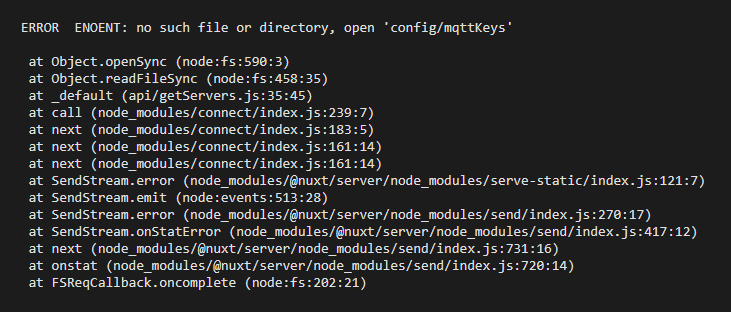
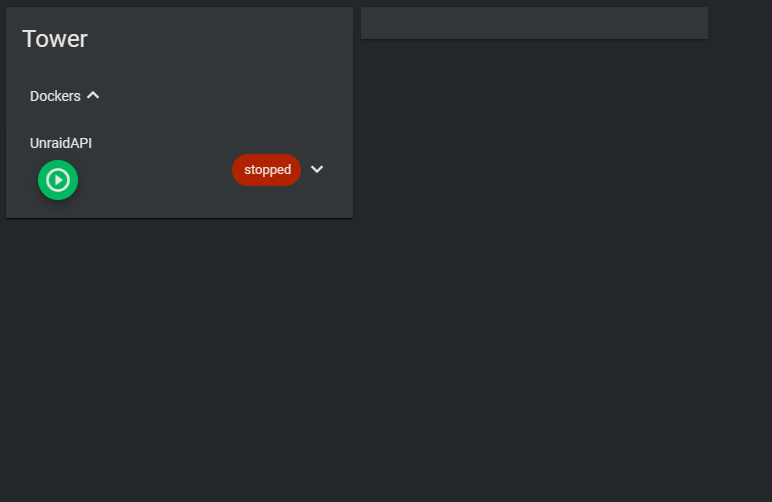
To see if there was a problem with the Unraid container, I deployed the one on HA. I get the same now, only seeing the single docker container in the WebUI (no other details about the Unraid server) and I've seeing these errors in the logs. When I restart the add-on the Unraid server details disappear. I assume something to do with this? so the two issues I have are: 1. The Docker WebUI only shows the docker container status. 2. Home Assistant isn't getting any MQTT data (I can see the successful connection, but that's it)
-
I've just seen there was an update for the Docker container, so due to my issues, I've updated it. However when I access the web UI the container stops.
-
Did you see my PM? I'm still not getting the majority of info shown from Unraid.
-
There is a link on the first page, you are right, it's just not very clear that the version has to match your install. I read it as the container version, not the unraid version
-
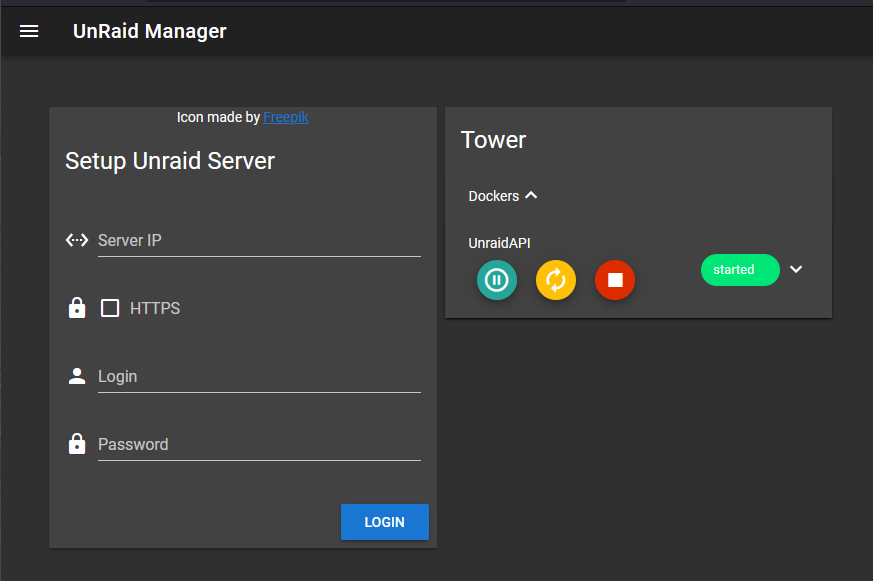
OK making progress, I can see this in the GUI now.
-
Thanks, there's nothing in the documentation I read that explains that. I've made those changes, just downloading the new container.
-
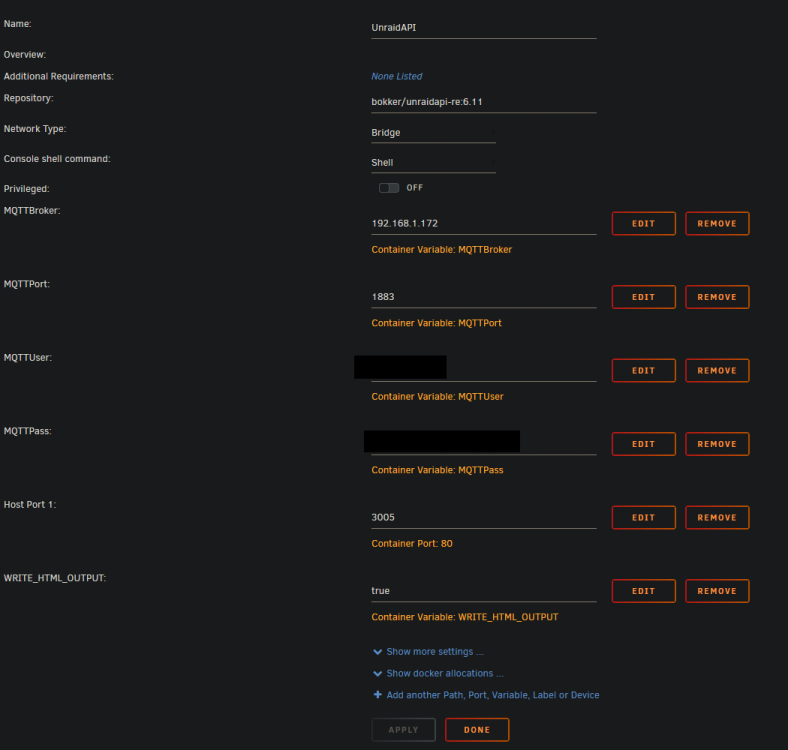
6.12.10 I don't see that path on my server. This is my container setup.
-
Sorry for the stupid question, but how can I browse to the config files? I've added that variable. Snippet from the log file I have found {"log":"}\n","stream":"stdout","time":"2024-04-24T11:16:36.312422879Z"} {"log":"The secure keys for mqtt may have not been generated, you need to make 1 authenticated request via the API first for this to work\n","str> {"log":"Failed to retrieve config file, creating new.\n","stream":"stdout","time":"2024-04-24T11:16:47.408770032Z"} {"log":"Error: ENOENT: no such file or directory, open 'secure/mqttKeys'\n","stream":"stdout","time":"2024-04-24T11:16:56.313429941Z"} {"log":" at Object.openSync (node:fs:590:3)\n","stream":"stdout","time":"2024-04-24T11:16:56.313845917Z"} {"log":" at Object.readFileSync (node:fs:458:35)\n","stream":"stdout","time":"2024-04-24T11:16:56.313862841Z"} {"log":" at updateMQTT (/app/mqtt/index.js:382:19)\n","stream":"stdout","time":"2024-04-24T11:16:56.313876898Z"} {"log":" at Timeout._onTimeout (/app/mqtt/index.js:439:7)\n","stream":"stdout","time":"2024-04-24T11:16:56.313885199Z"} {"log":" at listOnTimeout (node:internal/timers:559:17)\n","stream":"stdout","time":"2024-04-24T11:16:56.313892732Z"} {"log":" at processTimers (node:internal/timers:502:7) {\n","stream":"stdout","time":"2024-04-24T11:16:56.313898864Z"} {"log":" errno: -2,\n","stream":"stdout","time":"2024-04-24T11:16:56.313904981Z"} {"log":" syscall: 'open',\n","stream":"stdout","time":"2024-04-24T11:16:56.31391113Z"} {"log":" code: 'ENOENT',\n","stream":"stdout","time":"2024-04-24T11:16:56.313917005Z"} {"log":" path: 'secure/mqttKeys'\n","stream":"stdout","time":"2024-04-24T11:16:56.313923134Z"} {"log":"}\n","stream":"stdout","time":"2024-04-24T11:16:56.313929404Z"} {"log":"The secure keys for mqtt may have not been generated, you need to make 1 authenticated request via the API first for this to work\n","str> {"log":"Error: ENOENT: no such file or directory, open 'secure/mqttKeys'\n","stream":"stdout","time":"2024-04-24T11:17:16.315129599Z"} {"log":" at Object.openSync (node:fs:590:3)\n","stream":"stdout","time":"2024-04-24T11:17:16.315161179Z"} {"log":" at Object.readFileSync (node:fs:458:35)\n","stream":"stdout","time":"2024-04-24T11:17:16.315170932Z"} {"log":" at updateMQTT (/app/mqtt/index.js:382:19)\n","stream":"stdout","time":"2024-04-24T11:17:16.315192317Z"} {"log":" at Timeout._onTimeout (/app/mqtt/index.js:439:7)\n","stream":"stdout","time":"2024-04-24T11:17:16.315198664Z"} {"log":" at listOnTimeout (node:internal/timers:559:17)\n","stream":"stdout","time":"2024-04-24T11:17:16.315203648Z"} {"log":" at processTimers (node:internal/timers:502:7) {\n","stream":"stdout","time":"2024-04-24T11:17:16.315208523Z"} {"log":" errno: -2,\n","stream":"stdout","time":"2024-04-24T11:17:16.31521341Z"} {"log":" syscall: 'open',\n","stream":"stdout","time":"2024-04-24T11:17:16.315218275Z"} {"log":" code: 'ENOENT',\n","stream":"stdout","time":"2024-04-24T11:17:16.31522497Z"} {"log":" path: 'secure/mqttKeys'\n","stream":"stdout","time":"2024-04-24T11:17:16.315231808Z"} {"log":"}\n","stream":"stdout","time":"2024-04-24T11:17:16.315236996Z"} {"log":"The secure keys for mqtt may have not been generated, you need to make 1 authenticated request via the API first for this to work\n","str> {"log":"Get VM Details for ip: 192.168.1.19 Failed\n","stream":"stdout","time":"2024-04-24T11:17:36.564266739Z"} {"log":"Request failed with status code 500\n","stream":"stdout","time":"2024-04-24T11:17:36.56429392Z"} {"log":"There was a problem retrieving a field for a docker image\n","stream":"stdout","time":"2024-04-24T11:17:36.593781823Z"} {"log":"Cannot read properties of undefined (reading '0')\n","stream":"stdout","time":"2024-04-24T11:17:36.593810992Z"}
-
Thanks, it was already enabled, however for some reason the syslog server had stopped receiving logs. Anywhoo, found the issue, it was the S3 sleep plugin. It was putting the server into S2idle which was causing it not to respond. I've removed the plugin.
-
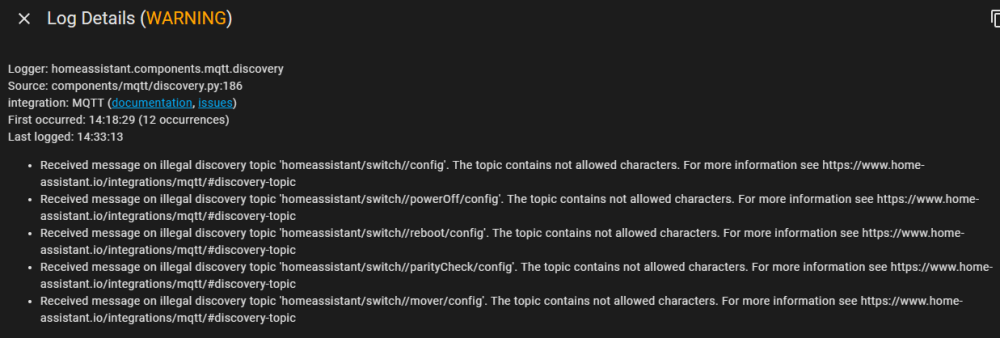
Thanks @BoKKeR that's fine then, however my other two issues persist. I have the Docker deployed on the Unraid server. I have noticed that I am getting these MQTT errors on my Home Assistant server since deploying this.
-
I've had my Unraid server setup for a couple of years now, but it's been turned off for several months. I first noticed this issue a couple of months ago after I started using it again but I keep finding it's going offline. It will power up, start a parity check then anywhere from 20 minutes to 4 hours later it will stop responding on the network. It's still powered on, the IPMI is responding, but the Unraid GUI isn't and pinging the interfaces doesn't work either. Only way to recover is a reboot via the IPMI which is essentially just a power off and on (not shutdown). I've just deployed my first and only Docker image on there as well and that stops responding as well. Any ideas? The server has 3 NICs (4 inc the IPMI). 2 10GB ports on an PCI card and one E1000 1GB NIC onboard. All 3 stop responding, so I fear it's an Unraid OS hang or something. I've updated the OS to the latest (6.12.10) but it's still doing it.
-
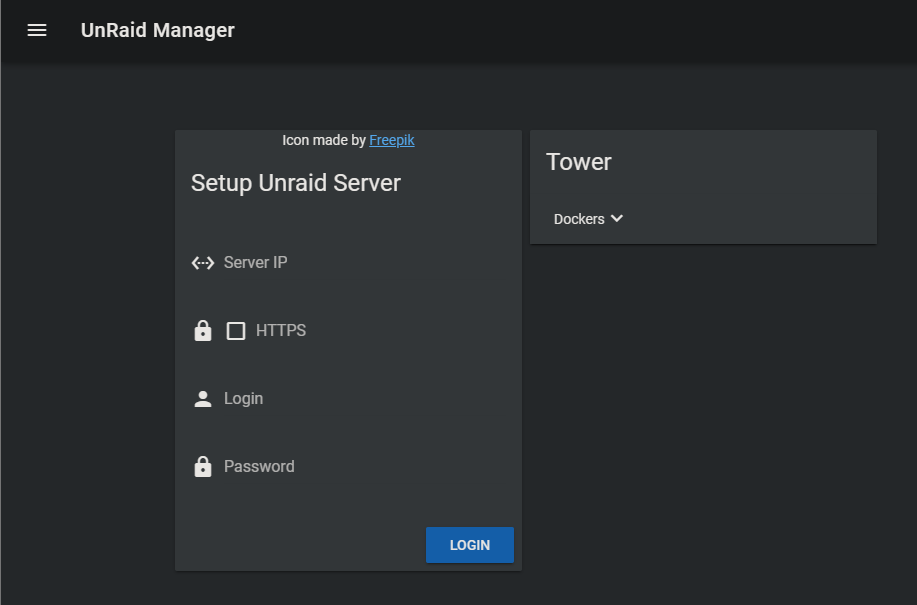
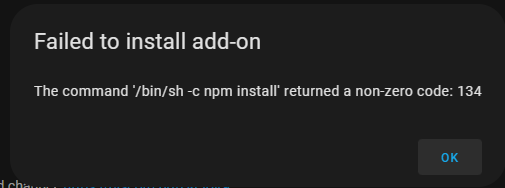
Hello, I'm having no joy getting this to work. The documentation isn't very clear and, certain on my server, the Docker image isn't working correctly. I added the Management Server app from the CA then added the Docker image using the image from the OP here (not the old one). Added the environment variables for my MQTT broker and started the container. But when I connect, there's nothing there. The webpage loads, I enter my server details, it says connected but that's it. Nothing populates. If wait, nothing happens, if I refresh the server details on "setup unraid server" disappear. On the Home Assistant side, I cannot get the add-on to install at all. I wasn't sure if there was a newer add-on I should be using.