.JPG.9c99fa79474213b08a257a3e6fe7dfce.JPG)

Grrrreg
Members
-
Joined
-
Last visited
Everything posted by Grrrreg
-
RESOLVED: @feederbox826 Thank you for the quick responses, it is appreciated along with all you other work sharing templates! I've got the version of the overlay-info that you shared installed and that resolved the issue. Do you know if the codec overlay will be functional again? It's a feature I would downgrade the version if needed to keep. Thank you in advance for your time!
-
Thank you JoregB
-
If anyone has a moment to poke at the diagnostics, or point me towards a good starting point to look at in the logs. Logs are just after a hard reset of the server. Server was unresponsive, could not ssh to terminal. Cheers and Thank You, Greg seine-diagnostics-20231229-2103.zip
-
Thank you trurl and JorgeB for reviewing. It did finally stabilize at normal speeds after a while, now at 13 hours remaining. I've just never seen it take so long before. @trurlThank for pointing out the docker.img size and libvirt.img. I had about 35GB of orphaned images I hadn't paid attention to, deleting those brought it down to the low 50GB's. I need to do some additional clean up of other duplicate/test containers. Thank you @JorgeBI did stop several dockers thinking they might be adding to it. Next time I'll stop all but critical containers. Thank you
-
Hello All, I swapped an old 4TB WD Blue for a shucked WD easystore 12TB. Normally, it takes between 2-3 days to complete an array rebuilt or parity check. The estimated time for rebuild is bouncing between 3 and 16 days, mostly staying at towards the 16 day side of the spectrum at about 15MB/s rebuild speed. I'm not overly concerned, more curious if there is anything I should dig into, or if it's might be something harmless like a large number of small files slowing the rebuild. Dual E5-2660 v2 @ 2.20GHz [CPU utilization averaging 8%] with 64GB ECC RAM [25% Used]. I've gone attached a fresh diagnostics download. Thank You PS. 22 disk+2 disk parity array, 201TB array, with mixed 12TB and smaller disks. Supermicro X9DRi-LN4+/X9DR3-LN4+ , Version REV:1.20A seine-diagnostics-20221016-1831.zip
-
[RESOLVED] Loving the application, great progress. I'm having issues saving backups as root. [2022-01-24T01:59:25.274Z] ERROR: [BackupManager] Invalid user attempting to create backup There was one initial backup that worked, once I deleted it I was able to start creating additional backups.
-
***Update*** It seems /var/log was full, after expanding /var/log and a reboot, preclear is displaying correctly. We'll see if that also corrects the issue with preclear status once it completes. _____________________________________________________________________ I precleared a drive last week, which appeared to finish without error, but it was unable to upload the stats and afterward, the drive did not show as being precleared. I've updated to 6.9.2 with version 2021.03.18 of preclear. I decided to go ahead and run another preclear on the drive. Now, the preview and log are acting odd, scrolling continuously. Let me know if you'd like a diagnostics post or anything else. tput: unknown terminal "screen" tput: unknown terminal "screen" tput: unknown terminal "screen" tput: unknown terminal "screen" unRAID Server Preclear of disk 35504A5642525646 Cycle 1 of 1, partition start on sector 64. Step 1 of 4 - Zeroing in progress: (1% Done) ** Time elapsed: 0:11:33 | Write speed: 206 MB/s | Average speed: 208 MB/s Cycle elapsed time: 0:11:35 | Total elapsed time: 0:11:35 S.M.A.R.T. Status (device type: default) ATTRIBUTE INITIAL STATUS Reallocated_Sector_Ct 0 - Power_On_Hours 142 - Temperature_Celsius 27 - Reallocated_Event_Count 0 - Current_Pending_Sector 0 - Offline_Uncorrectable 0 - UDMA_CRC_Error_Count 0 - SMART overall-health self-assessment test result: PASSED tput: unknown terminal "screen" tput: unknown terminal "screen" tput: unknown terminal "screen" tput: unknown terminal "screen" tput: unknown terminal "screen" Thanks for your time! seine-diagnostics-20210408-1852.zip
-
Hi ich777, Thank you for taking the time to review my issue. I did force the container update as suggested on the first page of the thread. It seems after switching from linxserver container to binhex-plexpass, the transcoder was having permission issues. Ultimately, I deleted the transcode variable from the container and replaced it with a path variable pointing to /tmp. Hardware accelerated encoding is now working. Thanks again for your great support and hard work on the plug-in!
-
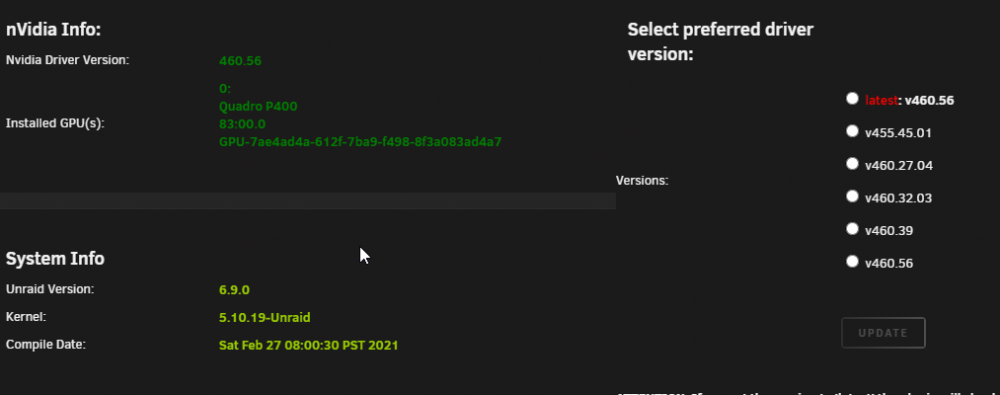
Good Afternoon, A thousand thanks for all the hardwork on this plug-in! I just upgrade to 6.9 from 6.8.3 following the plug-in instructions, plug-in removed and re-install, docker disabled/enabled, with multiple reboots. Hardware encoding is now broken, playback stoping after 2-3 seconds and erroring out. An unknown error occurred (4294967283). Hardware decoding is working, and I've just disabled HW encoding for the time being. It was working without issue for the last year. I did remove the container and re-installed it. repo: linuxserver/plex Plex Version: 1.21.4.4079 X9DRi-LN4+/X9DR3-LN4 2x Nvidia GP107GL [Quadro P400] What information can I supply, and what troubleshooting steps would you recommend? I've also trying switching to binhex's plexpass container, which has the same behavior of stopping after a few seconds. Should I post this issue somewhere else? seine-diagnostics-20210305-1319.zip