





MaxiWheat
Members
-
Joined
-
Last visited
-
A few endpoints changed recently in the list of those supporting port forwarding, I experienced the same issue with swiss.privacy.network. That was not that easy to find out at first glance.
-
You should be careful with this. I was also searching for a way to hide my IP and not exposing my Plex directly on the Internet, but according to many sources, it is not allowed to use their free services to stream video. You can look their terms and conditions and/or google about that. Here is the “interesting” part:
-
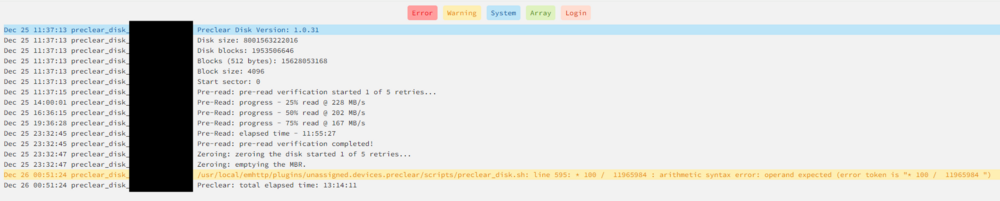
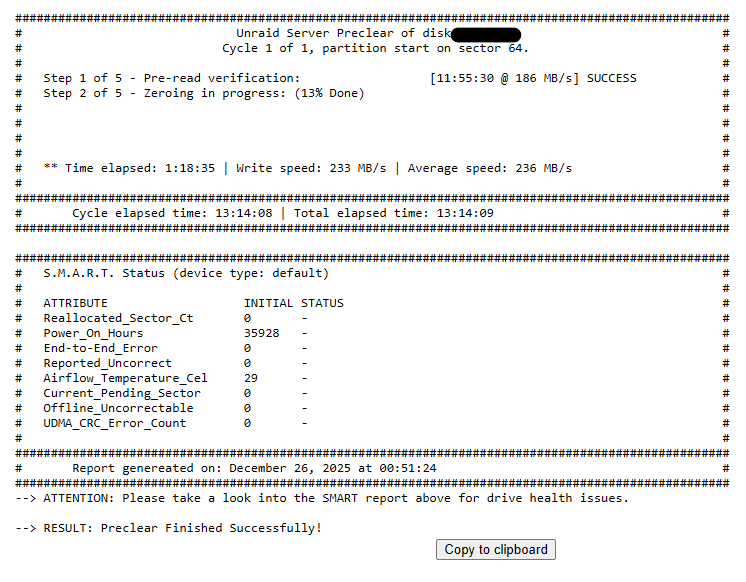
I started a pre-clear of a 8TB drive yesterday (pre-read, zeroing, post-read) just to find out this morning that it was already finished (but it's not) : I see in unassigned devices that the drive is still writing. I get this error in the logs: /usr/local/emhttp/plugins/unassigned.devices.preclear/scripts/preclear_disk.sh: line 595: 100 / 11965984 : arithmetic syntax error: operand expected (error token is " 100 / 11965984 ") Any idea what might cause this kind of issue ? Is it okay to let it finish (because it looks like to continue to zero the drive, but I get no progress in the report at this point, it's stuck at 13%) It's a little misleading that the report says that the preclear finished successfully

-
Any follow up on this ? I plan to do something similar for the same reason as OP, since Apple requires https for autofill. I would like to use my own domain too. Has previous method worked for combining files ?
-
Ok I think I found what the problem is, or more like how to replicate the issue... I'm not totally sure about the deep root cause, but I have an explaination. I access each webui by the IP address of my Unraid server with the port (http://10.0.0.xxx:8080 and http://10.0.0.xxx:8081). If I open each webui in different browser tabs at the same time and then interact with them (open settings, change filters, etc.) then the container memory start to grow and grow... as long as I keep the tabs with the webui opened. The problem does not occur if I open a webui alone, close it and open the other. It also happen if I open both with the server name (hostname) instead of the IP address. I think it has something to do with the cookies and/or the authentication for the URL/Hostname used. I was using "Bypass authentication for clients in whitelisted IP subnets" with a single address in it so that my main desktop computer could access the webui without provinding a password. Both containers were set that way and the issue occured. If I uncheck this setting and have to provide a password to access the webgui, if I log into one of the webgui, I get disconnected from the other in the other tab, so the problem does not occur, but I can't use both webgui at the same time in the same browser. This can also be solved by using different hostnames to access each webgui (also need to provide the port). So this is it, if you have more details about this issue or tricks to share, they're welcome
-
Hi everyone, I'm having a very strange memory issue with this docker image. I am already running an instance of this image in Docker, and it runs pretty smoothly. I seed ~1200 torrents and it idles at around 300MiB of RAM usage according to the Docker page in Unraid. I'm also running an old rtorrent/rutorrent container serving ~ 2200 torrents (and on average larger than those in current qBT), that I want to migrate to qBittorrent so I created a new binhex-qbittorrentvpn container using the previous one as a template and I took good care of changing all ports and paths (including appdata) to avoid issues. The container started correctly, the webui is accessible (had to do a thing for the login since adminadmin does not work anymore, but I managed to make it work). I then imported all my torrents from rtorrent into the new qbittorrent instance without starting them to be make sure everything is fine before starting to seed. I stopped my rtorrent container to avoid "double-seeding" and started seeding with the new qbittorrent container. And then problems began... Both qbittorrent containers started to increase in memory usage... I did not set a limit to their memory usage so it ended taking all my Unraid RAM (24GB) to the point the WEBUI of Unraid was not accessible anymore: I had to reboot my server. I decided to set a memory limit on the containers at 3GB (first qBT) and 6GB (new qBT) but they maxed it too, sometimes in the container logs the "watchdog-script" detected that qBT was not running anymore (it got killed inside the container) and restarted it and other times the memory stayed at 5.997GiB and the 2 CPU cores I allowed maxed at 100%. All this happening in ~5 minutes. If I only start one or the other of the qBT container, everything runs fine... but if I run both, dang, the memory goes crazy. Can someone explain what is going on here ? Am I missing something ? Are there special configs I need to set to avoid issues running this container twice ? Any help would be appreciated. I can also provide more information/context if required.
-
Could you give more details how you managed to make it work without a VPN at all ? Where/how to you specify the port for torrenting ? It does not seem to have one like linuxserver had. Do I have to add one more port myself and configure it manually in rtorrent conf files when the container is started ?

