





dja
Members
-
Joined
-
Last visited
-
Offff. Ok. Yikes. I guess it is time for a new solution. This is very unfortunate; there doesn't seem to be anyone else with a Docker image for this.
-
@ich777 Forgive my AI generated report here, but I spent a good while trying to isolate an issue where Enpass was failing to start and looping through the startup. (It has been working without issue...). Title: Bug Report / Missing Dependencies: Container loops/exits with Enpass v6.12.6+ (Wayland/XCB issues) Environment: Container: ich777/enpass OS: Unraid Enpass Versions: v6.12.6.2255 and v6.12.6.2258 Symptoms: When starting the container, it enters a restart loop (Exit Code 0). The noVNC web interface starts, but the Enpass UI never appears. Because line 95 in /opt/scripts/start-server.sh suppresses standard error output (${DATA_DIR}/Enpass 2>/dev/null), the application crashes silently, making it appear as though the script simply reached EOF. Root Causes Discovered: After executing the binary manually inside the container to unmask the stderr output, I tracked the crashes down to a few compounding issues: Missing Shared Libraries: The current Debian base image is missing Qt/XCB dependencies required by recent Enpass builds. Running ldd and unmasking the crash logs revealed fatal errors for: libOpenGL.so.0 -> requires apt-get install libopengl0 libxcb-cursor.so.0 -> requires apt-get install libxcb-cursor0 Wayland vs. X11 Shift: Upstream Enpass appears to be dropping X11 plugins in favor of Wayland in their latest builds. When the startup script downloads the newest version, it instantly crashes against the container’s TurboVNC/Fluxbox X11 display (:99). Forced Version Overwrites: If a user manually rolls back the binary in their /appdata to a working X11-compatible version (like 2255), the start-server.sh script sees the version mismatch on the next boot and automatically overwrites it with the broken Wayland build. Current Workaround: To get it running, I had to build a custom local image layer injecting libopengl0 and libxcb-cursor0, roll back the binary in my appdata to a working X11 build, and spoof the instv6.12.6.x file to trick the version checker so it wouldn't overwrite my working binary. Feature/Fix Request: Could you add libopengl0 and libxcb-cursor0 to the base image dependencies? Is it possible to remove the 2>/dev/null redirection in the start-server.sh so future silent crashes are logged to the Unraid Docker console? Might need to look into an environment bridge for Wayland if Enpass permanently drops XCB support in future builds.
-
Running the following did the trick: After running the below command, delete the file and all set! chattr -i "file name"
-
No issues found. First thing I did. Really stumped.
-
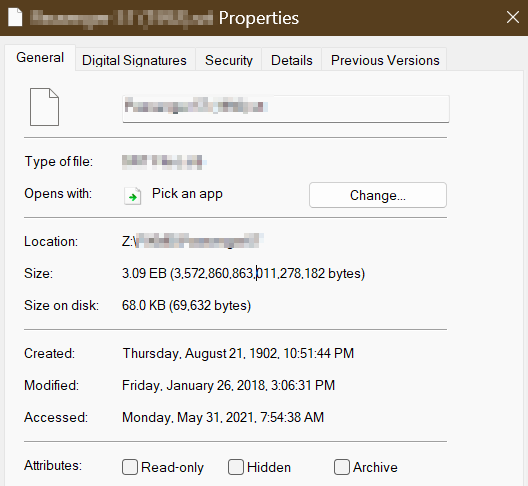
Title sorta says it all. Back story: Had two disks fail (not hardware) , rebuilt them manually, but had a TON of lost&found folders and files. I have cleaned it all up by moving files into a share on the respective two recovered disks and fixing things from there. The ONLY issue I am having is removing a SINGLE file. I have tried via SSH & terminal. It is showing 3.09 EB! (3,572,860,863,011,278,182 bytes) When I attempt to delete, I receive a 'permission denied' error. (WinSCP). The terminal shows "operation not permitted". The file is set to the owner 'nobody' and group 'users' with 0666 permissions. (read/write/delete) To add to the problem, I tried to move it, and now have a "copy" (haha) on another folder which I also cannot remove. I can't rename it either. Any ideas on how I can get rid of this?

-
Thanks @JorgeB . I'm getting a "Dirty log detected", still ok to proceed?
-
I just happened to notice some files missing and did a little digging- turns out I have a drive online, but showing no data. I went into maintenance mode and did a check...plenty of errors. Anyone know safe 'next steps'? Included diagnostics and the output of check. thanks in advance! Output tower-diagnostics-20250604-1213.zip output_drive_check.txt
-
Anybody know how to get a connected session to stretch to the window? I have 4K monitors and can't seem to get it to fill the entire window without changing the resolution to match.
-
Title says it all. When navigating to a directory and exiting MC, it drops you back to where you started. This used to work, not sure what happened. I tried adding an alias but that didn't seem to help either. alias mc='. /usr/share/mc/bin/mc-wrapper.sh' (From this link, Use Midnight Commander like a pro) Any ideas? This is really helpful at times.
-
Is there any way for me to test this?
-
Yup. Sorry, I do see you mentioned that... maybe that will be supported at some point?
-
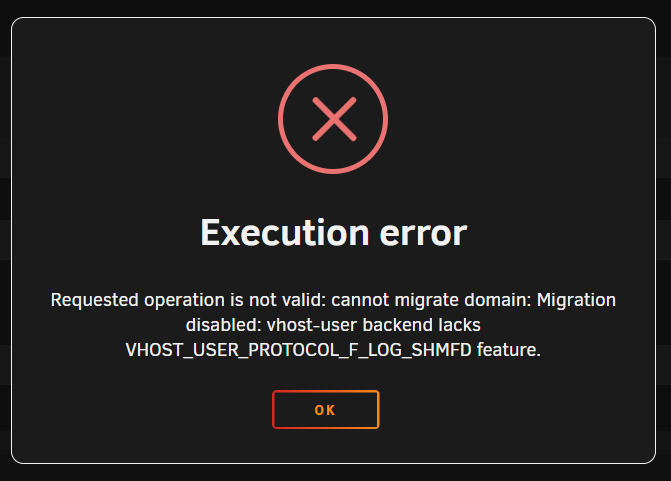
Ok. I tried a normal Win11 VM. It works to snapshot when powered off. Getting error when started. Surely this is supposed to work in either state? I have 'Migratable' set to 'on' for VM.
-
Um... (embarrassed) Yes? I guess I'm used to the HyperV world where you can do it running...is that not a thing? Or does it need to convert first?
-
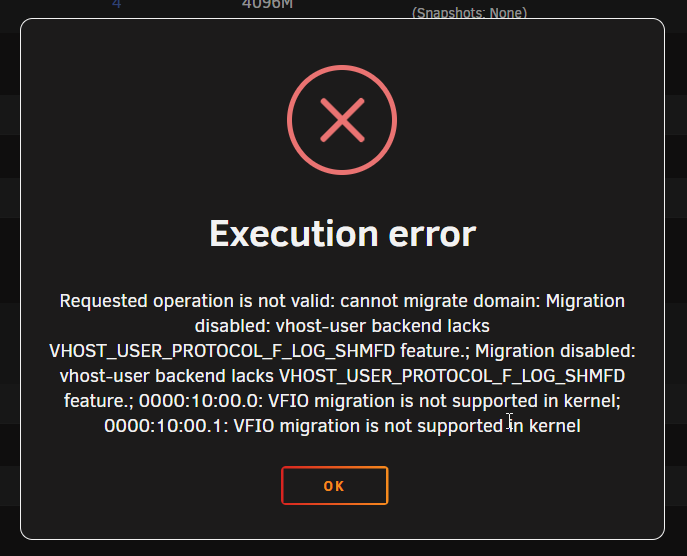
Sorry if I missed this in another area. Trying to snapshot a Windows Server w/ QCOW disks. Getting this? I have migration enabled, although I'm not sure what that does. Execution error Requested operation is not valid: cannot migrate domain: Migration disabled: vhost-user backend lacks VHOST_USER_PROTOCOL_F_LOG_SHMFD feature.; Migration disabled: vhost-user backend lacks VHOST_USER_PROTOCOL_F_LOG_SHMFD feature.; 0000:10:00.0: VFIO migration is not supported in kernel; 0000:10:00.1: VFIO migration is not supported in kernel
-
I believe I took that diagnostic after messing with the cache disks. I had removed, started, stopped and re-added them but forgot to put them in correctly, that being encrypting BTFRS RAID0. I did the same thing again but with the correct options and after running a repair from command line it restored things. I'm not seeing any loss of data (at the moment...) So I guess it worked? I only had dockers/VMs on that and have multiple backups, so I guess I can restore if need be. (and freeze my backup tools for a bit!! lol) Thanks for the help.

