dja
Members
-
Joined
-
Last visited
Everything posted by dja
-
Perhaps this? You can pass a SSD through to the VM. I don't believe you can partition a cache drive in Unraid however.
-
I'm trying to pass an Nvidia NVIDIA GeForce GTX 1660 SUPER to my Windows 10 VM. I have a AMD Ryzen 9 5950X with 128 GB DDR4. Latest BIOS. Motherboard info: ASUSTeK COMPUTER INC. ROG STRIX X570-E GAMING WIFI II , Version Rev X.0x American Megatrends Inc., Version 4203 BIOS dated: Tue 08 Feb 2022 12:00:00 AM EST Every time I try to start the VM the VM icon starts spinning (red) and eventually crashes the GUI forcing me to do a powerdown command from SSH. Not optimal of course. I have 2 cards. I am passing the other, a NVIDIA GeForce GTX 1660 Ti to my dockers. I am 1000% positive I am not using the docker graphic card with VM. I have disabled docker just to test that out...issue still happens. I have looked at the suggested AMD tweaks but I have no c-State settings or anything close to that. (From what I can see..) Motherboard manual below: https://dlcdnets.asus.com/pub/ASUS/mb/SocketAM4/ROG_STRIX_X570-E_GAMING_WIFI_II/E19182_ROG_STRIX_X570-E_GAMING_WIFI_II_V2_UM_WEB.pdf I have also tried passing the card I use for docker to VM (when docker disabled) and it still crashes Unraid. Any suggestions? I saw in another video that @SpaceInvaderOne created a video card bios file in order to boot his VM. I hope that isn't the situation, seems like a ton of work to pass GPU. 2 Diags from crashes attached. Any ideas suggestions appreciated! zeus-diagnostics-20220218-0019.zip zeus-diagnostics-20220218-1613.zip
-
Do you need have a custom job for your backup? Can you try the default job?
-
Can you post your custom job file from /boot/config/plugins/vmbackup/Elmojo
-
I would highly suggest getting familiar with the command line, Unraid will be a much better experience! You can access this from the top left tool-bar. Be careful! You are root when you do this. Once you have that open, you can navigate around OR use something called Midnight Commander. You can launch it from the terminal by typing 'mc'. It is standard with Unraid and has a nice simple panel style GUI. Here is a brief guide on its use. The best option in my opinion, IF you use Windows...is to use WinSCP. That can integrate with Putty, which will give you the same terminal access I explained above, PLUS Midnight Commander! I wouldn't use WinSCP for moving large amounts of data/files (Use MC!!!), but for a quick edit or moving a couple files it works perfectly and gives you the Windows explorer experience. You can assign a master password to WinSCP and save your credentials for any configured site, pretty handy! Doing that lets you save a single password for everything and it can even pass the credentials to your Putty session so you don't have to login (again) when launching that. On top of all that- WinSCP (SSH really..) can save you if the Unraid gui should be become unavailable, you can still SSH in most times. This would allow you to troubleshoot and do a proper shutdown- possibly saving data loss or a parity re-sync.
-
You should definitely have that folder, it is in root folder of UNRAID. If you edit your VM config, change to XML view and look for this line- <nvram>/etc/libvirt/qemu/nvram/*Your_FileName_Here_*VARS-pure-efi.fd></nvram> You need to grab the VARS-pure-efi.fd file from your backup and place it where the XML has it listed. Don't forget to rename/remove the date/time stamp as noted in directions. There is a script listed above which may help you, but I would suggest understanding how to restore manually before using that just in case.
-
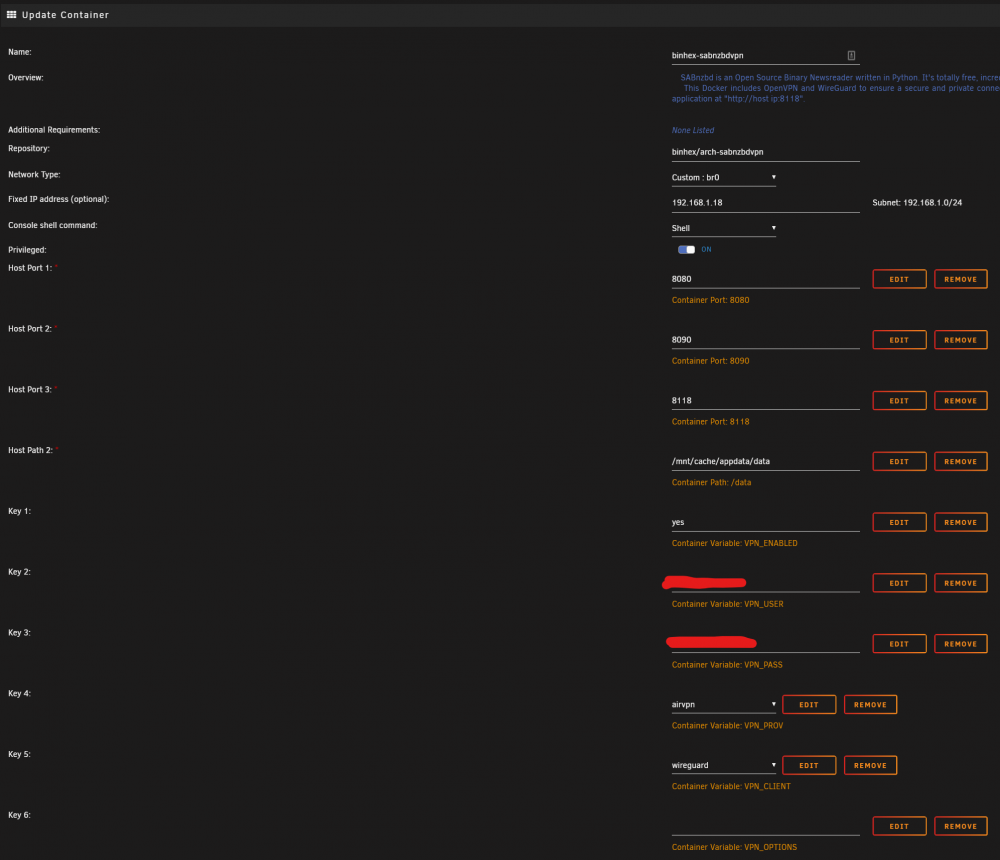
It looks like you have vpn settings configured without it actually turned on via settings? See key1 in settings. Are you running more than one network for Unraid? Can you set the docker to custom bridge for networking and manually assign it a static IP on the same network as your Unraid server? Also, try looking if it is http vs. https in the address. I've attached my config so you can see.
-
Look at the docker logs, it should be fairly clear what the issue is. Did you place your vpn file where required? (Conf/ovpn)
-
@itimpi mentioned some important things, but I would also add that you shouldn't back up data to a specific disk, use the /mnt/user/ folder. (Don't use /mnt/user0 ) As always, @SpaceInvaderOne has a good video. It's for an older version of UNRAID, but is still accurate.
-
I believe you may be seeing that because you have "Enable Backups" marked as "NO". It looks like you manually ran it however, which is why you see the notification telling you it completed. Think of the warning more as a "Heads up, auto backups won't run".
-
I did a short guide a few posts up... @mods...can this be pinned / sticky'd to the top of the thread?
-
If you set 'enable snapshots' to yes it will backup your VM after powering down and restore it back to the original state once completed. See the 'danger zone' tab of the plugin, you can see additional options including the 'restore to original state' and other shutdown/restart selections. The problems I have had with it doing the shutdown during backup were resolved by updating the VirtIO drivers. Also, you should find a logging file included in the destination directory even if it fails. Maybe post that so people can review. Edit- my logs file for VM backup is here--> /mnt/user/Backups/VM/Windows10/logs Backup files are (for me) /mnt/user/Backups/VM/Windows10/Windows 10
-
I have never used this to shut down my Win10 VM- but I can tell you that snapshots DO in-fact work. I would adjust that setting to 'yes' and see where it gets you. Maybe try it without compression first so you don't have to deal with that headache. Edit- also, did you install VirtIO drivers on the VM itself?
-
By reload I just meant to hit F5 on the page just to reload it. If you are absolutely sure you know the original location I would back it up before doing anything further. Double check the pass that you have configured for the plug-in to make sure that it's actually looking at the correct folder and not one above it and then change the path to where you think it should be pointed, hit save and apply and hit F5 to reload the page you should see a new available backup appear. If not, you may want to post a directory listing so that we could take a look at it and see what might be going on. Just the directory for where the backup is.
-
Have you located the "old" backup? You should be able to change the backup location to the old location, re-load the plugin and then see your original backup.
-
Well, found the problem child. (thanks!) Here's hoping Corsair will honor the warranty. And thank god Microcenter keeps track of your purchases since I don't have the receipt! I have 4 of these installed... https://www.microcenter.com/product/616297/Vengeance_RGB_Pro_32GB_(2_x_16GB)_DDR4-3200_PC4-25600_CL16_Dual_Channel_Desktop_Memory_Kit_CMW32GX4M2E3200C16_-_Black
-
Offfff. Lots of errors. Still running. Does it offer the option to save a log once completed? I'm hoping it is just one stick.
-
I'm having a strange issue where my dockers/cache go R/O after about a week or two uptime. I have my dockers stored exclusively on cache. My cache drive are 2 Sabrent 2 TB NVME drives setup in a RAID 0 pool. (So, 4tb..) One of them is connected via onboard slot and another is via an addon card. Everything works fine after stopping and starting the array or reboot. Should I just roll with 1 NVME cache drive or change my cache config to have redundancy? Quick smart tests come back ok. Diags attached. zeus-diagnostics-20220121-1233.zip
-
Not to argue or belabor the point- I REALLY appreciate your assistance, but I did enter the key. (twice) Start was not available before and after entering it. I tried re-entering it, nadda. The only option I had to get start enabled was clicking maintenance mode. I'm wondering if there isn't a bug here, something related to replacing a drive on a encrypted system. At the very least, the prompt to enter a new key should be tweaked since I wasn't attempting to do that. My rebuild of the drive finished early this morning and all went well, so I'm happy. I did notice the /user share went away about 4 hours in. I've seen that before though. /user0 was still there however.
-
That makes sense, but the only way for me to get the array started was to check that. It was greyed out. For some reason the normal start was not available. Just the new key fields and maintenance mode.
-
Thank you!!! That did the trick. This is odd though, I don't think I messed this up initially. When I started the system up after adding the swapped drive all I had was a maintenance mode option to start along with setting the encryption key. (2 fields, one was to confirm) I did mis-quote the directions- on step 9 it says- "Put a check in the Yes, I'm sure checkbox (next to the information indicating the drive will be rebuilt)," I never received that option which is why I did the new config route after trying maintenance mode. (It didn't say format) Why did it ask for the encryption key to be set again? I had changed nothing at this point but reset the server/swapped a drive. Was the system decrypted at this point, by just removing a drive? Would it have been corrupted if I had entered a new key?
-
Thanks. I did a fresh backup with and without compression yesterday and was able to extract just fine. Weird. On the topic of extraction- is it possible to add an option to create tars for each docker vs. one giant one? With stuff like Plex, Radarr and Config folders it can be pretty intensive to work with a backup, esp. if you only need one thing. I know the intended use of this is to automate things, but there are probably more than a few folks who would appreciate the option(s). Thanks for the work on this plugin btw!!
-
I'm a little stuck. I replaced a drive that had been failing randomly but IS/WAS working. Parity valid. I followed the guide but got stuck on step 9, I never got a checkbox or a prompt to format. https://wiki.unraid.net/Replacing_a_Data_Drive My drives have encryption on them and Unraid was asking for me to set a new key? I put the old key in and started in maintenance mode but nothing happened. I stopped the array and created a new config and re-assigned all the drives as they were. (I have 2 parity drives) NOW- I'm not sure what to do as it is warning that the parity will be re-written if I start the array. I obviously don't want that since I need to rebuild the new drive. Can I start with the "parity already valid" option and things will rebuild the new drive? zeus-diagnostics-20220114-1252.zip
-
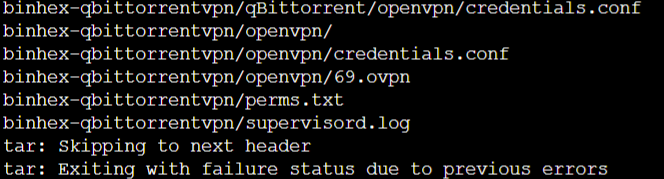
I'm still getting the error below...is my tar backup bad? Plex-Media-Server/Library/Application Support/Plex Media Server/Metadata/Albums/a/92fd63c59b1620e87a3bdc7cbc78c6ecd46f7e7.bundle/Contents/tv.plex.agents.music/posters/3901c63bbf7d6e1dba7fa5c8eef75b0fc2c11b4b tar: Skipping to next header tar: Exiting with failure status due to previous errors
-
@Squid I need to extract ONE backup file for my Unifi controller that would be in the /mnt/cache/unifi folder from a backup created by this plugin. I keep getting an error when running the command below and even without all the extra tags and also just the folder name itself. Are ALL my backups crap or am I missing something? I used one of the backups to restore my dockers that is NOT working for this command and I can't seem to extract that either. What am I missing? Does the plugin use another flag or otherwise know how to pull the data? The file is quite large as it includes my plex, radarr and sonarr info. tar -xzvf CA_backup.tar.gz --ignore-failed-read --exclude="Plex-Media-Server" --exclude="config" --exclude="binhex-radarr" --exclude="binhex-sonarr"