





dja
Members
-
Joined
-
Last visited
Everything posted by dja
-
I ran into a similar issue eventually re-installing it. However- I believe you can set 'back up all VMs' to 'no' and make sure no VMs are selected.
-
One thing I will warn- if you are using qemu to convert image files like vdi, vdmk or qcow2...be careful to specify all the variables correctly as the resulting backup can result in a broken archive that you CAN'T restore because zstd will see it as having corrupt blocks and crash out. This is mostly a concern when you expand a image file and don't specify file type. (qemu will warn you also..) If you are just working with standard images created on UNRAID I don't think you'll have an issue. I would recommend verifying your backups from time to time.
-
I do. I guess I can remove that and try.
-
@SimonF could you post a Windows VM XML to look at? (W11 if you have it..) I had to create a new VM and while I can copy paste and type- the stupid mouse doesn't work! Uuuggh.
-
Thanks! I pointed my VM at a array backup to test and ran into this. This *seems* like a bug, who/how does this get reported? At least offer a warning that disk type has/will change & option to set? Issue is in the snip <disk type='file' device='disk'> <driver name='qemu' type='raw' cache='writeback'/> <source file='/mnt/cache/domains/ZEUS/vdisk1.img'/> <target dev='hdc' bus='virtio'/> <boot order='1'/> <address type='pci' domain='0x0000' bus='0x00' slot='0x08' function='0x0'/> </disk>
-
@bonienl , my cache pool is BTRFS, can I change it by just selecting BTRFS Encrypted without losing any data or do I need to move it off cache first?
-
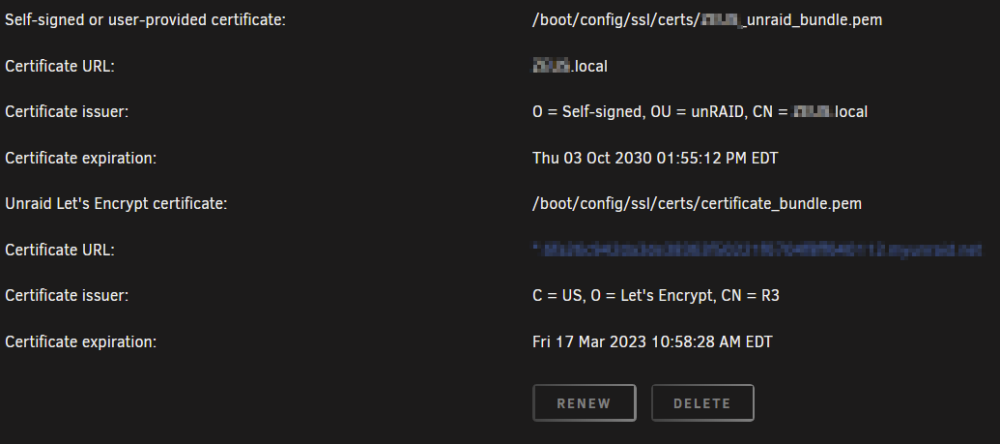
Exactly what I am seeing after doing the same upgrade. I have rebooted, removed the plugin, signed out/in. I checked Edge, FireFox, Chrome and Brave and all are behaving the same. Connects every so often than it dies. I followed the directions to add the new cert. (I think!?) I seem to have two listed, maybe that is related? I don't know how to remove either of them to start over. The delete option is greyed out. Thanks @ljm42 for the heads up. I'll consider this 'on hold' I guess Not a show stopper by any means.
-
I have 'DNS rebind' disabled completely in pfSense. I just added the brand new cert maybe a week ago. I guess I can remove it and re-add, but this seems a bit overboard. If I am having this much trouble and it WAS working previously, something must be off/broken outside of my config.
-
Yes, I have done that and it is reachable according to the GUI.
-
I had tried all of those except to remove the plugin. I just tried that with the same result. The web app does eventually show 'online' but it seems to drop every so often and then come back. I am using a non standard (443) WAN port, perhaps that has something to do with it. (pfSense)
-
Thanks. I'll definitely check that out. Did you see something in the logging i posted that led you to suggest that? I have run this hardware build over a year now and this just started in the last couple weeks, it seems strange something like that would just now pop up.
-
Getting the same exact thing after update. I tried re-starting api, signing out and in again. Reboots, no dice. <-----UNRAID-API-REPORT-----> SERVER_NAME: ZEUS ENVIRONMENT: production UNRAID_VERSION: 6.11.5 UNRAID_API_VERSION: 2.54.0 UNRAID_API_STATUS: running API_KEY: valid MY_SERVERS: authenticated MY_SERVERS_USERNAME: *** CLOUD: STATUS: [ok] IP: [5**.***.***] RELAY: STATUS: [disconnected] ERROR: [API disconnected itself] MINI-GRAPH: STATUS: [disconnected] SERVERS: ONLINE: OFFLINE: ZEUS[owner="***"] ALLOWED_ORIGINS: http://localhost, http://IPV4ADDRESS, https://IPV4ADDRESS, http://zeus, https://zeus, http://zeus.local, https://zeus.local, https://IPV4ADDRES S.HASH.myunraid.net NCHAN_MODE: nchan </----UNRAID-API-REPORT-----> root@ZEUS:/mnt/user/Backups/URBackup#
-
I'm seeing a very similar behavior. I'm not sure if it is the same cause, but I posted up my info for what it's worth.
-
I'm having a similar issue to this- I'm not sure what (if any) docker app might be causing it, but I noticed my PLEX docker was down. I checked the UNRAID GUI and it won't load. Other dockers and VMs are working fine. SSH into server not working, but the server shares are up??? I went to the server and can't get the GUI or terminal. (My server boots to GUI, I'm talking the GUI interface) Midnight Commander loads @ the server, but diagnostics seem to fail when capturing logging, it's all blank! I did get a .zip file with what it did capture along with another diagnostic after reboot. Powerdown -r hung and I had to hard boot. This server is very well spec'd and running fine until now. This is the third time in about 2 weeks it has just stopped like this. The only significant thing I have changed recently is the digital cert for 'My Servers' and adjusting VM settings to run Spice. (vs VNC) Ideas? zeus-diagnostics-20221227-1515.zip PRE-REBOOT.zip
-
Here is where I found the info if it is helpful: https://stafwag.github.io/blog/blog/2018/04/22/high-screen-resolution-on-a-kvm-virtual-machine-with-qxl/
-
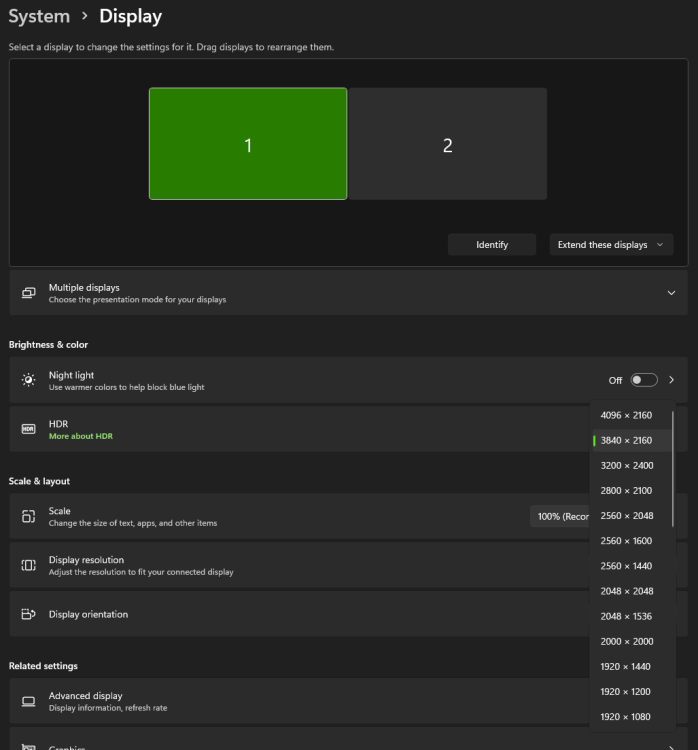
Is it possible to get 4k resolution using Spice? (3840x2160) Edit- yes!! Edit the XML of your VM and change the video section for your virtual display device. Change vgamem from 16384 to: vgamem='65536' Example: <video> <model type='qxl' ram='131072' vram='65536' vgamem='65536' heads='1' primary='yes'/> <alias name='video0'/> <address type='pci' domain='0x0000' bus='0x00' slot='0x02' function='0x0'/> </video>
-
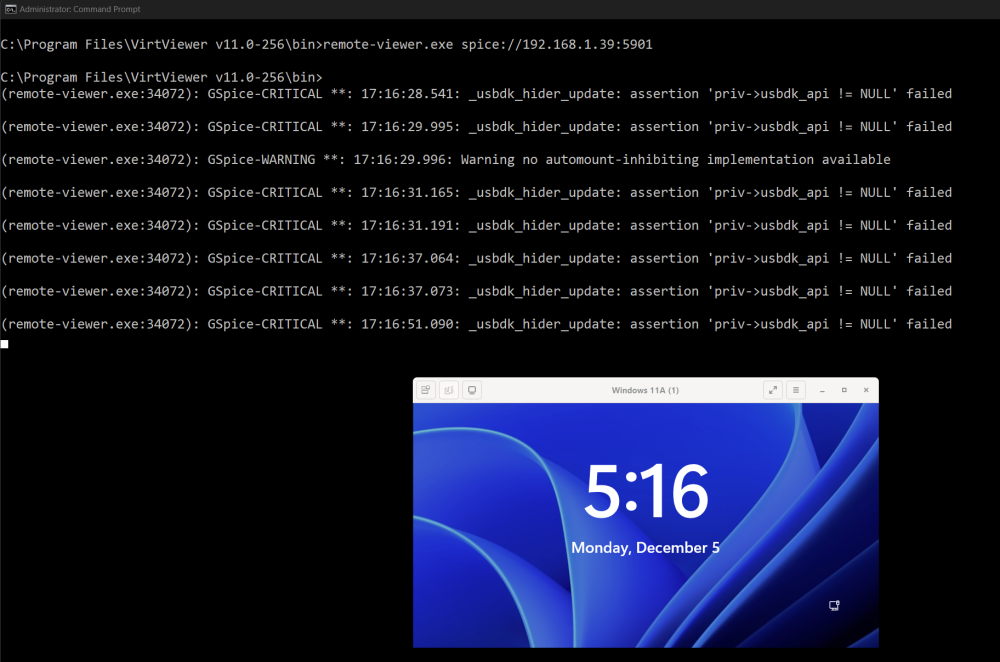
Yeah I saw that..5 years!!?? A bit surprising it has persisted that long. It's pretty clumsy having to type that out every time. I guess I could make a batch file, but I couldn't get that to start right. , example C:\Program Files\VirtViewer v11.0-256\bin>start remote-viewer.exe spice://192.168.1.10:5901 App starts, but holds open the window with status updates. I guess it doesn't matter until I can get the clipboard to work, but something to look at if anyone cares. It is definitely better than VNC from my experience. Is there another viewer option for Spice? Edit- its working now! Yea!!!!!
-
Sounds good. Thanks for working with me on this. I would normally just use RDP, but I am using work VPNs that disable split-tunnel and require this type of remote access. I've been having to use HyperV on my local workstation, but my sever is much better equipped hardware wise. I've been hoping for a good solution that has decent integration and copy/paste....Spice def. seems to be the way to go. Is the integration for copy/paste text only?
-
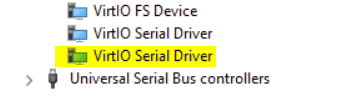
The only difference I can spot is that you seem to have two VirtIO Serial drivers? I only have one. At a loss here, not sure what else it could be. Does it matter exactly where the above snippet is added to the XML? Also, off topic but related, have you figured out how to save the remote viewer recent connections? That seems to be broken. I saw some off site posts that seem to indicate it may be a known issue. I know you can call the .exe from CLI and pass the URL to start, but that's a bit clunky when the app has a recent list available. (maybe) Sorry for going off topic! Continued over here-->
-
Sadly...that isn't working. I attached my VM XML. <?xml version='1.0' encoding='UTF-8'?> <domain type='kvm' id='24'> <name>Windows 11A</name> <uuid>3ebaa220-2d1d-78d2-d0af-240ed585a969</uuid> <metadata> <vmtemplate xmlns="unraid" name="Windows 11" icon="windows11.png" os="windowstpm"/> </metadata> <memory unit='KiB'>33554432</memory> <currentMemory unit='KiB'>33554432</currentMemory> <memoryBacking> <nosharepages/> <source type='memfd'/> <access mode='shared'/> </memoryBacking> <vcpu placement='static'>4</vcpu> <cputune> <vcpupin vcpu='0' cpuset='8'/> <vcpupin vcpu='1' cpuset='24'/> <vcpupin vcpu='2' cpuset='9'/> <vcpupin vcpu='3' cpuset='25'/> </cputune> <resource> <partition>/machine</partition> </resource> <os> <type arch='x86_64' machine='pc-i440fx-6.2'>hvm</type> <loader readonly='yes' type='pflash'>/usr/share/qemu/ovmf-x64/OVMF_CODE-pure-efi-tpm.fd</loader> <nvram>/etc/libvirt/qemu/nvram/3ebaa220-2d1d-78d2-d0af-240ed585a969_VARS-pure-efi-tpm.fd</nvram> </os> <features> <acpi/> <apic/> <hyperv mode='custom'> <relaxed state='on'/> <vapic state='on'/> <spinlocks state='on' retries='8191'/> <vendor_id state='on' value='none'/> </hyperv> </features> <cpu mode='host-passthrough' check='none' migratable='on'> <topology sockets='1' dies='1' cores='2' threads='2'/> <cache mode='passthrough'/> <feature policy='require' name='topoext'/> </cpu> <clock offset='localtime'> <timer name='hypervclock' present='yes'/> <timer name='hpet' present='no'/> </clock> <on_poweroff>destroy</on_poweroff> <on_reboot>restart</on_reboot> <on_crash>restart</on_crash> <devices> <emulator>/usr/local/sbin/qemu</emulator> <disk type='file' device='cdrom'> <driver name='qemu' type='raw'/> <source file='/mnt/cache/isos/HBCD_PE_x64_UR2.iso' index='4'/> <backingStore/> <target dev='hda' bus='sata'/> <readonly/> <alias name='sata0-0-0'/> <address type='drive' controller='0' bus='0' target='0' unit='0'/> </disk> <disk type='file' device='cdrom'> <driver name='qemu' type='raw'/> <source file='/mnt/cache/isos/virtio-win-0.1.221-1.iso' index='3'/> <backingStore/> <target dev='hdb' bus='sata'/> <readonly/> <alias name='sata0-0-1'/> <address type='drive' controller='0' bus='0' target='0' unit='1'/> </disk> <disk type='file' device='disk'> <driver name='qemu' type='raw' cache='writeback'/> <source file='/mnt/cache/domains/Windows 11A/vdisk1.img' index='2'/> <backingStore/> <target dev='hdc' bus='sata'/> <boot order='1'/> <alias name='sata0-0-2'/> <address type='drive' controller='0' bus='0' target='0' unit='2'/> </disk> <disk type='file' device='disk'> <driver name='qemu' type='raw' cache='writeback'/> <source file='/mnt/cache/domains/Windows 11A/vdisk2.img' index='1'/> <backingStore/> <target dev='hdd' bus='sata'/> <alias name='sata0-0-3'/> <address type='drive' controller='0' bus='0' target='0' unit='3'/> </disk> <controller type='usb' index='0' model='ich9-ehci1'> <alias name='usb'/> <address type='pci' domain='0x0000' bus='0x00' slot='0x07' function='0x7'/> </controller> <controller type='usb' index='0' model='ich9-uhci1'> <alias name='usb'/> <master startport='0'/> <address type='pci' domain='0x0000' bus='0x00' slot='0x07' function='0x0' multifunction='on'/> </controller> <controller type='usb' index='0' model='ich9-uhci2'> <alias name='usb'/> <master startport='2'/> <address type='pci' domain='0x0000' bus='0x00' slot='0x07' function='0x1'/> </controller> <controller type='usb' index='0' model='ich9-uhci3'> <alias name='usb'/> <master startport='4'/> <address type='pci' domain='0x0000' bus='0x00' slot='0x07' function='0x2'/> </controller> <controller type='pci' index='0' model='pci-root'> <alias name='pci.0'/> </controller> <controller type='sata' index='0'> <alias name='sata0'/> <address type='pci' domain='0x0000' bus='0x00' slot='0x05' function='0x0'/> </controller> <controller type='virtio-serial' index='0'> <alias name='virtio-serial0'/> <address type='pci' domain='0x0000' bus='0x00' slot='0x08' function='0x0'/> </controller> <filesystem type='mount' accessmode='passthrough'> <driver type='virtiofs' queue='1024'/> <binary path='/usr/libexec/virtiofsd' xattr='on'> <cache mode='always'/> <sandbox mode='chroot'/> <lock posix='on' flock='on'/> </binary> <source dir='/mnt/'/> <target dir='UNRAID'/> <alias name='fs0'/> <address type='pci' domain='0x0000' bus='0x00' slot='0x03' function='0x0'/> </filesystem> <interface type='bridge'> <mac address='52:54:00:f8:06:27'/> <source bridge='br0'/> <target dev='vnet23'/> <model type='virtio-net'/> <alias name='net0'/> <address type='pci' domain='0x0000' bus='0x00' slot='0x04' function='0x0'/> </interface> <serial type='pty'> <source path='/dev/pts/1'/> <target type='isa-serial' port='0'> <model name='isa-serial'/> </target> <alias name='serial0'/> </serial> <console type='pty' tty='/dev/pts/1'> <source path='/dev/pts/1'/> <target type='serial' port='0'/> <alias name='serial0'/> </console> <channel type='spicevmc'> <target type='virtio' name='com.redhat.spice.0' state='connected'/> <alias name='channel0'/> <address type='virtio-serial' controller='0' bus='0' port='2'/> </channel> <channel type='unix'> <source mode='bind' path='/var/lib/libvirt/qemu/channel/target/domain-24-Windows 11A/org.qemu.guest_agent.0'/> <target type='virtio' name='org.qemu.guest_agent.0' state='connected'/> <alias name='channel1'/> <address type='virtio-serial' controller='0' bus='0' port='1'/> </channel> <input type='tablet' bus='usb'> <alias name='input0'/> <address type='usb' bus='0' port='1'/> </input> <input type='mouse' bus='ps2'> <alias name='input1'/> </input> <input type='keyboard' bus='ps2'> <alias name='input2'/> </input> <tpm model='tpm-tis'> <backend type='emulator' version='2.0' persistent_state='yes'/> <alias name='tpm0'/> </tpm> <graphics type='spice' port='5901' autoport='yes' listen='0.0.0.0' keymap='en-us'> <listen type='address' address='0.0.0.0'/> </graphics> <audio id='1' type='none'/> <video> <model type='qxl' ram='65536' vram='65536' vgamem='16384' heads='1' primary='yes'/> <alias name='video0'/> <address type='pci' domain='0x0000' bus='0x00' slot='0x02' function='0x0'/> </video> <memballoon model='virtio'> <alias name='balloon0'/> <address type='pci' domain='0x0000' bus='0x00' slot='0x06' function='0x0'/> </memballoon> </devices> <seclabel type='dynamic' model='dac' relabel='yes'> <label>+0:+100</label> <imagelabel>+0:+100</imagelabel> </seclabel> </domain>
-
Spice with Virt Machine viewer 11.0-256
-
Ok, well no dice then. I had that installed before. NO copy paste with XML added. The only thing it did was make the mouse impossible to use as it is not aligned with where it should be since adding it. I removed the XML and the cursor works (?)
-
That's just source code from what I can see??
-
Sorry I'm not getting this. How do you install vdaagent in Windows? I'm not seeing an installer for that.
-
Sorry if I am being thick headed here, but you are saying vdagent needs to be installed on Unraid, right? I have the tools package installed on the client already and added XML and it doesn't seem to work. If it DOES need to be installed on Unraid, how do you do that without apt install?




