





dja
Members
-
Joined
-
Last visited
Everything posted by dja
-
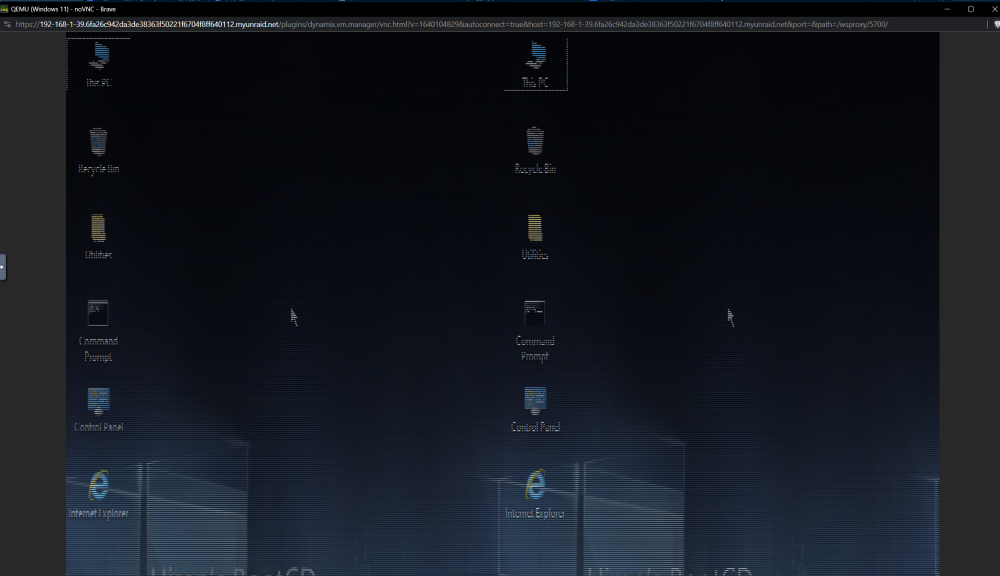
Thanks! That worked perfectly. Just a heads up for anyone, I found that for UNRAID VMs, VNC doesn't play nicely...gotta use SPICE viewer. The VNC view shows a weird double and triple ghosted display.
-
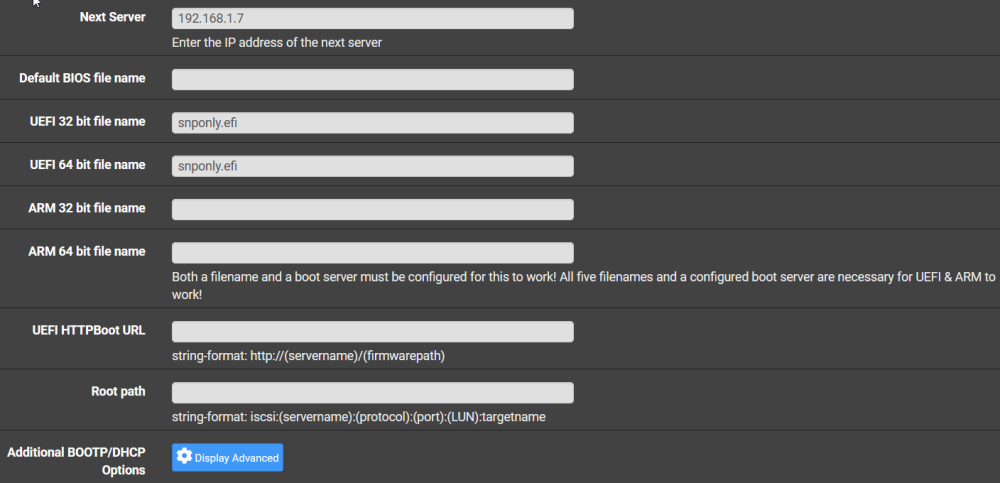
What is the BIOS file name I should be using? I'm on pFsense. Sorry if I am being thick-headed and missed it!
-
That's some good info! Thanks for sharing. I'm weighing my luck to decide if I try it
-
Yeah, I don't think it is supported any more. "Easy Backup" seems to be pretty good. I've not really looked at it too much, but does seem to cover all the bases, including Docker backups.
-
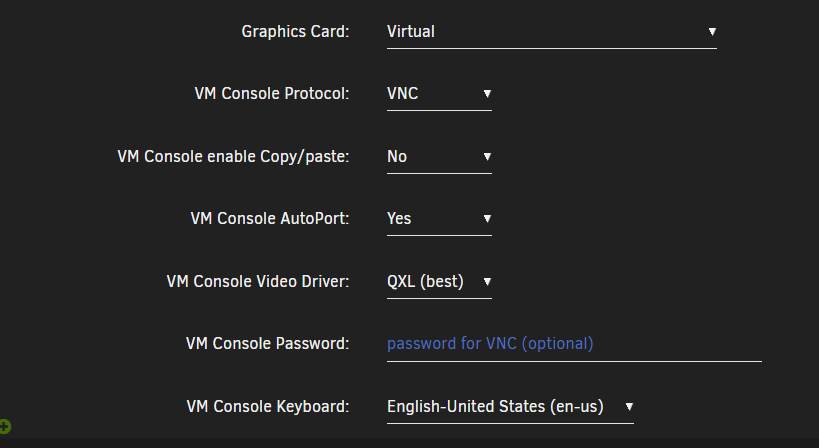
That's easy, it has to do with the VNC port. (or Spice protocol if you use that) Go to the port section and change VM Console AutoPort from auto to 'no' and pick a new port NOT in conflict with an already assigned port. (VM)
-
Without logging, it is hard to know. I have seen issues with libvirt starting, your best bet (in my experience anyway) is to reboot Unraid, remove (DONT DELETE!) the existing VM and re-create the vm and point it to the .img file corresponding to the VM. If you don't have one or it is corrupted, hopefully you have a previous backup you can restore. As a rule, I keep 3 backups at a once a month interval. Good luck! Edit- try to start the VM one more time on re-boot to make sure it is still not working
-
Can you post logs after checking the settings below and running the backup one more time? Under "other settings" in the plugin make sure to set the following to 'yes' "Keep log files" "Enable per VM logs"
-
Sure does, still using it to this day. Works well.
-
I'm seeing the same issue and I think this might be my problem. What cert did you remove or how did you resolve? I have self signed .pem in /boot/config/ssl/certs (Self-signed or user-provided certificate)
-
Bummer...I did try that. Looks like it is not. Is that something you can add? What would that cost me!? I'm looking to start the session at 1920x1080 without resize, but full-screen by default. (no auto resize) I'm setting this up for a jump server for remote support and that is the standard resolution for the support folks I have who are using it.
-
What exactly is the syntax that would be in the ini (.vv) file? I tried --auto-resize and it doesn't want to load.
-
@binhex , I have a corrupt DB that I can't repair on the official PLEX release. It runs "fine" (?), but I get a weekly notice it is corrupt. I would like to migrate to your docker, but can't update past 1.32.0.6973-a787c5a8e without the docker crashing with this error- Error: Unable to set up server: sqlite3_statement_backend::prepare: no such table: metadata_agent_providers for SQL: update metadata_agent_providers set online = 0 (N4soci10soci_errorE) Is there a way I can export a fresh (not corrupt) DB without having to start all over?
-
Thanks for the suggestions. I tried every combination I could think of without luck. I looked at some of the code they have up and I can't seem to find any reference to which flags can be used. I wish they had more documentation on Github. Maybe I'm looking in the wrong spot? https://github.com/jactry/virt-viewer
-
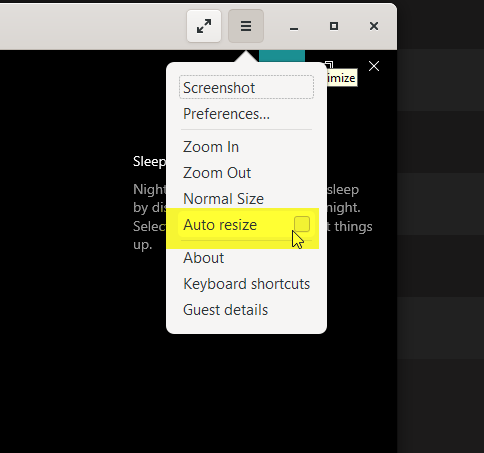
@SimonF thanks for the continued work on this! Question on the .vv files....what option would I add to specify the resolution or at least to disable auto-resize? I have a 4K monitor with a 1080p host I don't want to resize and I have to clear the option from the viewer each time I launch it.
-
Seeing this logging in Libvirt. Is this possibly related @SimonF ? I'm not seeing anything in /var/log/vfio-pci-errors however. *Note, I verified the path mentioned does exist and is R/W 2023-04-30 00:39:55.113+0000: 16323: info : libvirt version: 8.7.0 2023-04-30 00:39:55.113+0000: 16323: info : hostname: ZEUS 2023-04-30 00:39:55.113+0000: 16323: error : qemuVirtioFSStart:198 : internal error: the virtiofs export directory '/mnt/remotes/YALE-FORTY-FIVE_YALE-FORTY-FIVE/GoogleDrive/WORK/DW' does not exist 2023-04-30 00:39:55.113+0000: 16323: error : virPidFileAcquirePath:401 : Failed to acquire pid file '/run/libvirt/qemu/4-CAD-fs0-fs.pid': Resource temporarily unavailable 2023-04-30 00:39:55.347+0000: 16323: error : qemuAutostartDomain:197 : internal error: Failed to autostart VM 'CAD': internal error: the virtiofs export directory '/mnt/remotes/YALE-FORTY-FIVE_YALE-FORTY-FIVE/GoogleDrive/WORK/DW' does not exist 2023-04-30 00:49:12.750+0000: 16276: error : virNetSocketReadWire:1791 : End of file while reading data: Input/output error 2023-04-30 00:59:13.568+0000: 16276: error : virNetSocketReadWire:1791 : End of file while reading data: Input/output error 2023-04-30 01:09:14.382+0000: 16276: error : virNetSocketReadWire:1791 : End of file while reading data: Input/output error 2023-04-30 01:19:15.190+0000: 16276: error : virNetSocketReadWire:1791 : End of file while reading data: Input/output error 2023-04-30 01:29:16.007+0000: 16276: error : virNetSocketReadWire:1791 : End of file while reading data: Input/output error 2023-04-30 01:39:16.833+0000: 16276: error : virNetSocketReadWire:1791 : End of file while reading data: Input/output error 2023-04-30 01:49:17.645+0000: 16276: error : virNetSocketReadWire:1791 : End of file while reading data: Input/output error 2023-04-30 01:59:18.462+0000: 16276: error : virNetSocketReadWire:1791 : End of file while reading data: Input/output error 2023-04-30 02:09:19.274+0000: 16276: error : virNetSocketReadWire:1791 : End of file while reading data: Input/output error 2023-04-30 02:19:20.092+0000: 16276: error : virNetSocketReadWire:1791 : End of file while reading data: Input/output error 2023-04-30 02:29:20.914+0000: 16276: error : virNetSocketReadWire:1791 : End of file while reading data: Input/output error 2023-04-30 02:39:21.744+0000: 16276: error : virNetSocketReadWire:1791 : End of file while reading data: Input/output error 2023-04-30 02:49:22.555+0000: 16276: error : virNetSocketReadWire:1791 : End of file while reading data: Input/output error 2023-04-30 02:59:23.335+0000: 16276: error : virNetSocketReadWire:1791 : End of file while reading data: Input/output error 2023-04-30 03:09:24.167+0000: 16276: error : virNetSocketReadWire:1791 : End of file while reading data: Input/output error 2023-04-30 03:19:25.018+0000: 16276: error : virNetSocketReadWire:1791 : End of file while reading data: Input/output error 2023-04-30 03:29:25.867+0000: 16276: error : virNetSocketReadWire:1791 : End of file while reading data: Input/output error 2023-04-30 03:39:26.717+0000: 16276: error : virNetSocketReadWire:1791 : End of file while reading data: Input/output error 2023-04-30 03:49:27.546+0000: 16276: error : virNetSocketReadWire:1791 : End of file while reading data: Input/output error 2023-04-30 03:59:28.359+0000: 16276: error : virNetSocketReadWire:1791 : End of file while reading data: Input/output error 2023-04-30 04:09:29.195+0000: 16276: error : virNetSocketReadWire:1791 : End of file while reading data: Input/output error
-
As the title states, my GUI is loading *some* pages. Logs show memory is full...so I'm not surprised. I'm seeing the sys log showing "Increase nchan_max_reserved_memory." a LOT. Things were running great until the RC 4.1 update. Could that be related? I suspect a VM hung, but shutting that down didn't resolve things. It's prob. hung in memory. Docker is working, at least. Zeus-diagnostics-20230429-1921.zip Anyway, before I rebooted I wanted to see if anyone had an idea what went south or something to try. Diags I could capture are attached. It hung on creation, so not sure if it finished or just hung in process.
-
Wow, that's huge...!!! I didn't think the recent connections thing even worked! This is a TON easier than the .bat / multiple shortcuts solution I've been using! THANKS!!!
-
Assuming Windows....Make sure Spice agent in services is set to auto and running. You should also have these bits in your XML, around TPM section normally. (Replace port with whatever you use...) <graphics type='spice' port='5905' autoport='no' listen='0.0.0.0' keymap='en-us'> <listen type='address' address='0.0.0.0'/> <mouse mode='server'/> </graphics> <channel type='spicevmc'> <target type='virtio' name='com.redhat.spice.0' state='connected'/> <alias name='channel1'/> <address type='virtio-serial' controller='0' bus='0' port='2'/> </channel>
-
You will need to create a new VM and select SeaBios in the BIOS section. This removes the TPM option as a drop-down option. You don't need to install a new OS for the new VM, just remove the existing VM without deleting the disk files and point the new VM to the original disk image file(s).
-
If the data is missing there isn't anything that can be done. I would check your backup location in the plugin. Also, verify the backup settings in terms of how many backups to keep. @everybody mentioned some good info as well. If you are backing up to a remote location there may be some other gremlins to chase down.
-
Have you tried using SeaBios?
-
Awesome, that did the trick, thanks!!! One weird issue with Win11 persists, (not related) The Spice service(s) don't start even when set to auto. Any ideas on how to do this? Win10 seems fine and Win11 works once you start them. (copy paste) Strange... (I manually started below) Is there something you can make them dependent on to ensure they run? Maybe I could set another account to run them.

-
Is there anything else I can try? I have a Win10 machine working with copy paste, but no mouse. My VM XML is below. No video card passed in. https://pastebin.com/raw/GGuMMbfE
-
An interesting note: I have a Win10 VM running fine with everything turned on and enabled. Not one freeze. The only difference I can spot is TPM. Is this possibly the cause?
-
Seeing the same lockups with Win11. Trying 16 Gb memory idea. Uuuugh.




