





PeteAsking
Members
-
Joined
-
Last visited
Everything posted by PeteAsking
-
Not really. I dont know what specifically ‘remote into the VM’ means as it could be interpreted many ways.
-
Your fighting the good fight for all of us!
-
I use nomachine mx with it and it seems fine. You can set 60fps in that software with using the h264 codec for fastest results. Its better than vnc for sure. (I also dont have a grphics card passed and just unticked the ‘use acceleration for display processing under server options).
-
I guess you could try limiting it to less like 2GB and seeing what happens. Someone has to do the experiment for everyone to find out if anyone is feeling like it lol
-
It may be that DPI uses the database quite a bit and the DB is configured to cache as much as it can in RAM, so wthout a limit, and DPI on, it just eats up whatever it can, however with a limit is forces it to cleanup the cache as it fills close to the limit, meaning the problem you guys see is a combination of things working in conjunction to create the scenario you see.
-
Wow thanks, you were correct. A different browser loaded it up fine. Apologies for wasting your time.
-
Yes that IP is the machine I am trying from, and it prompts for the login, once it logs in I get that error though.
-
Here you go It does look like there are a lot of errors at the end - hopefully nothing drastic. supervisord.log
-
I havent altered the default settings but if you tell me where to check I can tell you what they are set to.
-
I cant see anything connecting and it only on my LAN. I also have never used it before and am just trying form this 1 pc at the moment so havent got very far with it. I will wait and see if anyone else has any issues connecting because I am stuck
-
I dont understand what to do. I stopped the docker and restarted it. If I immediatly try connect with the console web the same issue happens. How can something already be connected if I just restarted it?
-
Hi, I added the docker lines and config for the terminal on port 8222. When I open my browser I am prompted to authenticate and I can login, but the page that loads simply says:
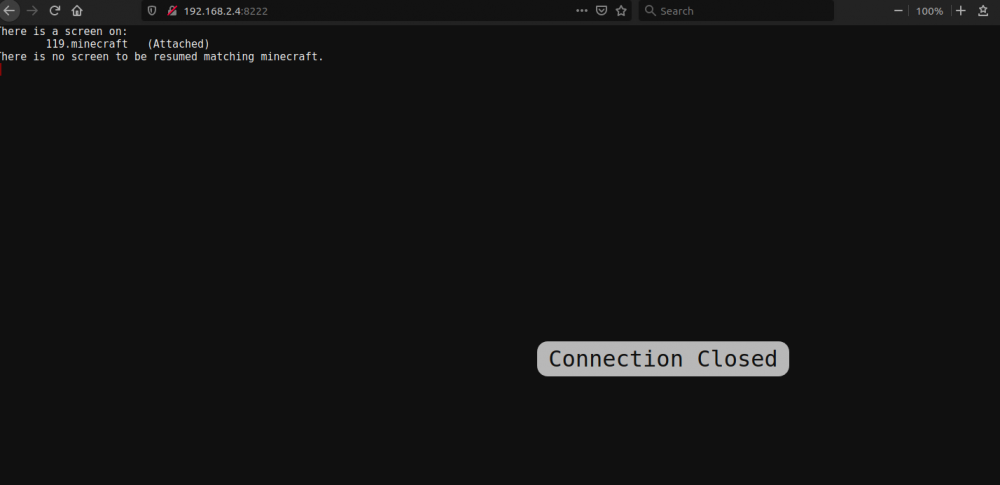
-
Thank you @SpaceInvaderOnefor creating this docker. You are very kind. I am going to try this out but wondered after watching the instructions if there is any possible way one can work around having to stop and restart the array. This is difficult for me to do as unraid provides essential services to my network, so thought I would ask if there are any hacks/workarounds that would allow me to avoid doing this. If not I will have to just stay up really late one night to do this. Kind regards Pete
-
Most likely it will not grow beyond 70% of the limit you set as this is how their appliances work.
-
Sorry I missed your messages Chas. Is there any update from anyone who set a 4gb docker limit if the docker is ok and didnt go mad with ram usage yet? Like hoopster or penguin maybe? I was thinking that 4gb limits would allow the dockers to average 2.8gb in size for RAM. I looked up the hardware appliances that unifi sell (eg udmp) and they ship with 4gb ram so believe this is the amount they will optimise for. P
-
Cool for once the theory of how it should work did actually happen in practice. Good job man. We are currently working on the memory leak issue and others like hoopster above so if you also have that let us know and if the suggestions so far make any difference.
-
Yes you stop the docker, rename the current unifi folder to like unifiold or something and give the backed up one the name the current one had, then set the tag to be the 5.12 version you ran before by checking the tags on the github repo and then start the docker at the end of all this. I believe that should work fine but dont sue me if it doesnt. if you need more detail on one of the above steps let me know.
-
Turn on dpi and see what happens. Is the docker limited to 4gb still?
-
If it runs out of ram the docker would just stop or halt or crash same as when you run out of ram on linux (kernel just starts killing random processes).
-
Normally some free memory is required to be seen by a docker even if it does not make use of it at all times, so that seems a bit low. For example Windows 10 works boots and only uses 1.7GB on my system but if I pull all the ram out and only give it 2GB it isnt very happy. It needs a bit of overhead to shuffle things around. It might need a bit extra to do a bit of cleanup to its memory and then might drop down for example but if you restrict it so much it is barely able to operate you may experience some negative effects. Its ultimately up to you of course.
-
I dont think setting it too low is a good idea (ie less than 2GB) as some reasonable amount of memory is actually required for it to function normally.
-
Try setting one, I have one set. Edit your docker and click advanced view. Under Extra Parameters: enter this (example): --memory=4G This will limit the docker to seeing it has 4GB of RAM (you can set a logical value of your preference but thats what I am using).

-
Have you all set a memory limit on the docker (those with issues) or not?
-
Thats strange that I dont have mine growing. I dont have a unifi gateway so maybe the people where it grows all have gateways and use things like dpi etc like you ?
-
Hmm I am not experiencing these issues with 5.13, here is a screenshot to show no memory increase:





