





PeteAsking
Members
-
Joined
-
Last visited
Everything posted by PeteAsking
-
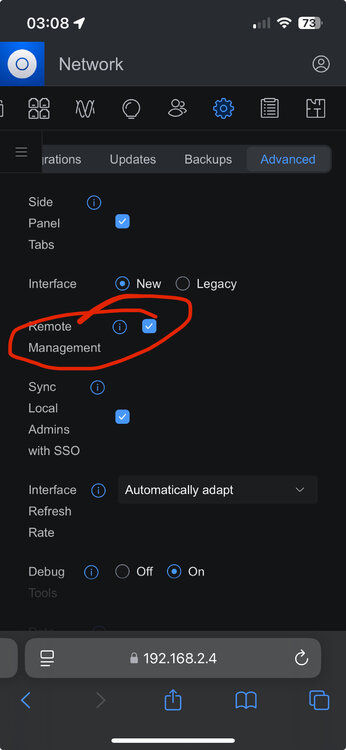
For that unifi.ui.com site - thats a unifi site hosted by unifi who owns the domain. To access that site it should load if you have a normal internet connection. once logged in you can access your controllers if you have sso turned on in the controller and also remote management here (as you are logging into their website you have to be using a username/password that is synced from the controller to their website):
-
Is the docker in Bridge mode? If so please use the ip of your unraid server eg: https://192.168.2.4:8443/ where 192.168.2.4 would be replaced with your unraid server ip address.
-
What are you typing into the private browser window as the address? also please disable the port forward on your firewall. It is not required at all.
-
I think you are in the wrong track. Can you try in a private window to ensure autocomplete history of your browser isnt messed up.
-
Thanks for posting the solution.
-
Docker worked perfectly for me - thanks.
-
If this was setup on a different controller before you will have to factory reset it as it states using the pin button on the back. Unifi wont adopt an already adopted device. The fact it sees it but cant adopt it means its just a config issue at this point eg: you didnt reset the device, or set something up wrong etc.
-
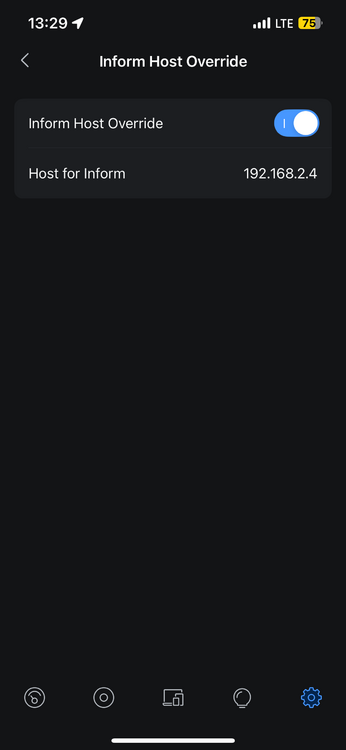
I put the ip address only eg: 10.10.0.3 in the unifi mobile app:
-
Interesting. Running in bridge mode is fine but I also dont know how to change that setting. One thing you could do is change from bridge mode to dedicated ip with macvlan or similar and set it to that .6 ip address and change the inform host ip back to .6. Thats not really answering your question how to update the UI to the new IP but it would resolve the issue.
-
Can you rephrase this question in a way that I can logically understand what you are saying?
-
I have a flex on the same firmware so will make sure it works and finds an update when applicable. Also a non poe one.
-
I believe Unifi have misnamed the flex firmware. That is only for POE models, if you have a non poe flex then 2.0.5 is latest. Regards The U6 pro firmware, that link states: This release is only for these models: U6-LR/U6-Lite/U6+/U6-LR+ UAP-nanoHD/FlexHD/BeaconHD/IW-HD So it would not be applicable to you. I believe the firmwares you have are the latest and correct for reasons above.
-
I think this is working for me as I get firmware updates every now and again… can you tell us the controller version you are on, how you checked the controller could resolve dns and what firmware the devices are on and what you expect them to find?
-
@DizRD What happened
-
You can delete the docker then delete anything left behind in the appdata folder on unraid and then create a new docker image. I would try restore with that file though. No harm and if it works at least you know its fixable. when its working, whatever you choose, stop the docker and start it a few times to make sure its running stable.
-
Can you send me a copy of this backup file for me to try work with and restore and or can you try restore from it? did you look under the autobackup folder? like if you do an ‘ls’ in that folder what was in there? I mean are you ssh into your unraid and going to the appdata location and the docker folder to check this?
-
Ok so maybe he can use this backup file if he makes a new container altogether. @DizRD can you check if you have any backups and then make a copy of a few of them. You may have to start again and restore from one of them if its broken. P
-
It sounds maybe like something corrupted somehow but I cant explain why. Are there any backups at all? If you dont take manual backups there might be some under appdata/unifi-controller-reborn/backup/autobackup can you check? @bmartino1do you know how to use these backups? They are .unf files.
-
Thanks. I believe its a non issue as I could detect no problems but will be happy for anyone to correct and let me know what isnt working.
-
I also tested 9.0.114-unraid this morning and see the same error. However this only happens on first start, when there is no system.properties during the initial run. Making changes, stopping the docker and starting it again means the system.properties file is found and the error does not reoccur. Changes are saved and remembered normally. Can you clarify if there is an actual problem? This could just be how the unifi docker now works. I was unable to find an issue of any kind during testing (beyond the error on first run only that seems to resolve itself). I have tested multiple times and could not determine an issue. Kind regards P
-
I installed 9.0.108-unraid and saw the error but could not detect anything wrong with the image. It seemed to work correctly andhad no issues. I will ask what this error means but was there some sort of actual problem?
-
I will double check tomorrow but I did test these versions from scratch and had no issues first time around. I will check again however.
-
The docker is not yet ready, not an unraid issue: https://github.com/mattwebbio/orbital-sync/issues/190
-
Yes thats right, if it didnt used to come long ago with one, it was probably before my time. Good luck which ever direction you choose to go. Good luck with the reiserfs move. Just ask again if you are still stuck somewhere with something.
-
@beanmeister you realise you can just import a certificate to a machine right? for windows like: eg: access unifi webpage in Edge browser. Get cert error. click lock then error then cert icon. click details click export. Save cert to desktop. view under details : subject alternative name. Note name you must use (unifi) ensure you can ping unifi by name eg: ping unifi in cmd if not working add entry on dns server or add in local pc hosts file entry eg: x.x.x.x unifi right click cert on desktop and choose install. Install to local machine. Place into personal store. access https://unifi:8443 note there is no cert warning as cert is trusted. this is not acceptable to you? Seems easier than waiting and searching for a solution for more than a whole year. also does not change functionality in anyway, error or no error. Running a docker with known exploits however… p




