





dandus
Members
-
Joined
-
Last visited
-
I have noticed this. The SATA and power connectors to the new SSDs are the same as for the old ones. I will try to open up, unplug and plug again.
-
I did a smart test on the SSD in the cache pool, healthy! Why were there so much zio error
-
Update: - now my unraid is back on, cache pool is normal, parity checking in progress What has been done: - at command prompt did a ”mover stop" - this revived the button to stop the array - tried stopping the array but can't umount /mnt/user. A "ps X" and "lsof" shows that the mover process is holding on to /mnt/user. But the mover process is in the uninterruptible D status and cannot be killed - forced a power recycle
-
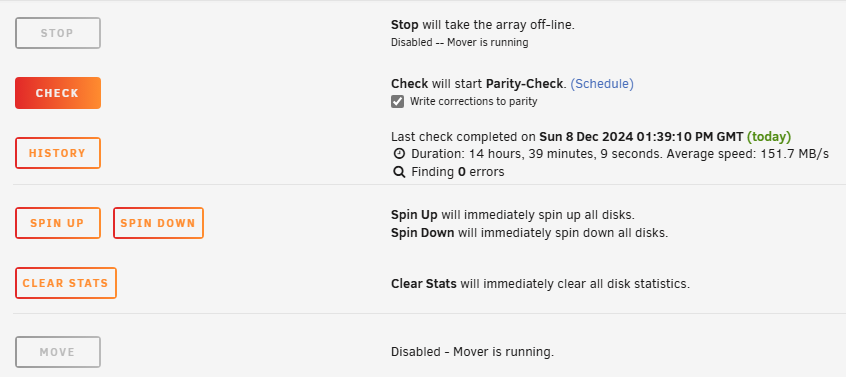
Background: upgraded cache pool SSD's to a bigger ones. Did the necessary to move all files on cache to array (only "appdata" and "system" were on cache) new cache pool has 2 SSDs in a pool formatted to zfs. changed the mover direction for "appdata" and "system" now Array->Cache initiated mover to move the two back from Array to cache What happened: log shows a log of zio errors on one SSD in the pool. now the zpool "cache" is suspended. followed suggestion from "zpool status -x" and did a "zpool clear cache". seems not much use ... pool: cache state: SUSPENDED status: One or more devices are faulted in response to IO failures. action: Make sure the affected devices are connected, then run 'zpool clear'. see: https://openzfs.github.io/openzfs-docs/msg/ZFS-8000-HC config: NAME STATE READ WRITE CKSUM cache UNAVAIL 0 0 0 insufficient replicas mirror-0 UNAVAIL 0 0 0 insufficient replicas sdi1 FAULTED 6 0 0 too many errors sdj1 FAULTED 3 0 0 too many errors errors: No known data errors Not sure what could be done now. All files in "system" are still in Array. Some files in "appdata" are already moved to Cache. But mover seem hanged, cannot stop array (grey out) and "move" is also grey out. See screenshot vault-diagnostics-20241208-2004.zip
-
It turns out i have a Supermicro AOC-SG-I4 4 port LAN card. Removing it and the reboot goes to completion and UNRaid is up and running 6.12.13. The 4 port LAN card is Intel 82576 based card. I suspected earlier that the stuck at reboot might due to hw passthrough to some VM that is no longer run. I therefore reboot with a fresh 6.12.13 USB stick. The reboot is stuck at the very same point. I therefore open the sever and see this unused LAN card. Removing it and the UNRaid is fine
-
I wonder if anyone has any clue. After the upgrade, when rebooting, stuck at a particular point, see iKVM_capture(1).jpg When booting 6.11.5, it goes smoothly and the corresponding section in the booting log looks like the following: : : Oct 25 22:29:09 vault kernel: pci 0000:03:00.0: PCI bridge to [bus 04] Oct 25 22:29:09 vault kernel: pci 0000:03:00.0: bridge window [io 0xd000-0xdfff] Oct 25 22:29:09 vault kernel: pci 0000:03:00.0: bridge window [mem 0xf6000000-0xf70fffff] Oct 25 22:29:09 vault kernel: pci 0000:05:00.0: working around ROM BAR overlap defect Oct 25 22:29:09 vault kernel: pci 0000:05:00.0: [8086:1533] type 00 class 0x020000 Oct 25 22:29:09 vault kernel: pci 0000:05:00.0: reg 0x10: [mem 0xf7700000-0xf777ffff] Oct 25 22:29:09 vault kernel: pci 0000:05:00.0: reg 0x18: [io 0xc000-0xc01f] Oct 25 22:29:09 vault kernel: pci 0000:05:00.0: reg 0x1c: [mem 0xf7780000-0xf7783fff] Oct 25 22:29:09 vault kernel: pci 0000:05:00.0: PME# supported from D0 D3hot D3cold Oct 25 22:29:09 vault kernel: pci 0000:00:1c.2: PCI bridge to [bus 05] Oct 25 22:29:09 vault kernel: pci 0000:00:1c.2: bridge window [io 0xc000-0xcfff] Oct 25 22:29:09 vault kernel: pci 0000:00:1c.2: bridge window [mem 0xf7700000-0xf77fffff] Oct 25 22:29:09 vault kernel: pci 0000:06:00.0: working around ROM BAR overlap defect Oct 25 22:29:09 vault kernel: pci 0000:06:00.0: [8086:1533] type 00 class 0x020000 Oct 25 22:29:09 vault kernel: pci 0000:06:00.0: reg 0x10: [mem 0xf7600000-0xf767ffff] Oct 25 22:29:09 vault kernel: pci 0000:06:00.0: reg 0x18: [io 0xb000-0xb01f] Oct 25 22:29:09 vault kernel: pci 0000:06:00.0: reg 0x1c: [mem 0xf7680000-0xf7683fff] Oct 25 22:29:09 vault kernel: pci 0000:06:00.0: PME# supported from D0 D3hot D3cold Oct 25 22:29:09 vault kernel: pci 0000:00:1c.3: PCI bridge to [bus 06] Oct 25 22:29:09 vault kernel: pci 0000:00:1c.3: bridge window [io 0xb000-0xbfff] Oct 25 22:29:09 vault kernel: pci 0000:00:1c.3: bridge window [mem 0xf7600000-0xf76fffff] Oct 25 22:29:09 vault kernel: pci 0000:07:00.0: [10b5:8518] type 01 class 0x060400 Oct 25 22:29:09 vault kernel: pci 0000:07:00.0: reg 0x10: [mem 0xf7300000-0xf731ffff] Oct 25 22:29:09 vault kernel: pci 0000:07:00.0: PME# supported from D0 D3hot D3cold Oct 25 22:29:09 vault kernel: pci 0000:07:00.0: 8.000 Gb/s available PCIe bandwidth, limited by 2.5 GT/s PCIe x4 link at 0000:00:1c.4 (capable of 16.000 Gb/s with 2.5 GT/s PCIe x8 link) Oct 25 22:29:09 vault kernel: pci 0000:00:1c.4: PCI bridge to [bus 07-0a] Oct 25 22:29:09 vault kernel: pci 0000:00:1c.4: bridge window [io 0x9000-0xafff] Oct 25 22:29:09 vault kernel: pci 0000:00:1c.4: bridge window [mem 0xf7100000-0xf73fffff] Oct 25 22:29:09 vault kernel: pci 0000:08:01.0: [10b5:8518] type 01 class 0x060400 Oct 25 22:29:09 vault kernel: pci 0000:08:01.0: PME# supported from D0 D3hot D3cold Oct 25 22:29:09 vault kernel: pci 0000:08:02.0: [10b5:8518] type 01 class 0x060400 Oct 25 22:29:09 vault kernel: pci 0000:08:02.0: PME# supported from D0 D3hot D3cold Oct 25 22:29:09 vault kernel: pci 0000:07:00.0: PCI bridge to [bus 08-0a] Oct 25 22:29:09 vault kernel: pci 0000:07:00.0: bridge window [io 0x9000-0xafff] Oct 25 22:29:09 vault kernel: pci 0000:07:00.0: bridge window [mem 0xf7100000-0xf72fffff] : : Configuration: M/B:Supermicro X10SL7-F Version 1.01 - s/n: NM157S007108 BIOS:American Megatrends Inc. Version 3.0. Dated: 04/24/2015 CPU:Intel® Core™ i7-4790K CPU @ 4.00GHz HVM:Enabled IOMMU:Enabled Cache:256 KiB, 1 MB, 8 MB Memory:32 GiB DDR3 (max. installable capacity 32 GiB) 0215 CMV8GX3M1C1600C11, 8 GiB DDR3 @ 1600 MT/s 0215 CMV8GX3M1C1600C11, 8 GiB DDR3 @ 1600 MT/s 0215 CMV8GX3M1C1600C11, 8 GiB DDR3 @ 1600 MT/s 0215 CMV8GX3M1C1600C11, 8 GiB DDR3 @ 1600 MT/s Network:eth0: 1000 Mbps, full duplex, mtu 1500 eth1: 1000 Mbps, full duplex, mtu 1500 eth2: interface down eth3: interface down eth4: interface down eth5: interface down Kernel:Linux 5.19.17-Unraid x86_64
.jpg.6d5127a335e2bfc0966d4fa4ba1be87e.jpg)
-
dandus changed their profile photo
-
I dont think you have to the share. It pops up in Mac's Time Machine by itself. I think once Avahi has listed the share, Time Machine will pick it up. Have you checked from the log that if Avahi reload after you have changed the config file?
-
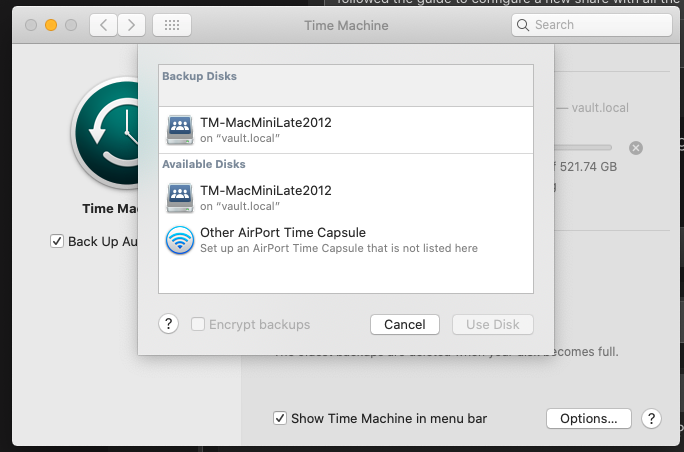
Yes. It works perfectly. Yet, I have not digged into how to allow more than one one TimeMachine share. That is, if I want to allow more than one Mac backing up to my UnRAID, I need another share. How would the Avahi configuration file be like for more than one share.
-
I have some finding. I tested it with Catalina.
-
I have also encountered my Mac Time Machine cannot find the Time Machine share I created based on the UnRAID wiki ( this ). I have done some googling on how others (ie. not UnRAID way) are setting up SMB Time Machine share. I come across this article that uses Samba and Avahi to setup Time Machine share on Raspberry Pi. I compare the UnRAID avahi configuration file for Samba (ie. /etc/avahi/services/smb.service) against that being suggested in the Raspberry Pi article. I have tested adding the third <service></service> of type "_adisk._tcp" as in the Raspberry article. It works and my share can now be found by Time Machine I am sharing my amended smb.service below. My Time Machine share is called "TM-MacMini-Late2012". FYI, I did not include "<txt-record>sys=adVF=0x100</txt-record>" in the third <service></service> as in the Raspberry article. It is because my Time Machine share is "public" to start with. Yet, when I ask Time Machine to use this share, it still ask for credential. I guess there is global setting asking for credential anyway. <!-- Generated settings: --> <service-group> <name replace-wildcards='yes'>%h</name> <service> <type>_smb._tcp</type> <port>445</port> </service> <service> <type>_device-info._tcp</type> <port>0</port> <txt-record>model=Xserve</txt-record> </service> <service> <type>_adisk._tcp</type> <port>0</port> <txt-record>dk0=adVN=TM-MacMiniLate2012,adVF=0x82</txt-record> </service> </service-group>
-
-
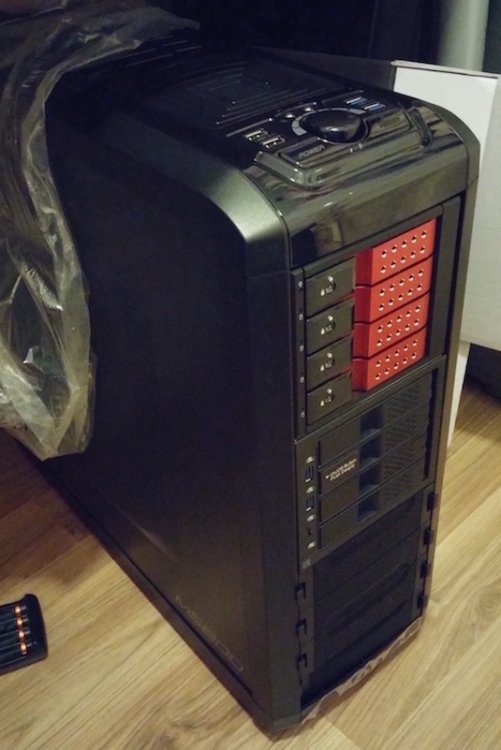
I dont know if anybody is still reading this thread but id like to add if you dont mind, i tried to Google this case to see if anybody did a build in it as it is a cheap case i was going to go with a fractal case because it had 8 bays but after reading peoples post i will buying the case and i will keep you all updated on a new thread for anybody who is interested I will document how my build goes with any other useful information, i will be buying the case at the end of the month im going to do some more research but will keep you all posted. Regards Callum I have also bought the same case. I am putting in the following (a) 1x iStarUSA BPN-DE340SS (can hold 4 x 3.5 drives) (b) 1 x ICY DOCK MB974SP-2B (can hold 4 x 3.5 drives) © 1 x ICY DOCK MB994IPO-3SB (can hold 1 slim optical + 2 SSD ) I should have three 5.25 space left. Will put in another 4-in-3 cage later for expansion. I intended to go for 5-in-3 cages, but there are rails along the 5.25 drive bays in the case. 5-in-3 cages do not have the ditches and therefore cannot be used. But anyway, my URAID licence allows 12 drives only, I might not need using 5-in-3 cages. I attached a photo without © yet.

.jpg.6d5127a335e2bfc0966d4fa4ba1be87e.jpg)

